> ## Documentation Index
> Fetch the complete documentation index at: https://docs.brightdata.com/llms.txt
> Use this file to discover all available pages before exploring further.

# OpenAI's ChatGPT MCP Server Integration

> Connect ChatGPT to the Bright Data MCP server to give your custom GPTs real-time web search, scraping and structured data access in a few setup steps.

<Card title="Building an AI startup?" cta="Learn more" href="https://brightdata.com/ai/ai-startups-program" icon="rocket-launch" iconType="duotone" arrow="true">
  You might be eligible for our Startup Program. Get fully funded access to the infrastructure you're reading about right now (up to \$20K value).
</Card>

**Requirements:**

* [Bright Data account](https://brightdata.com/?hs_signup=1\&utm_source=docs)
* OpenAI account

<Steps>
  <Step title="Add a new source">
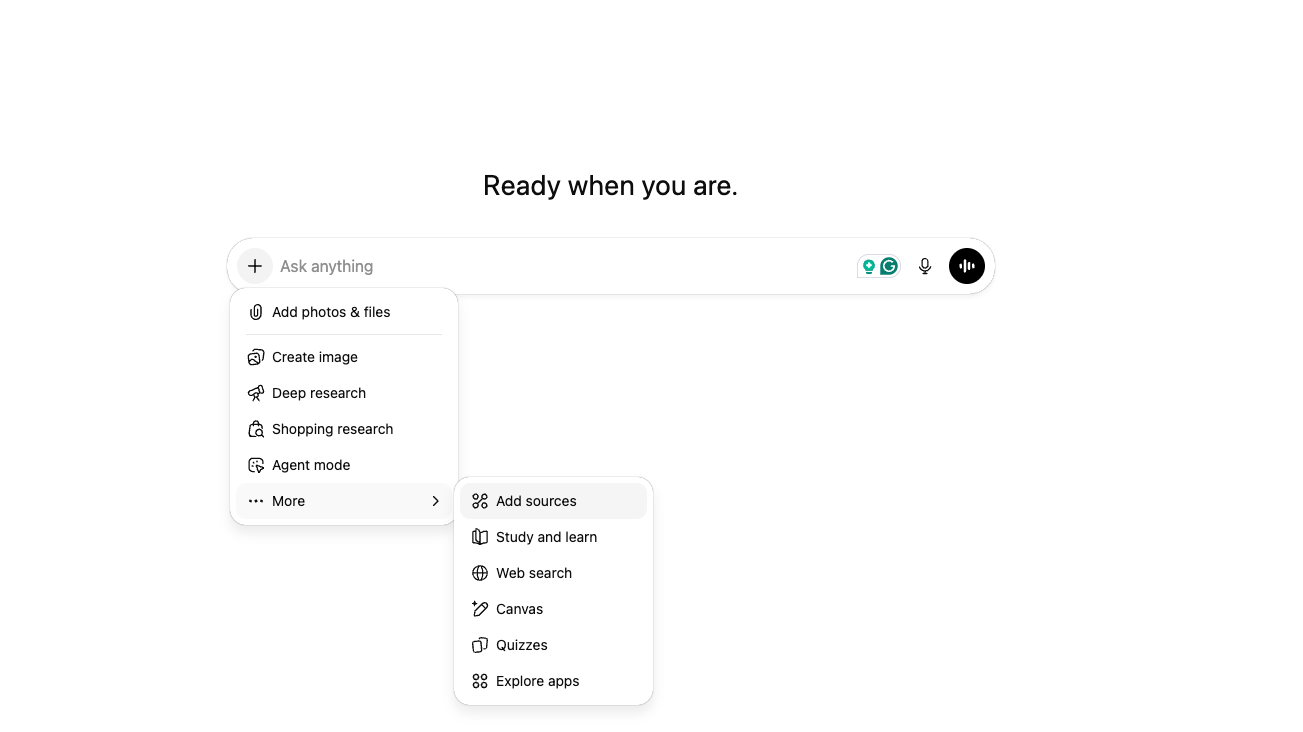
    Go to [ChatGPT](https://chatgpt.com/) and click the "+" button to add a new source.
    <img src="https://mintcdn.com/brightdata/od7HnkNTUKP3k-KY/images/Screenshot2025-12-18at15.37.02.png?fit=max&auto=format&n=od7HnkNTUKP3k-KY&q=85&s=af8f5ca476078d851a2f51c6d863f52e" alt="OpenAI's ChatGPT MCP Server Integration" width="1303" height="732" data-path="images/Screenshot2025-12-18at15.37.02.png" />
  </Step>

  <Step title="Connect more">
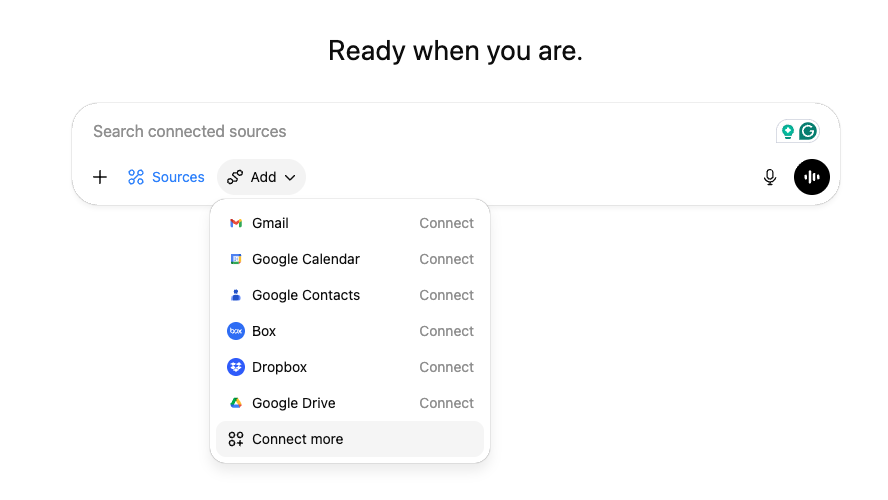
    Click the "Add" button, then select "Connect more".
    <img src="https://mintcdn.com/brightdata/od7HnkNTUKP3k-KY/images/Screenshot2025-12-18at15.39.13.png?fit=max&auto=format&n=od7HnkNTUKP3k-KY&q=85&s=c46b8c2889309504a72ed0f9b4cf7a8d" alt="OpenAI's ChatGPT MCP Server Integration" width="888" height="500" data-path="images/Screenshot2025-12-18at15.39.13.png" />
  </Step>

  <Step title="Advanced settings">
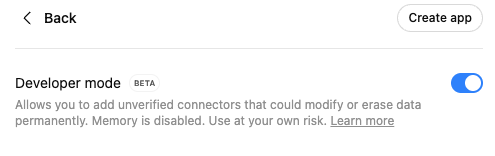
    Click on "Advanced settings", enable Developer Mode, then click "Create app".
    <img src="https://mintcdn.com/brightdata/od7HnkNTUKP3k-KY/images/Screenshot2025-12-18at15.48.06.png?fit=max&auto=format&n=od7HnkNTUKP3k-KY&q=85&s=f3b135e904eb3ce7c5542d00c254d484" alt="OpenAI's ChatGPT MCP Server Integration" width="495" height="156" data-path="images/Screenshot2025-12-18at15.48.06.png" />
  </Step>

  <Step title="Connect Bright Data MCP">
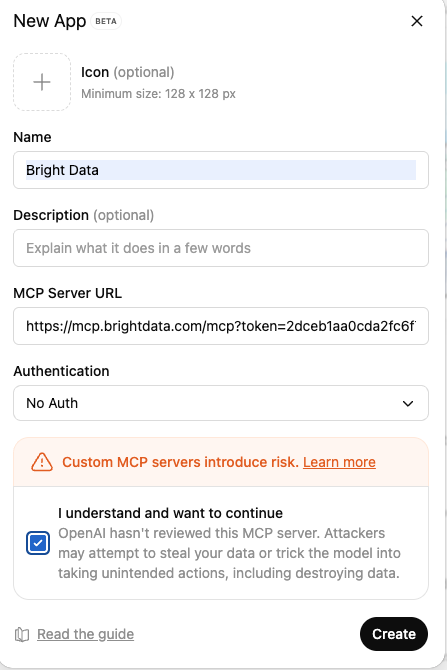
    Click "Create app" and fill in the following details:

    * **App name**
    * **MCP Server URL:**

    ```http theme={null}
    https://mcp.brightdata.com/mcp?token=<your_api_token>
    ```

    * **Authentication: no authentication**

    Here is how it should look like:
    <img src="https://mintcdn.com/brightdata/od7HnkNTUKP3k-KY/images/Screenshot2025-12-18at15.52.47.png?fit=max&auto=format&n=od7HnkNTUKP3k-KY&q=85&s=de66ee7fa845333a37734a1037389b2d" alt="OpenAI's ChatGPT MCP Server Integration" width="447" height="670" data-path="images/Screenshot2025-12-18at15.52.47.png" />
  </Step>

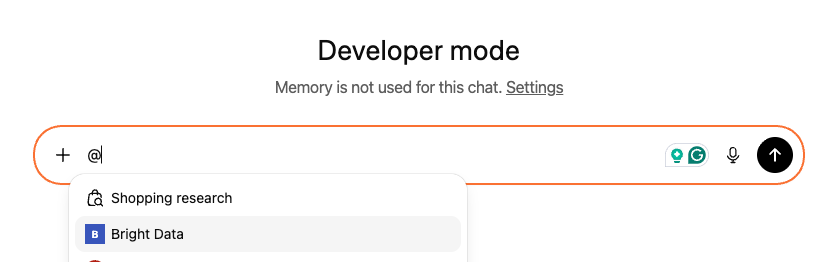
  <Step title="Unlock the web">
    Tag Bright Data MCP and chat with the open web without getting blocked!
    <img src="https://mintcdn.com/brightdata/od7HnkNTUKP3k-KY/images/Screenshot2025-12-18at15.55.30.png?fit=max&auto=format&n=od7HnkNTUKP3k-KY&q=85&s=f6f1cbd80ed921d3573aaa0ceddf9eb9" alt="OpenAI's ChatGPT MCP Server Integration" width="834" height="262" data-path="images/Screenshot2025-12-18at15.55.30.png" />
  </Step>
</Steps>
