> ## Documentation Index
> Fetch the complete documentation index at: https://docs.brightdata.com/llms.txt
> Use this file to discover all available pages before exploring further.
# Cloudflare Agents SDK Integration
> How to integrate Cloudflare's Agents SDK with Bright Data's Web MCP server for building AI agents on Cloudflare Workers. Exposes 60+ MCP tools.
You might be eligible for our Startup Program. Get fully funded access to the infrastructure you're reading about right now (up to \$20K value).
## Hosted MCP
1. Go to [Bright Data user settings](https://brightdata.com/cp/setting/users)
2. Copy your API token (it looks like: `2dceb1aa0***************************`)
Make sure you have Node.js 20+ installed, then log in to Cloudflare:
```shell theme={null}
npx wrangler login
```
```shell theme={null}
npx create-cloudflare@latest mcp-demo --template cloudflare/agents-starter
cd mcp-example
npm install
```
Copy the example env file and add your OpenAI API key:
```shell theme={null}
cp .dev.vars.example .dev.vars
```
Edit `.dev.vars`:
```env theme={null}
OPENAI_API_KEY=sk-...
```
In `src/server.ts`, find the default commented-out MCP connection inside `onChatMessage`:
```ts theme={null}
// const mcpConnection = await this.mcp.connect(
// "https://path-to-mcp-server/sse"
// );
```
Replace it with the Bright Data MCP connection:
```ts expandable theme={null}
// Connect to Bright Data MCP server
const mcpConnection = await this.mcp.connect(
"https://mcp.brightdata.com/mcp?token="
);
// Merge MCP tools with local tools
const allTools = {
...tools,
...this.mcp.getAITools()
};
```
Make sure `mcp.connect()` is called **before** `this.mcp.getAITools()` to avoid `jsonSchema not initialized` errors.
1. Replace `` with your actual Bright Data API token
2. Start the development server:
```shell theme={null}
npm start
```
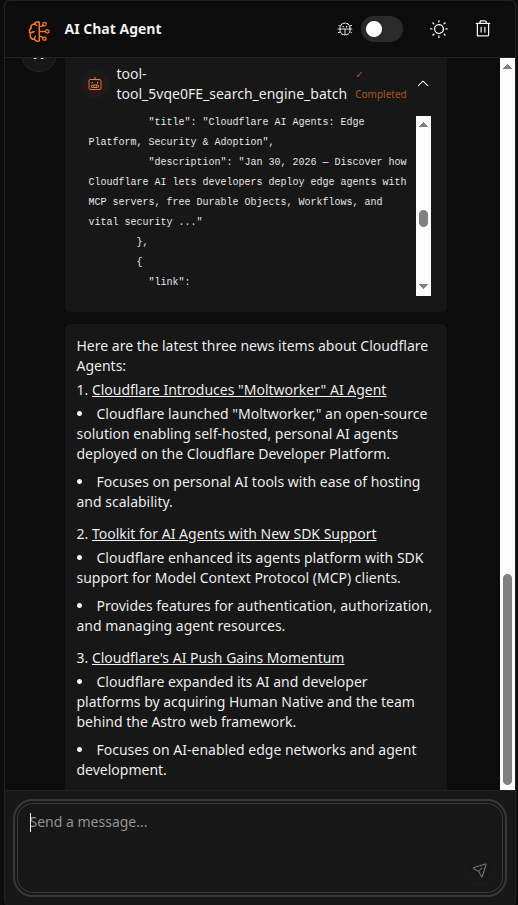
3. Open the app in your browser and ask the agent a question, for example:
```text theme={null}
Find the latest 3 news items about Cloudflare Agents and summarize them in bullets with links.
```
You should see the agent use Bright Data's web scraping tools to fetch and summarize live results:
 1. View your API usage at [My Zones](https://brightdata.com/cp/zones) in your Bright Data dashboard
2. Your free tier includes 5,000 requests per month
1. View your API usage at [My Zones](https://brightdata.com/cp/zones) in your Bright Data dashboard
2. Your free tier includes 5,000 requests per month