

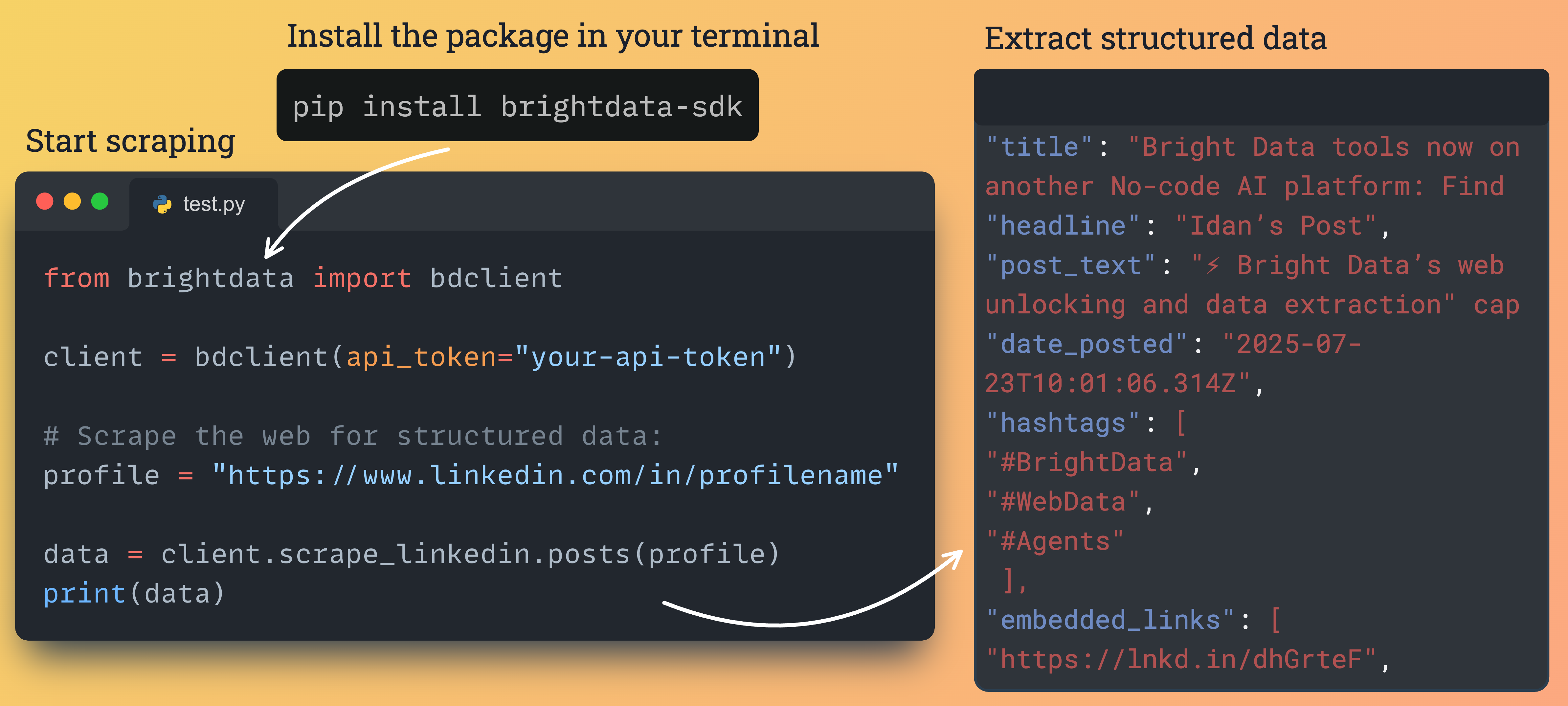
Installation and setup
Install the package via pip:pip install brightdata-sdk
Configuration
You must provide your API key. You can find it in your Bright Data Control Panel. Option 1: Environment variable (recommended)export BRIGHTDATA_API_KEY="YOUR_API_KEY"
The Python SDK looks for your API key in this order: the
token argument, BRIGHTDATA_API_TOKEN, BRIGHTDATA_API_KEY, then the key stored by brightdata login. BRIGHTDATA_API_KEY is the variable the Bright Data CLI reads, so one export covers both. If both variables are set, BRIGHTDATA_API_TOKEN wins. Versions before 2.5.0 read only BRIGHTDATA_API_TOKEN; upgrade with pip install -U brightdata-sdk or export that variable instead.# Async client
from brightdata import BrightDataClient
async with BrightDataClient(token="YOUR_API_KEY") as client:
...
# Sync client
from brightdata import SyncBrightDataClient
with SyncBrightDataClient(token="YOUR_API_KEY") as client:
...
Basic usage
UseSyncBrightDataClient for simple scripts. Use BrightDataClient with asyncio for high-concurrency workloads.
from brightdata import SyncBrightDataClient

with SyncBrightDataClient() as client:
    # Scrape a URL
    data = client.scrape_url("https://example.com")
    print(f"Result: {data.data}")

    # Search Google
    search = client.search.google(query="Bright Data")
    print(f"Found: {len(search.data)}")
import asyncio
from brightdata import BrightDataClient

async def main():
    async with BrightDataClient() as client:
        result = await client.scrape_url("https://example.com")
        print(result.data)

        search = await client.search.google(query="Bright Data")
        print(f"Found: {len(search.data)}")

if __name__ == "__main__":
    asyncio.run(main())
Launch scrapes and web searches
from brightdata import BrightDataClient

client = BrightDataClient()

# Google search
results = client.search.google(
    query="best shoes of 2025",
    location="United States",
    language="en",
    num_results=20
)

# Bing search
results = client.search.bing(
    query="python tutorial",
    location="United States"
)

# Yandex search
results = client.search.yandex(
    query="latest news",
    location="Germany"
)

if results.success:
    print(f"Cost: ${results.cost:.4f}")
    print(f"Time: {results.elapsed_ms():.2f}ms")
from brightdata import BrightDataClient

client = BrightDataClient()

# Scrape single URL
result = client.scrape_url("https://example.com")

# Scrape multiple URLs concurrently
urls = [
    "https://example1.com",
    "https://example2.com",
    "https://example3.com"
]
results = client.scrape_url(urls)

for r in results:
    if r.success:
        print(f"Success: {r.data[:200]}...")
        r.save_to_file(f"result_{hash(r.data)}.json")
When working with multiple queries or URLs, requests are handled concurrently for optimal performance.
Use platform-specific scrapers for structured data
Extract structured data from Amazon, LinkedIn, Facebook, Instagram, TikTok, YouTube, Reddit, Pinterest, ChatGPT, Perplexity, and Digikey.# Async
import asyncio
from brightdata import BrightDataClient
async def main():
async with BrightDataClient(auto_create_zones=False) as client:
products = await client.scrape.amazon.products(url="https://amazon.com/dp/B0CRMZHDG8")
reviews = await client.scrape.amazon.reviews(
url="https://amazon.com/dp/B0CRMZHDG8",
pastDays=30,
keyWord="quality"
)
sellers = await client.scrape.amazon.sellers(
url="https://amazon.com/sp?seller=AXXXXXXXXXXX"
)
asyncio.run(main())
# Sync
from brightdata import SyncBrightDataClient
with SyncBrightDataClient(auto_create_zones=False) as client:
products = client.scrape.amazon.products(url="https://amazon.com/dp/B0CRMZHDG8")
reviews = client.scrape.amazon.reviews(
url="https://amazon.com/dp/B0CRMZHDG8",
pastDays=30,
keyWord="quality"
)
sellers = client.scrape.amazon.sellers(
url="https://amazon.com/sp?seller=AXXXXXXXXXXX"
)
# Async: collect by URL, then discover by parameters
import asyncio
from brightdata import BrightDataClient

async def main():
    async with BrightDataClient(auto_create_zones=False) as client:
        profiles = await client.scrape.linkedin.profiles(
            url="https://www.linkedin.com/in/johndoe"
        )
        companies = await client.scrape.linkedin.companies(
            url="https://www.linkedin.com/company/bright-data"
        )
        jobs = await client.scrape.linkedin.jobs(
            url="https://www.linkedin.com/jobs/view/123456"
        )
        posts = await client.scrape.linkedin.posts(
            url="https://www.linkedin.com/feed/update/urn:li:activity:123"
        )

        # Discover by parameters
        job_results = await client.search.linkedin.jobs(
            keyword="python developer",
            location="New York",
            remote=True
        )
        profile_results = await client.search.linkedin.profiles(
            first_name="John",
            last_name="Doe"
        )


asyncio.run(main())

# Sync
from brightdata import SyncBrightDataClient

with SyncBrightDataClient(auto_create_zones=False) as client:
    profiles = client.scrape.linkedin.profiles(url="https://www.linkedin.com/in/johndoe")
    companies = client.scrape.linkedin.companies(
        url="https://www.linkedin.com/company/bright-data"
    )
    jobs = client.scrape.linkedin.jobs(url="https://www.linkedin.com/jobs/view/123456")
    posts = client.scrape.linkedin.posts(
        url="https://www.linkedin.com/feed/update/urn:li:activity:123"
    )
# Async
import asyncio
from brightdata import BrightDataClient

async def main():
    async with BrightDataClient(auto_create_zones=False) as client:
        await client.scrape.facebook.posts_by_profile(
            url="https://www.facebook.com/nasa", num_of_posts=10
        )
        await client.scrape.facebook.posts_by_group(
            url="https://www.facebook.com/groups/example"
        )
        await client.scrape.facebook.posts_by_url(
            url="https://www.facebook.com/post/123456"
        )
        await client.scrape.facebook.comments(
            url="https://www.facebook.com/post/123456", num_of_comments=100
        )
        await client.scrape.facebook.reels(url="https://www.facebook.com/nasa")

        await client.scrape.instagram.profiles(url="https://www.instagram.com/nasa/")
        await client.scrape.instagram.posts(url="https://www.instagram.com/p/Cuf4s0MNqNr")
        await client.scrape.instagram.reels(
            url="https://www.instagram.com/reel/C5Rdyj_q7YN/"
        )
        await client.scrape.instagram.comments(
            url="https://www.instagram.com/p/CesFC7JLyFl/"
        )


asyncio.run(main())

# Sync
from brightdata import SyncBrightDataClient

with SyncBrightDataClient(auto_create_zones=False) as client:
    client.scrape.facebook.posts_by_profile(
        url="https://www.facebook.com/nasa", num_of_posts=10
    )
    client.scrape.instagram.profiles(url="https://www.instagram.com/nasa/")
# Async
import asyncio
from brightdata import BrightDataClient

async def main():
    async with BrightDataClient(auto_create_zones=False) as client:
        profiles = await client.scrape.tiktok.profiles(
            url="https://www.tiktok.com/@username"
        )
        posts = await client.scrape.tiktok.posts(
            url="https://www.tiktok.com/@user/video/7433494424040017194"
        )
        comments = await client.scrape.tiktok.comments(
            url="https://www.tiktok.com/@user/video/7216019547806092550"
        )
        fast_posts = await client.scrape.tiktok.posts_by_profile_fast(
            url="https://www.tiktok.com/@bbc"
        )
        search = await client.scrape.tiktok.posts_by_search_url_fast(
            url="https://www.tiktok.com/search?q=cats", num_of_posts=10
        )


asyncio.run(main())
# Async
import asyncio
from brightdata import BrightDataClient

async def main():
    async with BrightDataClient(auto_create_zones=False) as client:
        videos = await client.scrape.youtube.videos(
            url="https://www.youtube.com/watch?v=dQw4w9WgXcQ",
            transcription_language="English"
        )
        channels = await client.scrape.youtube.channels(
            url="https://www.youtube.com/@MrBeast/about"
        )
        comments = await client.scrape.youtube.comments(
            url="https://www.youtube.com/watch?v=dQw4w9WgXcQ", num_of_comments=100
        )


asyncio.run(main())
# Async
import asyncio
from brightdata import BrightDataClient

async def main():
    async with BrightDataClient(auto_create_zones=False) as client:
        posts = await client.scrape.reddit.posts(
            url="https://www.reddit.com/r/python/comments/abc123/"
        )
        by_keyword = await client.scrape.reddit.posts_by_keyword(
            keyword="machine learning", sort_by="Top", date="Past week"
        )
        by_subreddit = await client.scrape.reddit.posts_by_subreddit(
            url="https://www.reddit.com/r/datascience/"
        )
        comments = await client.scrape.reddit.comments(
            url="https://www.reddit.com/r/python/comments/abc123/", days_back=30
        )


asyncio.run(main())
# Async
import asyncio
from brightdata import BrightDataClient

async def main():
    async with BrightDataClient(auto_create_zones=False) as client:
        posts = await client.scrape.pinterest.posts(
            url="https://www.pinterest.com/pin/3166662230556591/"
        )
        profiles = await client.scrape.pinterest.profiles(
            url="https://www.pinterest.com/boredpanda/"
        )

        # Discover by parameters
        by_keyword = await client.search.pinterest.posts_by_keyword(
            keyword="spaghetti recipes"
        )
        by_profile = await client.search.pinterest.posts_by_profile(
            url="https://www.pinterest.com/grandmapowpow/", num_of_posts=20
        )


asyncio.run(main())

# Sync
from brightdata import SyncBrightDataClient

with SyncBrightDataClient(auto_create_zones=False) as client:
    posts = client.scrape.pinterest.posts(
        url="https://www.pinterest.com/pin/3166662230556591/"
    )
    profiles = client.scrape.pinterest.profiles(
        url="https://www.pinterest.com/boredpanda/"
    )
# Async
import asyncio
from brightdata import BrightDataClient

async def main():
    async with BrightDataClient(auto_create_zones=False) as client:
        result = await client.scrape.chatgpt.prompt(
            "Explain async programming", web_search=True
        )
        batch = await client.scrape.chatgpt.prompts(
            prompts=["Explain Python", "Explain JavaScript"]
        )


asyncio.run(main())

# Sync
from brightdata import SyncBrightDataClient

with SyncBrightDataClient(auto_create_zones=False) as client:
    result = client.scrape.chatgpt.prompt(
        "Explain async programming", web_search=True
    )
    batch = client.scrape.chatgpt.prompts(
        prompts=["Explain Python", "Explain JavaScript"]
    )
import asyncio
from brightdata import BrightDataClient

async def main():
    async with BrightDataClient(auto_create_zones=False) as client:
        parts = await client.scrape.digikey.products(
            url="https://www.digikey.com/en/products/detail/abc"
        )
        answer = await client.scrape.perplexity.search(
            prompt="What is new in battery technology?"
        )


asyncio.run(main())
Run your custom Scraper Studio scrapers
# Async
from brightdata import BrightDataClient

async with BrightDataClient() as client:
    data = await client.scraper_studio.run(
        collector="c_abc123",
        input={"url": "https://example.com/product/1"}
    )
    job = await client.scraper_studio.trigger(
        "c_abc123", {"url": "https://example.com/product/1"}
    )
    data = await job.wait_and_fetch(timeout=120)
    status = await client.scraper_studio.status("j_abc123")

# Sync
from brightdata import SyncBrightDataClient

with SyncBrightDataClient() as client:
    data = client.scraper_studio.run(
        collector="c_abc123",
        input={"url": "https://example.com/product/1"}
    )
    status = client.scraper_studio.status("j_abc123")
Datasets API
Access pre-collected data snapshots.from brightdata import SyncBrightDataClient
with SyncBrightDataClient() as client:
# 1. Request snapshot with filters
print("Requesting snapshot...")
snapshot_id = client.datasets.imdb_movies(
filter={"name": "year", "operator": "=", "value": 2024},
records_limit=10
)
# 2. Download (SDK polls automatically)
print(f"Snapshot {snapshot_id} ready. Downloading...")
data = client.datasets.imdb_movies.download(snapshot_id)
print(f"Downloaded {len(data)} records.")
In your IDE, hover over the
BrightDataClient class or any of its methods to view available parameters, type hints, and usage examples. The SDK provides full IntelliSense support.Use dataclass payloads for type safety
The SDK includes dataclass payloads with runtime validation and helper properties.from brightdata import BrightDataClient
from brightdata.payloads import (
AmazonProductPayload,
LinkedInJobSearchPayload,
ChatGPTPromptPayload
)
client = BrightDataClient()
# Amazon product with validation
amazon_payload = AmazonProductPayload(
url="https://amazon.com/dp/B123456789",
reviews_count=50 # Runtime validated.
)
print(f"ASIN: {amazon_payload.asin}") # Helper property
print(f"Domain: {amazon_payload.domain}")
# LinkedIn job search
linkedin_payload = LinkedInJobSearchPayload(
keyword="python developer",
location="San Francisco",
remote=True
)
print(f"Remote search: {linkedin_payload.is_remote_search}")
# Use with client
result = client.scrape.amazon.products(**amazon_payload.to_dict())
Connect to scraping browser
Connect Playwright to Bright Data’s cloud browser via the Browser API.from brightdata import BrightDataClient
from playwright.async_api import async_playwright
client = BrightDataClient(
browser_username="brd-customer-xxxx-zone-scraping_browser1",
browser_password="YOUR_ZONE_PASSWORD",
)
async with async_playwright() as pw:
browser = await pw.chromium.connect_over_cdp(client.browser.get_connect_url())
page = await browser.new_page()
await page.goto("https://example.com", timeout=120000)
print(await page.content())
await browser.close()
Use the CLI tool
The SDK includes a command-line interface for terminal usage.# Search operations
brightdata search google "python tutorial" --location "United States"
brightdata search linkedin jobs --keyword "python developer" --remote
# Scrape operations
brightdata scrape amazon products "https://amazon.com/dp/B123"
brightdata scrape linkedin profiles "https://linkedin.com/in/johndoe"
# Generic web scraping
brightdata scrape generic "https://example.com" --output-format pretty
# Save results to file
brightdata search google "AI news" --output-file results.json
Async usage for better performance
For concurrent operations, pass a list of URLs toscrape_url and run inside an async context manager.
import asyncio
from brightdata import BrightDataClient

async def main():
    async with BrightDataClient() as client:
        results = await client.scrape_url([
            "https://example1.com",
            "https://example2.com",
            "https://example3.com",
        ], mode="async", poll_timeout=180)

        for result in results:
            print(result.data)

asyncio.run(main())
Resources
GitHub repository
View source code, examples, and contribute
Examples directory
10+ working examples for all features
PyPI page
Package listing and release history
What’s new
| Feature | Description |
|---|---|
| Scraper Studio | client.scraper_studio.run/trigger/status(). Trigger and fetch your custom Scraper Studio scrapers. Available on both sync and async clients. |
| Browser API | client.browser.get_connect_url(). Connect Playwright/Puppeteer to Bright Data’s cloud browser. Replaces client.connect_browser(). |
| New scrapers | TikTok, YouTube, Reddit, Pinterest, Digikey, Perplexity added to client.scrape.* |
| Platform search | client.search.linkedin / amazon / instagram / tiktok / youtube / pinterest / chatgpt. Discover content by parameters, not just URLs. |
| 126+ Datasets | Full catalog via client.datasets.* with .sample() and .download() |
| Full sync parity | SyncBrightDataClient now covers all features: scrapers, search, discover, scraper studio, browser |