> ## Documentation Index
> Fetch the complete documentation index at: https://docs.brightdata.com/llms.txt
> Use this file to discover all available pages before exploring further.
# 使用 Haystack 进行销售智能
> 使用 Haystack、MongoDB Atlas 和 Bright Data 构建 AI 销售研究助手
您可能符合我们的初创计划资格。获得本文所介绍基础设施的全额资助访问权限(最高价值 \$20,000)。
构建一个 AI 驱动的销售研究助手,从 LinkedIn、Crunchbase 和新闻来源提取实时数据,将其存储在 MongoDB Atlas 中以进行语义搜索,并使用 [Haystack](https://haystack.deepset.ai/) 和 [Bright Data](https://www.bright.cn/) 回答复杂的销售问题。
本 cookbook 将指导您构建一个完整的潜在客户智能管道 - 从抓取到 RAG 驱动的问答。
## 您将构建什么
一个 AI 销售研究助手,具有以下功能:
1. **查找公司**:匹配您的理想客户档案 (ICP) 标准
2. **识别决策者**:研究他们的背景
3. **提取痛点**:来自职位发布、新闻文章和公司数据
4. **生成个性化外展**:基于全面的公司智能
**技术栈:**
* **Bright Data**:来自 45+ 数据源的网页抓取(LinkedIn、Crunchbase、新闻、招聘板块)
* **MongoDB Atlas**:用于语义搜索的向量数据库 + 结构化元数���过滤
* **Haystack**:用于构建 RAG 管道的开源 LLM 框架
* **Google Gemini 2.5**:从原始数据生成可操作的销售智能
## 架构概览
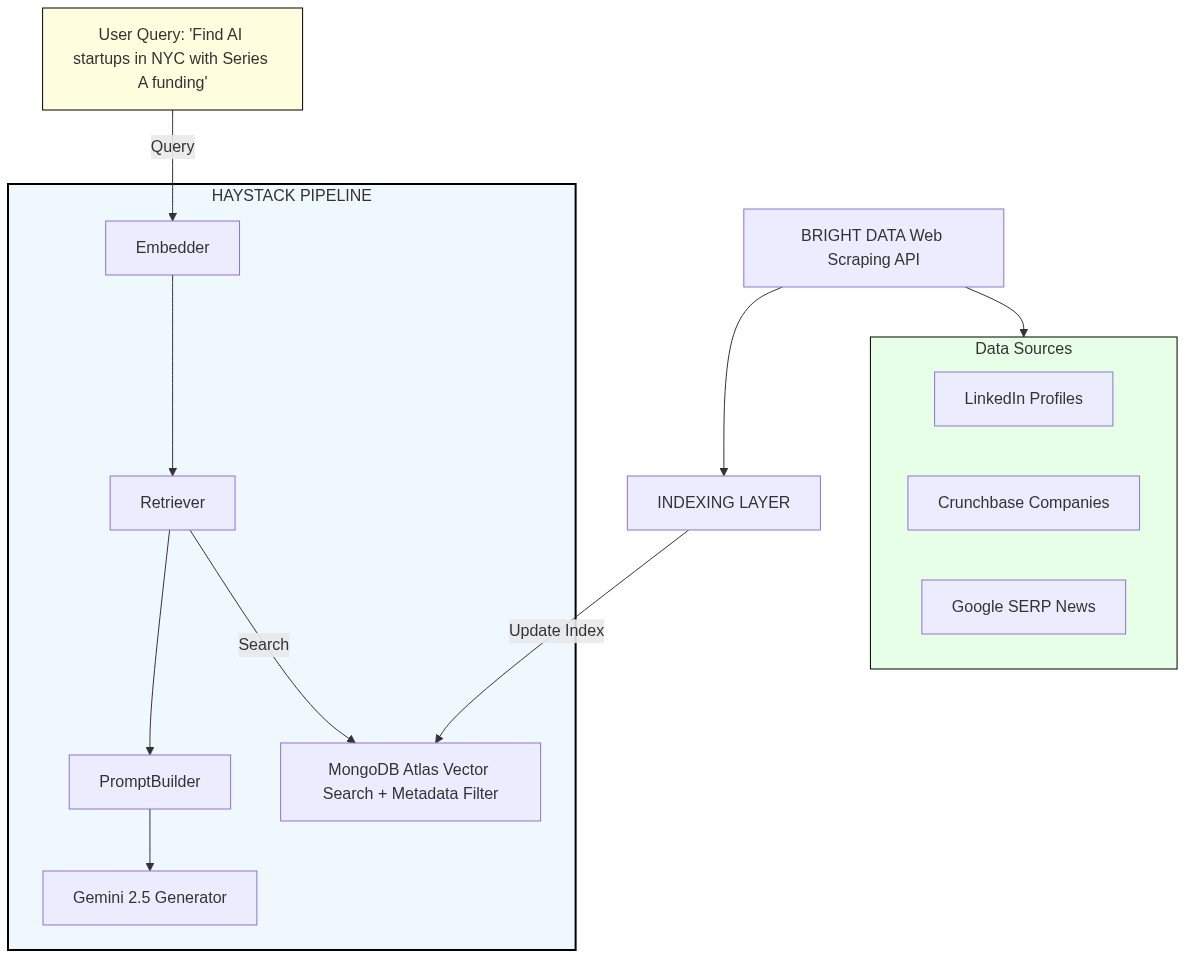 ### 组件分解
**1. Bright Data 层**(数据收集)
* **抓取工具**:从 45+ 来源提取结构化数据
* `linkedin_company_profile`:公司规模、行业、描述、位置
* `linkedin_person_profile`:决策者职位、背景、经验
* `crunchbase_company`:融资轮次、投资者、员工数
* **SERP API**:来自谷歌/必应的实时搜索结果
* 公司新闻和新闻稿
* 职位发布(痛点信号)
* 行业趋势和提及
**2. MongoDB Atlas**(存储和检索)
* **向量搜索**:嵌入式公司/人员描述的语义相似性匹配
* **元数据过滤**:混合搜索,将向量与结构化过滤器相结合(行业、融资阶段、位置、公司规模、职位)
* **文档存储**:存储原始抓取数据 + 嵌入向量 + 元数据
**3. Haystack 管道**(编排)
* **嵌入器**:使用 Google 的 text-embedding-004 将查询和文档转换为向量表示
* **检索器**:根据语义 + 元数据匹配从 MongoDB 查找最相关的潜在客户
* **提示构建器**:使用检索到的潜在客户数据构建上下文丰富的提示
* **LLM 生成器**:Gemini 2.5 Flash 综合见解并生成可操作的智能
## 前置要求
* 一个 [Bright Data 账户](https://www.bright.cn/?hs_signup=1\&utm_source=docs),具有来自[仪表板](https://www.bright.cn/cp/setting/users)的 API 密钥
* 一个 [MongoDB Atlas 集群](https://www.mongodb.com/docs/atlas/getting-started/)(M0 免费层足以用于测试)
* 一个 [Google API 密钥](https://aistudio.google.com/)用于 Gemini 访问
* Python 3.10+
***
## 步骤 1:安装依赖
```bash theme={null}
pip install haystack-ai haystack-brightdata mongodb-atlas-haystack google-genai-haystack dotenv
```
***
## 步骤 2:设置环境变量
获取您的 API 密钥:
* [Bright Data API 密钥](/api-reference/authentication#how-do-i-generate-a-new-api-key) - 从您的仪表板生成
* [MongoDB 连接字符串](https://www.mongodb.com/docs/atlas/getting-started/) - 从您的 Atlas 集群
* [Google API 密钥](https://aistudio.google.com/) - 用于 Gemini 访问
```python theme={null}
import os
from dotenv import load_dotenv
load_dotenv(override=True)
if not os.environ.get("GOOGLE_API_KEY") and os.environ.get("GOOGLE_AI_API_KEY"):
os.environ["GOOGLE_API_KEY"] = os.environ["GOOGLE_AI_API_KEY"]
# 验证所有必需的密钥都已加载
required_keys = ["BRIGHT_DATA_API_KEY", "MONGO_CONNECTION_STRING", "GOOGLE_API_KEY"]
missing_keys = [key for key in required_keys if not os.environ.get(key)]
if missing_keys:
raise ValueError(f"Please add {', '.join(missing_keys)} to your .env file")
else:
print("All environment variables loaded successfully")
```
### Bright Data 数据集参考
* [Crunchbase Company](https://www.bright.cn/products/datasets/crunchbase)
* [LinkedIn Company Profile](https://www.bright.cn/products/datasets/linkedin/company)
* [LinkedIn Person Profile](https://www.bright.cn/products/datasets/linkedin/profiles)
* [Google SERP API](https://www.bright.cn/products/serp-api/google-search)
***
## 步骤 3:初始化组件
### 列出可用数据集
```python theme={null}
from haystack_brightdata import BrightDataWebScraper
datasets = BrightDataWebScraper.get_supported_datasets()
print(f"Total available datasets: {len(datasets)}\n")
print("Sales research relevant datasets:")
print("-" * 50)
relevant_keywords = ["linkedin", "crunchbase", "company", "profile"]
for dataset in datasets:
if any(keyword in dataset['id'].lower() for keyword in relevant_keywords):
print(f" {dataset['id']}")
print(f" {dataset['description']}\n")
```
### MongoDB Atlas 设置
MongoDB Atlas 作为向量数据库,用于存储嵌入式潜在客户数据并启用语义搜索。
**1. 创建 MongoDB Atlas 集群**
遵循[开始使用 Atlas](https://www.mongodb.com/docs/atlas/getting-started/) 指南来:
* 创建免费集群(M0 层足以用于测试)
* 设置数据库访问凭证
* 配置网络访问(允许您的 IP 或使用 0.0.0.0/0 进行测试)
* 获取您的连接字符串
**2. 创建向量搜索索引**
1. 在 Atlas UI 中转到您的集群
2. 点击 **"Search"** 选项卡 → "Create Search Index"
3. 选择 "Atlas Vector Search" → "JSON Editor"
4. 配置:
* 索引名称:`lead_vector_index`
* 数据库:`sales_intelligence`
* 集合:`leads`
5. 粘贴此配置:
```json theme={null}
{
"fields": [
{
"type": "vector",
"path": "embedding",
"numDimensions": 768,
"similarity": "cosine"
}
]
}
```
6. 等待索引状态从 "Building" 变为 "Active"
### 初始化文档存储
```python theme={null}
from haystack_integrations.document_stores.mongodb_atlas import MongoDBAtlasDocumentStore
# 初始化 MongoDB Atlas 文档存储
# 注意:它自动从 MONGO_CONNECTION_STRING 环境变量读取
document_store = MongoDBAtlasDocumentStore(
database_name="sales_intelligence",
collection_name="leads",
vector_search_index="lead_vector_index",
full_text_search_index="lead_fulltext_index"
)
print("MongoDB Atlas DocumentStore initialized")
print(f" Database: sales_intelligence")
print(f" Collection: leads")
print(f" Vector Search Index: lead_vector_index")
```
### 初始化检索器和抓取工具
```python theme={null}
from haystack_integrations.components.retrievers.mongodb_atlas import MongoDBAtlasEmbeddingRetriever
retriever = MongoDBAtlasEmbeddingRetriever(document_store=document_store)
```
```python theme={null}
from haystack_brightdata import BrightDataWebScraper
# 初始化网页抓取工具
# 注意:自动使用环境变量中的 BRIGHT_DATA_API_KEY
scraper = BrightDataWebScraper()
```
***
## 步骤 4:从多个来源抓取数据
### 示例 1:抓取 Crunchbase 公司数据
从 Crunchbase 提取公司智能 - 融资信息、投资者、员工数等。
```python theme={null}
import json
company_url = "https://www.crunchbase.com/organization/openai"
def coalesce(data, *keys, default="N/A"):
for key in keys:
value = data.get(key)
if value not in (None, "", [], {}):
return value
return default
def format_industries(industries):
if not industries:
return "N/A"
if isinstance(industries, list):
values = []
for item in industries:
if isinstance(item, dict):
value = item.get("value") or item.get("name") or item.get("id")
if value:
values.append(value)
else:
values.append(str(item))
return ", ".join(values) if values else "N/A"
return industries
def parse_company(result):
raw = result.get("data", result)
if isinstance(raw, str):
raw = json.loads(raw)
if isinstance(raw, list):
return raw[0] if raw else {}
if isinstance(raw, dict):
return raw
return {}
result = scraper.run(
dataset="crunchbase_company",
url=company_url
)
company_data = parse_company(result)
industries = format_industries(company_data.get("industries"))
print(f"Company: {coalesce(company_data, 'name', 'legal_name')}")
print(f"Overview: {coalesce(company_data, 'about', 'company_overview')}")
print(f"Industries: {industries}")
print(f"Operating Status: {coalesce(company_data, 'operating_status')}")
print(f"Website: {coalesce(company_data, 'website', 'url')}")
print(f"Employees: {coalesce(company_data, 'num_employees', 'number_of_employee_profiles')}")
```
**预期输出:**
```
Company: OpenAI
Overview: OpenAI is an AI research and deployment company that develops advanced AI models, including ChatGPT.
Industries: Agentic AI, Artificial Intelligence (AI), Generative AI, Machine Learning, SaaS
Operating Status: active
Website: https://www.openai.com
Employees: 1001-5000
```
### 示例 2:抓取 LinkedIn 公司数据
从 LinkedIn 提取更广泛的公司信息。
```python theme={null}
import json
linkedin_url = "https://www.linkedin.com/company/openai/"
result = scraper.run(
dataset="linkedin_company_profile",
url=linkedin_url
)
if isinstance(result["data"], str):
company_data = json.loads(result["data"])
else:
company_data = result["data"]
if isinstance(company_data, list):
company_data = company_data[0] if company_data else {}
print(f"Company: {company_data.get('name', 'N/A')}")
print(f"Description: {company_data.get('description', 'N/A')[:200]}...")
print(f"Industry: {company_data.get('industry', 'N/A')}")
print(f"Company Size: {company_data.get('company_size', 'N/A')}")
print(f"Headquarters: {company_data.get('headquarters', 'N/A')}")
print(f"Website: {company_data.get('website', 'N/A')}")
```
### 示例 3:抓取 LinkedIn 人员档案
从 LinkedIn 提取决策者档案 - 关键联系人、他们的背景和经验。
```python theme={null}
import json
person_url = "https://www.linkedin.com/in/satyanadella/"
result = scraper.run(
dataset="linkedin_person_profile",
url=person_url
)
if isinstance(result["data"], str):
person_data = json.loads(result["data"])
else:
person_data = result["data"]
if isinstance(person_data, list):
person_data = person_data[0] if person_data else {}
print(f"Name: {person_data.get('name', 'N/A')}")
print(f"Position: {person_data.get('position', 'N/A')}")
print(f"Location: {person_data.get('city', 'N/A')}, {person_data.get('country_code', 'N/A')}")
current_company = person_data.get('current_company', {})
if current_company:
print(f"Current Company: {current_company.get('name', 'N/A')}")
print(f"Followers: {person_data.get('followers', 'N/A')}")
print(f"Connections: {person_data.get('connections', 'N/A')}")
about = person_data.get('about')
if about:
print(f"\nAbout: {about[:200]}...")
experience = person_data.get('experience', [])
if experience:
print(f"\nExperience ({len(experience)} roles):")
for i, exp in enumerate(experience[:3]):
company = exp.get('company', 'N/A')
title = exp.get('title', 'N/A')
duration = exp.get('duration', 'N/A')
print(f" {i+1}. {title} at {company} ({duration})")
```
**预期输出:**
```
Name: Satya Nadella
Position: Chairman and CEO at Microsoft
Location: Redmond, Washington, United States, US
Current Company: Microsoft
Followers: 11816477
Connections: 500
Experience (5 roles):
1. Chairman and CEO at Microsoft (N/A)
2. Member Board Of Trustees at University of Chicago (N/A)
3. Board Member at Starbucks (N/A)
```
***
## 步骤 5:SERP API 用于市场信号
Bright Data 的 SERP API 让您通过搜索结果收集市场信号 - 招聘信号、新闻和痛点。
### 销售研究的 SERP 查询示例
```python theme={null}
# 招聘信号
query = 'site:linkedin.com/jobs "Company Name" engineering'
# 融资新闻
query = '"Company Name" funding Series A announcement'
# 最近新闻
query = '"Company Name" news (2024 OR 2025)'
```
### 搜索公司新闻
```python theme={null}
import json
from haystack_brightdata import BrightDataSERP
serp = BrightDataSERP()
company_name = "OpenAI"
search_query = f'"{company_name}" news funding OR announcement OR launch 2025 OR 2026'
result = serp.run(
query=search_query,
num_results=10
)
if isinstance(result["results"], str):
serp_data = json.loads(result["results"])
else:
serp_data = result["results"]
organic_results = serp_data.get("organic", [])
if not organic_results and "results" in serp_data:
organic_results = serp_data.get("results", [])
print(f"Found {len(organic_results)} results\n")
for i, item in enumerate(organic_results[:5], 1):
title = item.get("title", "N/A")
link = item.get("link", item.get("url", "N/A"))
snippet = item.get("snippet", item.get("description", "N/A"))
print(f"{i}. {title}")
print(f" URL: {link}")
print(f" Snippet: {snippet[:150]}...")
print()
```
***
## 步骤 6:数据处理和索引管道
处理和索引抓取的数据到 MongoDB Atlas 以进行语义搜索。
```
原始抓取数据 → 文档创建 → 嵌入生成 → MongoDB 存储
(JSON) (Haystack) (Gemini 768d) (向量数据库)
```
### 辅助函数:将抓取的数据转换为 Haystack 文档
```python theme={null}
import json
from datetime import datetime
from haystack import Document
def create_company_documents(scraper_result, source_url, dataset_type):
"""
将来自 Crunchbase 或 LinkedIn 的公司数据转换为 Haystack 文档。
"""
if isinstance(scraper_result["data"], str):
data = json.loads(scraper_result["data"])
else:
data = scraper_result["data"]
if not isinstance(data, list):
data = [data]
documents = []
scraped_date = datetime.now().strftime("%Y-%m-%d")
for item in data:
if dataset_type == "crunchbase_company":
content = f"""Company: {item.get('name', 'N/A')}
Overview: {item.get('about', 'N/A')}
Industries: {item.get('industries', 'N/A')}
Operating Status: {item.get('operating_status', 'N/A')}
Location: {item.get('headquarters', 'N/A')}
Founded: {item.get('founded_year') or item.get('founded_date', 'N/A')}
Employees: {item.get('num_employees', 'N/A')}
Website: {item.get('website', 'N/A')}"""
elif dataset_type == "linkedin_company_profile":
content = f"""Company: {item.get('name', 'N/A')}
About: {item.get('about') or item.get('description', 'N/A')}
Industries: {item.get('industries', 'N/A')}
Company Size: {item.get('company_size', 'N/A')}
Headquarters: {item.get('headquarters', 'N/A')}
Founded: {item.get('founded', 'N/A')}
Website: {item.get('website', 'N/A')}
Followers: {item.get('followers', 'N/A')}
Employees on LinkedIn: {item.get('employees_in_linkedin', 'N/A')}"""
else:
content = f"Company: {item.get('name', 'N/A')}"
industries = item.get('industries', item.get('industry', ''))
if isinstance(industries, list):
industries = ', '.join([
ind.get('value', ind) if isinstance(ind, dict) else str(ind)
for ind in industries
])
documents.append(Document(
content=content,
meta={
"source_url": source_url,
"dataset_type": dataset_type,
"company_name": item.get('name', ''),
"industry": industries,
"location": item.get('headquarters') or item.get('location', ''),
"scraped_date": scraped_date
}
))
return documents
```
```python theme={null}
def create_person_documents(scraper_result, source_url):
"""
将 LinkedIn 人员档案数据转换为 Haystack 文档。
"""
if isinstance(scraper_result["data"], str):
data = json.loads(scraper_result["data"])
else:
data = scraper_result["data"]
if not isinstance(data, list):
data = [data]
documents = []
scraped_date = datetime.now().strftime("%Y-%m-%d")
for person in data:
experience = person.get('experience', [])
experience_summary = []
for exp in experience[:3]:
company = exp.get('company', 'N/A')
title = exp.get('title', 'N/A')
duration = exp.get('duration', 'N/A')
experience_summary.append(f"{title} at {company} ({duration})")
experience_text = '\n'.join(experience_summary) if experience_summary else 'N/A'
education = person.get('education', [])
education_summary = []
for edu in education[:2]:
title = edu.get('title', 'N/A')
years = f"{edu.get('start_year', '')}-{edu.get('end_year', '')}"
education_summary.append(f"{title} ({years})")
education_text = '\n'.join(education_summary) if education_summary else 'N/A'
current_company = person.get('current_company', {})
current_company_name = current_company.get('name', 'N/A') if current_company else 'N/A'
content = f"""Name: {person.get('name', 'N/A')}
Position: {person.get('position', 'N/A')}
Current Company: {current_company_name}
Location: {person.get('city', 'N/A')}, {person.get('country_code', 'N/A')}
About: {person.get('about', 'N/A')}
Followers: {person.get('followers', 'N/A')}
Connections: {person.get('connections', 'N/A')}
Recent Experience:
{experience_text}
Education:
{education_text}"""
documents.append(Document(
content=content,
meta={
"source_url": source_url,
"dataset_type": "linkedin_person_profile",
"person_name": person.get('name', ''),
"person_title": person.get('position', ''),
"company": current_company_name,
"location": f"{person.get('city', '')}, {person.get('country_code', '')}",
"scraped_date": scraped_date
}
))
return documents
```
### 构建索引管道
创建一个 Haystack 管道,自动生成嵌入向量并写入 MongoDB Atlas。
```python theme={null}
from haystack import Pipeline
from haystack.components.writers import DocumentWriter
from haystack_integrations.components.embedders.google_genai import GoogleGenAIDocumentEmbedder
indexing_pipeline = Pipeline()
indexing_pipeline.add_component("embedder", GoogleGenAIDocumentEmbedder(model="text-embedding-004"))
indexing_pipeline.add_component("writer", DocumentWriter(document_store=document_store))
indexing_pipeline.connect("embedder.documents", "writer.documents")
print("Indexing pipeline created")
print(" Documents → Embedder (Gemini text-embedding-004) → Writer (MongoDB)")
```
### 索引示例公司
通过抓取公司并将其索引到 MongoDB Atlas 来测试完整的索引流。
```python theme={null}
from pymongo import MongoClient
client = MongoClient(os.environ.get("MONGO_CONNECTION_STRING"))
db = client[document_store.database_name]
if document_store.collection_name not in db.list_collection_names():
db.create_collection(document_store.collection_name)
print(f"Created collection '{document_store.collection_name}'")
else:
print(f"Collection '{document_store.collection_name}' already exists")
collection = db[document_store.collection_name]
doc_count = collection.count_documents({})
print(f" Current document count: {doc_count}")
```
```python theme={null}
# 从 Crunchbase 抓取并索引公司
company_url = "https://www.crunchbase.com/organization/openai"
# 步骤 1:抓取公司
scraper_result = scraper.run(
dataset="crunchbase_company",
url=company_url
)
# 步骤 2:转换为 Haystack 文档
documents = create_company_documents(
scraper_result=scraper_result,
source_url=company_url,
dataset_type="crunchbase_company"
)
print(f"Created {len(documents)} document(s)")
print(f"Content (first 200 chars): {documents[0].content[:200]}...")
print(f"Metadata: {documents[0].meta}")
# 步骤 3:生成嵌入向量并索引到 MongoDB
result = indexing_pipeline.run({"embedder": {"documents": documents}})
print(f"Indexed {result['writer']['documents_written']} document(s) into MongoDB")
```
***
## 步骤 7:用于销售智能的 RAG 管道
RAG 将**检索**(查找相关文档)与**生成**(LLM 综合)相结合,以根据您的索引数据回答问题。
```
用户问题 → 文本嵌入器 → 检索器 → 提示构建器 → 生成器 → 答案
```
### 组件
* [GoogleGenAITextEmbedder](https://docs.haystack.deepset.ai/docs/googlegenaitextembedder)
* [MongoDBAtlasEmbeddingRetriever](https://docs.haystack.deepset.ai/docs/mongodbatlasembeddingretriever)
* [ChatPromptBuilder](https://docs.haystack.deepset.ai/docs/chatpromptbuilder)
* [GoogleGenAIChatGenerator](https://docs.haystack.deepset.ai/docs/googlegenaichatgenerator)
### 构建 RAG 管道
```python theme={null}
from haystack import Pipeline
from haystack.components.builders import ChatPromptBuilder
from haystack.dataclasses import ChatMessage
from haystack_integrations.components.embedders.google_genai import GoogleGenAITextEmbedder
from haystack_integrations.components.generators.google_genai import GoogleGenAIChatGenerator
system_message = ChatMessage.from_system("""
You are a sales intelligence assistant. Your role is to analyze company and people data to provide actionable sales intelligence.
When answering queries:
- Cite specific company names and details from the data
- Provide insights relevant for sales outreach
- Highlight key information like funding, company size, location, recent news
- Suggest talking points for personalized outreach
""")
user_template = """
Based on the following company/person data, answer the user's question.
Context:
{% for document in documents %}
{{ document.content }}
---
{% endfor %}
Question: {{ question }}
Provide a detailed, actionable answer based on the retrieved data.
"""
user_message = ChatMessage.from_user(user_template)
rag_pipeline = Pipeline()
rag_pipeline.add_component("text_embedder", GoogleGenAITextEmbedder(model="text-embedding-004"))
rag_pipeline.add_component("retriever", MongoDBAtlasEmbeddingRetriever(document_store=document_store, top_k=5))
rag_pipeline.add_component("prompt_builder", ChatPromptBuilder(template=[system_message, user_message]))
rag_pipeline.add_component("generator", GoogleGenAIChatGenerator(model="gemini-2.5-flash"))
rag_pipeline.connect("text_embedder.embedding", "retriever.query_embedding")
rag_pipeline.connect("retriever.documents", "prompt_builder.documents")
rag_pipeline.connect("prompt_builder.prompt", "generator.messages")
print("RAG pipeline created")
print(" Question → Text Embedder → Retriever → Prompt Builder → Generator → Answer")
```
***
## 步骤 8:查询销售研究助手
```python theme={null}
question = "What can you tell me about OpenAI? Include details about their industry, products, and any relevant information for sales outreach."
result = rag_pipeline.run(
data={
"text_embedder": {"text": question},
"prompt_builder": {"question": question}
},
include_outputs_from={"retriever"}
)
answer = result["generator"]["replies"][0].text
print(answer)
# 显示检索到的文档
if "retriever" in result:
retrieved_docs = result["retriever"]["documents"]
print(f"\nRetrieved {len(retrieved_docs)} relevant documents from MongoDB")
for i, doc in enumerate(retrieved_docs, 1):
print(f"\nDocument {i}:")
print(f" Company: {doc.meta.get('company_name', 'N/A')}")
print(f" Source: {doc.meta.get('dataset_type', 'N/A')}")
print(f" Location: {doc.meta.get('location', 'N/A')}")
print(f" Industry: {doc.meta.get('industry', 'N/A')}")
print(f" Content: {doc.content[:300]}...")
```
***
## 数据模型设计
潜在客户智能数据库使用灵活的模式,可适应来自多个来源的数据,同时启用强大的混合搜索功能。
此结构支持三种搜索模式:
1. **语义搜索**:根据含义查找相似的公司/人员
* 查询:"AI startups focused on enterprise automation"
* 匹配:公司有相似的描述,即使措辞不同
2. **元数据过滤**:对结构化字段进行精确匹配
* 过滤:`funding_stage = "Series A" AND location = "New York, NY"`
* 返回:仅满足精确标准的公司
3.
### 组件分解
**1. Bright Data 层**(数据收集)
* **抓取工具**:从 45+ 来源提取结构化数据
* `linkedin_company_profile`:公司规模、行业、描述、位置
* `linkedin_person_profile`:决策者职位、背景、经验
* `crunchbase_company`:融资轮次、投资者、员工数
* **SERP API**:来自谷歌/必应的实时搜索结果
* 公司新闻和新闻稿
* 职位发布(痛点信号)
* 行业趋势和提及
**2. MongoDB Atlas**(存储和检索)
* **向量搜索**:嵌入式公司/人员描述的语义相似性匹配
* **元数据过滤**:混合搜索,将向量与结构化过滤器相结合(行业、融资阶段、位置、公司规模、职位)
* **文档存储**:存储原始抓取数据 + 嵌入向量 + 元数据
**3. Haystack 管道**(编排)
* **嵌入器**:使用 Google 的 text-embedding-004 将查询和文档转换为向量表示
* **检索器**:根据语义 + 元数据匹配从 MongoDB 查找最相关的潜在客户
* **提示构建器**:使用检索到的潜在客户数据构建上下文丰富的提示
* **LLM 生成器**:Gemini 2.5 Flash 综合见解并生成可操作的智能
## 前置要求
* 一个 [Bright Data 账户](https://www.bright.cn/?hs_signup=1\&utm_source=docs),具有来自[仪表板](https://www.bright.cn/cp/setting/users)的 API 密钥
* 一个 [MongoDB Atlas 集群](https://www.mongodb.com/docs/atlas/getting-started/)(M0 免费层足以用于测试)
* 一个 [Google API 密钥](https://aistudio.google.com/)用于 Gemini 访问
* Python 3.10+
***
## 步骤 1:安装依赖
```bash theme={null}
pip install haystack-ai haystack-brightdata mongodb-atlas-haystack google-genai-haystack dotenv
```
***
## 步骤 2:设置环境变量
获取您的 API 密钥:
* [Bright Data API 密钥](/api-reference/authentication#how-do-i-generate-a-new-api-key) - 从您的仪表板生成
* [MongoDB 连接字符串](https://www.mongodb.com/docs/atlas/getting-started/) - 从您的 Atlas 集群
* [Google API 密钥](https://aistudio.google.com/) - 用于 Gemini 访问
```python theme={null}
import os
from dotenv import load_dotenv
load_dotenv(override=True)
if not os.environ.get("GOOGLE_API_KEY") and os.environ.get("GOOGLE_AI_API_KEY"):
os.environ["GOOGLE_API_KEY"] = os.environ["GOOGLE_AI_API_KEY"]
# 验证所有必需的密钥都已加载
required_keys = ["BRIGHT_DATA_API_KEY", "MONGO_CONNECTION_STRING", "GOOGLE_API_KEY"]
missing_keys = [key for key in required_keys if not os.environ.get(key)]
if missing_keys:
raise ValueError(f"Please add {', '.join(missing_keys)} to your .env file")
else:
print("All environment variables loaded successfully")
```
### Bright Data 数据集参考
* [Crunchbase Company](https://www.bright.cn/products/datasets/crunchbase)
* [LinkedIn Company Profile](https://www.bright.cn/products/datasets/linkedin/company)
* [LinkedIn Person Profile](https://www.bright.cn/products/datasets/linkedin/profiles)
* [Google SERP API](https://www.bright.cn/products/serp-api/google-search)
***
## 步骤 3:初始化组件
### 列出可用数据集
```python theme={null}
from haystack_brightdata import BrightDataWebScraper
datasets = BrightDataWebScraper.get_supported_datasets()
print(f"Total available datasets: {len(datasets)}\n")
print("Sales research relevant datasets:")
print("-" * 50)
relevant_keywords = ["linkedin", "crunchbase", "company", "profile"]
for dataset in datasets:
if any(keyword in dataset['id'].lower() for keyword in relevant_keywords):
print(f" {dataset['id']}")
print(f" {dataset['description']}\n")
```
### MongoDB Atlas 设置
MongoDB Atlas 作为向量数据库,用于存储嵌入式潜在客户数据并启用语义搜索。
**1. 创建 MongoDB Atlas 集群**
遵循[开始使用 Atlas](https://www.mongodb.com/docs/atlas/getting-started/) 指南来:
* 创建免费集群(M0 层足以用于测试)
* 设置数据库访问凭证
* 配置网络访问(允许您的 IP 或使用 0.0.0.0/0 进行测试)
* 获取您的连接字符串
**2. 创建向量搜索索引**
1. 在 Atlas UI 中转到您的集群
2. 点击 **"Search"** 选项卡 → "Create Search Index"
3. 选择 "Atlas Vector Search" → "JSON Editor"
4. 配置:
* 索引名称:`lead_vector_index`
* 数据库:`sales_intelligence`
* 集合:`leads`
5. 粘贴此配置:
```json theme={null}
{
"fields": [
{
"type": "vector",
"path": "embedding",
"numDimensions": 768,
"similarity": "cosine"
}
]
}
```
6. 等待索引状态从 "Building" 变为 "Active"
### 初始化文档存储
```python theme={null}
from haystack_integrations.document_stores.mongodb_atlas import MongoDBAtlasDocumentStore
# 初始化 MongoDB Atlas 文档存储
# 注意:它自动从 MONGO_CONNECTION_STRING 环境变量读取
document_store = MongoDBAtlasDocumentStore(
database_name="sales_intelligence",
collection_name="leads",
vector_search_index="lead_vector_index",
full_text_search_index="lead_fulltext_index"
)
print("MongoDB Atlas DocumentStore initialized")
print(f" Database: sales_intelligence")
print(f" Collection: leads")
print(f" Vector Search Index: lead_vector_index")
```
### 初始化检索器和抓取工具
```python theme={null}
from haystack_integrations.components.retrievers.mongodb_atlas import MongoDBAtlasEmbeddingRetriever
retriever = MongoDBAtlasEmbeddingRetriever(document_store=document_store)
```
```python theme={null}
from haystack_brightdata import BrightDataWebScraper
# 初始化网页抓取工具
# 注意:自动使用环境变量中的 BRIGHT_DATA_API_KEY
scraper = BrightDataWebScraper()
```
***
## 步骤 4:从多个来源抓取数据
### 示例 1:抓取 Crunchbase 公司数据
从 Crunchbase 提取公司智能 - 融资信息、投资者、员工数等。
```python theme={null}
import json
company_url = "https://www.crunchbase.com/organization/openai"
def coalesce(data, *keys, default="N/A"):
for key in keys:
value = data.get(key)
if value not in (None, "", [], {}):
return value
return default
def format_industries(industries):
if not industries:
return "N/A"
if isinstance(industries, list):
values = []
for item in industries:
if isinstance(item, dict):
value = item.get("value") or item.get("name") or item.get("id")
if value:
values.append(value)
else:
values.append(str(item))
return ", ".join(values) if values else "N/A"
return industries
def parse_company(result):
raw = result.get("data", result)
if isinstance(raw, str):
raw = json.loads(raw)
if isinstance(raw, list):
return raw[0] if raw else {}
if isinstance(raw, dict):
return raw
return {}
result = scraper.run(
dataset="crunchbase_company",
url=company_url
)
company_data = parse_company(result)
industries = format_industries(company_data.get("industries"))
print(f"Company: {coalesce(company_data, 'name', 'legal_name')}")
print(f"Overview: {coalesce(company_data, 'about', 'company_overview')}")
print(f"Industries: {industries}")
print(f"Operating Status: {coalesce(company_data, 'operating_status')}")
print(f"Website: {coalesce(company_data, 'website', 'url')}")
print(f"Employees: {coalesce(company_data, 'num_employees', 'number_of_employee_profiles')}")
```
**预期输出:**
```
Company: OpenAI
Overview: OpenAI is an AI research and deployment company that develops advanced AI models, including ChatGPT.
Industries: Agentic AI, Artificial Intelligence (AI), Generative AI, Machine Learning, SaaS
Operating Status: active
Website: https://www.openai.com
Employees: 1001-5000
```
### 示例 2:抓取 LinkedIn 公司数据
从 LinkedIn 提取更广泛的公司信息。
```python theme={null}
import json
linkedin_url = "https://www.linkedin.com/company/openai/"
result = scraper.run(
dataset="linkedin_company_profile",
url=linkedin_url
)
if isinstance(result["data"], str):
company_data = json.loads(result["data"])
else:
company_data = result["data"]
if isinstance(company_data, list):
company_data = company_data[0] if company_data else {}
print(f"Company: {company_data.get('name', 'N/A')}")
print(f"Description: {company_data.get('description', 'N/A')[:200]}...")
print(f"Industry: {company_data.get('industry', 'N/A')}")
print(f"Company Size: {company_data.get('company_size', 'N/A')}")
print(f"Headquarters: {company_data.get('headquarters', 'N/A')}")
print(f"Website: {company_data.get('website', 'N/A')}")
```
### 示例 3:抓取 LinkedIn 人员档案
从 LinkedIn 提取决策者档案 - 关键联系人、他们的背景和经验。
```python theme={null}
import json
person_url = "https://www.linkedin.com/in/satyanadella/"
result = scraper.run(
dataset="linkedin_person_profile",
url=person_url
)
if isinstance(result["data"], str):
person_data = json.loads(result["data"])
else:
person_data = result["data"]
if isinstance(person_data, list):
person_data = person_data[0] if person_data else {}
print(f"Name: {person_data.get('name', 'N/A')}")
print(f"Position: {person_data.get('position', 'N/A')}")
print(f"Location: {person_data.get('city', 'N/A')}, {person_data.get('country_code', 'N/A')}")
current_company = person_data.get('current_company', {})
if current_company:
print(f"Current Company: {current_company.get('name', 'N/A')}")
print(f"Followers: {person_data.get('followers', 'N/A')}")
print(f"Connections: {person_data.get('connections', 'N/A')}")
about = person_data.get('about')
if about:
print(f"\nAbout: {about[:200]}...")
experience = person_data.get('experience', [])
if experience:
print(f"\nExperience ({len(experience)} roles):")
for i, exp in enumerate(experience[:3]):
company = exp.get('company', 'N/A')
title = exp.get('title', 'N/A')
duration = exp.get('duration', 'N/A')
print(f" {i+1}. {title} at {company} ({duration})")
```
**预期输出:**
```
Name: Satya Nadella
Position: Chairman and CEO at Microsoft
Location: Redmond, Washington, United States, US
Current Company: Microsoft
Followers: 11816477
Connections: 500
Experience (5 roles):
1. Chairman and CEO at Microsoft (N/A)
2. Member Board Of Trustees at University of Chicago (N/A)
3. Board Member at Starbucks (N/A)
```
***
## 步骤 5:SERP API 用于市场信号
Bright Data 的 SERP API 让您通过搜索结果收集市场信号 - 招聘信号、新闻和痛点。
### 销售研究的 SERP 查询示例
```python theme={null}
# 招聘信号
query = 'site:linkedin.com/jobs "Company Name" engineering'
# 融资新闻
query = '"Company Name" funding Series A announcement'
# 最近新闻
query = '"Company Name" news (2024 OR 2025)'
```
### 搜索公司新闻
```python theme={null}
import json
from haystack_brightdata import BrightDataSERP
serp = BrightDataSERP()
company_name = "OpenAI"
search_query = f'"{company_name}" news funding OR announcement OR launch 2025 OR 2026'
result = serp.run(
query=search_query,
num_results=10
)
if isinstance(result["results"], str):
serp_data = json.loads(result["results"])
else:
serp_data = result["results"]
organic_results = serp_data.get("organic", [])
if not organic_results and "results" in serp_data:
organic_results = serp_data.get("results", [])
print(f"Found {len(organic_results)} results\n")
for i, item in enumerate(organic_results[:5], 1):
title = item.get("title", "N/A")
link = item.get("link", item.get("url", "N/A"))
snippet = item.get("snippet", item.get("description", "N/A"))
print(f"{i}. {title}")
print(f" URL: {link}")
print(f" Snippet: {snippet[:150]}...")
print()
```
***
## 步骤 6:数据处理和索引管道
处理和索引抓取的数据到 MongoDB Atlas 以进行语义搜索。
```
原始抓取数据 → 文档创建 → 嵌入生成 → MongoDB 存储
(JSON) (Haystack) (Gemini 768d) (向量数据库)
```
### 辅助函数:将抓取的数据转换为 Haystack 文档
```python theme={null}
import json
from datetime import datetime
from haystack import Document
def create_company_documents(scraper_result, source_url, dataset_type):
"""
将来自 Crunchbase 或 LinkedIn 的公司数据转换为 Haystack 文档。
"""
if isinstance(scraper_result["data"], str):
data = json.loads(scraper_result["data"])
else:
data = scraper_result["data"]
if not isinstance(data, list):
data = [data]
documents = []
scraped_date = datetime.now().strftime("%Y-%m-%d")
for item in data:
if dataset_type == "crunchbase_company":
content = f"""Company: {item.get('name', 'N/A')}
Overview: {item.get('about', 'N/A')}
Industries: {item.get('industries', 'N/A')}
Operating Status: {item.get('operating_status', 'N/A')}
Location: {item.get('headquarters', 'N/A')}
Founded: {item.get('founded_year') or item.get('founded_date', 'N/A')}
Employees: {item.get('num_employees', 'N/A')}
Website: {item.get('website', 'N/A')}"""
elif dataset_type == "linkedin_company_profile":
content = f"""Company: {item.get('name', 'N/A')}
About: {item.get('about') or item.get('description', 'N/A')}
Industries: {item.get('industries', 'N/A')}
Company Size: {item.get('company_size', 'N/A')}
Headquarters: {item.get('headquarters', 'N/A')}
Founded: {item.get('founded', 'N/A')}
Website: {item.get('website', 'N/A')}
Followers: {item.get('followers', 'N/A')}
Employees on LinkedIn: {item.get('employees_in_linkedin', 'N/A')}"""
else:
content = f"Company: {item.get('name', 'N/A')}"
industries = item.get('industries', item.get('industry', ''))
if isinstance(industries, list):
industries = ', '.join([
ind.get('value', ind) if isinstance(ind, dict) else str(ind)
for ind in industries
])
documents.append(Document(
content=content,
meta={
"source_url": source_url,
"dataset_type": dataset_type,
"company_name": item.get('name', ''),
"industry": industries,
"location": item.get('headquarters') or item.get('location', ''),
"scraped_date": scraped_date
}
))
return documents
```
```python theme={null}
def create_person_documents(scraper_result, source_url):
"""
将 LinkedIn 人员档案数据转换为 Haystack 文档。
"""
if isinstance(scraper_result["data"], str):
data = json.loads(scraper_result["data"])
else:
data = scraper_result["data"]
if not isinstance(data, list):
data = [data]
documents = []
scraped_date = datetime.now().strftime("%Y-%m-%d")
for person in data:
experience = person.get('experience', [])
experience_summary = []
for exp in experience[:3]:
company = exp.get('company', 'N/A')
title = exp.get('title', 'N/A')
duration = exp.get('duration', 'N/A')
experience_summary.append(f"{title} at {company} ({duration})")
experience_text = '\n'.join(experience_summary) if experience_summary else 'N/A'
education = person.get('education', [])
education_summary = []
for edu in education[:2]:
title = edu.get('title', 'N/A')
years = f"{edu.get('start_year', '')}-{edu.get('end_year', '')}"
education_summary.append(f"{title} ({years})")
education_text = '\n'.join(education_summary) if education_summary else 'N/A'
current_company = person.get('current_company', {})
current_company_name = current_company.get('name', 'N/A') if current_company else 'N/A'
content = f"""Name: {person.get('name', 'N/A')}
Position: {person.get('position', 'N/A')}
Current Company: {current_company_name}
Location: {person.get('city', 'N/A')}, {person.get('country_code', 'N/A')}
About: {person.get('about', 'N/A')}
Followers: {person.get('followers', 'N/A')}
Connections: {person.get('connections', 'N/A')}
Recent Experience:
{experience_text}
Education:
{education_text}"""
documents.append(Document(
content=content,
meta={
"source_url": source_url,
"dataset_type": "linkedin_person_profile",
"person_name": person.get('name', ''),
"person_title": person.get('position', ''),
"company": current_company_name,
"location": f"{person.get('city', '')}, {person.get('country_code', '')}",
"scraped_date": scraped_date
}
))
return documents
```
### 构建索引管道
创建一个 Haystack 管道,自动生成嵌入向量并写入 MongoDB Atlas。
```python theme={null}
from haystack import Pipeline
from haystack.components.writers import DocumentWriter
from haystack_integrations.components.embedders.google_genai import GoogleGenAIDocumentEmbedder
indexing_pipeline = Pipeline()
indexing_pipeline.add_component("embedder", GoogleGenAIDocumentEmbedder(model="text-embedding-004"))
indexing_pipeline.add_component("writer", DocumentWriter(document_store=document_store))
indexing_pipeline.connect("embedder.documents", "writer.documents")
print("Indexing pipeline created")
print(" Documents → Embedder (Gemini text-embedding-004) → Writer (MongoDB)")
```
### 索引示例公司
通过抓取公司并将其索引到 MongoDB Atlas 来测试完整的索引流。
```python theme={null}
from pymongo import MongoClient
client = MongoClient(os.environ.get("MONGO_CONNECTION_STRING"))
db = client[document_store.database_name]
if document_store.collection_name not in db.list_collection_names():
db.create_collection(document_store.collection_name)
print(f"Created collection '{document_store.collection_name}'")
else:
print(f"Collection '{document_store.collection_name}' already exists")
collection = db[document_store.collection_name]
doc_count = collection.count_documents({})
print(f" Current document count: {doc_count}")
```
```python theme={null}
# 从 Crunchbase 抓取并索引公司
company_url = "https://www.crunchbase.com/organization/openai"
# 步骤 1:抓取公司
scraper_result = scraper.run(
dataset="crunchbase_company",
url=company_url
)
# 步骤 2:转换为 Haystack 文档
documents = create_company_documents(
scraper_result=scraper_result,
source_url=company_url,
dataset_type="crunchbase_company"
)
print(f"Created {len(documents)} document(s)")
print(f"Content (first 200 chars): {documents[0].content[:200]}...")
print(f"Metadata: {documents[0].meta}")
# 步骤 3:生成嵌入向量并索引到 MongoDB
result = indexing_pipeline.run({"embedder": {"documents": documents}})
print(f"Indexed {result['writer']['documents_written']} document(s) into MongoDB")
```
***
## 步骤 7:用于销售智能的 RAG 管道
RAG 将**检索**(查找相关文档)与**生成**(LLM 综合)相结合,以根据您的索引数据回答问题。
```
用户问题 → 文本嵌入器 → 检索器 → 提示构建器 → 生成器 → 答案
```
### 组件
* [GoogleGenAITextEmbedder](https://docs.haystack.deepset.ai/docs/googlegenaitextembedder)
* [MongoDBAtlasEmbeddingRetriever](https://docs.haystack.deepset.ai/docs/mongodbatlasembeddingretriever)
* [ChatPromptBuilder](https://docs.haystack.deepset.ai/docs/chatpromptbuilder)
* [GoogleGenAIChatGenerator](https://docs.haystack.deepset.ai/docs/googlegenaichatgenerator)
### 构建 RAG 管道
```python theme={null}
from haystack import Pipeline
from haystack.components.builders import ChatPromptBuilder
from haystack.dataclasses import ChatMessage
from haystack_integrations.components.embedders.google_genai import GoogleGenAITextEmbedder
from haystack_integrations.components.generators.google_genai import GoogleGenAIChatGenerator
system_message = ChatMessage.from_system("""
You are a sales intelligence assistant. Your role is to analyze company and people data to provide actionable sales intelligence.
When answering queries:
- Cite specific company names and details from the data
- Provide insights relevant for sales outreach
- Highlight key information like funding, company size, location, recent news
- Suggest talking points for personalized outreach
""")
user_template = """
Based on the following company/person data, answer the user's question.
Context:
{% for document in documents %}
{{ document.content }}
---
{% endfor %}
Question: {{ question }}
Provide a detailed, actionable answer based on the retrieved data.
"""
user_message = ChatMessage.from_user(user_template)
rag_pipeline = Pipeline()
rag_pipeline.add_component("text_embedder", GoogleGenAITextEmbedder(model="text-embedding-004"))
rag_pipeline.add_component("retriever", MongoDBAtlasEmbeddingRetriever(document_store=document_store, top_k=5))
rag_pipeline.add_component("prompt_builder", ChatPromptBuilder(template=[system_message, user_message]))
rag_pipeline.add_component("generator", GoogleGenAIChatGenerator(model="gemini-2.5-flash"))
rag_pipeline.connect("text_embedder.embedding", "retriever.query_embedding")
rag_pipeline.connect("retriever.documents", "prompt_builder.documents")
rag_pipeline.connect("prompt_builder.prompt", "generator.messages")
print("RAG pipeline created")
print(" Question → Text Embedder → Retriever → Prompt Builder → Generator → Answer")
```
***
## 步骤 8:查询销售研究助手
```python theme={null}
question = "What can you tell me about OpenAI? Include details about their industry, products, and any relevant information for sales outreach."
result = rag_pipeline.run(
data={
"text_embedder": {"text": question},
"prompt_builder": {"question": question}
},
include_outputs_from={"retriever"}
)
answer = result["generator"]["replies"][0].text
print(answer)
# 显示检索到的文档
if "retriever" in result:
retrieved_docs = result["retriever"]["documents"]
print(f"\nRetrieved {len(retrieved_docs)} relevant documents from MongoDB")
for i, doc in enumerate(retrieved_docs, 1):
print(f"\nDocument {i}:")
print(f" Company: {doc.meta.get('company_name', 'N/A')}")
print(f" Source: {doc.meta.get('dataset_type', 'N/A')}")
print(f" Location: {doc.meta.get('location', 'N/A')}")
print(f" Industry: {doc.meta.get('industry', 'N/A')}")
print(f" Content: {doc.content[:300]}...")
```
***
## 数据模型设计
潜在客户智能数据库使用灵活的模式,可适应来自多个来源的数据,同时启用强大的混合搜索功能。
此结构支持三种搜索模式:
1. **语义搜索**:根据含义查找相似的公司/人员
* 查询:"AI startups focused on enterprise automation"
* 匹配:公司有相似的描述,即使措辞不同
2. **元数据过滤**:对结构化字段进行精确匹配
* 过滤:`funding_stage = "Series A" AND location = "New York, NY"`
* 返回:仅满足精确标准的公司
3.