> ## Documentation Index
> Fetch the complete documentation index at: https://docs.brightdata.com/llms.txt
> Use this file to discover all available pages before exploring further.

# OpenAI ChatGPT MCP 服务器集成

> 如何将 ChatGPT 与 Bright Data 的 MCP 服务器集成以构建 AI 代理。

<Card title="正在构建 AI 初创公司？" cta="了解更多" href="https://brightdata.com/ai/ai-startups-program" icon="rocket-launch" iconType="duotone" arrow="true">
  您可能符合我们的初创计划资格。获得本文所介绍基础设施的全额资助访问权限（最高价值 \$20,000）。
</Card>

**要求：**

* [Bright Data 账户](https://www.bright.cn/?hs_signup=1\&utm_source=docs)
* OpenAI 账户

<Steps>
  <Step title="添加新源">
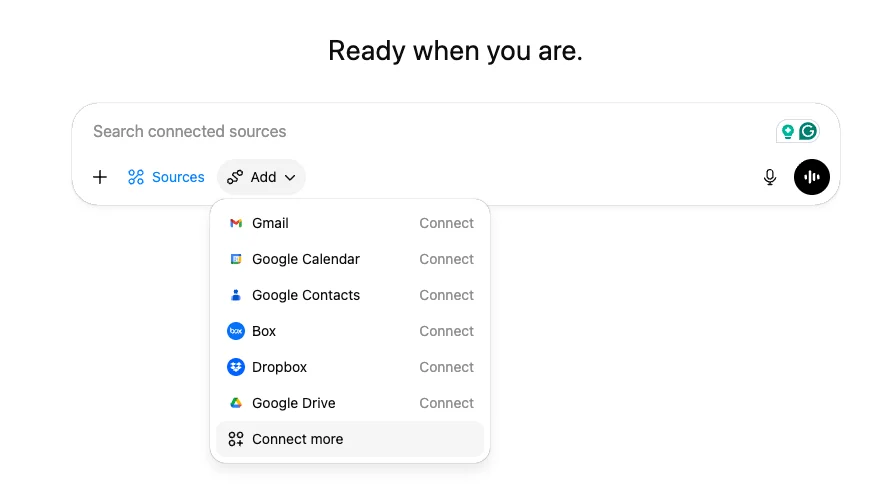
    转到 [ChatGPT](https://chatgpt.com/) 并点击"+"按钮添加新源。
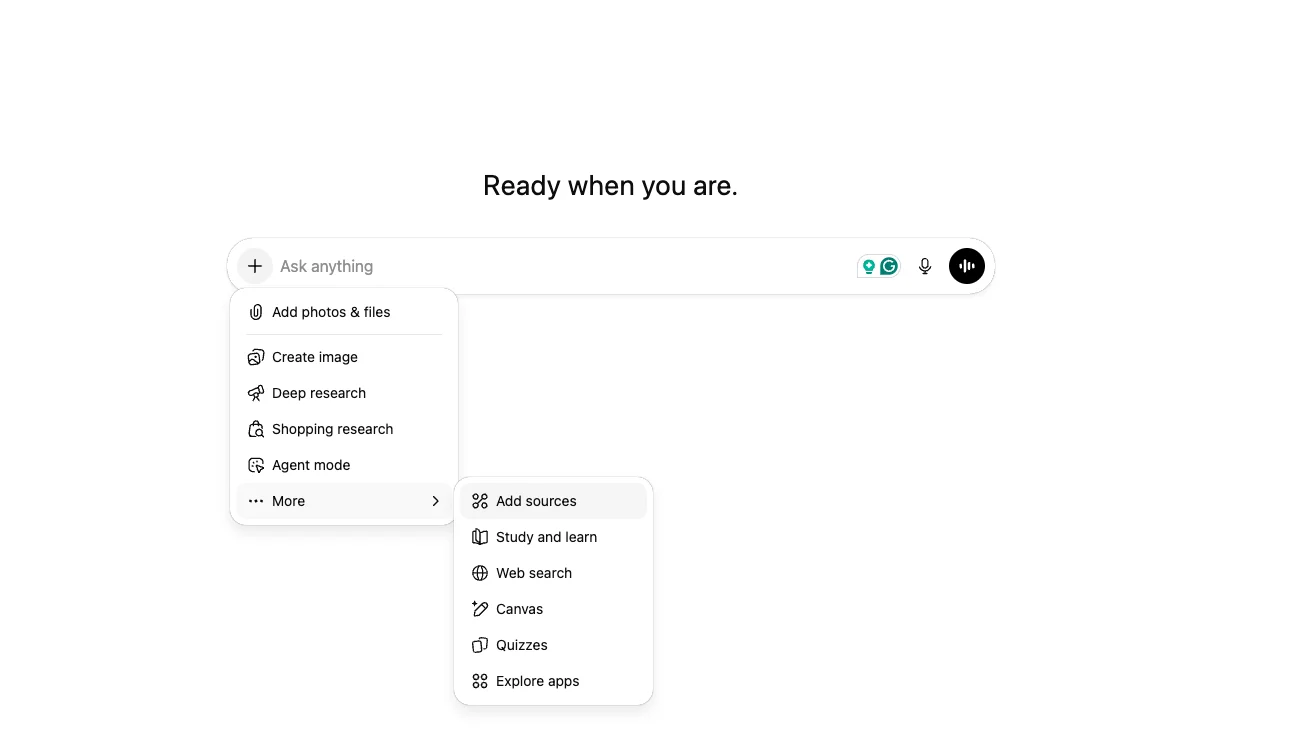
    <img src="https://mintcdn.com/brightdata/0sd4eqxAli7ENzfc/images/Screenshot2025-12-18at15.37.02.png?fit=max&auto=format&n=0sd4eqxAli7ENzfc&q=85&s=90e1181470f20eb58e1f5b4c1e0008bd" alt="Screenshot 2025 12 18 At 15 37 02" width="1303" height="732" data-path="images/Screenshot2025-12-18at15.37.02.png" />
  </Step>

  <Step title="连接更多">
    点击"添加"按钮，然后选择"连接更多"。

    <img src="https://mintcdn.com/brightdata/0sd4eqxAli7ENzfc/images/Screenshot2025-12-18at15.39.13.png?fit=max&auto=format&n=0sd4eqxAli7ENzfc&q=85&s=1f40430792a992d19672283cfb065f3b" alt="Screenshot 2025 12 18 At 15 39 13" width="888" height="500" data-path="images/Screenshot2025-12-18at15.39.13.png" />
  </Step>

  <Step title="高级设置">
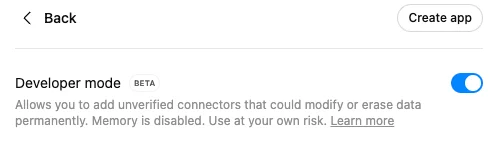
    点击"高级设置"，启用开发者模式，然后点击"创建应用"。

    <img src="https://mintcdn.com/brightdata/0sd4eqxAli7ENzfc/images/Screenshot2025-12-18at15.48.06.png?fit=max&auto=format&n=0sd4eqxAli7ENzfc&q=85&s=0b387627f7bdcd5b889a79cfbe29a90d" alt="Screenshot 2025 12 18 At 15 48 06" width="495" height="156" data-path="images/Screenshot2025-12-18at15.48.06.png" />
  </Step>

  <Step title="连接 Bright Data MCP">
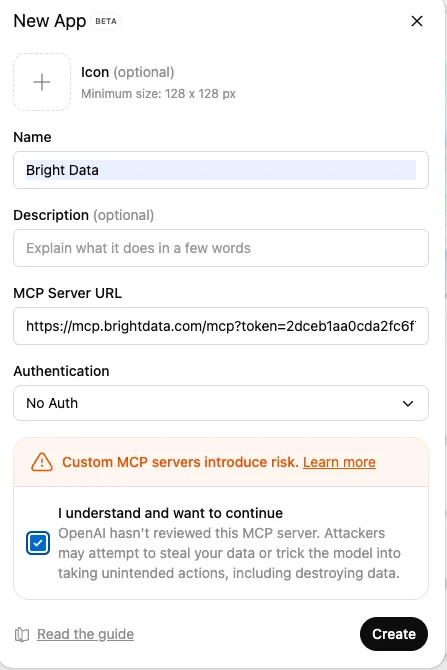
    点击"创建应用"并填写以下详细信息：

    * **应用名称**
    * **MCP 服务器 URL：**

    ```
    https://mcp.brightdata.com/mcp?token=<your_api_token>
    ```

    * **身份验证：无身份验证**

    以下是它的样子：

    <img src="https://mintcdn.com/brightdata/0sd4eqxAli7ENzfc/images/Screenshot2025-12-18at15.52.47.png?fit=max&auto=format&n=0sd4eqxAli7ENzfc&q=85&s=5131ebe2cc6c8c4c10ff7c4ac1109dfe" alt="Screenshot 2025 12 18 At 15 52 47" width="447" height="670" data-path="images/Screenshot2025-12-18at15.52.47.png" />
  </Step>

  <Step title="解锁网络">
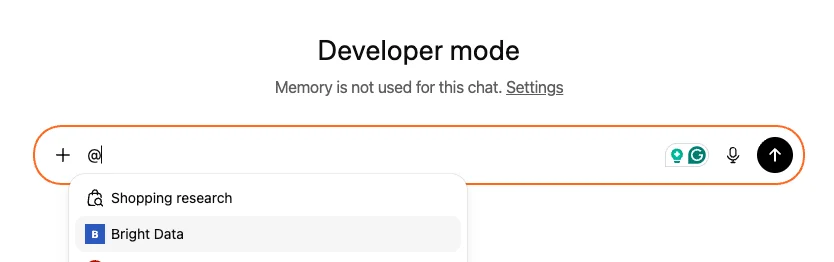
    标记 Bright Data MCP 并与开放网络聊天，无需被阻止！

    <img src="https://mintcdn.com/brightdata/0sd4eqxAli7ENzfc/images/Screenshot2025-12-18at15.55.30.png?fit=max&auto=format&n=0sd4eqxAli7ENzfc&q=85&s=9fbd5adf81080656430c42866fe1e576" alt="Screenshot 2025 12 18 At 15 55 30" width="834" height="262" data-path="images/Screenshot2025-12-18at15.55.30.png" />
  </Step>
</Steps>