> ## Documentation Index
> Fetch the complete documentation index at: https://docs.brightdata.com/llms.txt
> Use this file to discover all available pages before exploring further.
# Cloudflare Agents SDK 集成
> 如何将 Cloudflare 的 Agents SDK 与 Bright Data 的 Web MCP 服务器集成,用于在 Cloudflare Workers 上构建 AI 代理。
您可能符合我们的初创计划资格。获得本文所介绍基础设施的全额资助访问权限(最高价值 \$20,000)。
## 托管 MCP
1. 前往 [Bright Data 用户设置](https://www.bright.cn/cp/setting/users)
2. 复制您的 API 令牌(格式如:`2dceb1aa0***************************`)
确保已安装 Node.js 20+,然后登录 Cloudflare:
```shell theme={null}
npx wrangler login
```
```shell theme={null}
npx create-cloudflare@latest mcp-demo --template cloudflare/agents-starter
cd mcp-example
npm install
```
复制示例环境文件并添加您的 OpenAI API 密钥:
```shell theme={null}
cp .dev.vars.example .dev.vars
```
编辑 `.dev.vars`:
```env theme={null}
OPENAI_API_KEY=sk-...
```
在 `src/server.ts` 中,找到 `onChatMessage` 内默认被注释的 MCP 占位符:
```ts theme={null}
// const mcpConnection = await this.mcp.connect(
// "https://path-to-mcp-server/sse"
// );
```
将其替换为 Bright Data MCP 连接:
```ts expandable theme={null}
// 连接到 Bright Data MCP 服务器
const mcpConnection = await this.mcp.connect(
"https://mcp.brightdata.com/mcp?token="
);
// 合并 MCP 工具和本地工具
const allTools = {
...tools,
...this.mcp.getAITools()
};
```
确保 `mcp.connect()` 在 `this.mcp.getAITools()` 之前调用,以避免 `jsonSchema not initialized` 错误。
1. 将 `` 替换为您实际的 Bright Data API 令牌
2. 启动开发服务器:
```shell theme={null}
npm start
```
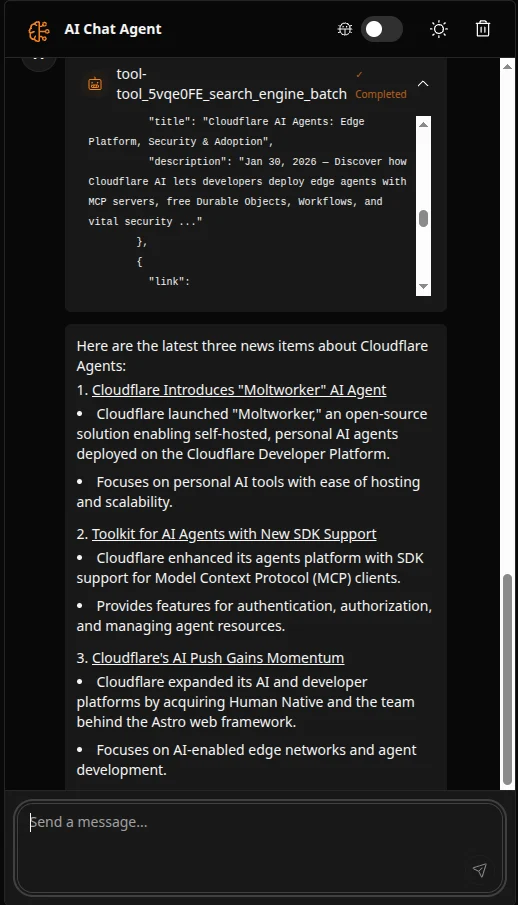
3. 在浏览器中打开应用程序并向代理提问,例如:
```
Find the latest 3 news items about Cloudflare Agents and summarize them in bullets with links.
```
您应该会看到代理使用 Bright Data 的网页抓取工具来获取和总结实时结果:
 1. 在 Bright Data 仪表板的 [My Zones](https://www.bright.cn/cp/zones) 中查看您的 API 使用情况
2. 免费层每月包含 5,000 个请求
1. 在 Bright Data 仪表板的 [My Zones](https://www.bright.cn/cp/zones) 中查看您的 API 使用情况
2. 免费层每月包含 5,000 个请求