> ## Documentation Index
> Fetch the complete documentation index at: https://docs.brightdata.com/llms.txt
> Use this file to discover all available pages before exploring further.
# Python SDK
> 安装并使用 Bright Data Python SDK 抓取 URL、搜索网页、运行平台 scrapers、连接 Browser API,并调用 Discover 与 Scraper Studio API。
本指南介绍如何安装 Bright Data Python SDK 并调用其全部功能:URL 抓取、搜索引擎、平台专用 scrapers(LinkedIn、Amazon、Instagram、TikTok、YouTube、Reddit、Pinterest、ChatGPT、Perplexity、Digikey)、Discover API、Scraper Studio、数据集与 Browser API。
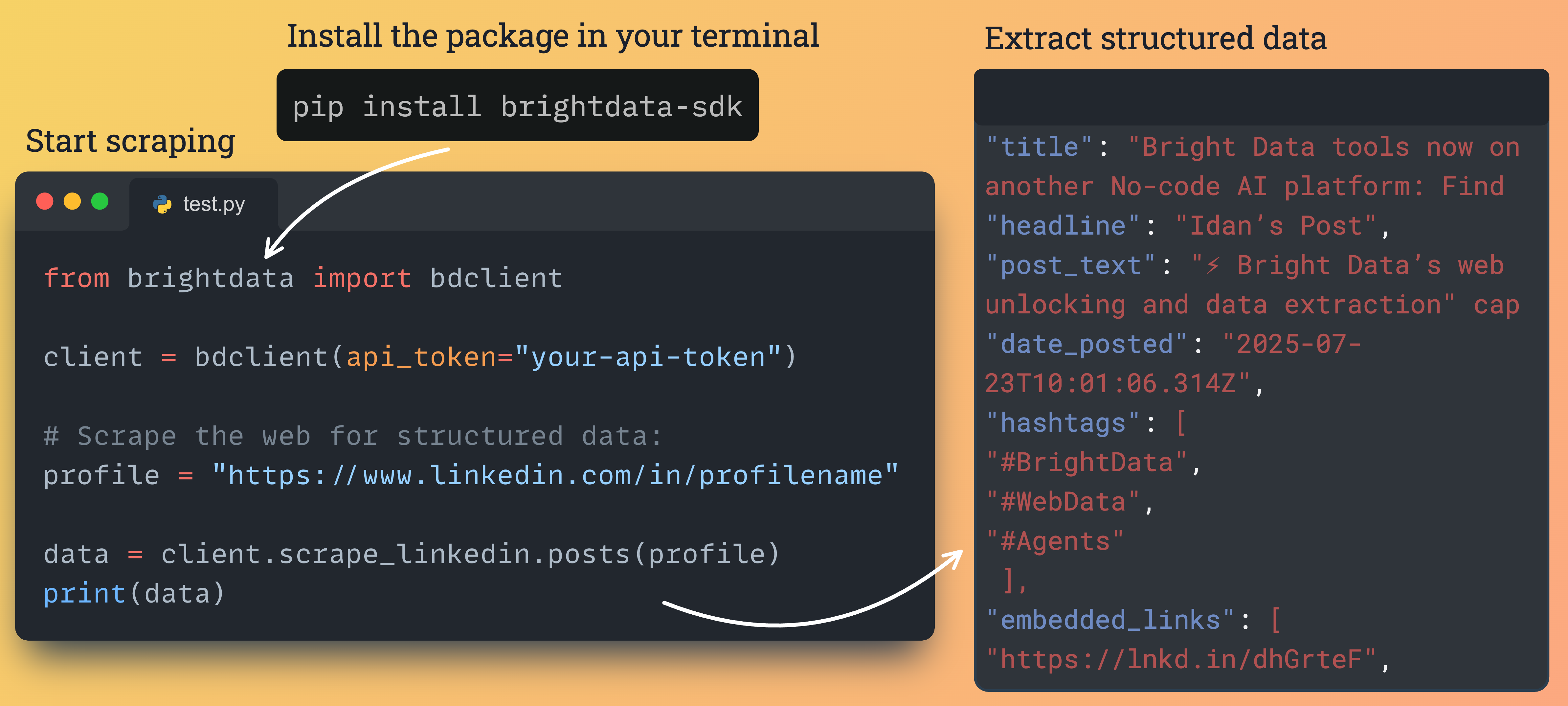 ### 安装与配置
通过 pip 安装包:
```bash theme={null}
pip install brightdata-sdk
```
#### 配置
您必须提供您的 API token。可在 [Bright Data 控制面板](https://www.bright.cn/cp/api_keys) 中找到。
**选项 1:环境变量(推荐)**
```bash theme={null}
export BRIGHTDATA_API_TOKEN="your_api_token_here"
```
**选项 2:直接初始化**
```python theme={null}
# 异步客户端
from brightdata import BrightDataClient
async with BrightDataClient(token="your_api_token_here") as client:
...
# 同步客户端
from brightdata import SyncBrightDataClient
with SyncBrightDataClient(token="your_api_token_here") as client:
...
```
### 基本用法
简单脚本使用 `SyncBrightDataClient`。需要高并发时配合 asyncio 使用 `BrightDataClient`。
```python Synchronous theme={null}
from brightdata import SyncBrightDataClient
with SyncBrightDataClient() as client:
# 抓取 URL
data = client.scrape_url("https://example.com")
print(f"Result: {data.data}")
# Google 搜索
search = client.search.google(query="Bright Data")
print(f"Found: {len(search.data)}")
```
```python Asynchronous theme={null}
import asyncio
from brightdata import BrightDataClient
async def main():
async with BrightDataClient() as client:
result = await client.scrape_url("https://example.com")
print(result.data)
search = await client.search.google(query="Bright Data")
print(f"Found: {len(search.data)}")
if __name__ == "__main__":
asyncio.run(main())
```
### 发起抓取和网络搜索
```python Search Engines theme={null}
from brightdata import BrightDataClient
client = BrightDataClient()
# Google 搜索
results = client.search.google(
query="best shoes of 2025",
location="United States",
language="en",
num_results=20
)
# Bing 搜索
results = client.search.bing(
query="python tutorial",
location="United States"
)
# Yandex 搜索
results = client.search.yandex(
query="latest news",
location="Germany"
)
if results.success:
print(f"Cost: ${results.cost:.4f}")
print(f"Time: {results.elapsed_ms():.2f}ms")
```
```python Web Scraping theme={null}
from brightdata import BrightDataClient
client = BrightDataClient()
# 抓取单个 URL
result = client.scrape_url("https://example.com")
# 并发抓取多个 URL
urls = [
"https://example1.com",
"https://example2.com",
"https://example3.com"
]
results = client.scrape_url(urls)
for r in results:
if r.success:
print(f"Success: {r.data[:200]}...")
r.save_to_file(f"result_{hash(r.data)}.json")
```
当处理多个查询或 URL 时,请求会并发执行以获得最佳性能。
### 使用平台专用 scrapers 提取结构化数据
从 Amazon、LinkedIn、Facebook、Instagram、TikTok、YouTube、Reddit、Pinterest、ChatGPT、Perplexity 与 Digikey 提取结构化数据。
```python Amazon theme={null}
# Async
from brightdata import BrightDataClient
async with BrightDataClient() as client:
products = await client.scrape.amazon.products(url="https://amazon.com/dp/B0CRMZHDG8")
reviews = await client.scrape.amazon.reviews(
url="https://amazon.com/dp/B0CRMZHDG8",
pastDays=30,
keyWord="quality"
)
sellers = await client.scrape.amazon.sellers(
url="https://amazon.com/sp?seller=AXXXXXXXXXXX"
)
# Sync
from brightdata import SyncBrightDataClient
with SyncBrightDataClient() as client:
products = client.scrape.amazon.products(url="https://amazon.com/dp/B0CRMZHDG8")
reviews = client.scrape.amazon.reviews(
url="https://amazon.com/dp/B0CRMZHDG8",
pastDays=30,
keyWord="quality"
)
sellers = client.scrape.amazon.sellers(
url="https://amazon.com/sp?seller=AXXXXXXXXXXX"
)
```
```python LinkedIn theme={null}
# Async:按 URL 采集,然后按参数发现
from brightdata import BrightDataClient
async with BrightDataClient() as client:
profiles = await client.scrape.linkedin.profiles(
url="https://www.linkedin.com/in/johndoe"
)
companies = await client.scrape.linkedin.companies(
url="https://www.linkedin.com/company/bright-data"
)
jobs = await client.scrape.linkedin.jobs(
url="https://www.linkedin.com/jobs/view/123456"
)
posts = await client.scrape.linkedin.posts(
url="https://www.linkedin.com/feed/update/urn:li:activity:123"
)
# 按参数发现
job_results = await client.search.linkedin.jobs(
keyword="python developer",
location="New York",
remote=True
)
profile_results = await client.search.linkedin.profiles(
firstName="John",
lastName="Doe"
)
# Sync
from brightdata import SyncBrightDataClient
with SyncBrightDataClient() as client:
profiles = client.scrape.linkedin.profiles(url="https://www.linkedin.com/in/johndoe")
companies = client.scrape.linkedin.companies(
url="https://www.linkedin.com/company/bright-data"
)
jobs = client.scrape.linkedin.jobs(url="https://www.linkedin.com/jobs/view/123456")
posts = client.scrape.linkedin.posts(
url="https://www.linkedin.com/feed/update/urn:li:activity:123"
)
```
```python Facebook & Instagram theme={null}
# Async
from brightdata import BrightDataClient
async with BrightDataClient() as client:
await client.scrape.facebook.posts_by_profile(
url="https://www.facebook.com/nasa", num_of_posts=10
)
await client.scrape.facebook.posts_by_group(
url="https://www.facebook.com/groups/example"
)
await client.scrape.facebook.posts_by_url(
url="https://www.facebook.com/post/123456"
)
await client.scrape.facebook.comments(
url="https://www.facebook.com/post/123456", num_of_comments=100
)
await client.scrape.facebook.reels(url="https://www.facebook.com/nasa")
await client.scrape.instagram.profiles(url="https://www.instagram.com/nasa/")
await client.scrape.instagram.posts(url="https://www.instagram.com/p/Cuf4s0MNqNr")
await client.scrape.instagram.reels(
url="https://www.instagram.com/reel/C5Rdyj_q7YN/"
)
await client.scrape.instagram.comments(
url="https://www.instagram.com/p/CesFC7JLyFl/"
)
# Sync
from brightdata import SyncBrightDataClient
with SyncBrightDataClient() as client:
client.scrape.facebook.posts_by_profile(
url="https://www.facebook.com/nasa", num_of_posts=10
)
client.scrape.instagram.profiles(url="https://www.instagram.com/nasa/")
```
```python TikTok theme={null}
# Async
from brightdata import BrightDataClient
async with BrightDataClient() as client:
profiles = await client.scrape.tiktok.profiles(
url="https://www.tiktok.com/@username"
)
posts = await client.scrape.tiktok.posts(
url="https://www.tiktok.com/@user/video/7433494424040017194"
)
comments = await client.scrape.tiktok.comments(
url="https://www.tiktok.com/@user/video/7216019547806092550"
)
fast_posts = await client.scrape.tiktok.posts_by_profile_fast(
url="https://www.tiktok.com/@bbc"
)
search = await client.scrape.tiktok.posts_by_search_url_fast(
url="https://www.tiktok.com/search?q=cats", num_of_posts=10
)
```
```python YouTube theme={null}
# Async
from brightdata import BrightDataClient
async with BrightDataClient() as client:
videos = await client.scrape.youtube.videos(
url="https://www.youtube.com/watch?v=dQw4w9WgXcQ",
transcription_language="English"
)
channels = await client.scrape.youtube.channels(
url="https://www.youtube.com/@MrBeast/about"
)
comments = await client.scrape.youtube.comments(
url="https://www.youtube.com/watch?v=dQw4w9WgXcQ", num_of_comments=100
)
```
```python Reddit theme={null}
# Async
from brightdata import BrightDataClient
async with BrightDataClient() as client:
posts = await client.scrape.reddit.posts(
url="https://www.reddit.com/r/python/comments/abc123/"
)
by_keyword = await client.scrape.reddit.posts_by_keyword(
keyword="machine learning", sort_by="Top", date="Past week"
)
by_subreddit = await client.scrape.reddit.posts_by_subreddit(
url="https://www.reddit.com/r/datascience/"
)
comments = await client.scrape.reddit.comments(
url="https://www.reddit.com/r/python/comments/abc123/", days_back=30
)
```
```python Pinterest theme={null}
# Async
from brightdata import BrightDataClient
async with BrightDataClient() as client:
posts = await client.scrape.pinterest.posts(
url="https://www.pinterest.com/pin/3166662230556591/"
)
profiles = await client.scrape.pinterest.profiles(
url="https://www.pinterest.com/boredpanda/"
)
# 按参数发现
by_keyword = await client.search.pinterest.posts_by_keyword(
keyword="spaghetti recipes"
)
by_profile = await client.search.pinterest.posts_by_profile(
url="https://www.pinterest.com/grandmapowpow/", num_of_posts=20
)
# Sync
from brightdata import SyncBrightDataClient
with SyncBrightDataClient() as client:
posts = client.scrape.pinterest.posts(
url="https://www.pinterest.com/pin/3166662230556591/"
)
profiles = client.scrape.pinterest.profiles(
url="https://www.pinterest.com/boredpanda/"
)
```
```python ChatGPT theme={null}
# Async
from brightdata import BrightDataClient
async with BrightDataClient() as client:
result = await client.scrape.chatgpt.prompt(
prompt="Explain async programming", web_search=True
)
batch = await client.scrape.chatgpt.prompts(
prompts=["Explain Python", "Explain JavaScript"]
)
# Sync
from brightdata import SyncBrightDataClient
with SyncBrightDataClient() as client:
result = client.scrape.chatgpt.prompt(
prompt="Explain async programming", web_search=True
)
batch = client.scrape.chatgpt.prompts(
prompts=["Explain Python", "Explain JavaScript"]
)
```
```python Digikey & Perplexity theme={null}
from brightdata import BrightDataClient
async with BrightDataClient() as client:
parts = await client.scrape.digikey.products(
url="https://www.digikey.com/en/products/detail/abc"
)
answer = await client.scrape.perplexity.search(
url="https://www.perplexity.ai/search?q=battery+tech"
)
```
### 使用 AI 排序搜索网页(Discover API)
```python theme={null}
# Async
from brightdata import BrightDataClient
async with BrightDataClient() as client:
result = await client.discover(
query="AI trends 2026",
intent="latest technology developments"
)
# result.data 形如 [{ title, link, description, relevance_score }]
# 手动:触发、等待并获取
job = await client.discover_trigger(
query="SaaS pricing",
intent="competitor pricing strategies"
)
await job.wait(timeout=60)
data = await job.fetch()
# Sync
from brightdata import SyncBrightDataClient
with SyncBrightDataClient() as client:
result = client.discover(
query="AI trends 2026",
intent="latest technology developments"
)
```
### 运行您的自定义 Scraper Studio scrapers
```python theme={null}
# Async
from brightdata import BrightDataClient
async with BrightDataClient() as client:
data = await client.scraper_studio.run(
collector="c_abc123",
input={"url": "https://example.com/product/1"}
)
job = await client.scraper_studio.trigger(
"c_abc123", {"url": "https://example.com/product/1"}
)
data = await job.wait_and_fetch(timeout=120)
status = await client.scraper_studio.status("j_abc123")
# Sync
from brightdata import SyncBrightDataClient
with SyncBrightDataClient() as client:
data = client.scraper_studio.run(
collector="c_abc123",
input={"url": "https://example.com/product/1"}
)
status = client.scraper_studio.status("j_abc123")
```
### Datasets API
访问预先采集的数据快照。
```python theme={null}
from brightdata import SyncBrightDataClient
with SyncBrightDataClient() as client:
# 1. 申请带筛选条件的快照
print("Requesting snapshot...")
snapshot_id = client.datasets.imdb_movies(
filter={"name": "year", "operator": "=", "value": 2024},
records_limit=10
)
# 2. 下载(SDK 会自动轮询)
print(f"Snapshot {snapshot_id} ready. Downloading...")
data = client.datasets.imdb_movies.download(snapshot_id)
print(f"Downloaded {len(data)} records.")
```
在 IDE 中将鼠标悬停在 `BrightDataClient` 类或其任意方法上,即可查看可用参数、类型提示与使用示例。SDK 提供完整的 IntelliSense 支持。
### 使用 dataclass 负载实现类型安全
SDK 提供带运行时校验和辅助属性的 dataclass payloads。
```python theme={null}
from brightdata import BrightDataClient
from brightdata.payloads import (
AmazonProductPayload,
LinkedInJobSearchPayload,
ChatGPTPromptPayload
)
client = BrightDataClient()
# 带校验的 Amazon 商品
amazon_payload = AmazonProductPayload(
url="https://amazon.com/dp/B123456789",
reviews_count=50 # 运行时校验
)
print(f"ASIN: {amazon_payload.asin}") # 辅助属性
print(f"Domain: {amazon_payload.domain}")
# LinkedIn 招聘搜索
linkedin_payload = LinkedInJobSearchPayload(
keyword="python developer",
location="San Francisco",
remote=True
)
print(f"Remote search: {linkedin_payload.is_remote_search}")
# 与客户端一起使用
result = client.scrape.amazon.products(**amazon_payload.to_dict())
```
### 连接至 Scraping Browser
通过 Browser API 将 Playwright 连接到 Bright Data 的云端浏览器。
```python theme={null}
from brightdata import BrightDataClient
from playwright.async_api import async_playwright
client = BrightDataClient(
browser_username="brd-customer-xxxx-zone-scraping_browser1",
browser_password="YOUR_ZONE_PASSWORD",
)
async with async_playwright() as pw:
browser = await pw.chromium.connect_over_cdp(client.browser.get_connect_url())
page = await browser.new_page()
await page.goto("https://example.com", timeout=120000)
print(await page.content())
await browser.close()
```
### 使用 CLI 工具
SDK 提供命令行界面以便在终端中使用。
```bash theme={null}
# 搜索操作
brightdata search google "python tutorial" --location "United States"
brightdata search linkedin jobs --keyword "python developer" --remote
# 抓取操作
brightdata scrape amazon products "https://amazon.com/dp/B123"
brightdata scrape linkedin profiles "https://linkedin.com/in/johndoe"
# 通用网页抓取
brightdata scrape generic "https://example.com" --output-format pretty
# 将结果保存到文件
brightdata search google "AI news" --output-file results.json
```
### 异步用法获取更高性能
并发操作时,将 URL 列表传递给 `scrape_url`,并在异步上下文管理器中运行。
```python theme={null}
import asyncio
from brightdata import BrightDataClient
async def main():
async with BrightDataClient() as client:
results = await client.scrape_url([
"https://example1.com",
"https://example2.com",
"https://example3.com",
], mode="async", poll_timeout=180)
for result in results:
print(result.data)
asyncio.run(main())
```
### 资源
查看源代码、示例并贡献代码
覆盖所有功能的 10+ 个示例
包列表与发布历史
### 更新内容
| 功能 | 说明 |
| ------------------ | --------------------------------------------------------------------------------------------------------------------- |
| **Discover API** | `client.discover()` / `client.discover_trigger()`:基于意图的 AI 相关性排序网页搜索。同步与异步客户端均可使用。 |
| **Scraper Studio** | `client.scraper_studio.run/trigger/status()`:触发并获取您的自定义 Scraper Studio scrapers。同步与异步客户端均可使用。 |
| **Browser API** | `client.browser.get_connect_url()`:将 Playwright/Puppeteer 连接到 Bright Data 的云端浏览器。取代 `client.connect_browser()`。 |
| **新增 scrapers** | `client.scrape.*` 新增 TikTok、YouTube、Reddit、Pinterest、Digikey、Perplexity |
| **平台搜索** | `client.search.linkedin` / `amazon` / `instagram` / `tiktok` / `youtube` / `pinterest` / `chatgpt`:按参数发现内容,而不仅是按 URL。 |
| **126+ 数据集** | 通过 `client.datasets.*` 访问完整目录,支持 `.sample()` 与 `.download()` |
| **完整的同步支持** | `SyncBrightDataClient` 现已覆盖全部功能:scrapers、search、discover、scraper studio、browser |
### 安装与配置
通过 pip 安装包:
```bash theme={null}
pip install brightdata-sdk
```
#### 配置
您必须提供您的 API token。可在 [Bright Data 控制面板](https://www.bright.cn/cp/api_keys) 中找到。
**选项 1:环境变量(推荐)**
```bash theme={null}
export BRIGHTDATA_API_TOKEN="your_api_token_here"
```
**选项 2:直接初始化**
```python theme={null}
# 异步客户端
from brightdata import BrightDataClient
async with BrightDataClient(token="your_api_token_here") as client:
...
# 同步客户端
from brightdata import SyncBrightDataClient
with SyncBrightDataClient(token="your_api_token_here") as client:
...
```
### 基本用法
简单脚本使用 `SyncBrightDataClient`。需要高并发时配合 asyncio 使用 `BrightDataClient`。
```python Synchronous theme={null}
from brightdata import SyncBrightDataClient
with SyncBrightDataClient() as client:
# 抓取 URL
data = client.scrape_url("https://example.com")
print(f"Result: {data.data}")
# Google 搜索
search = client.search.google(query="Bright Data")
print(f"Found: {len(search.data)}")
```
```python Asynchronous theme={null}
import asyncio
from brightdata import BrightDataClient
async def main():
async with BrightDataClient() as client:
result = await client.scrape_url("https://example.com")
print(result.data)
search = await client.search.google(query="Bright Data")
print(f"Found: {len(search.data)}")
if __name__ == "__main__":
asyncio.run(main())
```
### 发起抓取和网络搜索
```python Search Engines theme={null}
from brightdata import BrightDataClient
client = BrightDataClient()
# Google 搜索
results = client.search.google(
query="best shoes of 2025",
location="United States",
language="en",
num_results=20
)
# Bing 搜索
results = client.search.bing(
query="python tutorial",
location="United States"
)
# Yandex 搜索
results = client.search.yandex(
query="latest news",
location="Germany"
)
if results.success:
print(f"Cost: ${results.cost:.4f}")
print(f"Time: {results.elapsed_ms():.2f}ms")
```
```python Web Scraping theme={null}
from brightdata import BrightDataClient
client = BrightDataClient()
# 抓取单个 URL
result = client.scrape_url("https://example.com")
# 并发抓取多个 URL
urls = [
"https://example1.com",
"https://example2.com",
"https://example3.com"
]
results = client.scrape_url(urls)
for r in results:
if r.success:
print(f"Success: {r.data[:200]}...")
r.save_to_file(f"result_{hash(r.data)}.json")
```
当处理多个查询或 URL 时,请求会并发执行以获得最佳性能。
### 使用平台专用 scrapers 提取结构化数据
从 Amazon、LinkedIn、Facebook、Instagram、TikTok、YouTube、Reddit、Pinterest、ChatGPT、Perplexity 与 Digikey 提取结构化数据。
```python Amazon theme={null}
# Async
from brightdata import BrightDataClient
async with BrightDataClient() as client:
products = await client.scrape.amazon.products(url="https://amazon.com/dp/B0CRMZHDG8")
reviews = await client.scrape.amazon.reviews(
url="https://amazon.com/dp/B0CRMZHDG8",
pastDays=30,
keyWord="quality"
)
sellers = await client.scrape.amazon.sellers(
url="https://amazon.com/sp?seller=AXXXXXXXXXXX"
)
# Sync
from brightdata import SyncBrightDataClient
with SyncBrightDataClient() as client:
products = client.scrape.amazon.products(url="https://amazon.com/dp/B0CRMZHDG8")
reviews = client.scrape.amazon.reviews(
url="https://amazon.com/dp/B0CRMZHDG8",
pastDays=30,
keyWord="quality"
)
sellers = client.scrape.amazon.sellers(
url="https://amazon.com/sp?seller=AXXXXXXXXXXX"
)
```
```python LinkedIn theme={null}
# Async:按 URL 采集,然后按参数发现
from brightdata import BrightDataClient
async with BrightDataClient() as client:
profiles = await client.scrape.linkedin.profiles(
url="https://www.linkedin.com/in/johndoe"
)
companies = await client.scrape.linkedin.companies(
url="https://www.linkedin.com/company/bright-data"
)
jobs = await client.scrape.linkedin.jobs(
url="https://www.linkedin.com/jobs/view/123456"
)
posts = await client.scrape.linkedin.posts(
url="https://www.linkedin.com/feed/update/urn:li:activity:123"
)
# 按参数发现
job_results = await client.search.linkedin.jobs(
keyword="python developer",
location="New York",
remote=True
)
profile_results = await client.search.linkedin.profiles(
firstName="John",
lastName="Doe"
)
# Sync
from brightdata import SyncBrightDataClient
with SyncBrightDataClient() as client:
profiles = client.scrape.linkedin.profiles(url="https://www.linkedin.com/in/johndoe")
companies = client.scrape.linkedin.companies(
url="https://www.linkedin.com/company/bright-data"
)
jobs = client.scrape.linkedin.jobs(url="https://www.linkedin.com/jobs/view/123456")
posts = client.scrape.linkedin.posts(
url="https://www.linkedin.com/feed/update/urn:li:activity:123"
)
```
```python Facebook & Instagram theme={null}
# Async
from brightdata import BrightDataClient
async with BrightDataClient() as client:
await client.scrape.facebook.posts_by_profile(
url="https://www.facebook.com/nasa", num_of_posts=10
)
await client.scrape.facebook.posts_by_group(
url="https://www.facebook.com/groups/example"
)
await client.scrape.facebook.posts_by_url(
url="https://www.facebook.com/post/123456"
)
await client.scrape.facebook.comments(
url="https://www.facebook.com/post/123456", num_of_comments=100
)
await client.scrape.facebook.reels(url="https://www.facebook.com/nasa")
await client.scrape.instagram.profiles(url="https://www.instagram.com/nasa/")
await client.scrape.instagram.posts(url="https://www.instagram.com/p/Cuf4s0MNqNr")
await client.scrape.instagram.reels(
url="https://www.instagram.com/reel/C5Rdyj_q7YN/"
)
await client.scrape.instagram.comments(
url="https://www.instagram.com/p/CesFC7JLyFl/"
)
# Sync
from brightdata import SyncBrightDataClient
with SyncBrightDataClient() as client:
client.scrape.facebook.posts_by_profile(
url="https://www.facebook.com/nasa", num_of_posts=10
)
client.scrape.instagram.profiles(url="https://www.instagram.com/nasa/")
```
```python TikTok theme={null}
# Async
from brightdata import BrightDataClient
async with BrightDataClient() as client:
profiles = await client.scrape.tiktok.profiles(
url="https://www.tiktok.com/@username"
)
posts = await client.scrape.tiktok.posts(
url="https://www.tiktok.com/@user/video/7433494424040017194"
)
comments = await client.scrape.tiktok.comments(
url="https://www.tiktok.com/@user/video/7216019547806092550"
)
fast_posts = await client.scrape.tiktok.posts_by_profile_fast(
url="https://www.tiktok.com/@bbc"
)
search = await client.scrape.tiktok.posts_by_search_url_fast(
url="https://www.tiktok.com/search?q=cats", num_of_posts=10
)
```
```python YouTube theme={null}
# Async
from brightdata import BrightDataClient
async with BrightDataClient() as client:
videos = await client.scrape.youtube.videos(
url="https://www.youtube.com/watch?v=dQw4w9WgXcQ",
transcription_language="English"
)
channels = await client.scrape.youtube.channels(
url="https://www.youtube.com/@MrBeast/about"
)
comments = await client.scrape.youtube.comments(
url="https://www.youtube.com/watch?v=dQw4w9WgXcQ", num_of_comments=100
)
```
```python Reddit theme={null}
# Async
from brightdata import BrightDataClient
async with BrightDataClient() as client:
posts = await client.scrape.reddit.posts(
url="https://www.reddit.com/r/python/comments/abc123/"
)
by_keyword = await client.scrape.reddit.posts_by_keyword(
keyword="machine learning", sort_by="Top", date="Past week"
)
by_subreddit = await client.scrape.reddit.posts_by_subreddit(
url="https://www.reddit.com/r/datascience/"
)
comments = await client.scrape.reddit.comments(
url="https://www.reddit.com/r/python/comments/abc123/", days_back=30
)
```
```python Pinterest theme={null}
# Async
from brightdata import BrightDataClient
async with BrightDataClient() as client:
posts = await client.scrape.pinterest.posts(
url="https://www.pinterest.com/pin/3166662230556591/"
)
profiles = await client.scrape.pinterest.profiles(
url="https://www.pinterest.com/boredpanda/"
)
# 按参数发现
by_keyword = await client.search.pinterest.posts_by_keyword(
keyword="spaghetti recipes"
)
by_profile = await client.search.pinterest.posts_by_profile(
url="https://www.pinterest.com/grandmapowpow/", num_of_posts=20
)
# Sync
from brightdata import SyncBrightDataClient
with SyncBrightDataClient() as client:
posts = client.scrape.pinterest.posts(
url="https://www.pinterest.com/pin/3166662230556591/"
)
profiles = client.scrape.pinterest.profiles(
url="https://www.pinterest.com/boredpanda/"
)
```
```python ChatGPT theme={null}
# Async
from brightdata import BrightDataClient
async with BrightDataClient() as client:
result = await client.scrape.chatgpt.prompt(
prompt="Explain async programming", web_search=True
)
batch = await client.scrape.chatgpt.prompts(
prompts=["Explain Python", "Explain JavaScript"]
)
# Sync
from brightdata import SyncBrightDataClient
with SyncBrightDataClient() as client:
result = client.scrape.chatgpt.prompt(
prompt="Explain async programming", web_search=True
)
batch = client.scrape.chatgpt.prompts(
prompts=["Explain Python", "Explain JavaScript"]
)
```
```python Digikey & Perplexity theme={null}
from brightdata import BrightDataClient
async with BrightDataClient() as client:
parts = await client.scrape.digikey.products(
url="https://www.digikey.com/en/products/detail/abc"
)
answer = await client.scrape.perplexity.search(
url="https://www.perplexity.ai/search?q=battery+tech"
)
```
### 使用 AI 排序搜索网页(Discover API)
```python theme={null}
# Async
from brightdata import BrightDataClient
async with BrightDataClient() as client:
result = await client.discover(
query="AI trends 2026",
intent="latest technology developments"
)
# result.data 形如 [{ title, link, description, relevance_score }]
# 手动:触发、等待并获取
job = await client.discover_trigger(
query="SaaS pricing",
intent="competitor pricing strategies"
)
await job.wait(timeout=60)
data = await job.fetch()
# Sync
from brightdata import SyncBrightDataClient
with SyncBrightDataClient() as client:
result = client.discover(
query="AI trends 2026",
intent="latest technology developments"
)
```
### 运行您的自定义 Scraper Studio scrapers
```python theme={null}
# Async
from brightdata import BrightDataClient
async with BrightDataClient() as client:
data = await client.scraper_studio.run(
collector="c_abc123",
input={"url": "https://example.com/product/1"}
)
job = await client.scraper_studio.trigger(
"c_abc123", {"url": "https://example.com/product/1"}
)
data = await job.wait_and_fetch(timeout=120)
status = await client.scraper_studio.status("j_abc123")
# Sync
from brightdata import SyncBrightDataClient
with SyncBrightDataClient() as client:
data = client.scraper_studio.run(
collector="c_abc123",
input={"url": "https://example.com/product/1"}
)
status = client.scraper_studio.status("j_abc123")
```
### Datasets API
访问预先采集的数据快照。
```python theme={null}
from brightdata import SyncBrightDataClient
with SyncBrightDataClient() as client:
# 1. 申请带筛选条件的快照
print("Requesting snapshot...")
snapshot_id = client.datasets.imdb_movies(
filter={"name": "year", "operator": "=", "value": 2024},
records_limit=10
)
# 2. 下载(SDK 会自动轮询)
print(f"Snapshot {snapshot_id} ready. Downloading...")
data = client.datasets.imdb_movies.download(snapshot_id)
print(f"Downloaded {len(data)} records.")
```
在 IDE 中将鼠标悬停在 `BrightDataClient` 类或其任意方法上,即可查看可用参数、类型提示与使用示例。SDK 提供完整的 IntelliSense 支持。
### 使用 dataclass 负载实现类型安全
SDK 提供带运行时校验和辅助属性的 dataclass payloads。
```python theme={null}
from brightdata import BrightDataClient
from brightdata.payloads import (
AmazonProductPayload,
LinkedInJobSearchPayload,
ChatGPTPromptPayload
)
client = BrightDataClient()
# 带校验的 Amazon 商品
amazon_payload = AmazonProductPayload(
url="https://amazon.com/dp/B123456789",
reviews_count=50 # 运行时校验
)
print(f"ASIN: {amazon_payload.asin}") # 辅助属性
print(f"Domain: {amazon_payload.domain}")
# LinkedIn 招聘搜索
linkedin_payload = LinkedInJobSearchPayload(
keyword="python developer",
location="San Francisco",
remote=True
)
print(f"Remote search: {linkedin_payload.is_remote_search}")
# 与客户端一起使用
result = client.scrape.amazon.products(**amazon_payload.to_dict())
```
### 连接至 Scraping Browser
通过 Browser API 将 Playwright 连接到 Bright Data 的云端浏览器。
```python theme={null}
from brightdata import BrightDataClient
from playwright.async_api import async_playwright
client = BrightDataClient(
browser_username="brd-customer-xxxx-zone-scraping_browser1",
browser_password="YOUR_ZONE_PASSWORD",
)
async with async_playwright() as pw:
browser = await pw.chromium.connect_over_cdp(client.browser.get_connect_url())
page = await browser.new_page()
await page.goto("https://example.com", timeout=120000)
print(await page.content())
await browser.close()
```
### 使用 CLI 工具
SDK 提供命令行界面以便在终端中使用。
```bash theme={null}
# 搜索操作
brightdata search google "python tutorial" --location "United States"
brightdata search linkedin jobs --keyword "python developer" --remote
# 抓取操作
brightdata scrape amazon products "https://amazon.com/dp/B123"
brightdata scrape linkedin profiles "https://linkedin.com/in/johndoe"
# 通用网页抓取
brightdata scrape generic "https://example.com" --output-format pretty
# 将结果保存到文件
brightdata search google "AI news" --output-file results.json
```
### 异步用法获取更高性能
并发操作时,将 URL 列表传递给 `scrape_url`,并在异步上下文管理器中运行。
```python theme={null}
import asyncio
from brightdata import BrightDataClient
async def main():
async with BrightDataClient() as client:
results = await client.scrape_url([
"https://example1.com",
"https://example2.com",
"https://example3.com",
], mode="async", poll_timeout=180)
for result in results:
print(result.data)
asyncio.run(main())
```
### 资源
查看源代码、示例并贡献代码
覆盖所有功能的 10+ 个示例
包列表与发布历史
### 更新内容
| 功能 | 说明 |
| ------------------ | --------------------------------------------------------------------------------------------------------------------- |
| **Discover API** | `client.discover()` / `client.discover_trigger()`:基于意图的 AI 相关性排序网页搜索。同步与异步客户端均可使用。 |
| **Scraper Studio** | `client.scraper_studio.run/trigger/status()`:触发并获取您的自定义 Scraper Studio scrapers。同步与异步客户端均可使用。 |
| **Browser API** | `client.browser.get_connect_url()`:将 Playwright/Puppeteer 连接到 Bright Data 的云端浏览器。取代 `client.connect_browser()`。 |
| **新增 scrapers** | `client.scrape.*` 新增 TikTok、YouTube、Reddit、Pinterest、Digikey、Perplexity |
| **平台搜索** | `client.search.linkedin` / `amazon` / `instagram` / `tiktok` / `youtube` / `pinterest` / `chatgpt`:按参数发现内容,而不仅是按 URL。 |
| **126+ 数据集** | 通过 `client.datasets.*` 访问完整目录,支持 `.sample()` 与 `.download()` |
| **完整的同步支持** | `SyncBrightDataClient` 现已覆盖全部功能:scrapers、search、discover、scraper studio、browser |