> ## Documentation Index
> Fetch the complete documentation index at: https://docs.brightdata.com/llms.txt
> Use this file to discover all available pages before exploring further.
# 概览
> 了解 Scrapers,使用我们设计的现成爬虫来简化数据收集并增强数据集生成。学习如何启动抓取、管理数据以及系统限制。
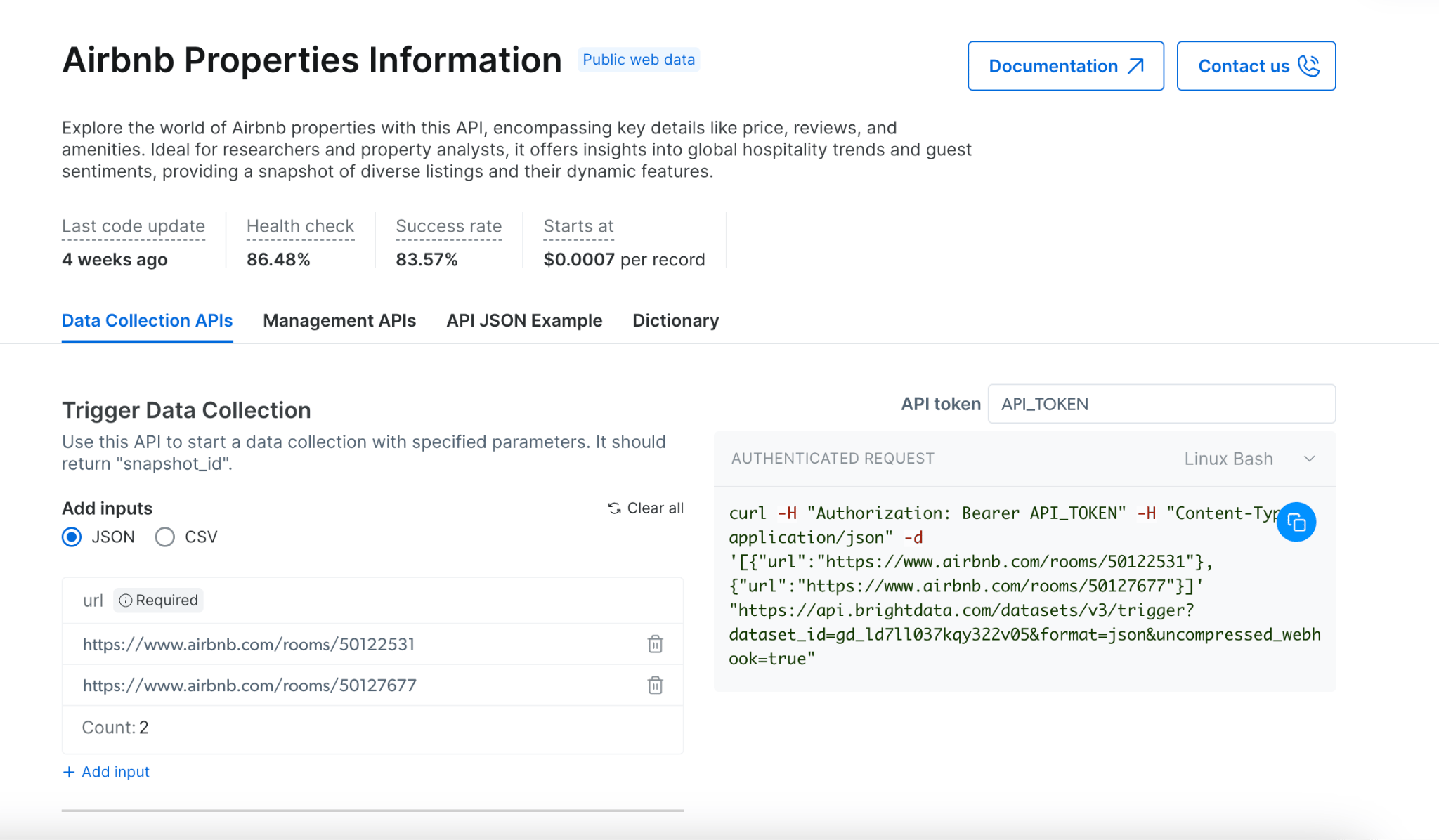
[Scrapers](https://www.bright.cn/cp/scrapers/browse) 允许您以编程方式从网站提取数据。它提供了同步和异步抓取方法,以满足不同使用场景的需求,从快速数据检索到复杂的大规模提取任务。
该 API 支持最多 20 个 URL 的实时处理,以及更大数据集的批量处理,以适应各种抓取需求。
 ## 抓取方法
### 同步抓取 (`/scrape`)
[同步抓取](/cn/api-reference/scrapers/synchronous-requests) 允许您在单个请求中启动抓取并接收结果,非常适合实时快速数据检索。
```powershell cURL theme={null}
curl "https://api.brightdata.com/datasets/v3/scrape?dataset_id=gd_l1viktl72bvl7bjuj0&format=json" \
-H "Authorization: Bearer API_KEY" \
-H "Content-Type: application/json" \
-d '[{"url": "https://www.linkedin.com/in/elad-moshe-05a90413/"}]'
```
```javascript sync-scrape.js theme={null}
(async function synchronousScrape() {
try {
const response = await fetch(
'https://api.brightdata.com/datasets/v3/scrape?dataset_id=gd_l1viktl72bvl7bjuj0&format=json',
{
method: 'POST',
headers: {
'Authorization': 'Bearer API_KEY',
'Content-Type': 'application/json'
},
body: JSON.stringify([
{"url": "https://www.linkedin.com/in/elad-moshe-05a90413/"}
])
}
);
const data = await response.json();
console.log('Scrape completed:', data);
return data;
} catch (error) {
console.error('Error during scrape:', error);
}
})();
```
```python sync_scrape.py theme={null}
import requests
def synchronous_scrape():
url = "https://api.brightdata.com/datasets/v3/scrape"
params = {
"dataset_id": "gd_l1viktl72bvl7bjuj0",
"format": "json"
}
headers = {
"Authorization": "Bearer API_KEY",
"Content-Type": "application/json"
}
data = [
{"url": "https://www.linkedin.com/in/elad-moshe-05a90413/"}
]
response = requests.post(url, params=params, headers=headers, json=data)
response.raise_for_status()
print("Scrape completed:", response.json())
return response.json()
synchronous_scrape()
```
```json sample-response.json theme={null}
[
{
"id": "john-doe-123abc",
"name": "John Doe",
"city": "San Francisco",
"country_code": "US",
"about": "Lorem ipsum dolor sit amet, consectetur adipiscing elit. Proin vel magna at nunc commodo...",
"current_company": {
"link": "https://www.linkedin.com/company/acme-corp",
"name": "ACME Corporation",
"company_id": "acme-corp"
},
"url": "https://www.linkedin.com/in/john-doe-123abc/",
"people_also_viewed": [
{
"profile_link": "https://www.linkedin.com/in/jane-smith",
"name": "Jane Smith",
"location": "New York, USA"
},
{
"profile_link": "https://www.linkedin.com/in/robert-johnson",
"name": "Robert Johnson",
"location": "Boston, USA"
}
],
"educations_details": "Stanford University",
"education": [
{
"title": "Stanford University",
"url": "https://www.linkedin.com/school/stanford-university/",
"start_year": "2010",
"end_year": "2014"
}
],
"avatar": "https://example.com/avatar.jpg",
"courses": [
{
"subtitle": "-",
"title": "Machine Learning"
},
{
"subtitle": "-",
"title": "Data Structures"
},
{
"subtitle": "-",
"title": "Cloud Computing"
}
],
"followers": 1250,
"connections": 500,
"current_company_name": "ACME Corporation",
"projects": [
{
"title": "Open Source Project X",
"start_date": "January 2022",
"end_date": "Present",
"description": "Lorem ipsum dolor sit amet, consectetur adipiscing elit. Sed do eiusmod tempor incididunt ut labore et dolore magna aliqua."
}
],
"timestamp": "2023-06-15T14:27:07.001Z",
"input": {
"url": "https://www.linkedin.com/in/john-doe-123abc/"
}
}
]
```
#### 同步抓取的主要特性:
* 在同一请求中实时返回结果
* 适合单 URL 和快速抓取
* 简化的错误处理
* 1 分钟超时(超时自动切换到异步抓取)
### 异步抓取 (`/trigger`)
[异步抓取](/cn/api-reference/rest-api/scraper/asynchronous-requests) 会启动一个在后台运行的任务,使您能够以批量模式处理更大、更复杂的抓取任务。批量模式支持最多 100 个并发请求,每个批次可以处理最多 1GB 的输入文件大小,非常适合大规模数据收集项目。
发现任务(如查找相关产品、抓取多个页面)需要使用异步抓取 (`/trigger`),因为这些任务需要跨多个网页进行导航和数据提取。
```shell cURL theme={null}
curl "https://api.brightdata.com/datasets/v3/trigger?dataset_id=gd_l1viktl72bvl7bjuj0&format=json&uncompressed_webhook=true" \
-H "Authorization: Bearer API_KEY" \
-H "Content-Type: application/json" \
-d '[
{"url": "https://www.linkedin.com/in/elad-moshe-05a90413/"},
{"url": "https://www.linkedin.com/in/jonathan-myrvik-3baa01109"},
{"url": "https://www.linkedin.com/in/aviv-tal-75b81/"},
{"url": "https://www.linkedin.com/in/bulentakar/"},
{"url": "https://www.linkedin.com/in/nnikolaev/"}
]'
```
```javascript trigger-async-scrape.js theme={null}
(async function asynchronousScrape() {
try {
const response = await fetch(
'https://api.brightdata.com/datasets/v3/trigger?dataset_id=gd_l1viktl72bvl7bjuj0&format=json',
{
method: 'POST',
headers: {
'Authorization': 'Bearer API_KEY',
'Content-Type': 'application/json'
},
body: JSON.stringify([
{"url": "https://www.linkedin.com/in/elad-moshe-05a90413/"},
{"url": "https://www.linkedin.com/in/jonathan-myrvik-3baa01109"},
{"url": "https://www.linkedin.com/in/aviv-tal-75b81/"},
{"url": "https://www.linkedin.com/in/bulentakar/"},
{"url": "https://www.linkedin.com/in/nnikolaev/"}
])
}
);
const data = await response.json();
console.log('Snapshot ID:', data);
return data;
} catch (error) {
console.error('Error during scrape:', error);
}
})();
```
```python trigger-async-scrape.py theme={null}
import requests
def asynchronous_scrape():
url = "https://api.brightdata.com/datasets/v3/trigger"
params = {
"dataset_id": "gd_l1viktl72bvl7bjuj0",
"format": "json"
}
headers = {
"Authorization": "Bearer API_KEY",
"Content-Type": "application/json"
}
data = [
{"url": "https://www.linkedin.com/in/elad-moshe-05a90413/"},
{"url": "https://www.linkedin.com/in/jonathan-myrvik-3baa01109"},
{"url": "https://www.linkedin.com/in/aviv-tal-75b81/"},
{"url": "https://www.linkedin.com/in/bulentakar/"},
{"url": "https://www.linkedin.com/in/nnikolaev/"}
]
response = requests.post(url, params=params, headers=headers, json=data)
response.raise_for_status()
print("Snapshot ID:", response.json())
return response.json()
asynchronous_scrape()
```
```json sample-respone.json theme={null}
{
"snapshot_id": "s_maof15r7v28n4gc95"
}
```
#### 异步抓取的主要特性:
* 支持批量处理多个 URL(输入文件大小最多 1GB)
* 长时间运行任务没有超时限制
* 通过 [进度监控](https://docs.brightdata.com/cn/api-reference/scrapers/management-apis/monitor-progress#monitor-progress) 检查状态
* 适合大数据集
* 适用于需要抓取多个页面或执行复杂数据提取的“发现”任务
### 理解同步与异步抓取
在进行网页抓取时,选择合适的方法至关重要,应根据需求决定:
#### 同步抓取 (`/scrape`):
* **用途**:适用于快速的单 URL 任务,需要即时结果。
* **响应**:在同一请求中直接返回抓取的数据。
* **适用场景**:快速数据检查,单页抓取,无需长时间运行。
仅有一个简单链接?可以尝试同步请求以获取即时结果。
#### 异步抓取 (`/trigger`):
* **用途**:用于大型、复杂或长时间运行的抓取任务。
* **响应**:立即返回 snapshot\_id,而不是数据。此 snapshot\_id 用于跟踪任务进度或稍后下载数据。
* **适用场景**:批量处理、多个 URL 或高流量数据收集任务。适合管理多个页面或执行复杂数据提取。
需要大规模抓取?异步请求可能更适合您的复杂任务。
## 如何收集?
## [触发数据收集](https://docs.brightdata.com/cn/api-reference/rest-api/scraper/asynchronous-requests) ([演示](https://app.arcade.software/share/BPGoTdRmf89Ip1EQuIOW))
1. 从我们的 [API 产品](https://www.bright.cn/cp/scrapers/browse?category=all) 中选择目标网站
2. 选择适合您需求的爬虫
3. 根据需求选择同步或异步抓取:
* 对于即时结果和简单抓取,使用同步 (`/scrape`)
* 对于复杂抓取、多 URL 或大数据集,使用异步 (`/trigger`)
4. 通过 JSON 或 CSV 提供输入 URL
5. 启用错误报告以跟踪任何问题
6. 选择您偏好的交付方式
* [外部存储](#via-deliver-to-external-storage:)
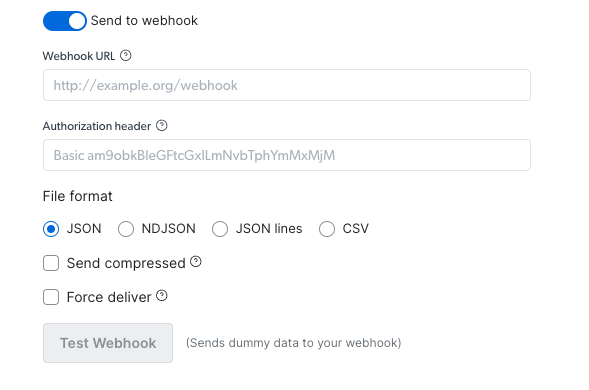
* [Webhook](https://docs.brightdata.com/cn/datasets/scrapers/scrapers-library/overview#via-webhook%3A)
### 通过 Webhook:
1. 设置您的 webhook URL 和授权头(如需要)
2. 选择您偏好的文件格式(JSON、NDJSON、JSON 行、CSV)
3. 选择是否压缩发送
4. 测试 webhook,以验证操作是否成功运行(使用示例数据)
5. 复制代码并运行
## 抓取方法
### 同步抓取 (`/scrape`)
[同步抓取](/cn/api-reference/scrapers/synchronous-requests) 允许您在单个请求中启动抓取并接收结果,非常适合实时快速数据检索。
```powershell cURL theme={null}
curl "https://api.brightdata.com/datasets/v3/scrape?dataset_id=gd_l1viktl72bvl7bjuj0&format=json" \
-H "Authorization: Bearer API_KEY" \
-H "Content-Type: application/json" \
-d '[{"url": "https://www.linkedin.com/in/elad-moshe-05a90413/"}]'
```
```javascript sync-scrape.js theme={null}
(async function synchronousScrape() {
try {
const response = await fetch(
'https://api.brightdata.com/datasets/v3/scrape?dataset_id=gd_l1viktl72bvl7bjuj0&format=json',
{
method: 'POST',
headers: {
'Authorization': 'Bearer API_KEY',
'Content-Type': 'application/json'
},
body: JSON.stringify([
{"url": "https://www.linkedin.com/in/elad-moshe-05a90413/"}
])
}
);
const data = await response.json();
console.log('Scrape completed:', data);
return data;
} catch (error) {
console.error('Error during scrape:', error);
}
})();
```
```python sync_scrape.py theme={null}
import requests
def synchronous_scrape():
url = "https://api.brightdata.com/datasets/v3/scrape"
params = {
"dataset_id": "gd_l1viktl72bvl7bjuj0",
"format": "json"
}
headers = {
"Authorization": "Bearer API_KEY",
"Content-Type": "application/json"
}
data = [
{"url": "https://www.linkedin.com/in/elad-moshe-05a90413/"}
]
response = requests.post(url, params=params, headers=headers, json=data)
response.raise_for_status()
print("Scrape completed:", response.json())
return response.json()
synchronous_scrape()
```
```json sample-response.json theme={null}
[
{
"id": "john-doe-123abc",
"name": "John Doe",
"city": "San Francisco",
"country_code": "US",
"about": "Lorem ipsum dolor sit amet, consectetur adipiscing elit. Proin vel magna at nunc commodo...",
"current_company": {
"link": "https://www.linkedin.com/company/acme-corp",
"name": "ACME Corporation",
"company_id": "acme-corp"
},
"url": "https://www.linkedin.com/in/john-doe-123abc/",
"people_also_viewed": [
{
"profile_link": "https://www.linkedin.com/in/jane-smith",
"name": "Jane Smith",
"location": "New York, USA"
},
{
"profile_link": "https://www.linkedin.com/in/robert-johnson",
"name": "Robert Johnson",
"location": "Boston, USA"
}
],
"educations_details": "Stanford University",
"education": [
{
"title": "Stanford University",
"url": "https://www.linkedin.com/school/stanford-university/",
"start_year": "2010",
"end_year": "2014"
}
],
"avatar": "https://example.com/avatar.jpg",
"courses": [
{
"subtitle": "-",
"title": "Machine Learning"
},
{
"subtitle": "-",
"title": "Data Structures"
},
{
"subtitle": "-",
"title": "Cloud Computing"
}
],
"followers": 1250,
"connections": 500,
"current_company_name": "ACME Corporation",
"projects": [
{
"title": "Open Source Project X",
"start_date": "January 2022",
"end_date": "Present",
"description": "Lorem ipsum dolor sit amet, consectetur adipiscing elit. Sed do eiusmod tempor incididunt ut labore et dolore magna aliqua."
}
],
"timestamp": "2023-06-15T14:27:07.001Z",
"input": {
"url": "https://www.linkedin.com/in/john-doe-123abc/"
}
}
]
```
#### 同步抓取的主要特性:
* 在同一请求中实时返回结果
* 适合单 URL 和快速抓取
* 简化的错误处理
* 1 分钟超时(超时自动切换到异步抓取)
### 异步抓取 (`/trigger`)
[异步抓取](/cn/api-reference/rest-api/scraper/asynchronous-requests) 会启动一个在后台运行的任务,使您能够以批量模式处理更大、更复杂的抓取任务。批量模式支持最多 100 个并发请求,每个批次可以处理最多 1GB 的输入文件大小,非常适合大规模数据收集项目。
发现任务(如查找相关产品、抓取多个页面)需要使用异步抓取 (`/trigger`),因为这些任务需要跨多个网页进行导航和数据提取。
```shell cURL theme={null}
curl "https://api.brightdata.com/datasets/v3/trigger?dataset_id=gd_l1viktl72bvl7bjuj0&format=json&uncompressed_webhook=true" \
-H "Authorization: Bearer API_KEY" \
-H "Content-Type: application/json" \
-d '[
{"url": "https://www.linkedin.com/in/elad-moshe-05a90413/"},
{"url": "https://www.linkedin.com/in/jonathan-myrvik-3baa01109"},
{"url": "https://www.linkedin.com/in/aviv-tal-75b81/"},
{"url": "https://www.linkedin.com/in/bulentakar/"},
{"url": "https://www.linkedin.com/in/nnikolaev/"}
]'
```
```javascript trigger-async-scrape.js theme={null}
(async function asynchronousScrape() {
try {
const response = await fetch(
'https://api.brightdata.com/datasets/v3/trigger?dataset_id=gd_l1viktl72bvl7bjuj0&format=json',
{
method: 'POST',
headers: {
'Authorization': 'Bearer API_KEY',
'Content-Type': 'application/json'
},
body: JSON.stringify([
{"url": "https://www.linkedin.com/in/elad-moshe-05a90413/"},
{"url": "https://www.linkedin.com/in/jonathan-myrvik-3baa01109"},
{"url": "https://www.linkedin.com/in/aviv-tal-75b81/"},
{"url": "https://www.linkedin.com/in/bulentakar/"},
{"url": "https://www.linkedin.com/in/nnikolaev/"}
])
}
);
const data = await response.json();
console.log('Snapshot ID:', data);
return data;
} catch (error) {
console.error('Error during scrape:', error);
}
})();
```
```python trigger-async-scrape.py theme={null}
import requests
def asynchronous_scrape():
url = "https://api.brightdata.com/datasets/v3/trigger"
params = {
"dataset_id": "gd_l1viktl72bvl7bjuj0",
"format": "json"
}
headers = {
"Authorization": "Bearer API_KEY",
"Content-Type": "application/json"
}
data = [
{"url": "https://www.linkedin.com/in/elad-moshe-05a90413/"},
{"url": "https://www.linkedin.com/in/jonathan-myrvik-3baa01109"},
{"url": "https://www.linkedin.com/in/aviv-tal-75b81/"},
{"url": "https://www.linkedin.com/in/bulentakar/"},
{"url": "https://www.linkedin.com/in/nnikolaev/"}
]
response = requests.post(url, params=params, headers=headers, json=data)
response.raise_for_status()
print("Snapshot ID:", response.json())
return response.json()
asynchronous_scrape()
```
```json sample-respone.json theme={null}
{
"snapshot_id": "s_maof15r7v28n4gc95"
}
```
#### 异步抓取的主要特性:
* 支持批量处理多个 URL(输入文件大小最多 1GB)
* 长时间运行任务没有超时限制
* 通过 [进度监控](https://docs.brightdata.com/cn/api-reference/scrapers/management-apis/monitor-progress#monitor-progress) 检查状态
* 适合大数据集
* 适用于需要抓取多个页面或执行复杂数据提取的“发现”任务
### 理解同步与异步抓取
在进行网页抓取时,选择合适的方法至关重要,应根据需求决定:
#### 同步抓取 (`/scrape`):
* **用途**:适用于快速的单 URL 任务,需要即时结果。
* **响应**:在同一请求中直接返回抓取的数据。
* **适用场景**:快速数据检查,单页抓取,无需长时间运行。
仅有一个简单链接?可以尝试同步请求以获取即时结果。
#### 异步抓取 (`/trigger`):
* **用途**:用于大型、复杂或长时间运行的抓取任务。
* **响应**:立即返回 snapshot\_id,而不是数据。此 snapshot\_id 用于跟踪任务进度或稍后下载数据。
* **适用场景**:批量处理、多个 URL 或高流量数据收集任务。适合管理多个页面或执行复杂数据提取。
需要大规模抓取?异步请求可能更适合您的复杂任务。
## 如何收集?
## [触发数据收集](https://docs.brightdata.com/cn/api-reference/rest-api/scraper/asynchronous-requests) ([演示](https://app.arcade.software/share/BPGoTdRmf89Ip1EQuIOW))
1. 从我们的 [API 产品](https://www.bright.cn/cp/scrapers/browse?category=all) 中选择目标网站
2. 选择适合您需求的爬虫
3. 根据需求选择同步或异步抓取:
* 对于即时结果和简单抓取,使用同步 (`/scrape`)
* 对于复杂抓取、多 URL 或大数据集,使用异步 (`/trigger`)
4. 通过 JSON 或 CSV 提供输入 URL
5. 启用错误报告以跟踪任何问题
6. 选择您偏好的交付方式
* [外部存储](#via-deliver-to-external-storage:)
* [Webhook](https://docs.brightdata.com/cn/datasets/scrapers/scrapers-library/overview#via-webhook%3A)
### 通过 Webhook:
1. 设置您的 webhook URL 和授权头(如需要)
2. 选择您偏好的文件格式(JSON、NDJSON、JSON 行、CSV)
3. 选择是否压缩发送
4. 测试 webhook,以验证操作是否成功运行(使用示例数据)
5. 复制代码并运行
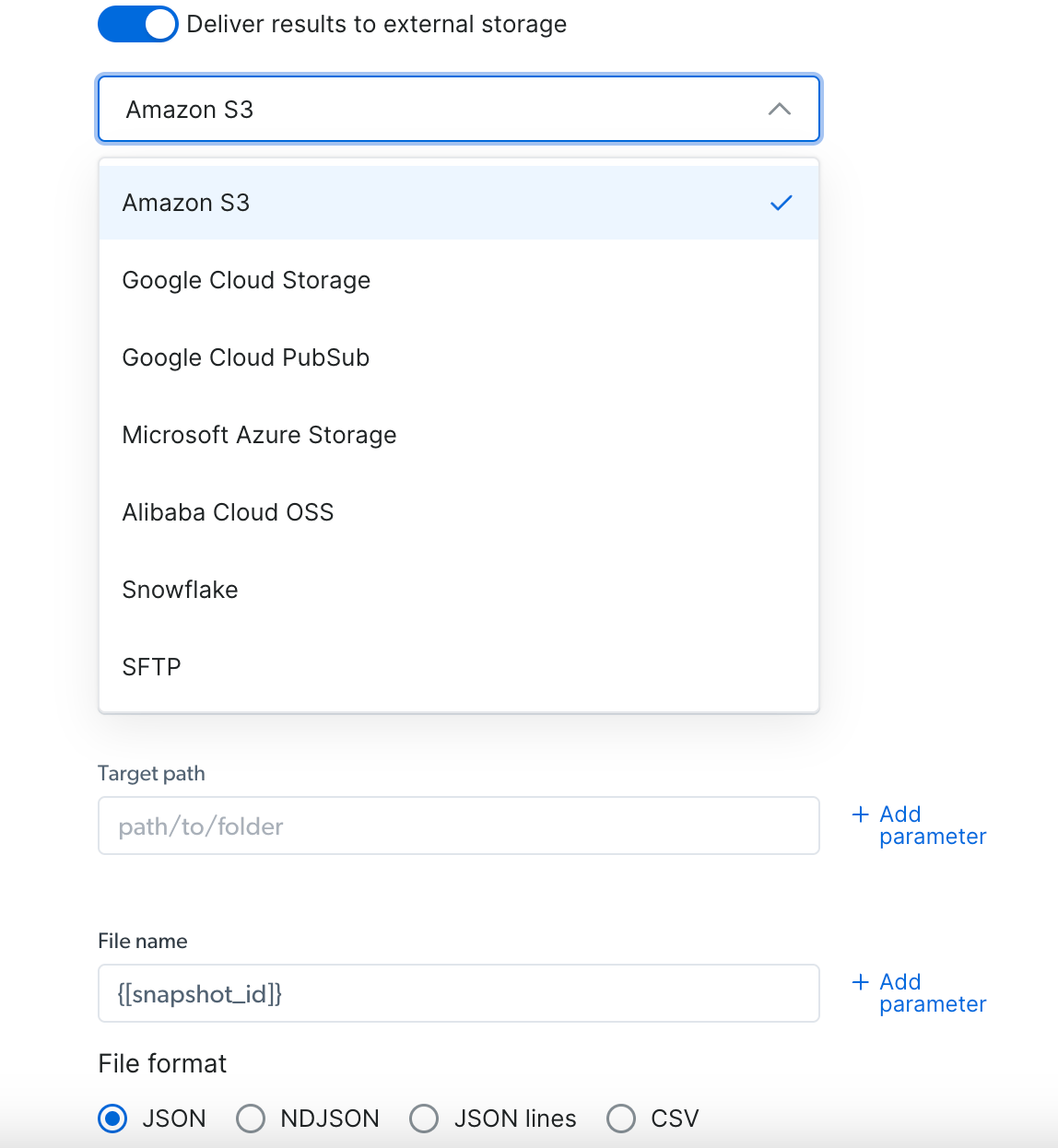
 ### 通过外部存储交付:
1. 选择您偏好的交付位置(S3、Google Cloud、Snowflake 或其他可用选项)
2. 根据所选存储填写所需凭据
3. 选择您偏好的文件格式(JSON、NDJSON、JSON 行、CSV)
4. 复制代码并运行
### 通过外部存储交付:
1. 选择您偏好的交付位置(S3、Google Cloud、Snowflake 或其他可用选项)
2. 根据所选存储填写所需凭据
3. 选择您偏好的文件格式(JSON、NDJSON、JSON 行、CSV)
4. 复制代码并运行
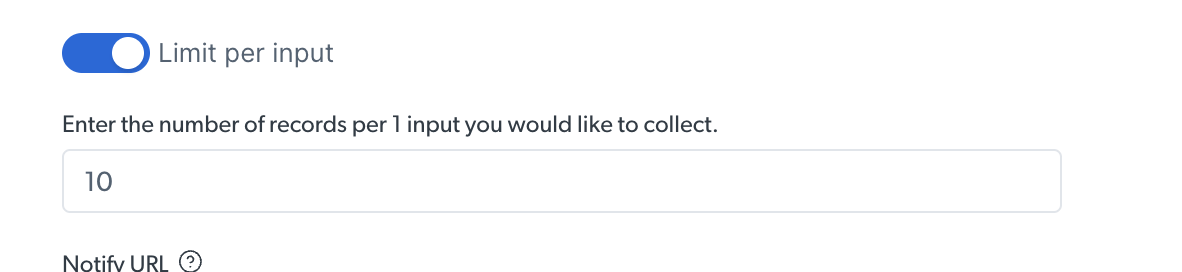
 ### 限制记录数
在运行发现 API 时,您可以为每个输入设置结果数量限制
### 限制记录数
在运行发现 API 时,您可以为每个输入设置结果数量限制
 下面的示例中,我们为每个输入设置了 10 个结果的限制
 ## [管理 API](https://docs.brightdata.com/cn/api-reference/scrapers/management-apis)
使用我们的不同 API 端点可以执行的其他操作
## [管理 API](https://docs.brightdata.com/cn/api-reference/scrapers/management-apis)
使用我们的不同 API 端点可以执行的其他操作
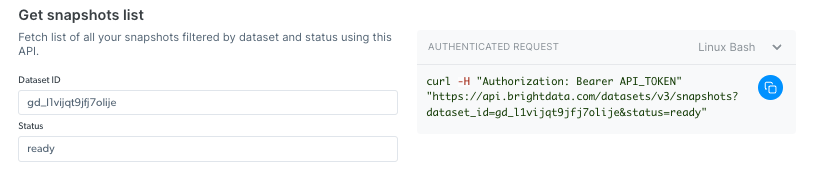
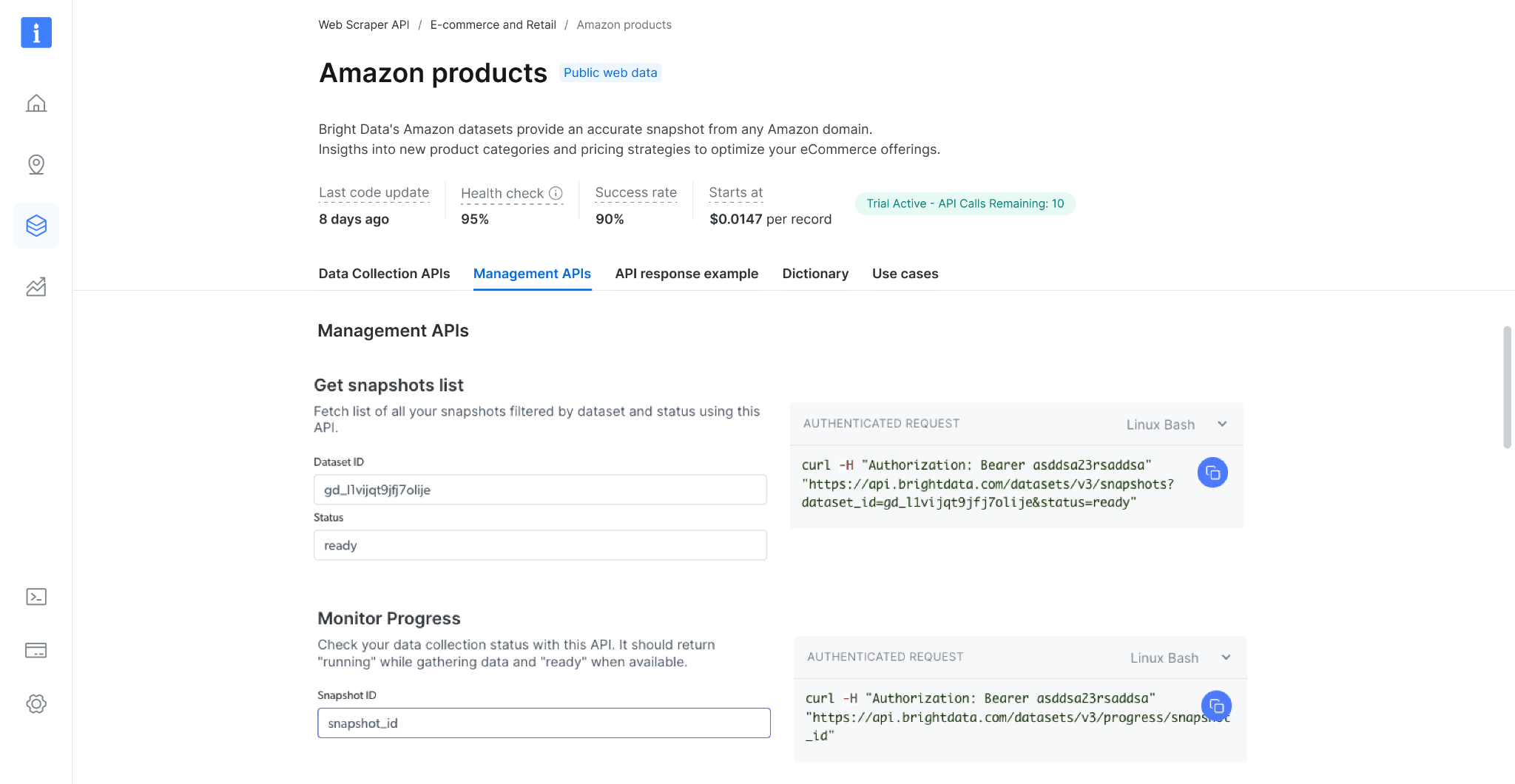 ### 获取快照列表
使用此 API 检查您的快照历史记录。它返回所有可用快照的列表,包括快照 ID、创建日期和状态。([端点 Playground 链接](https://docs.brightdata.com/cn/api-reference/scrapers/management-apis/get-snapshots))
### 获取快照列表
使用此 API 检查您的快照历史记录。它返回所有可用快照的列表,包括快照 ID、创建日期和状态。([端点 Playground 链接](https://docs.brightdata.com/cn/api-reference/scrapers/management-apis/get-snapshots))
 如果您收到 `snapshot_id` 感到困惑,这意味着已发起异步调用。对于更简单、即时的任务,请考虑使用同步 `/scrape` 端点。
### 监控进度
使用此 API 检查数据收集状态。收集数据时应返回 "collecting",处理数据时返回 "digesting",数据可用时返回 "ready"。([端点 Playground 链接](https://docs.brightdata.com/cn/api-reference/scrapers/management-apis/monitor-progress))
如果您收到 `snapshot_id` 感到困惑,这意味着已发起异步调用。对于更简单、即时的任务,请考虑使用同步 `/scrape` 端点。
### 监控进度
使用此 API 检查数据收集状态。收集数据时应返回 "collecting",处理数据时返回 "digesting",数据可用时返回 "ready"。([端点 Playground 链接](https://docs.brightdata.com/cn/api-reference/scrapers/management-apis/monitor-progress))
 ### 取消快照
取消正在运行的收集,使用此 API 在完成前停止数据收集。管理停止操作时应返回 "ok"。([端点 Playground 链接](https://docs.brightdata.com/cn/api-reference/scrapers/management-apis/cancel-snapshot))
### 监控交付
使用此 API 检查交付状态。完成交付时返回 "done",交付取消时返回 "canceled",交付失败时返回 "Failed"。([端点 Playground 链接](https://docs.brightdata.com/cn/api-reference/scrapers/management-apis/monitor-delivery))
## 系统限制
### 文件大小
| | |
| ---------- | ---------------------- |
| 输入 | 最大 1GB |
| Webhook 交付 | 最大 1GB |
| API 下载 | 最大 5GB(更大文件请使用 API 交付) |
| 交付 API | 不限 |
## 速率限制 & 并发请求
为了确保稳定性能和公平使用,Scrapers 根据请求类型(单个输入或批量输入)执行速率限制。超过限制将导致 429 错误响应。
### **什么是速率限制?**
Scrapers 支持的最大并发请求数量如下:
| 方法 | 速率限制 |
| :------------ | :------------ |
| 每个请求最多 20 个输入 | 最多 1500 个并发请求 |
| 每个请求超过 20 个输入 | 最多 100 个并发请求 |
如果您的应用程序超过这些限制,API 将返回以下错误:
> **429 客户端错误: 请求过多**
此错误表示您的请求速率已超过允许阈值。
### **如何避免触发速率限制**
为减少并发请求数量并保持在速率限制内:
* 尽可能使用 **批量输入方法**。
* 单个批量请求可包含最多 **1GB 的输入数据**(文件大小)。
* 将多个输入合并到一个批量请求中,可最大限度减少同时发送的请求总数。
使用 Discovery Scraper 时,系统会自动使用批量输入方法,速率限制为最多 100 个请求。
### **管理 API 速率限制的最佳实践**
* 监控请求量并相应调整并发数量。
* 使用批量请求将多个抓取任务合并到较少的 API 调用中。
* 如果需要优化请求,请联系支持团队获取帮助。
### 取消快照
取消正在运行的收集,使用此 API 在完成前停止数据收集。管理停止操作时应返回 "ok"。([端点 Playground 链接](https://docs.brightdata.com/cn/api-reference/scrapers/management-apis/cancel-snapshot))
### 监控交付
使用此 API 检查交付状态。完成交付时返回 "done",交付取消时返回 "canceled",交付失败时返回 "Failed"。([端点 Playground 链接](https://docs.brightdata.com/cn/api-reference/scrapers/management-apis/monitor-delivery))
## 系统限制
### 文件大小
| | |
| ---------- | ---------------------- |
| 输入 | 最大 1GB |
| Webhook 交付 | 最大 1GB |
| API 下载 | 最大 5GB(更大文件请使用 API 交付) |
| 交付 API | 不限 |
## 速率限制 & 并发请求
为了确保稳定性能和公平使用,Scrapers 根据请求类型(单个输入或批量输入)执行速率限制。超过限制将导致 429 错误响应。
### **什么是速率限制?**
Scrapers 支持的最大并发请求数量如下:
| 方法 | 速率限制 |
| :------------ | :------------ |
| 每个请求最多 20 个输入 | 最多 1500 个并发请求 |
| 每个请求超过 20 个输入 | 最多 100 个并发请求 |
如果您的应用程序超过这些限制,API 将返回以下错误:
> **429 客户端错误: 请求过多**
此错误表示您的请求速率已超过允许阈值。
### **如何避免触发速率限制**
为减少并发请求数量并保持在速率限制内:
* 尽可能使用 **批量输入方法**。
* 单个批量请求可包含最多 **1GB 的输入数据**(文件大小)。
* 将多个输入合并到一个批量请求中,可最大限度减少同时发送的请求总数。
使用 Discovery Scraper 时,系统会自动使用批量输入方法,速率限制为最多 100 个请求。
### **管理 API 速率限制的最佳实践**
* 监控请求量并相应调整并发数量。
* 使用批量请求将多个抓取任务合并到较少的 API 调用中。
* 如果需要优化请求,请联系支持团队获取帮助。