> ## Documentation Index
> Fetch the complete documentation index at: https://docs.brightdata.com/llms.txt
> Use this file to discover all available pages before exploring further.
# SERP API Google 查询参数
> 使用 Bright Data 的 SERP API 配置 Google 搜索、地图、趋势、评论、Lens、酒店和航班,包括本地化、分页、设备类型、解析等参数。
## 搜索
现在 Google 所有搜索结果均通过 `google.com` 提供,因此发送到其他 Google TLD(如 `google.co.uk`、`google.ca`)的 **SERP API** 请求会自动路由到 `google.com`。
**本地化** 不再由 TLD 决定,而应使用下面的 `gl`(国家)和 `hl`(语言)参数进行配置:
### `gl`
两字母国家代码,用于定义搜索所在国家
```sh gl theme={null}
curl --proxy brd.superproxy.io:33335 --proxy-user brd-customer--zone-: "https://www.google.com/maps/search/hotels+new+york/?gl=us"
```
***
### `hl`
两字母语言代码,用于定义页面语言
```sh hl theme={null}
curl --proxy brd.superproxy.io:33335 --proxy-user brd-customer--zone-: "https://www.google.com/maps/search/hotels+new+york/?hl=en"
```
### `tbm`
定义搜索类型。常规搜索无需使用 `tbm` 参数,其他类型有特定的 `tbm` 值。
> #### 示例:
>
> `tbm=isch` - 图片 \
> `tbm=shop` - 购物 \
> `tbm=nws` - 新闻 \
> `tbm=vid` - 视频
```sh theme={null}
curl --proxy brd.superproxy.io:33335 --proxy-user brd-customer--zone-: "https://www.google.com/search?q=pizza&tbm=shop"
```
### `ibp`
用于 Jobs 搜索类型。
> #### 示例:
>
> `ibp=htl;jobs` - 工作搜索
```sh theme={null}
curl --proxy brd.superproxy.io:33335 --proxy-user brd-customer--zone-: "https://www.google.com/search?q=pizza&ibp=htl%3Bjobs"
```
### `start`
定义结果偏移量,用于分页控制。
> #### 示例:
>
> `start=0`(默认)- 第一页结果 \
> `start=10` - 第二页结果 \
> `start=20` - 第三页结果,依此类推
```sh theme={null}
curl --proxy brd.superproxy.io:33335 --proxy-user brd-customer--zone-: "https://www.google.com/maps/search/hotels+new+york/?start=20"
```
***
### `num`
已弃用。返回结果数固定为 10。
自 2025 年 9 月 11 日起,Google 已逐步废弃 `num` 参数功能。
建议使用 [分页请求](/cn/scraping-automation/serp-api/query-parameters/google#pagination)。详情请参阅我们的 [FAQ](/cn/scraping-automation/serp-api/faqs#i-saw-that-google-recently-stopped-supporting-the-num-parameter-in-requests-are-you-working-on-an-alternative-solution)。
### `uule`
编码后的搜索位置,用于更改地理位置。可在 [此处](https://developers.google.com/adwords/api/docs/appendix/geotargeting) 下载所有可用 `uule` 值的 CSV。
CSV 中的 "Canonical Name" 列可直接作为 API 参数值
> #### 示例:
>
> `&uule=New+York,New+York,United+States`
```sh theme={null}
curl --proxy brd.superproxy.io:33335 --proxy-user brd-customer--zone-: "https://www.google.com/search?q=pizza&uule=w+CAIQICINVW5pdGVkK1N0YXRlcw"
```
### `brd_mobile`
定义使用的设备类型。 \
默认或 `brd_mobile=0` 提供随机桌面 User-Agent;`brd_mobile=1` 提供随机移动 User-Agent。
> **特定移动平台值:** \
> `brd_mobile=ios` - iPhone (别名 `brd_mobile=iphone`) \
> `brd_mobile=ipad` - iPad (别名 `brd_mobile=ios_tablet`) \
> `brd_mobile=android` - Android 手机 \
> `brd_mobile=android_tablet` - Android 平板
```sh theme={null}
curl --proxy brd.superproxy.io:33335 --proxy-user brd-customer--zone-: "https://www.google.com/search?q=pizza&brd_mobile=1"
```
### `brd_browser`
定义使用的浏览器类型。可与 `brd_mobile` 配合使用。默认提供随机浏览器。
> **特定浏览器值:** \
> `brd_browser=chrome` - Google Chrome \
> `brd_browser=safari` - Safari \
> `brd_browser=firefox` - Mozilla Firefox(不兼容 `brd_mobile=1`)
```sh theme={null}
curl --proxy brd.superproxy.io:33335 --proxy-user brd-customer--zone-: "https://www.google.com/search?q=pizza&brd_browser=chrome"
```
### `hotel_occupancy`
入住人数(最多 4 人)。
参见 Hotels 的 `brd_occupancy` 参数,可提供更多灵活性。
> #### 示例:
>
> `hotel_occupancy=1` - 1 位客人 \
> `hotel_occupancy=2`(默认)- 2 位客人
```sh theme={null}
curl --proxy brd.superproxy.io:33335 --proxy-user brd-customer--zone-: "https://www.google.com/search?q=pizza&hotel_occupancy=4"
```
***
### `hotel_dates`
入住和退房日期,逗号分隔。\
格式:`YYYY-MM-DD,YYYY-MM-DD`
> #### 示例:
>
> `hotel_dates=2022-05-01,2022-05-03` - 查询 2022 年 5 月 1 日至 3 日的可用房间
```sh theme={null}
curl --proxy brd.superproxy.io:33335 --proxy-user brd-customer--zone-: "https://www.google.com/search?q=pizza&hotel_dates=2023-05-01%2C2023-05-03"
```
请注意,平行请求仅适用于异步模式。
### `multi`
使用 POST 请求通过 API 发起平行请求。 \
可用于比较测试,即对相同参数的不同值发起多个请求。
> `multi=[{"query":{"q":"pizza","num":20}},{"query":{"q":"pizza","num":100}}]` - 相同关键词不同 num 参数 \
> `multi=[{"query":{"q":"pizza"}},{"query":{"q":"burger"}}]` - 不同关键词
发起请求:
```sh theme={null}
RESPONSE_ID=$(curl -i --silent --compressed "https://api.brightdata.com/serp/req?customer=&zone=" -H "Content-Type: application/json" -H "Authorization: Bearer API_KEY" -d $'{"country":"us","multi":[{"query":{"q":"pizza","num":20}},{"query":{"q":"pizza","num":100}}]}' | sed -En 's/^x-response-id: (.*)/\1/p' | tr -d '\r')
```
`x-response-id` 包含请求 ID,用于后续获取结果:
```sh theme={null}
curl -v --compressed "https://api.brightdata.com/serp/get_result?customer=&zone=&response_id=${RESPONSE_ID}" -H "Authorization: Bearer API_KEY"
```
### `brd_ai_overview`
设置 `brd_ai_overview=2` 可 **增加** 在 SERP 响应中获得 Google Generative AI Overview 的概率,通常出现在约 15-20%+ 的结果中。
* 使用该参数可能使 SERP API 响应延迟增加约 5-10 秒,因为需启动浏览器抓取完整 AI Overview 内容。
* 为触发 AI Overview,关键词需与 Google 认为适合生成的主题相关。
```sh theme={null}
curl --proxy brd.superproxy.io:33335 --proxy-user brd-customer--zone-: "https://www.google.com/search?q=what+makes+the+best+pizza&brd_ai_overview=2"
```
### 已解析的 AI Overview 示例
```js Request: Parsed AIO theme={null}
curl --proxy brd.superproxy.io:33335 --proxy-user brd-customer--zone-: "https://www.google.com/search?q=does+honey+ever+expire&brd_json=1&brd_ai_overview=2"
```
```json Response: AIO 存在 theme={null}
{
//Displaying AIO field snippet below from within the full parsed JSON
"ai_overview": {
"texts": [
{
"type": "paragraph",
"snippet": "To make the best pizza, focus on a good pizza dough, high heat baking, and fresh, high-quality toppings. Start with a slow fermentation for the dough, bake on a hot surface like a pizza stone or baking steel, and use fresh, quality toppings.",
"snippet_highlighted_words": "focus on a good pizza dough, high heat baking, and fresh, high-quality toppings",
"reference_indexes": [4, 5, 7, 9, 11, 12, 16]
},
{
"type": "paragraph",
"snippet": "Here's a more detailed breakdown:"
},
{
"type": "list",
"list": [
{
"type": "paragraph",
"snippet": "Slow Fermentation: . Opens in new tabAllow the dough to ferment for a longer period, ideally overnight in the refrigerator. This develops the flavor and makes the crust more chewy and crispy according to Serious Eats and Food & Wine.",
"reference_indexes": [2, 3, 6, 22]
},
{
"type": "paragraph",
"snippet": "Flour Selection: . Opens in new tabUse a combination of bread flour for strength and all-purpose flour for a nice rise.",
"reference_indexes": [14]
},
{
"type": "paragraph",
"snippet": "Dough Preparation: . Opens in new tabStretch the dough carefully to avoid overworking it, which can make it tough.",
"reference_indexes": [13]
}
],
"title": "1. Dough:"
},
{
"type": "list",
"list": [
{
"type": "paragraph",
"snippet": "High Heat: Preheat your oven to the highest temperature it can reach, ideally between 450°F and 500°F (232°C and 260°C).",
"reference_indexes": [9, 12]
},
{
"type": "paragraph",
"snippet": "Hot Baking Surface: Use a pizza stone or baking steel to distribute heat evenly and create a crispy crust.",
"reference_indexes": [9, 11]
},
{
"type": "paragraph",
"snippet": "Baking Time: Monitor the pizza closely and bake for 6-15 minutes, depending on the crust thickness and toppings.",
"reference_indexes": [9, 12, 17, 21, 23]
}
],
"title": "2. Baking:"
},
{
"type": "list",
"list": [
{
"type": "paragraph",
"snippet": "Layering: Start with the sauce, followed by a layer of cheese, then meats, and finally vegetables.",
"reference_indexes": [15]
},
{
"type": "paragraph",
"snippet": "Fresh Ingredients: Use fresh, high-quality ingredients for the sauce, cheese, and toppings.",
"reference_indexes": [0, 4, 18, 20]
},
{
"type": "paragraph",
"snippet": "Pre-Cooked Toppings: Pre-cook toppings like sausage and vegetables that may not cook completely in the short baking time.",
"reference_indexes": [10]
},
{
"type": "paragraph",
"snippet": "Sauce: Consider using a simple sauce made with fresh crushed tomatoes, garlic, basil, olive oil, and spices.",
"reference_indexes": [0, 4]
},
{
"type": "paragraph",
"snippet": "Cheese: Consider using a combination of low-moisture mozzarella for melting and fresh mozzarella for flavor.",
"reference_indexes": [4]
}
],
"title": "3. Toppings:"
},
{
"type": "list",
"list": [
{
"type": "paragraph",
"snippet": "Dough Storage: Store the dough in a bowl, oiled to prevent sticking, and covered tightly with plastic wrap.",
"reference_indexes": [2]
},
{
"type": "paragraph",
"snippet": "Crust: Consider using a baking stone, cast-iron griddle, or perforated pizza pan for a crispier crust.",
"reference_indexes": [8, 11]
},
{
"type": "paragraph",
"snippet": "Tossing Dough: For a more professional look, consider using the dough tossing technique.",
"reference_indexes": [1, 19, 24]
}
],
"title": "4. Optional but Recommended:"
},
{
"type": "paragraph",
"snippet": "This video demonstrates 5 pro chef secrets to the perfect pizza: 57sBigger Bolder Baking with Gemma StaffordYouTube · Jul 18, 2019",
"image": {
"image": "https://i.ytimg.com/vi/0hqLSZPaThU/mqdefault.jpg?sqp=-oaymwEGCPgEEOQC&rs=AMzJL3ldq2W1-OGaL6qxskwJT0GAYMe_4w",
"image_url": "https://i.ytimg.com/vi/0hqLSZPaThU/mqdefault.jpg?sqp=-oaymwEGCPgEEOQC&rs=AMzJL3ldq2W1-OGaL6qxskwJT0GAYMe_4w"
}
}
],
"references": [
{
"href": "https://www.youtube.com/watch?v=mRx_odAj-XQ&t=147",
"title": "The Best Pizza You'll Ever Make | Epicurious 101 - YouTube",
"subtitle": "Apr 18, 2023 — and they have a ton of flavor as well i'm using crushed peeled tomatoes. you can use whole peeled or diced tomatoes. w...",
"source": "YouTube · Epicurious",
"index": 0
}
// ... more references follow
]
}
}
```
```js Response: AIO 不存在 theme={null}
{
//Returned within response headers, displayed when adding `-i` OR `-v` to your request
`x-brd-warning: AI Overview did not appear on original SERP. 请确保使用 brd_ai_overview=2 参数,并且关键词与触发 AI Overview 的主题相关。`
}
```
## 地图
### `gl`
两字母国家代码,用于定义搜索所在国家
```sh gl theme={null}
curl --proxy brd.superproxy.io:33335 --proxy-user brd-customer--zone-: "https://www.google.com/maps/search/hotels+new+york/?gl=us"
```
***
### `hl`
两字母语言代码,用于定义页面语言
```sh hl theme={null}
curl --proxy brd.superproxy.io:33335 --proxy-user brd-customer--zone-: "https://www.google.com/maps/search/hotels+new+york/?hl=en"
```
### `geo params`
定义搜索位置的 GPS 坐标。构造方式为:`@ + 纬度 + , + 经度 + , + 缩放级别`。
> #### 示例:
>
> `@47.30227,1.67458,14.00z`
`zoom` 参数可选,但推荐使用以获得更高精度。范围从 3z(完全缩小)到 21z(完全放大)。
```sh theme={null}
curl --proxy brd.superproxy.io:33335 --proxy-user brd-customer--zone-: "https://www.google.com/maps/search/service%20de%20transport/@47.30227,1.67458,14.00z"
```
### `start`
定义结果偏移量,用于分页控制。
> #### 示例:
>
> `start=0`(默认)- 第一页结果 \
> `start=10` - 第二页结果 \
> `start=20` - 第三页结果,依此类推
```sh theme={null}
curl --proxy brd.superproxy.io:33335 --proxy-user brd-customer--zone-: "https://www.google.com/maps/search/hotels+new+york/?start=20"
```
***
### `num`
定义返回结果的数量。
> #### 示例:
>
> `num=20`(默认)- 返回 20 条结果 \
> `num=50` - 返回 50 条结果,依此类推
```sh theme={null}
curl --proxy brd.superproxy.io:33335 --proxy-user brd-customer--zone-: "https://www.google.com/maps/search/hotels+new+york/?num=40"
```
### `fid`
根据 `fid` 获取 Google Maps 地点信息。
使用 GET 请求访问 `http://www.google.com/maps/place/data=!3m1!4b1!4m2!3m1!1s`,在末尾添加 `fid` 值。
```sh theme={null}
curl --proxy brd.superproxy.io:33335 --proxy-user brd-customer--zone-: "http://www.google.com/maps/place/data=!3m1!4b1!4m2!3m1!1s0x89e37742d0f37093:0xbc048b8a744ff75a"
```
### `brd_accomodation_type`
住宿类型:酒店或度假租赁。
> #### 示例:
>
> `brd_accomodation_type=hotels`(默认)- 搜索酒店 \
> `brd_accomodation_type=vacation_rentals` - 搜索度假租赁
```sh theme={null}
curl --proxy brd.superproxy.io:33335 --proxy-user brd-customer--zone-: "https://www.google.com/maps/search/hotels+new+york/?brd_accomodation_type=vacation_rentals"
```
### `brd_json`
Bright Data 自定义参数,可返回解析后的 JSON 而非原始 HTML。
> #### 示例:
>
> `brd_json=1` - 返回 JSON 格式结果
```sh theme={null}
curl --proxy brd.superproxy.io:33335 --proxy-user brd-customer--zone-: "https://www.google.com/maps/search/hotels+new+york/?brd_json=1"
```
## 趋势(Trends)
**必需参数**\
`brd_json=1`:返回解析后的 JSON 结果(Trends 仅支持解析结果)。\
`brd_trends=timeseries,geo_map`:获取成功率最高的小组件数据。
我们仅支持 Google Trends 中的“Trending now(实时热点)”标签。其他标签(例如 “Explore(探索)”、“Home(主页)”)不受支持,因为它们需要登录才能完整访问功能。
若要在 Google Trends 结果中展示特定小组件数据,请使用以下小组件参数之一:
#### `timeseries`
#### `geo_map`
**多个小组件:** 使用英文逗号分隔,如:`timeseries,geo_map`
```sh theme={null}
curl --proxy brd.superproxy.io:33335 --proxy-user brd-customer--zone-: -k "https://trends.google.com/trends/explore?q=pizza&geo=us&brd_trends=timeseries,geo_map&brd_json=1"
```
### `geo`
感兴趣的地区,两字母国家代码。
```sh theme={null}
curl --proxy brd.superproxy.io:33335 --proxy-user brd-customer--zone-: -k "https://trends.google.com/trends/explore?q=pizza&geo=us&brd_trends=timeseries,geo_map&brd_json=1"
```
### `hl`
首选语言,两字母语言代码。
```sh theme={null}
curl --proxy brd.superproxy.io:33335 --proxy-user brd-customer--zone-: -k "https://trends.google.com/trends/explore?q=pizza&hl=de&brd_trends=timeseries,geo_map&brd_json=1"
```
### `date`
要搜索的时间范围。
> **可用值包括:**\
> `now 1-H` - 过去 1 小时\
> `now 4-H` - 过去 4 小时\
> `now 1-d` - 过去 1 天\
> `now 7-d` - 过去 7 天\
> `today 1-m` - 过去 30 天\
> `today 3-m` - 过去 90 天\
> `today 12-m`(默认)- 过去 12 个月\
> `today 5-y` - 过去 5 年\
> `2020-07-01 2020-12-31` - 自定义日期范围
```sh theme={null}
curl --proxy brd.superproxy.io:33335 --proxy-user brd-customer--zone-: -k "https://trends.google.com/trends/explore?q=pizza&date=now+1-d&brd_trends=timeseries,geo_map&brd_json=1"
```
### `cat`
搜索的类别。默认在所有类别中搜索。\
可在此查看所有类别列表:\
[https://trends.google.com/trends/api/explore/pickers/category?lang=en-US\&tz=240](https://trends.google.com/trends/api/explore/pickers/category?lang=en-US\&tz=240)
```sh theme={null}
curl --proxy brd.superproxy.io:33335 --proxy-user brd-customer--zone-: -k "https://trends.google.com/trends/explore?q=pizza&cat=3&brd_trends=timeseries,geo_map&brd_json=1"
```
### `gprop`
要筛选的 Google 属性。默认 Web 搜索。\
可选值包括:`images`、`news`、`froogle`(Google Shopping)、`youtube`
```sh theme={null}
curl --proxy brd.superproxy.io:33335 --proxy-user brd-customer--zone-: -k "https://trends.google.com/trends/explore?q=pizza&gprop=images&brd_trends=timeseries,geo_map&brd_json=1"
```
## Reviews
### `fid`
Feature id 是用于获取评论的数据字段。`fid` 参数可以在 Google 搜索响应中的 `knowledge.fid` 字段里找到。
> #### For example:
>
> [https://www.google.com/search?q=hilton%20new%20york%20midtown](https://www.google.com/search?q=hilton%20new%20york%20midtown)
```sh theme={null}
curl --proxy brd.superproxy.io:33335 --proxy-user brd-customer--zone-: "https://www.google.com/reviews?fid=0x808fba02425dad8f%3A0x6c296c66619367e0"
```
### `hl`
首选语言,两字母语言代码。
```sh theme={null}
curl --proxy brd.superproxy.io:33335 --proxy-user brd-customer--zone-: "https://www.google.com/reviews?fid=0x808fba02425dad8f%3A0x6c296c66619367e0&hl=de"
```
### `sort`
评论排序方式。
> **Possible values are:** \
> `sort=qualityScore`(默认)- 最相关优先 \
> `sort=newestFirst` - 最新优先 \
> `sort=ratingHigh` - 评分最高优先 \
> `sort=ratingLow` - 评分最低优先
```sh theme={null}
curl --proxy brd.superproxy.io:33335 --proxy-user brd-customer--zone-: "https://www.google.com/reviews?fid=0x808fba02425dad8f%3A0x6c296c66619367e0&sort=newestFirst"
```
### `filter`
关键词过滤器。只返回包含指定关键词的评论。
> #### For Example:
>
> `filter=awesome` - 搜索包含 'awesome' 的评论
```sh theme={null}
curl --proxy brd.superproxy.io:33335 --proxy-user brd-customer--zone-: "https://www.google.com/reviews?fid=0x808fba02425dad8f%3A0x6c296c66619367e0&filter=awesome"
```
### `start`
定义结果偏移量——从哪个结果开始返回。用于分页管理。
> #### Examples:
>
> `start=0`(默认)- 第一页结果 \
> `start=10` - 第二页结果 \
> `start=20` - 第三页结果,依此类推。
```sh theme={null}
curl --proxy brd.superproxy.io:33335 --proxy-user brd-customer--zone-: "https://www.google.com/reviews?fid=0x808fba02425dad8f%3A0x6c296c66619367e0&start=10"
```
### `num`
定义返回结果的数量。
> #### Examples:
>
> `num=10`(默认)- 返回 10 条结果 \
> `num=20` - 返回 20 条结果(最大值)。
```sh theme={null}
curl --proxy brd.superproxy.io:33335 --proxy-user brd-customer--zone-: "https://www.google.com/reviews?fid=0x808fba02425dad8f%3A0x6c296c66619367e0&num=10"
```
## Lens
### `url`
你要搜索的图片 URL。
```sh theme={null}
curl --proxy brd.superproxy.io:33335 --proxy-user brd-customer--zone-: "https://lens.google.com/uploadbyurl?url=https%3A%2F%2Fwww.youtube.com%2Fimg%2Fdesktop%2Fyt_1200.png"
```
### `hl`
首选语言,两字母语言代码。
```sh theme={null}
curl --proxy brd.superproxy.io:33335 --proxy-user brd-customer--zone-: "https://lens.google.com/uploadbyurl?url=https%3A%2F%2Fwww.youtube.com%2Fimg%2Fdesktop%2Fyt_1200.png&hl=de"
```
### `upload`
上传当前目录下名为 `cat.jpg` 的图片(不支持 async zones)。
```sh theme={null}
curl -F "encoded_image=@cat.jpg" --proxy brd.superproxy.io:33335 --proxy-user brd-customer--zone-: "https://lens.google.com/v3/upload"
```
### `brd_lens`
请求中的 `brd_lens` 参数通过指定 tab 值(例如 `products`、`homework`、`visual_matches`、`exact_matches`)来获取特定 Google Lens **标签结果**。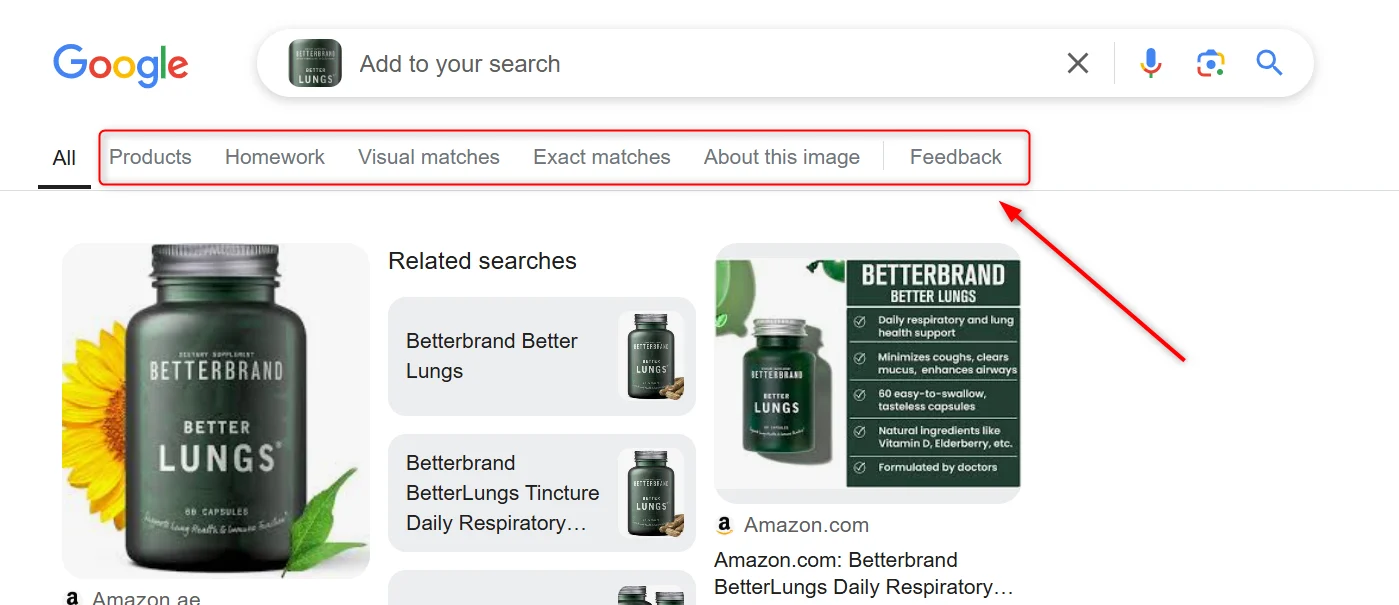 ```sh theme={null}
curl --proxy brd.superproxy.io:33335 --proxy-user brd-customer--zone-: "https://lens.google.com/uploadbyurl?url=https%3A//cdn.shopify.com/s/files/1/0243/303[…]6-05d7-4eb6-bf06-8e0c143f4f00.png%3Fv%3D1693159120&brd_json=1&brd_lens=visual_matches"
```
## Hotels(酒店)
### `gl`
用于定义搜索国家的两个字母国家代码。
```sh theme={null}
curl --proxy brd.superproxy.io:33335 --proxy-user brd-customer--zone-: "https://www.google.com/travel/hotels/four%20seasons%20hotel%20new%20york%20downtown/entity/CgoIovWq7d7c9psTEAE/prices?g2lb=2502548,2503771,2503781,4258168,4270442,4284970,4291517,4306835,4401769,4429192,4518326,4597339,4640247,4647135,4649665,4680677,4718357,4721475,4722435,4722900,4723331,4726607,4733969,4734960,4736008,4738608,4741664,4743499&ssta=1&q=four+seasons+hotel+new+york+downtown&grf=EmQKLAgOEigSJnIkKiIKBwjmDxADGB4SBwjmDxAEGAcYAjAeQMoCSgcI5g8QAxgcCjQIDBIwEi6yASsSKQonCiUweDg5YzI1YTE4ZTM1NTNmOGI6MHgxMzM3ZGFlNWVkYWFiYWEy&rp=EKL1qu3e3PabExCi9art3tz2mxM4AkAASAHAAQI&ictx=1&gl=us"
```
### `hl`
用于定义页面语言的两个字母语言代码。
```sh theme={null}
curl --proxy brd.superproxy.io:33335 --proxy-user brd-customer--zone-: "https://www.google.com/travel/hotels/four%20seasons%20hotel%20new%20york%20downtown/entity/CgoIovWq7d7c9psTEAE/prices?g2lb=2502548,2503771,2503781,4258168,4270442,4284970,4291517,4306835,4401769,4429192,4518326,4597339,4640247,4647135,4649665,4680677,4718357,4721475,4722435,4722900,4723331,4726607,4733969,4734960,4736008,4738608,4741664,4743499&ssta=1&q=four+seasons+hotel+new+york+downtown&grf=EmQKLAgOEigSJnIkKiIKBwjmDxADGB4SBwjmDxAEGAcYAjAeQMoCSgcI5g8QAxgcCjQIDBIwEi6yASsSKQonCiUweDg5YzI1YTE4ZTM1NTNmOGI6MHgxMzM3ZGFlNWVkYWFiYWEy&rp=EKL1qu3e3PabExCi9art3tz2mxM4AkAASAHAAQI&ictx=1&hl=en"
```
### `brd_dates`
入住与退房日期,以逗号分隔。
> #### 格式:
>
> `YYYY-MM-DD,YYYY-MM-DD`
>
> #### 示例:
>
> `2022-01-20,2022-02-05`
```sh theme={null}
curl --proxy brd.superproxy.io:33335 --proxy-user brd-customer--zone-: "https://www.google.com/travel/hotels/four%20seasons%20hotel%20new%20york%20downtown/entity/...&brd_dates=2022-04-03%2C2022-04-10"
```
### `brd_occupancy`
预订房间的入住人数(最多 6 人)。
> #### 示例:
>
> `brd_occupancy=1` - 查询 1 人房间 \
> `brd_occupancy=2`(默认)- 2 人 \
> `brd_occupancy=3` - 3 人,依此类推。
也支持逗号分隔的整数列表,其中:
* 第一个值为成年人数
* 后续值为儿童年龄
> #### 格式:
>
> `brd_occupancy=,,,...,`
>
> #### 示例:
>
> `brd_occupancy=1,5,7,12` - 1 名成人 + 3 名儿童(5、7、12 岁) \
> `brd_occupancy=2,1,3` - 2 名成人 + 2 名儿童(1、3 岁)
```sh theme={null}
curl --proxy brd.superproxy.io:33335 --proxy-user brd-customer--zone-: "https://www.google.com/travel/hotels/four%20seasons%20hotel%20new%20york%20downtown/entity/CgoIovWq7d7c9psTEAE/prices?g2lb=2502548,2503771,2503781,4258168,4270442,4284970,4291517,4306835,4401769,4429192,4518326,4597339,4640247,4647135,4649665,4680677,4718357,4721475,4722435,4722900,4723331,4726607,4733969,4734960,4736008,4738608,4741664,4743499&ssta=1&q=four+seasons+hotel+new+york+downtown&grf=EmQKLAgOEigSJnIkKiIKBwjmDxADGB4SBwjmDxAEGAcYAjAeQMoCSgcI5g8QAxgcCjQIDBIwEi6yASsSKQonCiUweDg5YzI1YTE4ZTM1NTNmOGI6MHgxMzM3ZGFlNWVkYWFiYWEy&rp=EKL1qu3e3PabExCi9art3tz2mxM4AkAASAHAAQI&ictx=1&brd_occupancy=4"
```
### `brd_free_cancellation`
仅显示可免费取消的房型。
> #### 示例:
>
> `brd_free_cancellation=true` - 仅显示可免费取消 \
> `brd_free_cancellation=false`(默认)- 显示所有选项
```sh theme={null}
curl --proxy brd.superproxy.io:33335 --proxy-user brd-customer--zone-: "https://www.google.com/travel/hotels/four%20seasons%20hotel%20new%20york%20downtown/entity/CgoIovWq7d7c9psTEAE/prices?g2lb=2502548,2503771,2503781,4258168,4270442,4284970,4291517,4306835,4401769,4429192,4518326,4597339,4640247,4647135,4649665,4680677,4718357,4721475,4722435,4722900,4723331,4726607,4733969,4734960,4736008,4738608,4741664,4743499&ssta=1&q=four+seasons+hotel+new+york+downtown&grf=EmQKLAgOEigSJnIkKiIKBwjmDxADGB4SBwjmDxAEGAcYAjAeQMoCSgcI5g8QAxgcCjQIDBIwEi6yASsSKQonCiUweDg5YzI1YTE4ZTM1NTNmOGI6MHgxMzM3ZGFlNWVkYWFiYWEy&rp=EKL1qu3e3PabExCi9art3tz2mxM4AkAASAHAAQI&ictx=1&brd_free_cancellation=true"
```
### `brd_accomodation_type`
住宿类型:酒店或度假租赁。
> #### 示例:
>
> `brd_accomodation_type=hotels`(默认)- 搜索酒店 \
> `brd_accomodation_type=vacation_rentals` - 搜索度假租赁
```sh theme={null}
curl --proxy brd.superproxy.io:33335 --proxy-user brd-customer--zone-: "https://www.google.com/travel/hotels/four%20seasons%20hotel%20new%20york%20downtown/entity/CgoIovWq7d7c9psTEAE/prices?g2lb=2502548,2503771,2503781,4258168,4270442,4284970,4291517,4306835,4401769,4429192,4518326,4597339,4640247,4647135,4649665,4680677,4718357,4721475,4722435,4722900,4723331,4726607,4733969,4734960,4736008,4738608,4741664,4743499&ssta=1&q=four+seasons+hotel+new+york+downtown&grf=EmQKLAgOEigSJnIkKiIKBwjmDxADGB4SBwjmDxAEGAcYAjAeQMoCSgcI5g8QAxgcCjQIDBIwEi6yASsSKQonCiUweDg5YzI1YTE4ZTM1NTNmOGI6MHgxMzM3ZGFlNWVkYWFiYWEy&rp=EKL1qu3e3PabExCi9art3tz2mxM4AkAASAHAAQI&ictx=1&brd_accomodation_type=vacation_rentals"
```
### `brd_currency`
展示价格的货币(3 字母货币代码)。
> #### 示例:
>
> `brd_currency=USD` - 美元 \
> `brd_currency=EUR` - 欧元 \
> `brd_currency=INR` - 印度卢比
```sh theme={null}
curl --proxy brd.superproxy.io:33335 --proxy-user brd-customer--zone-: "https://www.google.com/travel/hotels/four%20seasons%20hotel%20new%20york%20downtown/entity/CgoIovWq7d7c9psTEAE/prices?g2lb=2502548,2503771,2503781,4258168,4270442,4284970,4291517,4306835,4401769,4429192,4518326,4597339,4640247,4647135,4649665,4680677,4718357,4721475,4722435,4722900,4723331,4726607,4733969,4734960,4736008,4738608,4741664,4743499&ssta=1&q=four+seasons+hotel+new+york+downtown&grf=EmQKLAgOEigSJnIkKiIKBwjmDxADGB4SBwjmDxAEGAcYAjAeQMoCSgcI5g8QAxgcCjQIDBIwEi6yASsSKQonCiUweDg5YzI1YTE4ZTM1NTNmOGI6MHgxMzM3ZGFlNWVkYWFiYWEy&rp=EKL1qu3e3PabExCi9art3tz2mxM4AkAASAHAAQI&ictx=1&brd_currency=USD"
```
### `brd_mobile`
定义使用何种设备类型的 user-agent。
默认或 `brd_mobile=0` 会使用随机桌面 UA,而 `brd_mobile=1` 会使用随机移动 UA。
> **指定移动平台可使用以下值:** \
> `brd_mobile=ios` - iPhone UA(别名 `brd_mobile=iphone`) \
> `brd_mobile=ipad` - iPad UA(别名 `brd_mobile=ios_tablet`) \
> `brd_mobile=android` - 安卓手机 \
> `brd_mobile=android_tablet` - 安卓平板
```sh theme={null}
curl --proxy brd.superproxy.io:33335 --proxy-user brd-customer--zone-: "https://www.google.com/travel/hotels/four%20seasons%20hotel%20new%20york%20downtown/entity/CgoIovWq7d7c9psTEAE/prices?g2lb=2502548,2503771,2503781,4258168,4270442,4284970,4291517,4306835,4401769,4429192,4518326,4597339,4640247,4647135,4649665,4680677,4718357,4721475,4722435,4722900,4723331,4726607,4733969,4734960,4736008,4738608,4741664,4743499&ssta=1&q=four+seasons+hotel+new+york+downtown&grf=EmQKLAgOEigSJnIkKiIKBwjmDxADGB4SBwjmDxAEGAcYAjAeQMoCSgcI5g8QAxgcCjQIDBIwEi6yASsSKQonCiUweDg5YzI1YTE4ZTM1NTNmOGI6MHgxMzM3ZGFlNWVkYWFiYWEy&rp=EKL1qu3e3PabExCi9art3tz2mxM4AkAASAHAAQI&ictx=1&brd_mobile=1"
```
### `brd_json`
Bright Data 自定义参数,用于返回解析后的 JSON 而不是原始 HTML。
> #### 示例:
>
> `brd_json=1` - 返回 JSON 结果
```sh theme={null}
curl --proxy brd.superproxy.io:33335 --proxy-user brd-customer--zone-: "https://www.google.com/travel/hotels/four%20seasons%20hotel%20new%20york%20downtown/entity/CgoIovWq7d7c9psTEAE/prices?g2lb=2502548,2503771,2503781,4258168,4270442,4284970,4291517,4306835,4401769,4429192,4518326,4597339,4640247,4647135,4649665,4680677,4718357,4721475,4722435,4722900,4723331,4726607,4733969,4734960,4736008,4738608,4741664,4743499&ssta=1&q=four+seasons+hotel+new+york+downtown&grf=EmQKLAgOEigSJnIkKiIKBwjmDxADGB4SBwjmDxAEGAcYAjAeQMoCSgcI5g8QAxgcCjQIDBIwEi6yASsSKQonCiUweDg5YzI1YTE4ZTM1NTNmOGI6MHgxMzM3ZGFlNWVkYWFiYWEy&rp=EKL1qu3e3PabExCi9art3tz2mxM4AkAASAHAAQI&ictx=1&brd_json=1"
```
## Flights(航班)
### `gl`
用于定义搜索国家的两个字母国家代码。
```sh theme={null}
curl --proxy brd.superproxy.io:33335 --proxy-user brd-customer--zone-: "https://www.google.com/travel/flights/search?tfs=CBwQAhoiEgoyMDI0LTA1LTI5agsIAhIHL20vMGszcHIHCAESA1hSSkABSAFwAYIBCwj___________8BmAEC&gl=us"
```
### `hl`
用于定义页面语言的两个字母语言代码。
```sh theme={null}
curl --proxy brd.superproxy.io:33335 --proxy-user brd-customer--zone-: "https://www.google.com/travel/flights/search?tfs=CBwQAhoiEgoyMDI0LTA1LTI5agsIAhIHL20vMGszcHIHCAESA1hSSkABSAFwAYIBCwj___________8BmAEC&hl=en"
```
### `tfs`
表示航班搜索参数的字符串。
```sh theme={null}
curl --proxy brd.superproxy.io:33335 --proxy-user brd-customer--zone-: "https://www.google.com/travel/flights/search?tfs=CBwQAhoiEgoyMDI0LTA1LTI5agsIAhIHL20vMGszcHIHCAESA1hSSkABSAFwAYIBCwj___________8BmAEC"
```
### `curr`
用于定义返回价格的货币。
```sh theme={null}
curl --proxy brd.superproxy.io:33335 --proxy-user brd-customer--zone-: "https://www.google.com/travel/flights/search?tfs=CBwQAhoiEgoyMDI0LTA1LTI5agsIAhIHL20vMGszcHIHCAESA1hSSkABSAFwAYIBCwj___________8BmAEC&curr=USD"
```
```sh theme={null}
curl --proxy brd.superproxy.io:33335 --proxy-user brd-customer--zone-: "https://lens.google.com/uploadbyurl?url=https%3A//cdn.shopify.com/s/files/1/0243/303[…]6-05d7-4eb6-bf06-8e0c143f4f00.png%3Fv%3D1693159120&brd_json=1&brd_lens=visual_matches"
```
## Hotels(酒店)
### `gl`
用于定义搜索国家的两个字母国家代码。
```sh theme={null}
curl --proxy brd.superproxy.io:33335 --proxy-user brd-customer--zone-: "https://www.google.com/travel/hotels/four%20seasons%20hotel%20new%20york%20downtown/entity/CgoIovWq7d7c9psTEAE/prices?g2lb=2502548,2503771,2503781,4258168,4270442,4284970,4291517,4306835,4401769,4429192,4518326,4597339,4640247,4647135,4649665,4680677,4718357,4721475,4722435,4722900,4723331,4726607,4733969,4734960,4736008,4738608,4741664,4743499&ssta=1&q=four+seasons+hotel+new+york+downtown&grf=EmQKLAgOEigSJnIkKiIKBwjmDxADGB4SBwjmDxAEGAcYAjAeQMoCSgcI5g8QAxgcCjQIDBIwEi6yASsSKQonCiUweDg5YzI1YTE4ZTM1NTNmOGI6MHgxMzM3ZGFlNWVkYWFiYWEy&rp=EKL1qu3e3PabExCi9art3tz2mxM4AkAASAHAAQI&ictx=1&gl=us"
```
### `hl`
用于定义页面语言的两个字母语言代码。
```sh theme={null}
curl --proxy brd.superproxy.io:33335 --proxy-user brd-customer--zone-: "https://www.google.com/travel/hotels/four%20seasons%20hotel%20new%20york%20downtown/entity/CgoIovWq7d7c9psTEAE/prices?g2lb=2502548,2503771,2503781,4258168,4270442,4284970,4291517,4306835,4401769,4429192,4518326,4597339,4640247,4647135,4649665,4680677,4718357,4721475,4722435,4722900,4723331,4726607,4733969,4734960,4736008,4738608,4741664,4743499&ssta=1&q=four+seasons+hotel+new+york+downtown&grf=EmQKLAgOEigSJnIkKiIKBwjmDxADGB4SBwjmDxAEGAcYAjAeQMoCSgcI5g8QAxgcCjQIDBIwEi6yASsSKQonCiUweDg5YzI1YTE4ZTM1NTNmOGI6MHgxMzM3ZGFlNWVkYWFiYWEy&rp=EKL1qu3e3PabExCi9art3tz2mxM4AkAASAHAAQI&ictx=1&hl=en"
```
### `brd_dates`
入住与退房日期,以逗号分隔。
> #### 格式:
>
> `YYYY-MM-DD,YYYY-MM-DD`
>
> #### 示例:
>
> `2022-01-20,2022-02-05`
```sh theme={null}
curl --proxy brd.superproxy.io:33335 --proxy-user brd-customer--zone-: "https://www.google.com/travel/hotels/four%20seasons%20hotel%20new%20york%20downtown/entity/...&brd_dates=2022-04-03%2C2022-04-10"
```
### `brd_occupancy`
预订房间的入住人数(最多 6 人)。
> #### 示例:
>
> `brd_occupancy=1` - 查询 1 人房间 \
> `brd_occupancy=2`(默认)- 2 人 \
> `brd_occupancy=3` - 3 人,依此类推。
也支持逗号分隔的整数列表,其中:
* 第一个值为成年人数
* 后续值为儿童年龄
> #### 格式:
>
> `brd_occupancy=,,,...,`
>
> #### 示例:
>
> `brd_occupancy=1,5,7,12` - 1 名成人 + 3 名儿童(5、7、12 岁) \
> `brd_occupancy=2,1,3` - 2 名成人 + 2 名儿童(1、3 岁)
```sh theme={null}
curl --proxy brd.superproxy.io:33335 --proxy-user brd-customer--zone-: "https://www.google.com/travel/hotels/four%20seasons%20hotel%20new%20york%20downtown/entity/CgoIovWq7d7c9psTEAE/prices?g2lb=2502548,2503771,2503781,4258168,4270442,4284970,4291517,4306835,4401769,4429192,4518326,4597339,4640247,4647135,4649665,4680677,4718357,4721475,4722435,4722900,4723331,4726607,4733969,4734960,4736008,4738608,4741664,4743499&ssta=1&q=four+seasons+hotel+new+york+downtown&grf=EmQKLAgOEigSJnIkKiIKBwjmDxADGB4SBwjmDxAEGAcYAjAeQMoCSgcI5g8QAxgcCjQIDBIwEi6yASsSKQonCiUweDg5YzI1YTE4ZTM1NTNmOGI6MHgxMzM3ZGFlNWVkYWFiYWEy&rp=EKL1qu3e3PabExCi9art3tz2mxM4AkAASAHAAQI&ictx=1&brd_occupancy=4"
```
### `brd_free_cancellation`
仅显示可免费取消的房型。
> #### 示例:
>
> `brd_free_cancellation=true` - 仅显示可免费取消 \
> `brd_free_cancellation=false`(默认)- 显示所有选项
```sh theme={null}
curl --proxy brd.superproxy.io:33335 --proxy-user brd-customer--zone-: "https://www.google.com/travel/hotels/four%20seasons%20hotel%20new%20york%20downtown/entity/CgoIovWq7d7c9psTEAE/prices?g2lb=2502548,2503771,2503781,4258168,4270442,4284970,4291517,4306835,4401769,4429192,4518326,4597339,4640247,4647135,4649665,4680677,4718357,4721475,4722435,4722900,4723331,4726607,4733969,4734960,4736008,4738608,4741664,4743499&ssta=1&q=four+seasons+hotel+new+york+downtown&grf=EmQKLAgOEigSJnIkKiIKBwjmDxADGB4SBwjmDxAEGAcYAjAeQMoCSgcI5g8QAxgcCjQIDBIwEi6yASsSKQonCiUweDg5YzI1YTE4ZTM1NTNmOGI6MHgxMzM3ZGFlNWVkYWFiYWEy&rp=EKL1qu3e3PabExCi9art3tz2mxM4AkAASAHAAQI&ictx=1&brd_free_cancellation=true"
```
### `brd_accomodation_type`
住宿类型:酒店或度假租赁。
> #### 示例:
>
> `brd_accomodation_type=hotels`(默认)- 搜索酒店 \
> `brd_accomodation_type=vacation_rentals` - 搜索度假租赁
```sh theme={null}
curl --proxy brd.superproxy.io:33335 --proxy-user brd-customer--zone-: "https://www.google.com/travel/hotels/four%20seasons%20hotel%20new%20york%20downtown/entity/CgoIovWq7d7c9psTEAE/prices?g2lb=2502548,2503771,2503781,4258168,4270442,4284970,4291517,4306835,4401769,4429192,4518326,4597339,4640247,4647135,4649665,4680677,4718357,4721475,4722435,4722900,4723331,4726607,4733969,4734960,4736008,4738608,4741664,4743499&ssta=1&q=four+seasons+hotel+new+york+downtown&grf=EmQKLAgOEigSJnIkKiIKBwjmDxADGB4SBwjmDxAEGAcYAjAeQMoCSgcI5g8QAxgcCjQIDBIwEi6yASsSKQonCiUweDg5YzI1YTE4ZTM1NTNmOGI6MHgxMzM3ZGFlNWVkYWFiYWEy&rp=EKL1qu3e3PabExCi9art3tz2mxM4AkAASAHAAQI&ictx=1&brd_accomodation_type=vacation_rentals"
```
### `brd_currency`
展示价格的货币(3 字母货币代码)。
> #### 示例:
>
> `brd_currency=USD` - 美元 \
> `brd_currency=EUR` - 欧元 \
> `brd_currency=INR` - 印度卢比
```sh theme={null}
curl --proxy brd.superproxy.io:33335 --proxy-user brd-customer--zone-: "https://www.google.com/travel/hotels/four%20seasons%20hotel%20new%20york%20downtown/entity/CgoIovWq7d7c9psTEAE/prices?g2lb=2502548,2503771,2503781,4258168,4270442,4284970,4291517,4306835,4401769,4429192,4518326,4597339,4640247,4647135,4649665,4680677,4718357,4721475,4722435,4722900,4723331,4726607,4733969,4734960,4736008,4738608,4741664,4743499&ssta=1&q=four+seasons+hotel+new+york+downtown&grf=EmQKLAgOEigSJnIkKiIKBwjmDxADGB4SBwjmDxAEGAcYAjAeQMoCSgcI5g8QAxgcCjQIDBIwEi6yASsSKQonCiUweDg5YzI1YTE4ZTM1NTNmOGI6MHgxMzM3ZGFlNWVkYWFiYWEy&rp=EKL1qu3e3PabExCi9art3tz2mxM4AkAASAHAAQI&ictx=1&brd_currency=USD"
```
### `brd_mobile`
定义使用何种设备类型的 user-agent。
默认或 `brd_mobile=0` 会使用随机桌面 UA,而 `brd_mobile=1` 会使用随机移动 UA。
> **指定移动平台可使用以下值:** \
> `brd_mobile=ios` - iPhone UA(别名 `brd_mobile=iphone`) \
> `brd_mobile=ipad` - iPad UA(别名 `brd_mobile=ios_tablet`) \
> `brd_mobile=android` - 安卓手机 \
> `brd_mobile=android_tablet` - 安卓平板
```sh theme={null}
curl --proxy brd.superproxy.io:33335 --proxy-user brd-customer--zone-: "https://www.google.com/travel/hotels/four%20seasons%20hotel%20new%20york%20downtown/entity/CgoIovWq7d7c9psTEAE/prices?g2lb=2502548,2503771,2503781,4258168,4270442,4284970,4291517,4306835,4401769,4429192,4518326,4597339,4640247,4647135,4649665,4680677,4718357,4721475,4722435,4722900,4723331,4726607,4733969,4734960,4736008,4738608,4741664,4743499&ssta=1&q=four+seasons+hotel+new+york+downtown&grf=EmQKLAgOEigSJnIkKiIKBwjmDxADGB4SBwjmDxAEGAcYAjAeQMoCSgcI5g8QAxgcCjQIDBIwEi6yASsSKQonCiUweDg5YzI1YTE4ZTM1NTNmOGI6MHgxMzM3ZGFlNWVkYWFiYWEy&rp=EKL1qu3e3PabExCi9art3tz2mxM4AkAASAHAAQI&ictx=1&brd_mobile=1"
```
### `brd_json`
Bright Data 自定义参数,用于返回解析后的 JSON 而不是原始 HTML。
> #### 示例:
>
> `brd_json=1` - 返回 JSON 结果
```sh theme={null}
curl --proxy brd.superproxy.io:33335 --proxy-user brd-customer--zone-: "https://www.google.com/travel/hotels/four%20seasons%20hotel%20new%20york%20downtown/entity/CgoIovWq7d7c9psTEAE/prices?g2lb=2502548,2503771,2503781,4258168,4270442,4284970,4291517,4306835,4401769,4429192,4518326,4597339,4640247,4647135,4649665,4680677,4718357,4721475,4722435,4722900,4723331,4726607,4733969,4734960,4736008,4738608,4741664,4743499&ssta=1&q=four+seasons+hotel+new+york+downtown&grf=EmQKLAgOEigSJnIkKiIKBwjmDxADGB4SBwjmDxAEGAcYAjAeQMoCSgcI5g8QAxgcCjQIDBIwEi6yASsSKQonCiUweDg5YzI1YTE4ZTM1NTNmOGI6MHgxMzM3ZGFlNWVkYWFiYWEy&rp=EKL1qu3e3PabExCi9art3tz2mxM4AkAASAHAAQI&ictx=1&brd_json=1"
```
## Flights(航班)
### `gl`
用于定义搜索国家的两个字母国家代码。
```sh theme={null}
curl --proxy brd.superproxy.io:33335 --proxy-user brd-customer--zone-: "https://www.google.com/travel/flights/search?tfs=CBwQAhoiEgoyMDI0LTA1LTI5agsIAhIHL20vMGszcHIHCAESA1hSSkABSAFwAYIBCwj___________8BmAEC&gl=us"
```
### `hl`
用于定义页面语言的两个字母语言代码。
```sh theme={null}
curl --proxy brd.superproxy.io:33335 --proxy-user brd-customer--zone-: "https://www.google.com/travel/flights/search?tfs=CBwQAhoiEgoyMDI0LTA1LTI5agsIAhIHL20vMGszcHIHCAESA1hSSkABSAFwAYIBCwj___________8BmAEC&hl=en"
```
### `tfs`
表示航班搜索参数的字符串。
```sh theme={null}
curl --proxy brd.superproxy.io:33335 --proxy-user brd-customer--zone-: "https://www.google.com/travel/flights/search?tfs=CBwQAhoiEgoyMDI0LTA1LTI5agsIAhIHL20vMGszcHIHCAESA1hSSkABSAFwAYIBCwj___________8BmAEC"
```
### `curr`
用于定义返回价格的货币。
```sh theme={null}
curl --proxy brd.superproxy.io:33335 --proxy-user brd-customer--zone-: "https://www.google.com/travel/flights/search?tfs=CBwQAhoiEgoyMDI0LTA1LTI5agsIAhIHL20vMGszcHIHCAESA1hSSkABSAFwAYIBCwj___________8BmAEC&curr=USD"
```