> ## Documentation Index
> Fetch the complete documentation index at: https://docs.brightdata.com/llms.txt
> Use this file to discover all available pages before exploring further.
# Web Unlocker API 功能
> 探索 Web Unlocker API 的高级功能,包括 CAPTCHA 解决、Premium Domains、高级请求控制、Headers & Cookies 管理,以及浏览器渲染等强大能力,助你更高效地抓取数据。
## 禁用 CAPTCHA 解决
默认情况下,作为我们完整的代理解封解决方案的一部分,Web Unlocker API 会自动解决在返回代理请求时遇到的 CAPTCHA。
禁用 CAPTCHA 解决后,我们的智能算法仍会处理整个不断变化的解封流程,包括选择最佳代理网络、定制 headers、指纹伪装等,但**不会自动处理 CAPTCHA**,从而为你提供一种轻量级、精简的方案,同时拓宽你的抓取使用场景。
**最适合:**
* 需要抓取网站数据且不希望被封锁的团队
* 需要模拟真实用户浏览行为的场景
* 没有自建解封基础设施但**不希望**自动解决 CAPTCHA 的团队
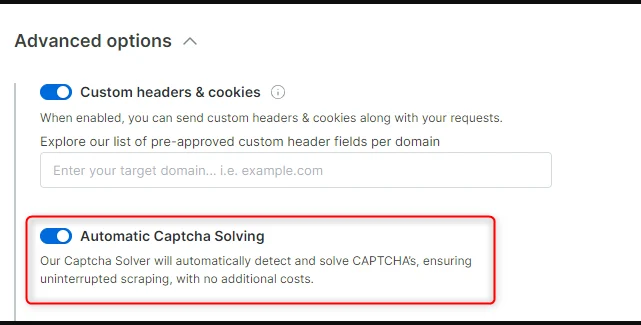
要禁用 CAPTCHA,只需打开相关 zone,进入“configuration”标签并展开高级设置。在这里你会看到 “Automatic Captcha Solving” 控制项。将其关闭即可禁用 CAPTCHA 解决。
 ## Web Unlocker API Premium Domains
Premium domains 是 Bright Data 网站分级系统的一部分。这些网站比普通网站更难解封,需要额外的 Web Unlocker API 资源。
在本章节中,我们将展示当前的 Premium domains 列表、如何访问它们,以及相关的定价说明。
Premium domains 列表每季度根据我们的分类逻辑更新。如果你的 Premium domains 有变化,我们会提前 30 天通过电子邮件通知你。你也可以随时在 Web Unlocker API zone 中查看最新列表。
### 当前 Premium Domains 列表
## Web Unlocker API Premium Domains
Premium domains 是 Bright Data 网站分级系统的一部分。这些网站比普通网站更难解封,需要额外的 Web Unlocker API 资源。
在本章节中,我们将展示当前的 Premium domains 列表、如何访问它们,以及相关的定价说明。
Premium domains 列表每季度根据我们的分类逻辑更新。如果你的 Premium domains 有变化,我们会提前 30 天通过电子邮件通知你。你也可以随时在 Web Unlocker API zone 中查看最新列表。
### 当前 Premium Domains 列表
Loading...
### 启用 Premium Domains
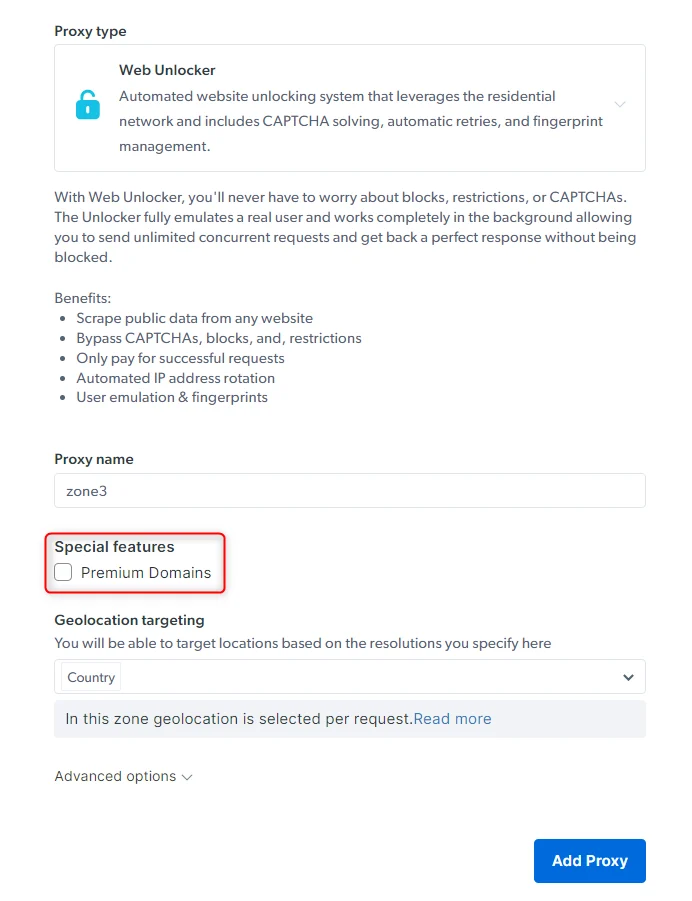
创建 Web Unlocker API zone 时,在 “Special features” 下勾选 **Premium Domains** 即可启用。
 ### 定价
启用后,Premium 定价会显示在 “Estimated cost” 区域。你可以查看 [pricing page](https://www.bright.cn/cn/pricing) 获取具体价格。但请注意,显示的通常是 “Pay as you go” 方案的价格。如果你改为套餐或与销售沟通,可以享受较大折扣。
即使启用 Premium Domains,只有访问这些 Premium 域名的请求才会按 Premium 价格计费。其他域名仍按默认较低价格计费。
## 地理位置定向 `-country-country_code`
Web Unlocker 会自动选择最佳 IP 地区来访问你的目标域名,因此在**大多数**情况下,你无需手动设置地理位置。手动地理定向通常用于访问地区受限或特定区域的数据。
若你想从特定**国家**进行 Web Unlocker API 请求,请参考 [geolocation targeting](/cn/api-reference/proxy/geolocation-targeting)。
## 移动端 User-Agent 定向 `-ua-mobile`
默认情况下,Web Unlocker API 使用桌面端的 User-Agent。如果你希望使用**移动端** UA,只需在请求中添加 `-ua-mobile` 即可。
## 以 Markdown 格式抓取页面
Web Unlocker 能够将网页从 HTML **实时转换为 Markdown**。这特别适合用作 LLM 训练数据。
启用方式:
* 原生代理接口:添加 `x-unblock-data-format: markdown`
* API 接口:设置 `data_format: 'markdown'`
```shell HTTP API theme={null}
API_KEY=your_api_key_here
ZONE=your_zone_here
curl -v \
-H "Authorization: Bearer \$API_KEY" \
-H 'content-type: application/json' \
--data '{"url": "https://example.com", "zone": "'\$ZONE'", "format": "raw", "data_format": "markdown"}' \
https://api.brightdata.com/request
```
```shell Native proxy interface theme={null}
curl -vk \
-x brd-customer-\$CUSTOMER_ID-zone-\$ZONE:\$PASSWORD@brd.superproxy.io:33335 \
-H 'x-unblock-data-format: markdown' \
https://example.com
```
## 返回截图
Web Unlocker 可以对你要抓取的页面进行截图,这可用于调试或监控页面视觉变化。
启用方式:
* 原生代理接口:添加 `x-unblock-data-format: screenshot`
* API 接口:设置 `data_format: screenshot`
输出格式为 `.png`
```shell HTTP API theme={null}
curl -k https://api.brightdata.com/request \
-H "Content-Type: application/json" \
-H "Authorization: Bearer " \
-d '{"zone":"unblocker","url":"https://example.com","format":"raw","data_format":"screenshot"}' \
--silent --output example_com.png
```
```shell Native proxy interface theme={null}
curl -k \
-x brd-customer-\$CUSTOMER_ID-zone-\$ZONE:\$PASSWORD@brd.superproxy.io:33335 \
-H 'x-unblock-data-format: screenshot' \
https://example.com > example_com.png
```
## 自定义 Web Unlocker API
通过更灵活的选项,你可以手动调整请求行为,以获得更高的控制力和优化的抓取流程。
默认情况下,Web Unlocker API 会自动处理所有请求 headers、cookies、expect 元素等,以确保最佳解封结果。附加的 headers/cookies 会被忽略。
启用自定义 Web Unlocker API 后,你可以覆盖自动参数,并根据你的需求发送自定义值。
#### 可用自定义功能:
* [手动 headers & cookies](/cn/scraping-automation/web-unlocker/features#manual-headers-%26-cookies)
* [手动 expect 元素](/cn/scraping-automation/web-unlocker/features#manual-%E2%80%98expect%E2%80%99-elements)
#### 如何启用
进入控制面板 → 选择你的 **Web Unlocker API** zone → Configuration → Advanced Settings,启用你需要的自定义功能。
### 定价
启用后,Premium 定价会显示在 “Estimated cost” 区域。你可以查看 [pricing page](https://www.bright.cn/cn/pricing) 获取具体价格。但请注意,显示的通常是 “Pay as you go” 方案的价格。如果你改为套餐或与销售沟通,可以享受较大折扣。
即使启用 Premium Domains,只有访问这些 Premium 域名的请求才会按 Premium 价格计费。其他域名仍按默认较低价格计费。
## 地理位置定向 `-country-country_code`
Web Unlocker 会自动选择最佳 IP 地区来访问你的目标域名,因此在**大多数**情况下,你无需手动设置地理位置。手动地理定向通常用于访问地区受限或特定区域的数据。
若你想从特定**国家**进行 Web Unlocker API 请求,请参考 [geolocation targeting](/cn/api-reference/proxy/geolocation-targeting)。
## 移动端 User-Agent 定向 `-ua-mobile`
默认情况下,Web Unlocker API 使用桌面端的 User-Agent。如果你希望使用**移动端** UA,只需在请求中添加 `-ua-mobile` 即可。
## 以 Markdown 格式抓取页面
Web Unlocker 能够将网页从 HTML **实时转换为 Markdown**。这特别适合用作 LLM 训练数据。
启用方式:
* 原生代理接口:添加 `x-unblock-data-format: markdown`
* API 接口:设置 `data_format: 'markdown'`
```shell HTTP API theme={null}
API_KEY=your_api_key_here
ZONE=your_zone_here
curl -v \
-H "Authorization: Bearer \$API_KEY" \
-H 'content-type: application/json' \
--data '{"url": "https://example.com", "zone": "'\$ZONE'", "format": "raw", "data_format": "markdown"}' \
https://api.brightdata.com/request
```
```shell Native proxy interface theme={null}
curl -vk \
-x brd-customer-\$CUSTOMER_ID-zone-\$ZONE:\$PASSWORD@brd.superproxy.io:33335 \
-H 'x-unblock-data-format: markdown' \
https://example.com
```
## 返回截图
Web Unlocker 可以对你要抓取的页面进行截图,这可用于调试或监控页面视觉变化。
启用方式:
* 原生代理接口:添加 `x-unblock-data-format: screenshot`
* API 接口:设置 `data_format: screenshot`
输出格式为 `.png`
```shell HTTP API theme={null}
curl -k https://api.brightdata.com/request \
-H "Content-Type: application/json" \
-H "Authorization: Bearer " \
-d '{"zone":"unblocker","url":"https://example.com","format":"raw","data_format":"screenshot"}' \
--silent --output example_com.png
```
```shell Native proxy interface theme={null}
curl -k \
-x brd-customer-\$CUSTOMER_ID-zone-\$ZONE:\$PASSWORD@brd.superproxy.io:33335 \
-H 'x-unblock-data-format: screenshot' \
https://example.com > example_com.png
```
## 自定义 Web Unlocker API
通过更灵活的选项,你可以手动调整请求行为,以获得更高的控制力和优化的抓取流程。
默认情况下,Web Unlocker API 会自动处理所有请求 headers、cookies、expect 元素等,以确保最佳解封结果。附加的 headers/cookies 会被忽略。
启用自定义 Web Unlocker API 后,你可以覆盖自动参数,并根据你的需求发送自定义值。
#### 可用自定义功能:
* [手动 headers & cookies](/cn/scraping-automation/web-unlocker/features#manual-headers-%26-cookies)
* [手动 expect 元素](/cn/scraping-automation/web-unlocker/features#manual-%E2%80%98expect%E2%80%99-elements)
#### 如何启用
进入控制面板 → 选择你的 **Web Unlocker API** zone → Configuration → Advanced Settings,启用你需要的自定义功能。
 启用后,你即可根据每项自定义功能的要求发送对应的 Web Unlocker API 请求:
[custom feature’s procedure](/cn/scraping-automation/web-unlocker/features#custom-features%3A)
#### 计费规则
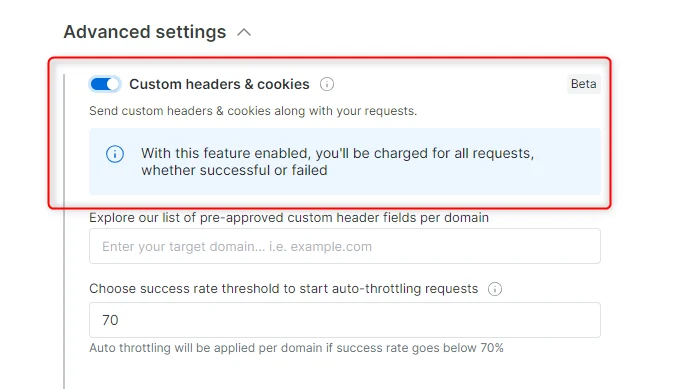
不同于普通 Web Unlocker API 仅为成功请求计费,启用任何自定义功能后,所有请求(成功 + 失败)都会计费。
原因是你现在控制部分参数,Bright Data 无法对解封流程与效果提供完整保障。
**注意:**
* 我们不允许使用 cookies 进行登录 / 认证
* 添加自定义参数可能导致封锁或成功率下降
### 手动 headers & cookies
你可以覆盖自动生成的 headers/cookies,并发送自定义值,以针对网站的特定版本。
启用 **Custom Headers & Cookies** 会带来以下变化:
你可以查看一个预批准的 headers/cookies 列表,用来确认目标站点所需的值是否已被允许。
如果你需要的 header/cookie 不在列表中,你可以提交表单给合规团队审批。提供必要说明后通常会快速审核,审核通过后会通知你。
启用此功能后,所有请求(成功与失败)都会计费,因为 Bright Data 无法完全控制解封流程。
### 手动 expect 元素
如果你收到部分渲染或加载不完整的页面,可以使用 `x-unblock-expect` header 让 Web Unlocker API 等待特定元素(如 CSS selector)、文本或页面内容加载完成后再返回结果。
你可以在请求中使用 `x-unblock-expect` 进行配置。
**添加 header**
```shell Element must exist theme={null}
curl -vk \
-x brd-customer-\$CUSTOMER_ID-zone-\$ZONE:\$PASSWORD@brd.superproxy.io:33335 \
-H 'x-unblock-expect: {"element": ".some-css-selector"}' \
https://example.com
```
```shell Page must include text theme={null}
curl -vk \
-x brd-customer-\$CUSTOMER_ID-zone-\$ZONE:\$PASSWORD@brd.superproxy.io:33335 \
-H 'x-unblock-expect: {"text": "items in stock"}' \
https://example.com
```
### Amazon 专用地理位置头
Web Unlocker API 允许您传递自定义头,以模拟用户选择的 Amazon 城市和邮政编码,从而访问区域特定的内容、价格和配送选项。
* `x-unblock-city` - 模拟选择城市。
* `x-unblock-zipcode` - 模拟在 Amazon 上选择邮政编码。
```shell Example theme={null}
curl -vk \
-x brd-customer-\$CUSTOMER_ID-zone-\$ZONE:\$PASSWORD@brd.superproxy.io:33335 \
-H 'x-unblock-zipcode: 10001' \
-H 'x-unblock-city: New York' \
https://www.amazon.com/
```
## 监控 Web Unlocker API 使用情况
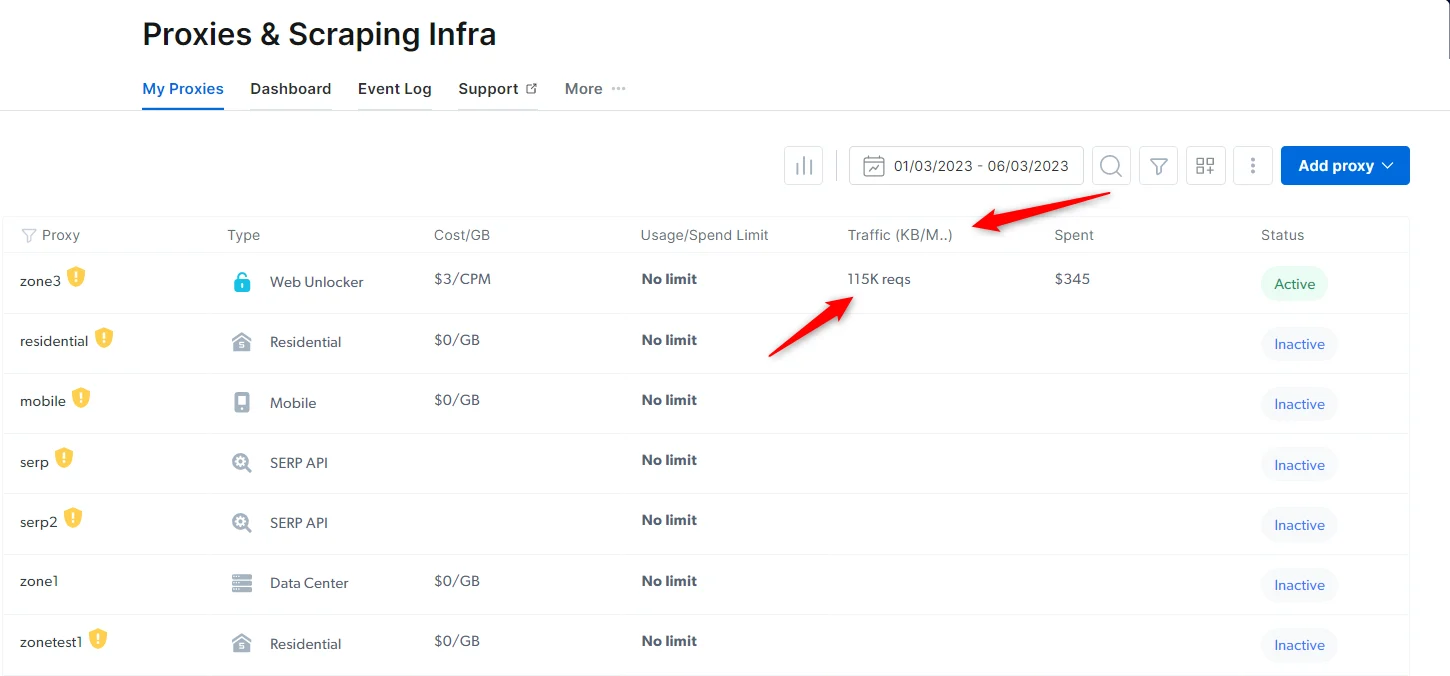
要查看您当前的 Web Unlocker API CPM,请导航到 [我的代理](https://www.bright.cn/cp/zones) 页面,并查看 **Traffic** 列。
启用后,你即可根据每项自定义功能的要求发送对应的 Web Unlocker API 请求:
[custom feature’s procedure](/cn/scraping-automation/web-unlocker/features#custom-features%3A)
#### 计费规则
不同于普通 Web Unlocker API 仅为成功请求计费,启用任何自定义功能后,所有请求(成功 + 失败)都会计费。
原因是你现在控制部分参数,Bright Data 无法对解封流程与效果提供完整保障。
**注意:**
* 我们不允许使用 cookies 进行登录 / 认证
* 添加自定义参数可能导致封锁或成功率下降
### 手动 headers & cookies
你可以覆盖自动生成的 headers/cookies,并发送自定义值,以针对网站的特定版本。
启用 **Custom Headers & Cookies** 会带来以下变化:
你可以查看一个预批准的 headers/cookies 列表,用来确认目标站点所需的值是否已被允许。
如果你需要的 header/cookie 不在列表中,你可以提交表单给合规团队审批。提供必要说明后通常会快速审核,审核通过后会通知你。
启用此功能后,所有请求(成功与失败)都会计费,因为 Bright Data 无法完全控制解封流程。
### 手动 expect 元素
如果你收到部分渲染或加载不完整的页面,可以使用 `x-unblock-expect` header 让 Web Unlocker API 等待特定元素(如 CSS selector)、文本或页面内容加载完成后再返回结果。
你可以在请求中使用 `x-unblock-expect` 进行配置。
**添加 header**
```shell Element must exist theme={null}
curl -vk \
-x brd-customer-\$CUSTOMER_ID-zone-\$ZONE:\$PASSWORD@brd.superproxy.io:33335 \
-H 'x-unblock-expect: {"element": ".some-css-selector"}' \
https://example.com
```
```shell Page must include text theme={null}
curl -vk \
-x brd-customer-\$CUSTOMER_ID-zone-\$ZONE:\$PASSWORD@brd.superproxy.io:33335 \
-H 'x-unblock-expect: {"text": "items in stock"}' \
https://example.com
```
### Amazon 专用地理位置头
Web Unlocker API 允许您传递自定义头,以模拟用户选择的 Amazon 城市和邮政编码,从而访问区域特定的内容、价格和配送选项。
* `x-unblock-city` - 模拟选择城市。
* `x-unblock-zipcode` - 模拟在 Amazon 上选择邮政编码。
```shell Example theme={null}
curl -vk \
-x brd-customer-\$CUSTOMER_ID-zone-\$ZONE:\$PASSWORD@brd.superproxy.io:33335 \
-H 'x-unblock-zipcode: 10001' \
-H 'x-unblock-city: New York' \
https://www.amazon.com/
```
## 监控 Web Unlocker API 使用情况
要查看您当前的 Web Unlocker API CPM,请导航到 [我的代理](https://www.bright.cn/cp/zones) 页面,并查看 **Traffic** 列。
 ### 使用情况说明
上图流量列中显示的数字是 **成功请求** 的数量。在上例中,115k 请求等于 115 CPM,因此您将根据该计费周期的 10 CPM 费率进行计费。
### 使用量如何计算?
您的 Web Unlocker API 使用量按 CPM 计量。CPM 是 1000 个 **成功请求** 的成本,这意味着只有成功的 Web Unlocker API 请求才会计入计费。
更多信息,请参阅我们的 [计费与价格](/cn/general/account/billing-and-pricing/payment) 页面。
## 调试 Web Unlocker API
有时提取请求的调试信息有助于更详细地了解请求内部发生的情况。
我们提供了 `x-brd-debug` 头用于此目的。
要激活该头,请在代理用户名中添加 `-debug-full`。
此功能仅适用于 Web Unlocker API,不适用于我们的代理产品。
```shell 在请求中启用调试头 theme={null}
curl -vk \
-x brd-customer-\$CUSTOMER_ID-zone-\$ZONE-debug-full:\$PASSWORD@brd.superproxy.io:33335 \
https://example.com
```
`x-brd-debug` 头的格式如下:
```
req_id=hl_d09913c7_a1lw123bkcg; bytes_up=2842; bytes_down=562418; billed=false; destination_ip=162.219.225.118; used_req_headers=accept-language,accept; peer_ip=r868133f79d0c3fa9d7c7ccca0151af2e; peer_country=us; render=false
```
| 字段 | 描述 |
| ------------------ | --------------------------------------------------- |
| req\_id | 您请求在系统中的内部 ID。提供此信息在提交 Bug 报告时很有用,有助于查看特定请求发生的详细情况。 |
| bytes\_up | 系统在处理此请求时记录的上传流量 |
| bytes\_down | 系统在处理此请求时记录的下载流量 |
| billed | 系统是否将此请求视为可计费请求 |
| destination\_ip | 用于获取数据的远程服务器 IP 地址 |
| used\_req\_headers | 最终请求中使用的请求头(如有)。这主要适用于使用自定义 Web Unlocker API 时 |
| peer\_ip | 用于发起请求的 IP 地址的唯一标识符。这主要用于验证 IP 轮换是否按预期工作 |
| peer\_country | 用于请求的对等方的国家 |
| render | 显示返回的页面是浏览器渲染后的结果,还是单个 HTTP 请求的响应正文 |
## 常见错误代码
在某些情况下,您可能会因为多种原因在 Web Unlocker API 请求中收到意外的错误代码。
以下列表将帮助您更深入地理解问题可能的来源。
| 错误 | 描述 |
| ----------------------------------------------------- | ------------------------------------------------------------------------------------------------------------------------------------- |
| `404` | 页面未找到。URL 无效,可能表示该 URL 已损坏或不存在。 |
| [403](/cn/proxy-networks/faqs#what-is-error-code-403) | 您尝试访问的 URL 是有效的,但禁止访问该 URL。 |
| [502](/cn/proxy-networks/faqs#what-is-error-code-502) | 错误代码 `502` 是 Web Unlocker API 用户最常遇到的错误,描述部分在 `x-luminati-error-code` 中。 |
| `407` | 此错误代码表示您的某个账户凭据不正确(密码或 zone 名称)。 |
| `429` | 此错误代码表示请求受到速率限制(较少发生)。在这种情况下,如果响应如下,Bright Data 对请求进行了自动节流,您应提交工单或发送邮件至 [support@brightdata.com](mailto:support@brightdata.com) 寻求帮助。 |
| `401` `411` `444` | 错误请求,通常发生在 API 请求中,当请求头或 cookies 缺失时。 |
| `503` | HTTP 错误代码 `503` 表示 "服务不可用"。浏览器检查失败或浏览器检查未完成。 |
```js theme={null}
< HTTP/1.1 429 The request was auto-throttled due to low success rate
< x-luminati-error-code: sr_rate_limit
< x-luminati-error: The request was auto-throttled due to low success rate
< x-brd-error-code: sr_rate_limit
< x-brd-error: The request was auto-throttled due to low success rate
< date: Tue, 23 Jan 2024 17:07:19 GMT
< connection: keep-alive
< keep-alive: timeout=5
< transfer-encoding: chunked
<
* Connection #0 to host brd.superproxy.io left intact
```
如果您在使用 Web Unlocker API 时遇到问题,在向我们报告之前,请先按照以下说明和提示进行测试:
1. 打开控制面板中的 '[API & 示例](/cn/cp/zones/proxy_examples)'
2. 选择 `curl` 和您的 Web Unlocker API zone
3. 在 'URL' 框中粘贴目标 URL
4. 使用右侧按钮复制
5. 在命令中添加 `-v -o test`(将开启详细日志,并生成名为 'test' 的输出文件,以便与支持人员共享)
6. 运行命令并检查输出(确保也检查静态 HTML 源码以获取数据)
如果此测试重现了您的问题,请联系 [support@brightdata.com](mailto:support@brightdata.com),并在邮件正文中提供以下内容:
1. 您用于生成结果的 `curl` 请求
2. 运行命令的完整详细输出
3. 返回的响应(即 'test' 文件)
4. 您是否使用浏览器自动化工具(Web Unlocker API 不支持此类工具或任何第三方集成,仅支持您自己的代码)。
## 获取每个域名的成功率统计
以下 API 端点将提供过去 7 天 Web Unlocker API 的成功率统计。
统计数据可以针对单个域名,如 `example.com`,也可以针对通配符域名,如 `example.*`,以获取所有顶级域的统计数据。
**注意**:调用此 API 端点需要使用您的
[API 密钥](/cn/api-reference/authentication#如何生成新的-api-key?)
**如何获取单个域名的统计数据?**
```shell Request theme={null}
curl "https://api.brightdata.com/unblocker/success_rate/example.com" -H "Content-Type: application/json" -H "Authorization: Bearer API_KEY"
```
```shell Response theme={null}
{"amazon.com":0.9835556363554884}
```
**如何获取所有监控的顶级域统计数据?**
```shell Request theme={null}
curl "https://api.brightdata.com/unblocker/success_rate/example.*" -H "Content-Type: application/json" -H "Authorization: Bearer API_KEY"
```
```shell Response theme={null}
{{"example.com":0.9835548316870116,"example.fr":0.987469724604454,"example.co.uk":0.9503769840916476,"example.ca":0.9904893224078992,"example.de":0.9864620859972142,"example.es":0.9845641506811664,"example.in":0.8558596797075156,"example.it":0.9890758071645432,"example.co.jp":0.996804161764218,"example.com.mx":0.9710054259117241,"example.com.au":0.9969920926297628,"example.ae":0.617948700199661,"example.nl":0.9872124916314797,"example.pl":0.9899010819017637,"example.com.br":0.9804172881460471,"example.com.be":0.9928999059667324,"example.se":0.9888455998636585,"example.sa":0.9939472688535012,"example.com.tr":0.7967697653998838,"example.eg":0.9990248073774932}}
```
### 使用情况说明
上图流量列中显示的数字是 **成功请求** 的数量。在上例中,115k 请求等于 115 CPM,因此您将根据该计费周期的 10 CPM 费率进行计费。
### 使用量如何计算?
您的 Web Unlocker API 使用量按 CPM 计量。CPM 是 1000 个 **成功请求** 的成本,这意味着只有成功的 Web Unlocker API 请求才会计入计费。
更多信息,请参阅我们的 [计费与价格](/cn/general/account/billing-and-pricing/payment) 页面。
## 调试 Web Unlocker API
有时提取请求的调试信息有助于更详细地了解请求内部发生的情况。
我们提供了 `x-brd-debug` 头用于此目的。
要激活该头,请在代理用户名中添加 `-debug-full`。
此功能仅适用于 Web Unlocker API,不适用于我们的代理产品。
```shell 在请求中启用调试头 theme={null}
curl -vk \
-x brd-customer-\$CUSTOMER_ID-zone-\$ZONE-debug-full:\$PASSWORD@brd.superproxy.io:33335 \
https://example.com
```
`x-brd-debug` 头的格式如下:
```
req_id=hl_d09913c7_a1lw123bkcg; bytes_up=2842; bytes_down=562418; billed=false; destination_ip=162.219.225.118; used_req_headers=accept-language,accept; peer_ip=r868133f79d0c3fa9d7c7ccca0151af2e; peer_country=us; render=false
```
| 字段 | 描述 |
| ------------------ | --------------------------------------------------- |
| req\_id | 您请求在系统中的内部 ID。提供此信息在提交 Bug 报告时很有用,有助于查看特定请求发生的详细情况。 |
| bytes\_up | 系统在处理此请求时记录的上传流量 |
| bytes\_down | 系统在处理此请求时记录的下载流量 |
| billed | 系统是否将此请求视为可计费请求 |
| destination\_ip | 用于获取数据的远程服务器 IP 地址 |
| used\_req\_headers | 最终请求中使用的请求头(如有)。这主要适用于使用自定义 Web Unlocker API 时 |
| peer\_ip | 用于发起请求的 IP 地址的唯一标识符。这主要用于验证 IP 轮换是否按预期工作 |
| peer\_country | 用于请求的对等方的国家 |
| render | 显示返回的页面是浏览器渲染后的结果,还是单个 HTTP 请求的响应正文 |
## 常见错误代码
在某些情况下,您可能会因为多种原因在 Web Unlocker API 请求中收到意外的错误代码。
以下列表将帮助您更深入地理解问题可能的来源。
| 错误 | 描述 |
| ----------------------------------------------------- | ------------------------------------------------------------------------------------------------------------------------------------- |
| `404` | 页面未找到。URL 无效,可能表示该 URL 已损坏或不存在。 |
| [403](/cn/proxy-networks/faqs#what-is-error-code-403) | 您尝试访问的 URL 是有效的,但禁止访问该 URL。 |
| [502](/cn/proxy-networks/faqs#what-is-error-code-502) | 错误代码 `502` 是 Web Unlocker API 用户最常遇到的错误,描述部分在 `x-luminati-error-code` 中。 |
| `407` | 此错误代码表示您的某个账户凭据不正确(密码或 zone 名称)。 |
| `429` | 此错误代码表示请求受到速率限制(较少发生)。在这种情况下,如果响应如下,Bright Data 对请求进行了自动节流,您应提交工单或发送邮件至 [support@brightdata.com](mailto:support@brightdata.com) 寻求帮助。 |
| `401` `411` `444` | 错误请求,通常发生在 API 请求中,当请求头或 cookies 缺失时。 |
| `503` | HTTP 错误代码 `503` 表示 "服务不可用"。浏览器检查失败或浏览器检查未完成。 |
```js theme={null}
< HTTP/1.1 429 The request was auto-throttled due to low success rate
< x-luminati-error-code: sr_rate_limit
< x-luminati-error: The request was auto-throttled due to low success rate
< x-brd-error-code: sr_rate_limit
< x-brd-error: The request was auto-throttled due to low success rate
< date: Tue, 23 Jan 2024 17:07:19 GMT
< connection: keep-alive
< keep-alive: timeout=5
< transfer-encoding: chunked
<
* Connection #0 to host brd.superproxy.io left intact
```
如果您在使用 Web Unlocker API 时遇到问题,在向我们报告之前,请先按照以下说明和提示进行测试:
1. 打开控制面板中的 '[API & 示例](/cn/cp/zones/proxy_examples)'
2. 选择 `curl` 和您的 Web Unlocker API zone
3. 在 'URL' 框中粘贴目标 URL
4. 使用右侧按钮复制
5. 在命令中添加 `-v -o test`(将开启详细日志,并生成名为 'test' 的输出文件,以便与支持人员共享)
6. 运行命令并检查输出(确保也检查静态 HTML 源码以获取数据)
如果此测试重现了您的问题,请联系 [support@brightdata.com](mailto:support@brightdata.com),并在邮件正文中提供以下内容:
1. 您用于生成结果的 `curl` 请求
2. 运行命令的完整详细输出
3. 返回的响应(即 'test' 文件)
4. 您是否使用浏览器自动化工具(Web Unlocker API 不支持此类工具或任何第三方集成,仅支持您自己的代码)。
## 获取每个域名的成功率统计
以下 API 端点将提供过去 7 天 Web Unlocker API 的成功率统计。
统计数据可以针对单个域名,如 `example.com`,也可以针对通配符域名,如 `example.*`,以获取所有顶级域的统计数据。
**注意**:调用此 API 端点需要使用您的
[API 密钥](/cn/api-reference/authentication#如何生成新的-api-key?)
**如何获取单个域名的统计数据?**
```shell Request theme={null}
curl "https://api.brightdata.com/unblocker/success_rate/example.com" -H "Content-Type: application/json" -H "Authorization: Bearer API_KEY"
```
```shell Response theme={null}
{"amazon.com":0.9835556363554884}
```
**如何获取所有监控的顶级域统计数据?**
```shell Request theme={null}
curl "https://api.brightdata.com/unblocker/success_rate/example.*" -H "Content-Type: application/json" -H "Authorization: Bearer API_KEY"
```
```shell Response theme={null}
{{"example.com":0.9835548316870116,"example.fr":0.987469724604454,"example.co.uk":0.9503769840916476,"example.ca":0.9904893224078992,"example.de":0.9864620859972142,"example.es":0.9845641506811664,"example.in":0.8558596797075156,"example.it":0.9890758071645432,"example.co.jp":0.996804161764218,"example.com.mx":0.9710054259117241,"example.com.au":0.9969920926297628,"example.ae":0.617948700199661,"example.nl":0.9872124916314797,"example.pl":0.9899010819017637,"example.com.br":0.9804172881460471,"example.com.be":0.9928999059667324,"example.se":0.9888455998636585,"example.sa":0.9939472688535012,"example.com.tr":0.7967697653998838,"example.eg":0.9990248073774932}}
```