> ## Documentation Index
> Fetch the complete documentation index at: https://docs.brightdata.com/llms.txt
> Use this file to discover all available pages before exploring further.
# 发送首个 Unlocker API 请求
> 通过易于理解的代码示例,逐步指导您如何发送首个 Web Unlocker API 请求
## 几分钟内发送您的第一个请求
使用以下现成的代码示例,您可以在几分钟内测试 Unlocker API。
Bright Data 提供两种访问 Web Unlocker API 的方式,两者输出结果完全**相同**,但可满足不同工作流程需求:
一种纯 REST API 的访问方式,简单易用,便于集成。
适用于依赖代理路由的工作流程。
## 直接 API 访问(推荐)
一种简单且符合 REST 规范的方式,可与 Bright Data 的 Web Unlocker API 交互。此方式抽象了代理管理,让您通过统一的端点发送请求,使集成更加轻松直接。
### 适用于:
* 集中化端点:通过单一 REST 端点访问 Web Unlocker API。
* 简化的直接集成:无需处理代理或路由的复杂性。
* 单个 API key 身份认证:安全且易于使用,无需管理用户名密码。
### 发送您的第一个请求
在完成 Web Unlocker API 区域的[设置](https://docs.brightdata.com/cn/scraping-automation/web-unlocker/quickstart)后,您可以在该区域的 **Overview** 选项卡中找到可用的 Web Unlocker API 请求示例以及您的 API key:
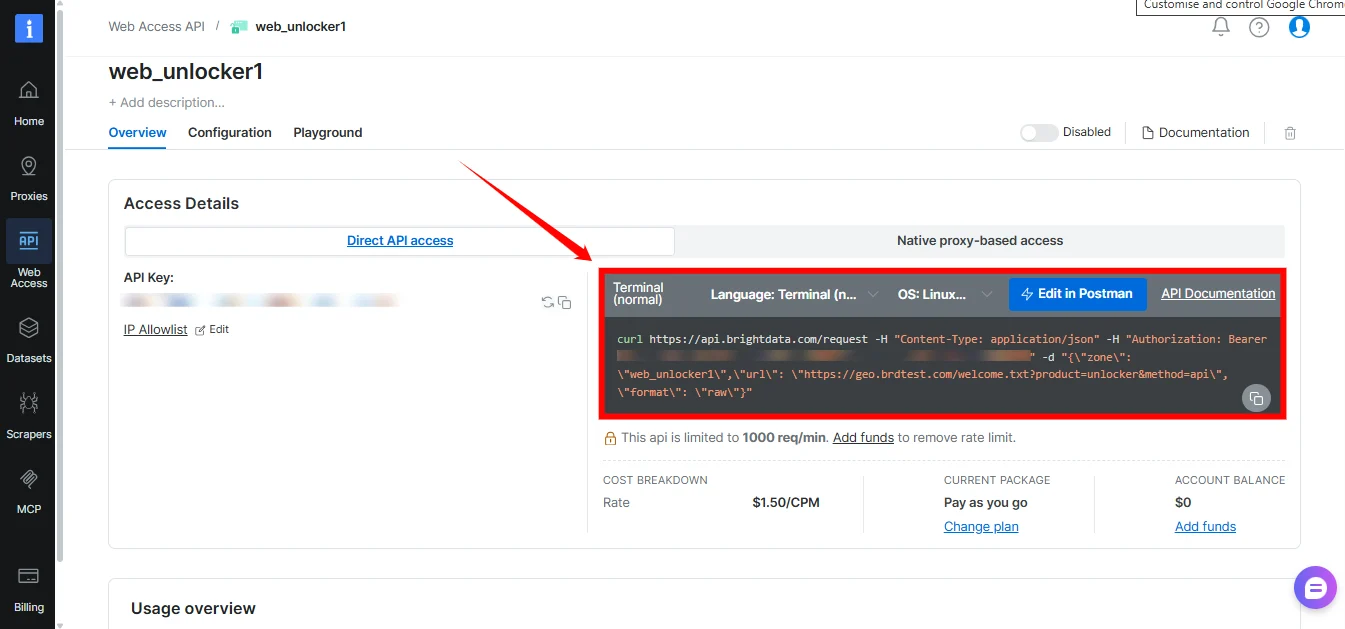 以下为一个简单的 Web Unlocker API cURL 请求示例:
```sh Direct API access - cURL theme={null}
curl -H "Content-Type: application/json" -H "Authorization: Bearer [INSERT_YOUR_API_KEY]" -d "{\"zone\": \"[INSERT_YOUR_WEB_UNLOCKER_ZONE_NAME]\", \"url\": \"[INSERT_YOUR_TARGET_URL]\", \"format\": \"raw\", \"body\": \"{\\\"key\\\":\\\"value\\\"}\"}" https://api.brightdata.com/request
```
### 请求解析
1. API 端点:[`https://api.brightdata.com/request`](https://api.brightdata.com/request)
2. 身份认证 Header:`Authorization: Bearer [INSERT YOUR API key]`
* 您的 API key 可在 Web Unlocker API 区域中找到。
3. Payload:
* `zone`:您的 Web Unlocker API **区域名称**。
* `url`:您想通过 Web Unlocker API 访问的目标 URL。
* `format`:响应格式。使用 `raw` 可获取目标站点的原始响应。
* 【可选】`body`:指定发送到目标 URL 的 POST 原始数据。例如 `"body": "{\"key\":\"value\"}"`
### 生成您的 Bright Data API key
Bright Data API key 是您访问 Web Unlocker API(通过直接 API 访问)时使用的安全身份认证凭据。在控制面板中新建 Web Unlocker API 区域时,系统会自动生成一个 API key,并显示在该区域的 **Overview** 中。
以下为一个简单的 Web Unlocker API cURL 请求示例:
```sh Direct API access - cURL theme={null}
curl -H "Content-Type: application/json" -H "Authorization: Bearer [INSERT_YOUR_API_KEY]" -d "{\"zone\": \"[INSERT_YOUR_WEB_UNLOCKER_ZONE_NAME]\", \"url\": \"[INSERT_YOUR_TARGET_URL]\", \"format\": \"raw\", \"body\": \"{\\\"key\\\":\\\"value\\\"}\"}" https://api.brightdata.com/request
```
### 请求解析
1. API 端点:[`https://api.brightdata.com/request`](https://api.brightdata.com/request)
2. 身份认证 Header:`Authorization: Bearer [INSERT YOUR API key]`
* 您的 API key 可在 Web Unlocker API 区域中找到。
3. Payload:
* `zone`:您的 Web Unlocker API **区域名称**。
* `url`:您想通过 Web Unlocker API 访问的目标 URL。
* `format`:响应格式。使用 `raw` 可获取目标站点的原始响应。
* 【可选】`body`:指定发送到目标 URL 的 POST 原始数据。例如 `"body": "{\"key\":\"value\"}"`
### 生成您的 Bright Data API key
Bright Data API key 是您访问 Web Unlocker API(通过直接 API 访问)时使用的安全身份认证凭据。在控制面板中新建 Web Unlocker API 区域时,系统会自动生成一个 API key,并显示在该区域的 **Overview** 中。
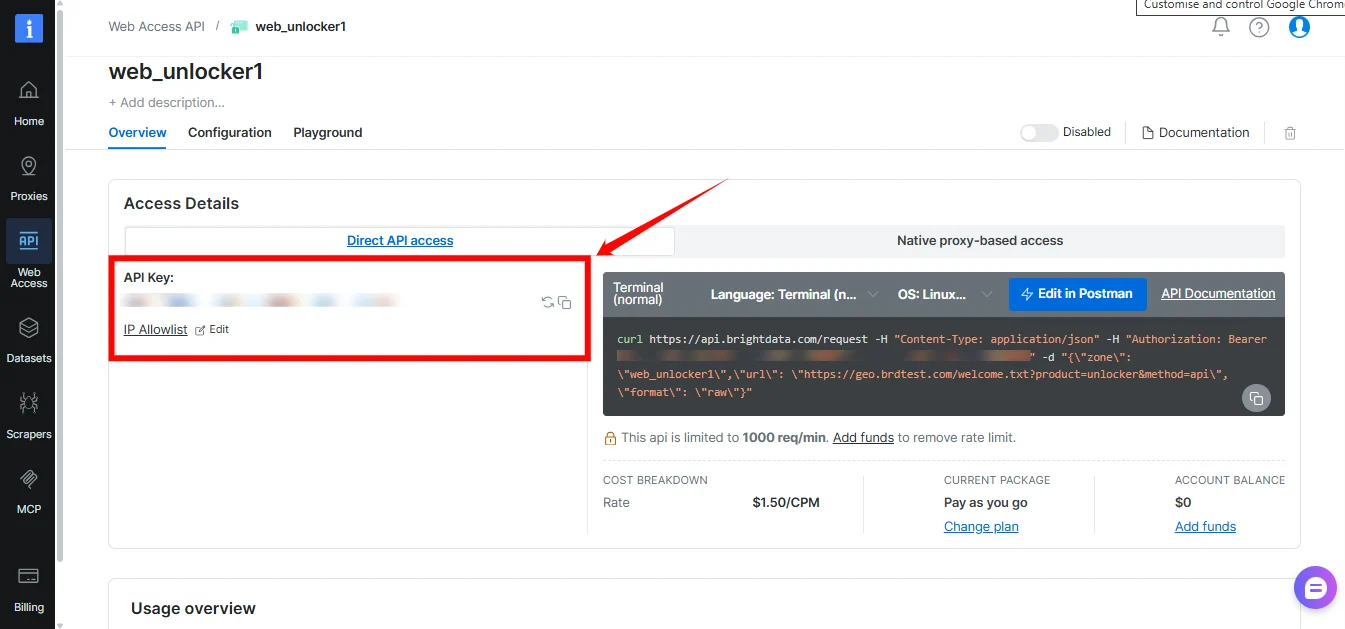 **生成新 API key 的步骤:**
* 访问 [Account settings](https://www.bright.cn/cp/setting/users)。
* 向下滚动并点击 Add API key。
* 按照屏幕提示完成流程。
强烈建议您为 API key 设置过期日期,以提高安全性。
API key **仅会在首次生成时显示一次**,请务必根据您组织的安全策略妥善保存。
## 原生代理访问
要使用原生代理方式访问 Web Unlocker,您需要以下凭证:
1. 您的 Customer ID(客户 ID)
2. 您的 Web Unlocker API 区域名称
3. 您的 Web Unlocker API 密码
4. Bright Data SSL 证书
#### Customer ID
您可以在欢迎邮件中找到 Customer ID,也可以点击控制面板右上角的账户首字母,或打开此页面查看:
[Account settings](https://www.bright.cn/cp/setting/customer_details)。
#### 区域名称与密码
区域名称和密码可在控制面板中 Web Unlocker 区域的 Overview 页面中找到。
#### Bright Data SSL 证书
为避免 SSL 错误,请务必设置 Bright Data SSL 证书
您可以通过区域 Overview 顶部菜单中的 “SSL certificate” 向导获取证书。更多说明请参见:
[SSL certificate](/cn/general/account/ssl-certificate#download-the-ssl-certificate)。
或者,您也可以[忽略 SSL 错误](/cn/general/account/ssl-certificate#how-to-ignore-ssl-errors%3F)。
#### Web Unlocker API:HTTPS Proxy 代码示例
准备好凭证之后,您可以使用以下代码发送首个请求:
```sh cURL theme={null}
curl "http://brdtest.com/myip.json" --proxy brd.superproxy.io:33335 --proxy-user brd-customer--zone-:
```
```javascript Node.js theme={null}
#!/usr/bin/env node
require("request-promise")({
url: "http://brdtest.com/myip.json",
proxy: "http://brd-customer--zone-:@brd.superproxy.io:33335",
})
.then(
function (data) {
console.log(data);
},
function (err) {
console.error(err);
},
);
```
```python Python theme={null}
import pprint
import requests
host = 'brd.superproxy.io'
port = 33335
username = 'brd-customer--zone-'
password = ''
proxy_url = f'http://{username}:{password}@{host}:{port}'
proxies = {
'http': proxy_url,
'https': proxy_url
}
url = "http://brdtest.com/myip.json"
response = requests.get(url, proxies=proxies)
pprint.pprint(response.json())
```
```php php theme={null}
-zone-:');
curl_exec($curl);
?>
```
```ruby Ruby theme={null}
#!/usr/bin/ruby
require 'uri'
require 'net/http'
require 'net/https'
puts 'To enable your free eval account and get CUSTOMER, YOURZONE and YOURPASS, please contact sales@brightdata.com'
uri = URI.parse('http://brdtest.com/myip.json')
proxy = Net::HTTP::Proxy('brd.superproxy.io', 33335, 'brd-customer--zone-', '')
req = Net::HTTP::Get.new(uri)
result = proxy.start(uri.host,uri.port, :use_ssl => uri.scheme == 'https') do |http|
http.request(req)
end
puts result.body
```
```cs C# theme={null}
using System;
using System.Net;
class Example {
static void Main() {
var client = new WebClient();
client.Proxy = new WebProxy("brd.superproxy.io:33335");
client.Proxy.Credentials = new NetworkCredential(
"brd-customer--zone-",
""
);
Console.WriteLine(client.DownloadString("http://brdtest.com/myip.json"));
}
}
```
```java Java theme={null}
package example;
import org.apache.http.HttpHost;
import org.apache.http.client.fluent.*;
public class Example {
public static void main(String[] args) throws Exception {
System.out.println(
"To enable your free eval account and get "
+"CUSTOMER, YOURZONE and YOURPASS, please contact "
+"sales@brightdata.com"
);
HttpHost proxy = new HttpHost("brd.superproxy.io", 33335);
String res = Executor.newInstance()
.auth(proxy, "brd-customer--zone-", "")
.execute(Request.Get("http://brdtest.com/myip.json").viaProxy(proxy))
.returnContent().asString();
System.out.println(res);
}
}
```
```perl Perl theme={null}
#!/usr/bin/perl
print 'To enable your free eval account and get CUSTOMER, YOURZONE and '
.'YOURPASS, please contact sales@brightdata.com';
use LWP::UserAgent;
my $agent = LWP::UserAgent->new();
$agent->proxy(['http', 'https'], "http://brd-customer--zone-:\@brd.superproxy.io:33335");
print $agent->get('http://brdtest.com/myip.json')->content();
```
```vb VBA theme={null}
Imports System.Net
Module Module1
Sub Main()
Console.WriteLine("To enable your free eval account and get " &
"CUSTOMER, YOURZONE and YOURPASS, please contact " &
"sales@brightdata.com")
Dim Client As New WebClient
Client.Proxy = New WebProxy("http://brd.superproxy.io:33335")
Client.Proxy.Credentials = New NetworkCredential("brd-customer--zone-", "")
Console.WriteLine(Client.DownloadString("http://brdtest.com/myip.json"))
End Sub
End Module
```
上述代码示例使用住宅代理向 `http://brdtest.com/myip.json` 发送请求。
它将以 JSON 格式返回你的 IP 信息:
```json Output theme={null}
{
"ip": "ALLOCATED_IP",
"country": "PK",
"asn": {
"asnum": 203020,
"org_name": "HostRoyale Technologies Pvt Ltd"
},
"geo": {
"city": "Islamabad",
"region": "IS",
"region_name": "Islamabad",
"postal_code": "44040",
"latitude": 33.7233,
"longitude": 73.0435,
"tz": "Asia/Karachi",
"lum_city": "islamabad",
"lum_region": "is"
}
}
```
现在,将 “[https://brdtest.com/myip.json”](https://brdtest.com/myip.json”) 替换为你选择的网站即可。
**生成新 API key 的步骤:**
* 访问 [Account settings](https://www.bright.cn/cp/setting/users)。
* 向下滚动并点击 Add API key。
* 按照屏幕提示完成流程。
强烈建议您为 API key 设置过期日期,以提高安全性。
API key **仅会在首次生成时显示一次**,请务必根据您组织的安全策略妥善保存。
## 原生代理访问
要使用原生代理方式访问 Web Unlocker,您需要以下凭证:
1. 您的 Customer ID(客户 ID)
2. 您的 Web Unlocker API 区域名称
3. 您的 Web Unlocker API 密码
4. Bright Data SSL 证书
#### Customer ID
您可以在欢迎邮件中找到 Customer ID,也可以点击控制面板右上角的账户首字母,或打开此页面查看:
[Account settings](https://www.bright.cn/cp/setting/customer_details)。
#### 区域名称与密码
区域名称和密码可在控制面板中 Web Unlocker 区域的 Overview 页面中找到。
#### Bright Data SSL 证书
为避免 SSL 错误,请务必设置 Bright Data SSL 证书
您可以通过区域 Overview 顶部菜单中的 “SSL certificate” 向导获取证书。更多说明请参见:
[SSL certificate](/cn/general/account/ssl-certificate#download-the-ssl-certificate)。
或者,您也可以[忽略 SSL 错误](/cn/general/account/ssl-certificate#how-to-ignore-ssl-errors%3F)。
#### Web Unlocker API:HTTPS Proxy 代码示例
准备好凭证之后,您可以使用以下代码发送首个请求:
```sh cURL theme={null}
curl "http://brdtest.com/myip.json" --proxy brd.superproxy.io:33335 --proxy-user brd-customer--zone-:
```
```javascript Node.js theme={null}
#!/usr/bin/env node
require("request-promise")({
url: "http://brdtest.com/myip.json",
proxy: "http://brd-customer--zone-:@brd.superproxy.io:33335",
})
.then(
function (data) {
console.log(data);
},
function (err) {
console.error(err);
},
);
```
```python Python theme={null}
import pprint
import requests
host = 'brd.superproxy.io'
port = 33335
username = 'brd-customer--zone-'
password = ''
proxy_url = f'http://{username}:{password}@{host}:{port}'
proxies = {
'http': proxy_url,
'https': proxy_url
}
url = "http://brdtest.com/myip.json"
response = requests.get(url, proxies=proxies)
pprint.pprint(response.json())
```
```php php theme={null}
-zone-:');
curl_exec($curl);
?>
```
```ruby Ruby theme={null}
#!/usr/bin/ruby
require 'uri'
require 'net/http'
require 'net/https'
puts 'To enable your free eval account and get CUSTOMER, YOURZONE and YOURPASS, please contact sales@brightdata.com'
uri = URI.parse('http://brdtest.com/myip.json')
proxy = Net::HTTP::Proxy('brd.superproxy.io', 33335, 'brd-customer--zone-', '')
req = Net::HTTP::Get.new(uri)
result = proxy.start(uri.host,uri.port, :use_ssl => uri.scheme == 'https') do |http|
http.request(req)
end
puts result.body
```
```cs C# theme={null}
using System;
using System.Net;
class Example {
static void Main() {
var client = new WebClient();
client.Proxy = new WebProxy("brd.superproxy.io:33335");
client.Proxy.Credentials = new NetworkCredential(
"brd-customer--zone-",
""
);
Console.WriteLine(client.DownloadString("http://brdtest.com/myip.json"));
}
}
```
```java Java theme={null}
package example;
import org.apache.http.HttpHost;
import org.apache.http.client.fluent.*;
public class Example {
public static void main(String[] args) throws Exception {
System.out.println(
"To enable your free eval account and get "
+"CUSTOMER, YOURZONE and YOURPASS, please contact "
+"sales@brightdata.com"
);
HttpHost proxy = new HttpHost("brd.superproxy.io", 33335);
String res = Executor.newInstance()
.auth(proxy, "brd-customer--zone-", "")
.execute(Request.Get("http://brdtest.com/myip.json").viaProxy(proxy))
.returnContent().asString();
System.out.println(res);
}
}
```
```perl Perl theme={null}
#!/usr/bin/perl
print 'To enable your free eval account and get CUSTOMER, YOURZONE and '
.'YOURPASS, please contact sales@brightdata.com';
use LWP::UserAgent;
my $agent = LWP::UserAgent->new();
$agent->proxy(['http', 'https'], "http://brd-customer--zone-:\@brd.superproxy.io:33335");
print $agent->get('http://brdtest.com/myip.json')->content();
```
```vb VBA theme={null}
Imports System.Net
Module Module1
Sub Main()
Console.WriteLine("To enable your free eval account and get " &
"CUSTOMER, YOURZONE and YOURPASS, please contact " &
"sales@brightdata.com")
Dim Client As New WebClient
Client.Proxy = New WebProxy("http://brd.superproxy.io:33335")
Client.Proxy.Credentials = New NetworkCredential("brd-customer--zone-", "")
Console.WriteLine(Client.DownloadString("http://brdtest.com/myip.json"))
End Sub
End Module
```
上述代码示例使用住宅代理向 `http://brdtest.com/myip.json` 发送请求。
它将以 JSON 格式返回你的 IP 信息:
```json Output theme={null}
{
"ip": "ALLOCATED_IP",
"country": "PK",
"asn": {
"asnum": 203020,
"org_name": "HostRoyale Technologies Pvt Ltd"
},
"geo": {
"city": "Islamabad",
"region": "IS",
"region_name": "Islamabad",
"postal_code": "44040",
"latitude": 33.7233,
"longitude": 73.0435,
"tz": "Asia/Karachi",
"lum_city": "islamabad",
"lum_region": "is"
}
}
```
现在,将 “[https://brdtest.com/myip.json”](https://brdtest.com/myip.json”) 替换为你选择的网站即可。