> ## Documentation Index
> Fetch the complete documentation index at: https://docs.brightdata.com/llms.txt
> Use this file to discover all available pages before exploring further.
# Sync vs async requests
> How synchronous and asynchronous requests differ across the Bright Data Scraper API, Web Unlocker API and SERP API, when to use each, and what a job costs, returns and retains.
This page explains the one choice every Bright Data API asks you to make: wait for the result in the same HTTP response, or submit a job and collect the result later. It covers how the Scraper API, the Web Unlocker API and the SERP API each implement the two modes, when to pick which, and the tradeoffs.
## What sync and async requests are
A **synchronous** request holds the connection open until the result arrives, typically seconds. A single request gives you a single response, and there is nothing else to track.
An **asynchronous** request returns an ID at once and the work continues in the background. You retrieve the result later by polling or by having Bright Data push it to a webhook or storage. Nothing waits on an open connection, so you can submit thousands of jobs in a minute and process them when they are ready.
## How each API implements the two modes
| API | Synchronous | Asynchronous | Result retention |
| :------------------- | :--------------------------------------------------------------------------------------------------------------- | :-------------------------------------------------------------------------------------------------------------------------------------------------------------------------------------------------------------------- | :--------------- |
| **Scraper API** | `POST /datasets/v3/scrape`, built for a handful of URLs; runs past 1 minute answer HTTP 202 with a `snapshot_id` | `POST /datasets/v3/trigger` returns a `snapshot_id`; poll it, or deliver to a webhook or storage. See [How to scrape in bulk with async requests](/products/scrapers/scrapers-library/async-requests) | 30 days |
| **Web Unlocker API** | The default request | An async zone returns an `x-response-id` header at once; retrieve by polling or by a `webhook_url`. See [Send your first async request](/products/web-unlocker/send-your-first-request#send-your-first-async-request) | 48 hours |
| **SERP API** | The default request | Same async zone mechanism as Web Unlocker API. See [Asynchronous requests](/products/serp-api/asynchronous-requests) | 48 hours |
## When to use each mode
**Use synchronous requests when:**
* You serve a live user who is waiting, such as a "check this product now" button or search results on screen.
* You need results in seconds for a small number of inputs. On the Scraper API that means a handful of URLs.
* You are prototyping and want the simplest possible integration.
**Use asynchronous requests when:**
* You run scheduled jobs: nightly competitor monitoring, weekly rank tracking.
* You scrape at volume, hundreds of requests per hour or more, or more URLs than fit one sync call.
* You run discovery on the Scraper API: searching by keyword, finding posts by company.
* You want results delivered to a webhook, S3, Snowflake or other storage.
* You are building a pipeline where freshness within minutes is fine and you want fewer retries.
Do not use async for a feature where a person is actively waiting. Async latency is minutes at best and, on the Web Unlocker API and SERP API, up to 8 hours at peak times.
An e-commerce team scrapes 50,000 competitor prices overnight with async for the morning report, and uses sync for the button shoppers click to check one product.
## How the Scraper API flows
Synchronous:
```text theme={null}
Your app --> POST /scrape --> [Wait up to 1 min] --> Scraped data in response
```
The whole operation is one HTTP request. If the scrape runs past 1 minute, the API answers HTTP 202 with a `snapshot_id` and finishes the job asynchronously; the data is still collected, you retrieve it as you would an async job. Code that calls `/scrape` must branch on the status code. The branch and the polling loop are in [How to handle a 202 response](/api-reference/scrapers/synchronous-requests#how-to-handle-a-202-response).
Asynchronous:
```text theme={null}
Your app --> POST /trigger --> snapshot_id (immediate)
|
+--------------+--------------+
| | |
Poll API Webhook S3/Storage
| | |
GET /snapshot POST to URL File in bucket
```
Three ways to get the results: poll `GET /datasets/v3/progress/{snapshot_id}` and download with `GET /datasets/v3/snapshot/{snapshot_id}`; pass `endpoint` on the trigger so Bright Data POSTs the records to your URL; or set a storage destination so the file lands in your bucket. Delivery destinations are listed in [How to deliver results](/products/scrapers/scrapers-library/data-delivery).
## How the Web Unlocker API and SERP API flow
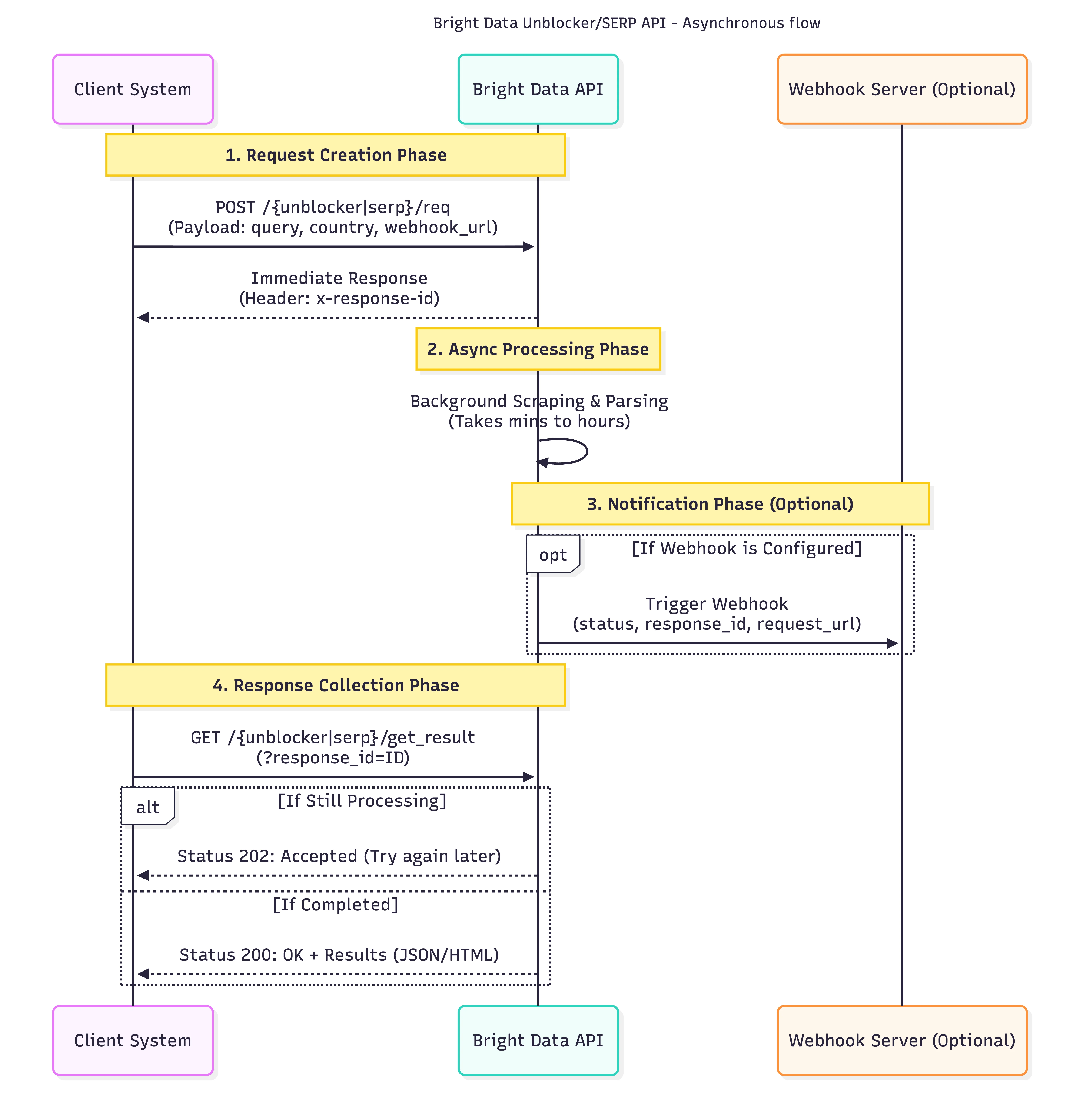 The request returns an `x-response-id` header immediately. You are billed for the submission, not for retrieving the result, and the result is stored for 48 hours. Polling before the job completes returns a `202`. Configure a `webhook_url` per request or in the zone settings and Bright Data POSTs a notification when the result is ready, from the IPs `100.27.150.189` and `18.214.10.85`; allowlist them or your firewall may drop the call. A zone is either sync or async, so keep one zone of each if you need both.
On the SERP API each poll is metered. Use webhooks, or poll no more than once a minute.
## What the tradeoffs are
| | Sync | Async |
| :---------------------- | :------------------------------- | :-------------------------- |
| **Latency** | Seconds | Minutes to hours |
| **Connection handling** | Holds a connection per request | No open connections |
| **Implementation** | One request, one response | Webhook or polling logic |
| **Volume** | Limited by open connections | Thousands of jobs a minute |
| **Cost** | Per successful record or request | The same; retrieval is free |
## Common misconceptions
### Async is always faster than sync
For a few inputs, sync is faster: there is no queue step before the scrape begins. Use sync for small real-time lookups.
### Sync requests fail if they take too long
They do not fail. On the Scraper API a sync request that passes 1 minute answers HTTP 202 with a `snapshot_id` and the job continues; on the Web Unlocker API and SERP API a sync request holds the connection until the result arrives.
## Common questions
### Can I mix sync and async in the same application?
Yes. Most applications use sync for user-facing lookups and async for batch jobs. On the Web Unlocker API and SERP API that means one sync zone and one async zone.
### Is there a cost difference between sync and async?
No. Pricing is per successful record on the Scraper API and per request on the Web Unlocker API and SERP API, whichever mode you use. Retrieving an async result is free.
### What happens if my webhook is down when the results are ready?
The Scraper API retries webhook delivery when your endpoint returns a non-200 status or times out. For guaranteed delivery, use a storage destination instead.
### What if I lose a response ID or snapshot ID?
A Web Unlocker API or SERP API response ID cannot be recovered, so store it with the request metadata when you submit. Scraper API snapshot IDs are listed by [Get snapshots](/api-reference/scrapers/management-apis/get-snapshots) for 30 days.
## Next steps
Trigger, monitor and download a Scraper API batch job.
Webhook, S3, Google Cloud, Azure, SFTP and Snowflake.
Async zones, polling and webhook IPs for search results.
The async form of the unlocker request.
The request returns an `x-response-id` header immediately. You are billed for the submission, not for retrieving the result, and the result is stored for 48 hours. Polling before the job completes returns a `202`. Configure a `webhook_url` per request or in the zone settings and Bright Data POSTs a notification when the result is ready, from the IPs `100.27.150.189` and `18.214.10.85`; allowlist them or your firewall may drop the call. A zone is either sync or async, so keep one zone of each if you need both.
On the SERP API each poll is metered. Use webhooks, or poll no more than once a minute.
## What the tradeoffs are
| | Sync | Async |
| :---------------------- | :------------------------------- | :-------------------------- |
| **Latency** | Seconds | Minutes to hours |
| **Connection handling** | Holds a connection per request | No open connections |
| **Implementation** | One request, one response | Webhook or polling logic |
| **Volume** | Limited by open connections | Thousands of jobs a minute |
| **Cost** | Per successful record or request | The same; retrieval is free |
## Common misconceptions
### Async is always faster than sync
For a few inputs, sync is faster: there is no queue step before the scrape begins. Use sync for small real-time lookups.
### Sync requests fail if they take too long
They do not fail. On the Scraper API a sync request that passes 1 minute answers HTTP 202 with a `snapshot_id` and the job continues; on the Web Unlocker API and SERP API a sync request holds the connection until the result arrives.
## Common questions
### Can I mix sync and async in the same application?
Yes. Most applications use sync for user-facing lookups and async for batch jobs. On the Web Unlocker API and SERP API that means one sync zone and one async zone.
### Is there a cost difference between sync and async?
No. Pricing is per successful record on the Scraper API and per request on the Web Unlocker API and SERP API, whichever mode you use. Retrieving an async result is free.
### What happens if my webhook is down when the results are ready?
The Scraper API retries webhook delivery when your endpoint returns a non-200 status or times out. For guaranteed delivery, use a storage destination instead.
### What if I lose a response ID or snapshot ID?
A Web Unlocker API or SERP API response ID cannot be recovered, so store it with the request metadata when you submit. Scraper API snapshot IDs are listed by [Get snapshots](/api-reference/scrapers/management-apis/get-snapshots) for 30 days.
## Next steps
Trigger, monitor and download a Scraper API batch job.
Webhook, S3, Google Cloud, Azure, SFTP and Snowflake.
Async zones, polling and webhook IPs for search results.
The async form of the unlocker request.