> ## Documentation Index
> Fetch the complete documentation index at: https://docs.brightdata.com/llms.txt
> Use this file to discover all available pages before exploring further.
# Scraper Studio IDE interface reference
> Reference for the Bright Data Scraper Studio JavaScript IDE: templates, stages, debug tabs, input controls, 2 worker settings and the Self-Healing tool.
The Bright Data Scraper Studio IDE is the browser-based JavaScript editor where you write, test, and debug custom scrapers. This page is a reference for every panel, control, and dashboard action you see in the IDE, with links to the guides that show each feature in use.
## What the IDE panel contains
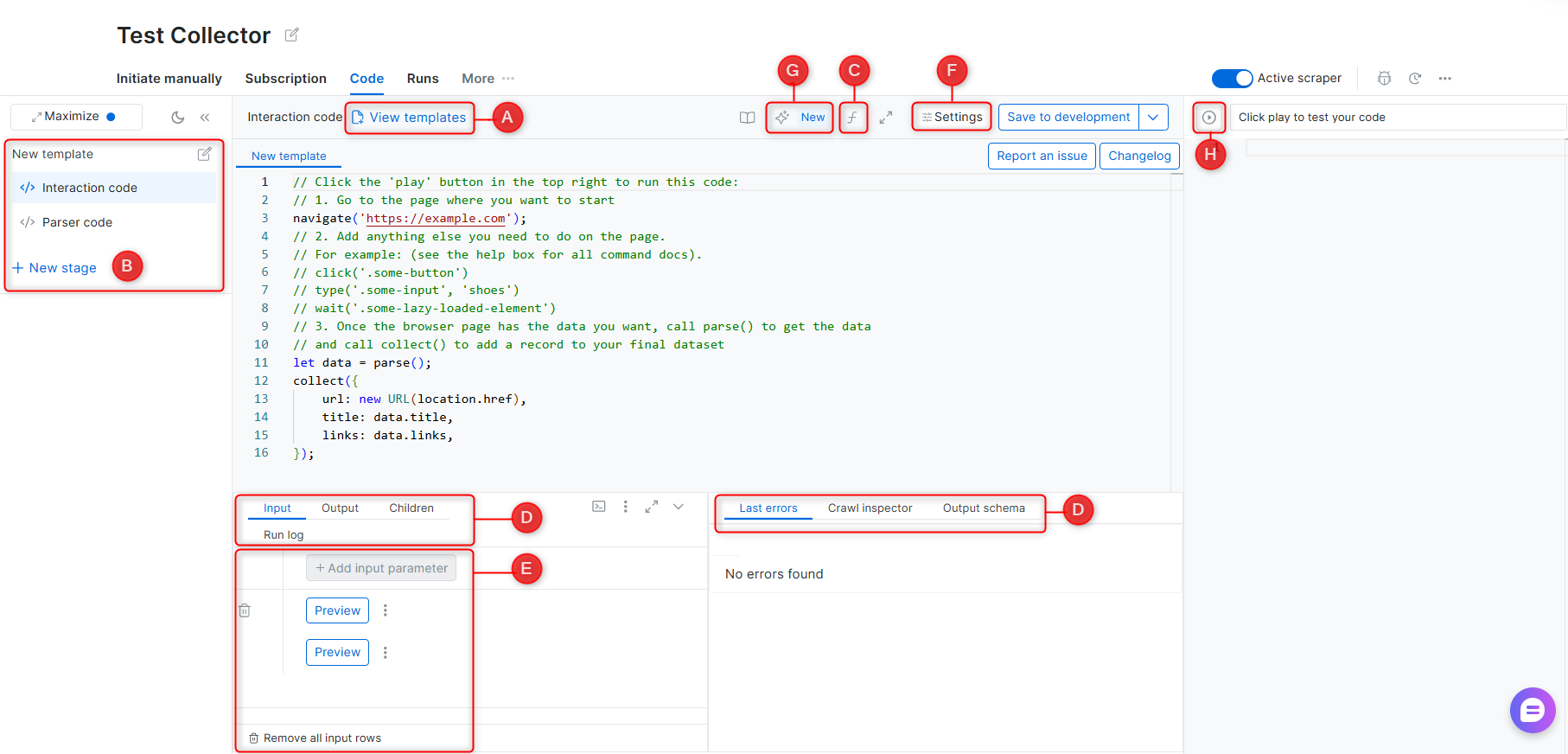
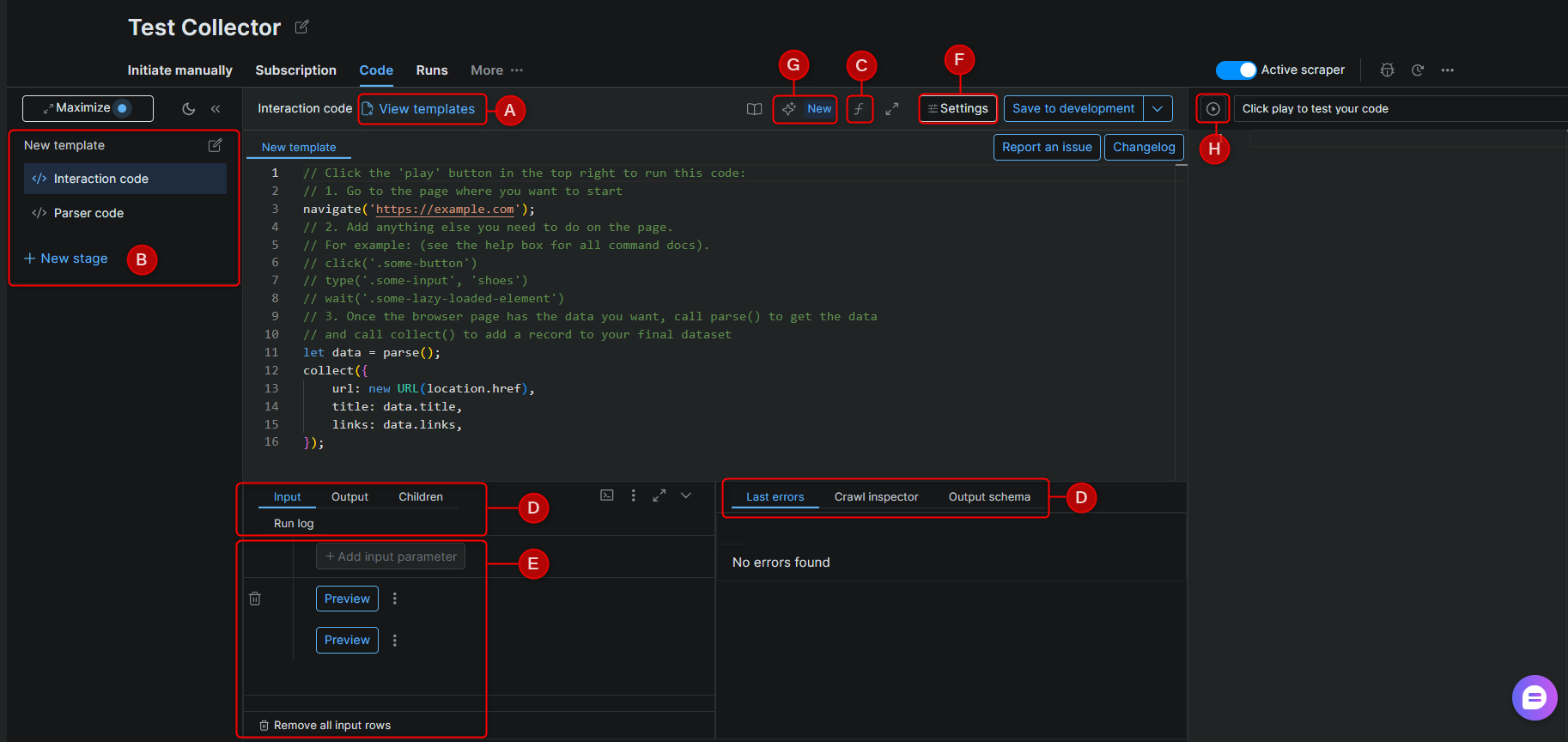
The IDE panel is where you write and test your scraper code. Each labeled component below corresponds to a section of the IDE interface.
 ### A - Templates
A library of pre-built scraper code created by Bright Data's engineers, covering common websites and scraping patterns. Templates are starting points and may require adjustments if a target website's structure has changed.
### B - Stages
Stages allow a scraper to operate across multiple steps in sequence. Each stage receives input from the previous one via next\_stage() or run\_stage(). Use stages when scraping requires navigating across multiple page types - for example, collecting URLs from a listing page, then extracting details from each URL.
> See [Scraper Studio functions](/datasets/scraper-studio/functions) for the full command reference.
### C - Functions reference
An in-IDE reference panel listing all available scraping functions with descriptions and usage examples.
> See [Interaction functions](/datasets/scraper-studio/functions#interaction-functions) and [Parser functions](/datasets/scraper-studio/functions#parser-functions).
### D - Debugging tabs
| Tab | Description |
| ------------------- | ---------------------------------------------------------------------------------------------------------------------------------------------------------------------- |
| **Input** | Define input parameters and select an input set to run a preview test |
| **Output** | Structured data returned by the scraper after a preview run |
| **Children** | Input sets passed to the next stage in a multi-stage scraper |
| **Run log** | Full code execution log for the most recent preview |
| **Browser network** | Browser-level network activity log (equivalent to DevTools > Network tab) |
| **Last errors** | The most recent error messages, including error codes and affected inputs (last 1,000 stored) |
| **Crawl inspector** | All pages crawled during a batch job, including successes and failures. For multi-stage scrapers, use **Search for children** to view pages generated from each parent |
| **Output schema** | Field names and data types for the scraper's output. Click **Edit Schema** to modify input or output schema |
### E - Input
| Control | Description |
| ----------------------- | --------------------------------------------- |
| **Add input parameter** | Define a new input parameter by name and type |
| **New input** | Add a value to an input set for testing |
| **Preview** | Run the scraper against a selected input set |
### F - Settings
| Setting | Description |
| -------------------- | ---------------------------------------------------------------------------------------------- |
| **Worker** | Select Browser Worker or Code Worker for this scraper |
| **Error mode** | Define scraper behavior when an error occurs |
| **Take screenshot** | Capture screenshots of loaded pages during preview runs |
| **Worker per stage** | Assign a different worker type to each stage instead of using one worker for the whole scraper |
> See [Worker types](/datasets/scraper-studio/worker-types) for guidance on choosing between Browser worker and Code worker.
### G - Self-Healing Tool
AI-powered code refactor. Accepts plain-language prompts to fix errors or modify input/output fields without manual code editing.
> See [Self-Healing tool](/datasets/scraper-studio/self-healing-tool).
### H - Preview
Runs the scraper against the currently selected input set. Results appear in the **Output** debugging tab.
## Scraper Dashboard Menu
The Dashboard lists all your scrapers under **My Scrapers**. Each scraper has an action menu with the following options:
| Action | Description |
| ------------------------ | ------------------------------------------------------------------------- |
| **Initiate manually** | Start a collection run directly from the UI |
| **Initiate by API** | Trigger a collection programmatically via API |
| **Run on schedule** | Configure a recurring collection - daily, weekly, or at a custom interval |
| **Delivery preferences** | Set the output format and delivery destination for completed jobs |
| **Code** | Open the scraper in the IDE |
| **Tickets** | View open support tickets for this scraper |
| **Report an issue** | Submit a report for platform, scraper, or data quality issues |
### A - Templates
A library of pre-built scraper code created by Bright Data's engineers, covering common websites and scraping patterns. Templates are starting points and may require adjustments if a target website's structure has changed.
### B - Stages
Stages allow a scraper to operate across multiple steps in sequence. Each stage receives input from the previous one via next\_stage() or run\_stage(). Use stages when scraping requires navigating across multiple page types - for example, collecting URLs from a listing page, then extracting details from each URL.
> See [Scraper Studio functions](/datasets/scraper-studio/functions) for the full command reference.
### C - Functions reference
An in-IDE reference panel listing all available scraping functions with descriptions and usage examples.
> See [Interaction functions](/datasets/scraper-studio/functions#interaction-functions) and [Parser functions](/datasets/scraper-studio/functions#parser-functions).
### D - Debugging tabs
| Tab | Description |
| ------------------- | ---------------------------------------------------------------------------------------------------------------------------------------------------------------------- |
| **Input** | Define input parameters and select an input set to run a preview test |
| **Output** | Structured data returned by the scraper after a preview run |
| **Children** | Input sets passed to the next stage in a multi-stage scraper |
| **Run log** | Full code execution log for the most recent preview |
| **Browser network** | Browser-level network activity log (equivalent to DevTools > Network tab) |
| **Last errors** | The most recent error messages, including error codes and affected inputs (last 1,000 stored) |
| **Crawl inspector** | All pages crawled during a batch job, including successes and failures. For multi-stage scrapers, use **Search for children** to view pages generated from each parent |
| **Output schema** | Field names and data types for the scraper's output. Click **Edit Schema** to modify input or output schema |
### E - Input
| Control | Description |
| ----------------------- | --------------------------------------------- |
| **Add input parameter** | Define a new input parameter by name and type |
| **New input** | Add a value to an input set for testing |
| **Preview** | Run the scraper against a selected input set |
### F - Settings
| Setting | Description |
| -------------------- | ---------------------------------------------------------------------------------------------- |
| **Worker** | Select Browser Worker or Code Worker for this scraper |
| **Error mode** | Define scraper behavior when an error occurs |
| **Take screenshot** | Capture screenshots of loaded pages during preview runs |
| **Worker per stage** | Assign a different worker type to each stage instead of using one worker for the whole scraper |
> See [Worker types](/datasets/scraper-studio/worker-types) for guidance on choosing between Browser worker and Code worker.
### G - Self-Healing Tool
AI-powered code refactor. Accepts plain-language prompts to fix errors or modify input/output fields without manual code editing.
> See [Self-Healing tool](/datasets/scraper-studio/self-healing-tool).
### H - Preview
Runs the scraper against the currently selected input set. Results appear in the **Output** debugging tab.
## Scraper Dashboard Menu
The Dashboard lists all your scrapers under **My Scrapers**. Each scraper has an action menu with the following options:
| Action | Description |
| ------------------------ | ------------------------------------------------------------------------- |
| **Initiate manually** | Start a collection run directly from the UI |
| **Initiate by API** | Trigger a collection programmatically via API |
| **Run on schedule** | Configure a recurring collection - daily, weekly, or at a custom interval |
| **Delivery preferences** | Set the output format and delivery destination for completed jobs |
| **Code** | Open the scraper in the IDE |
| **Tickets** | View open support tickets for this scraper |
| **Report an issue** | Submit a report for platform, scraper, or data quality issues |