> ## Documentation Index
> Fetch the complete documentation index at: https://docs.brightdata.com/llms.txt
> Use this file to discover all available pages before exploring further.
# WARC snapshots in Scraper Studio
> Enable WARC file output in Bright Data Scraper Studio to archive the full HTTP response captured during a browser-worker scrape, ISO 28500 compliant.
Bright Data Scraper Studio can return a WARC (Web ARChive) file alongside every scraped page, capturing the exact HTTP responses the browser received during the crawl. Use this for digital preservation, audit trails, research reproducibility, or any workflow that requires byte-level evidence of what the site served.
## What is a WARC file?
WARC is an ISO-standard file format (ISO 28500) for storing web crawls and HTTP interactions. A single WARC file contains the raw request and response pairs, headers, timestamps, and payload bytes from every browser-side fetch during page load, HTML, CSS, JavaScript, images, and XHR requests.
WARC snapshots are available only on Browser worker scrapers. Code worker scrapers do not run a browser, so there is no browser-level network traffic to archive.
## How do I enable WARC output on a scraper?
Go to [brightdata.com/cp](https://brightdata.com/cp/scrapers), select the scraper you want to archive, and click **Edit code** to open it in the IDE.
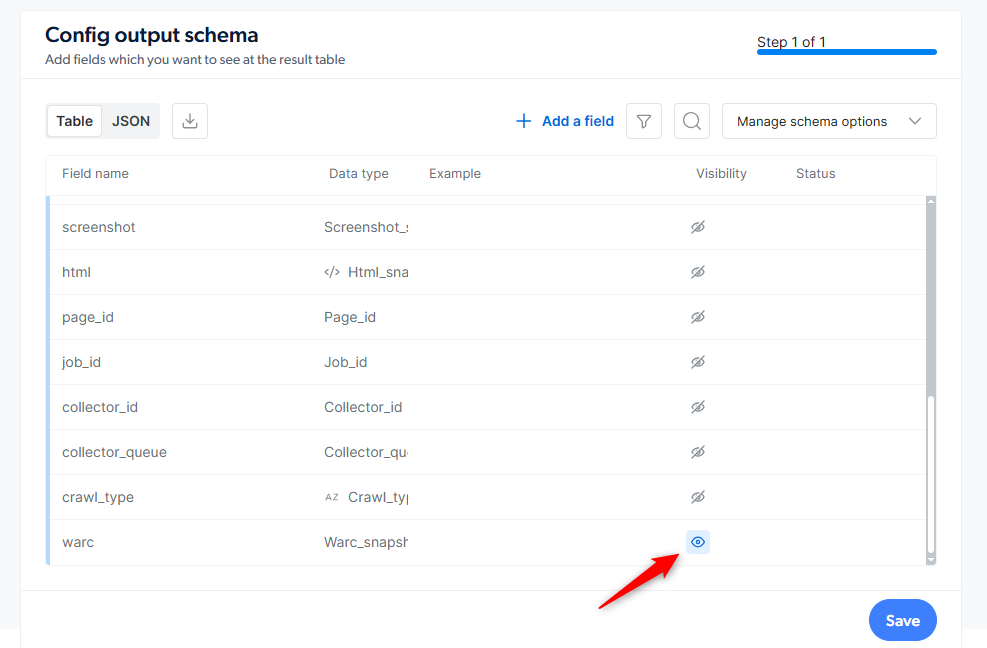
In the **Output Schema** panel, find the `additional_data` section and click the eye icon next to `warc_snapshot` to turn it on.
 Save the scraper to production and trigger a run. The WARC file is produced for every page the scraper collects.
Bright Data delivers the WARC files using whatever delivery method you configured for the scraper: API download, webhook, S3, Google Cloud Storage, Azure, SFTP, or email.
See [Initiate collection and delivery](/datasets/scraper-studio/initiate-collection-and-delivery-options) for delivery options.
## How do I maximize what the WARC captures?
WARC capture records every request the browser makes during page load, but only while the browser is actively loading the page. To capture more, give the browser time to finish loading before the scraper moves on:
* Call `wait_network_idle()` near the end of the interaction code so the browser drains in-flight XHR and fetch requests before Bright Data Scraper Studio finalizes the WARC file.
* Prefer Browser worker over Code worker. Only browser-worker network traffic is recorded; raw `request()` calls in code-worker scrapers are not.
* If the page lazy-loads media via scroll, call `scroll_to('bottom')` or `load_more()` before `wait_network_idle()` so the browser actually fetches those resources.
## Frequently asked questions
Every browser-side request and response captured during page load: HTML documents, CSS, JavaScript, images, fonts, XHR, and fetch calls. Each entry includes the request line, headers, and response payload as the browser received them.
No. WARC snapshots require Browser worker because the capture runs at the browser network layer. Code worker scrapers issue raw HTTP requests directly, with no browser to record traffic from.
WARC files are delivered through the scraper's configured delivery method (API download, webhook, cloud storage, SFTP, or email). File downloads are billed per GB, separately from CPM page loads. See [Scraper Studio specifications](/datasets/scraper-studio/specifications) for current rates.
WARC snapshots follow the scraper's snapshot retention: 16 days for batch collections and 7 days for real-time collections. Export or download the files before the retention window closes. Bright Data does not recover expired data.
## Related
Billing model, retention periods and infrastructure limits
Set the delivery destination for WARC files and collected data
Save the scraper to production and trigger a run. The WARC file is produced for every page the scraper collects.
Bright Data delivers the WARC files using whatever delivery method you configured for the scraper: API download, webhook, S3, Google Cloud Storage, Azure, SFTP, or email.
See [Initiate collection and delivery](/datasets/scraper-studio/initiate-collection-and-delivery-options) for delivery options.
## How do I maximize what the WARC captures?
WARC capture records every request the browser makes during page load, but only while the browser is actively loading the page. To capture more, give the browser time to finish loading before the scraper moves on:
* Call `wait_network_idle()` near the end of the interaction code so the browser drains in-flight XHR and fetch requests before Bright Data Scraper Studio finalizes the WARC file.
* Prefer Browser worker over Code worker. Only browser-worker network traffic is recorded; raw `request()` calls in code-worker scrapers are not.
* If the page lazy-loads media via scroll, call `scroll_to('bottom')` or `load_more()` before `wait_network_idle()` so the browser actually fetches those resources.
## Frequently asked questions
Every browser-side request and response captured during page load: HTML documents, CSS, JavaScript, images, fonts, XHR, and fetch calls. Each entry includes the request line, headers, and response payload as the browser received them.
No. WARC snapshots require Browser worker because the capture runs at the browser network layer. Code worker scrapers issue raw HTTP requests directly, with no browser to record traffic from.
WARC files are delivered through the scraper's configured delivery method (API download, webhook, cloud storage, SFTP, or email). File downloads are billed per GB, separately from CPM page loads. See [Scraper Studio specifications](/datasets/scraper-studio/specifications) for current rates.
WARC snapshots follow the scraper's snapshot retention: 16 days for batch collections and 7 days for real-time collections. Export or download the files before the retention window closes. Bright Data does not recover expired data.
## Related
Billing model, retention periods and infrastructure limits
Set the delivery destination for WARC files and collected data