> ## Documentation Index
> Fetch the complete documentation index at: https://docs.brightdata.com/llms.txt
> Use this file to discover all available pages before exploring further.
# Scrapers Library overview
> Use Bright Data's Scrapers Library to extract structured data from 700+ pre-built scrapers via synchronous or asynchronous API calls.
The [Scrapers](https://brightdata.com/cp/scrapers/browse) lets you extract data from websites programmatically. It offers both synchronous and asynchronous scraping methods for different use cases, from quick data retrieval to complex, large-scale extraction jobs.
The API handles real-time processing for single URL inputs, and batch processing for 2 or more inputs, accommodating various scraping requirements.
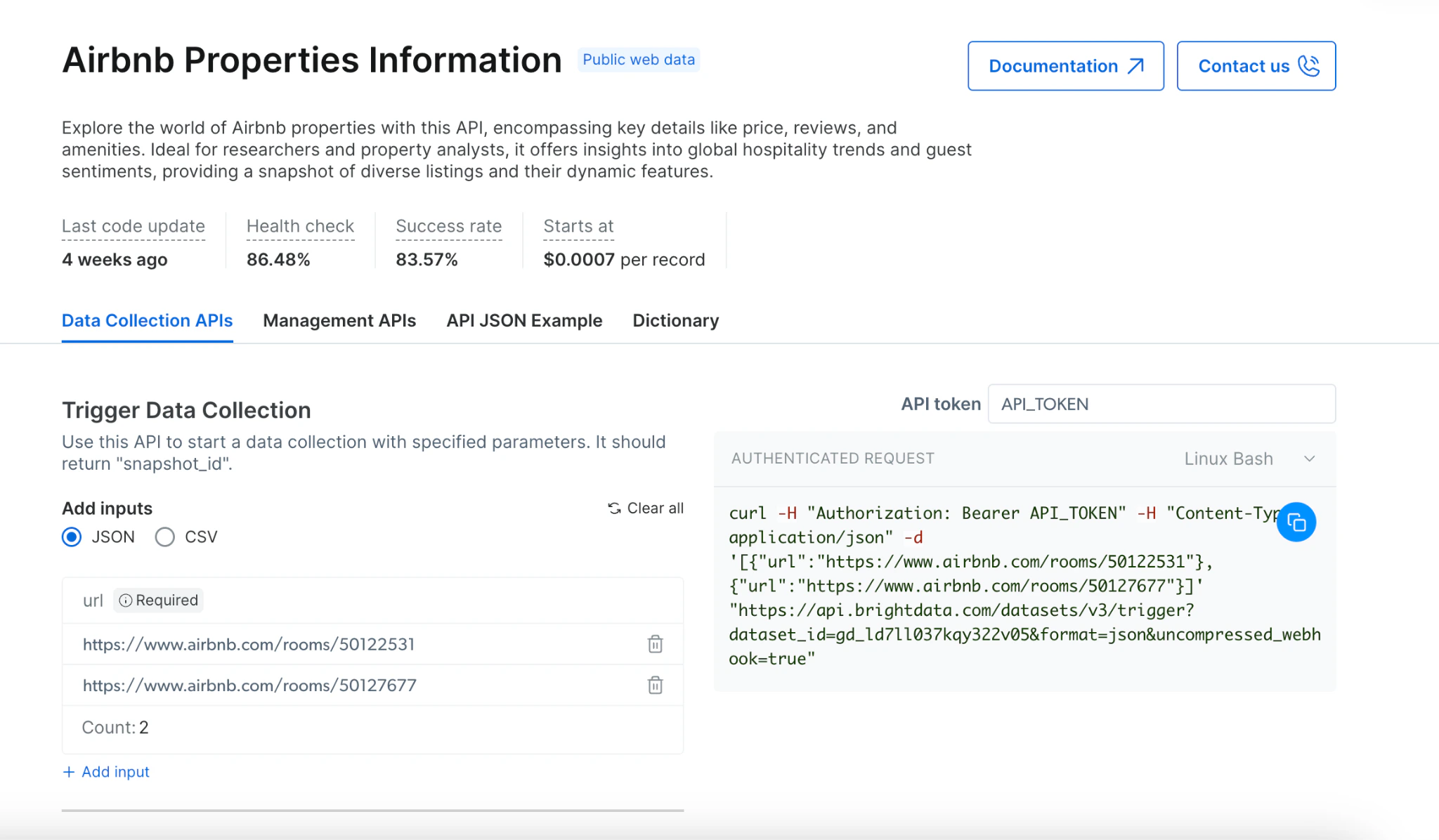 ## Which scraping methods are available
### Synchronous scraping (`/scrape`)
[Synchronous scraping](/api-reference/scrapers/synchronous-requests) allows you to initiate a scrape and receive results in a single request, ideal for real-time quick data retrieval.
```powershell cURL theme={null}
curl "https://api.brightdata.com/datasets/v3/scrape?dataset_id=gd_l1viktl72bvl7bjuj0&format=json" \
-H "Authorization: Bearer API_KEY" \
-H "Content-Type: application/json" \
-d '[{"url": "https://www.linkedin.com/in/elad-moshe-05a90413/"}]'
```
```javascript sync-scrape.js theme={null}
(async function synchronousScrape() {
try {
const response = await fetch(
'https://api.brightdata.com/datasets/v3/scrape?dataset_id=gd_l1viktl72bvl7bjuj0&format=json',
{
method: 'POST',
headers: {
'Authorization': 'Bearer API_KEY',
'Content-Type': 'application/json'
},
body: JSON.stringify([
{"url": "https://www.linkedin.com/in/elad-moshe-05a90413/"}
])
}
);
const data = await response.json();
console.log('Scrape completed:', data);
return data;
} catch (error) {
console.error('Error during scrape:', error);
}
})();
```
```python sync_scrape.py theme={null}
import requests
def synchronous_scrape():
url = "https://api.brightdata.com/datasets/v3/scrape"
params = {
"dataset_id": "gd_l1viktl72bvl7bjuj0",
"format": "json"
}
headers = {
"Authorization": "Bearer API_KEY",
"Content-Type": "application/json"
}
data = [
{"url": "https://www.linkedin.com/in/elad-moshe-05a90413/"}
]
response = requests.post(url, params=params, headers=headers, json=data)
response.raise_for_status()
print("Scrape completed:", response.json())
return response.json()
synchronous_scrape()
```
```json sample-response.json theme={null}
[
{
"id": "john-doe-123abc",
"name": "John Doe",
"city": "San Francisco",
"country_code": "US",
"about": "Lorem ipsum dolor sit amet, consectetur adipiscing elit. Proin vel magna at nunc commodo...",
"current_company": {
"link": "https://www.linkedin.com/company/acme-corp",
"name": "ACME Corporation",
"company_id": "acme-corp"
},
"url": "https://www.linkedin.com/in/john-doe-123abc/",
"people_also_viewed": [
{
"profile_link": "https://www.linkedin.com/in/jane-smith",
"name": "Jane Smith",
"location": "New York, USA"
},
{
"profile_link": "https://www.linkedin.com/in/robert-johnson",
"name": "Robert Johnson",
"location": "Boston, USA"
}
],
"educations_details": "Stanford University",
"education": [
{
"title": "Stanford University",
"url": "https://www.linkedin.com/school/stanford-university/",
"start_year": "2010",
"end_year": "2014"
}
],
"avatar": "https://example.com/avatar.jpg",
"courses": [
{
"subtitle": "-",
"title": "Machine Learning"
},
{
"subtitle": "-",
"title": "Data Structures"
},
{
"subtitle": "-",
"title": "Cloud Computing"
}
],
"followers": 1250,
"connections": 500,
"current_company_name": "ACME Corporation",
"projects": [
{
"title": "Open Source Project X",
"start_date": "January 2022",
"end_date": "Present",
"description": "Lorem ipsum dolor sit amet, consectetur adipiscing elit. Sed do eiusmod tempor incididunt ut labore et dolore magna aliqua."
}
],
"timestamp": "2023-06-15T14:27:07.001Z",
"input": {
"url": "https://www.linkedin.com/in/john-doe-123abc/"
}
}
]
```
#### Key features of synchronous scraping:
* Real-time results in the same request
* Perfect for single URL and quick extractions
* Simplified error handling
* 1-minute timeout (automatically switches to async if exceeded)
### Asynchronous scraping (`/trigger`)
[Asynchronous scraping](/api-reference/rest-api/scraper/asynchronous-requests) initiates a job that runs in the background, allowing you to handle larger and more complex scraping tasks in batch mode. Batch mode allows up to 100 concurrent requests, and each batch can process up to 1GB of inputs file size, making it ideal for high-volume data collection projects.
Discovery tasks (finding related products, scraping multiple pages) require the asynchronous scraping (`/trigger`) due to their need to navigate and extract data across multiple web pages.
```shell cURL theme={null}
curl "https://api.brightdata.com/datasets/v3/trigger?dataset_id=gd_l1viktl72bvl7bjuj0&format=json&uncompressed_webhook=true" \
-H "Authorization: Bearer API_KEY" \
-H "Content-Type: application/json" \
-d '[
{"url": "https://www.linkedin.com/in/elad-moshe-05a90413/"},
{"url": "https://www.linkedin.com/in/jonathan-myrvik-3baa01109"},
{"url": "https://www.linkedin.com/in/aviv-tal-75b81/"},
{"url": "https://www.linkedin.com/in/bulentakar/"},
{"url": "https://www.linkedin.com/in/nnikolaev/"}
]'
```
```javascript trigger-async-scrape.js theme={null}
(async function asynchronousScrape() {
try {
const response = await fetch(
'https://api.brightdata.com/datasets/v3/trigger?dataset_id=gd_l1viktl72bvl7bjuj0&format=json',
{
method: 'POST',
headers: {
'Authorization': 'Bearer API_KEY',
'Content-Type': 'application/json'
},
body: JSON.stringify([
{"url": "https://www.linkedin.com/in/elad-moshe-05a90413/"},
{"url": "https://www.linkedin.com/in/jonathan-myrvik-3baa01109"},
{"url": "https://www.linkedin.com/in/aviv-tal-75b81/"},
{"url": "https://www.linkedin.com/in/bulentakar/"},
{"url": "https://www.linkedin.com/in/nnikolaev/"}
])
}
);
const data = await response.json();
console.log('Snapshot ID:', data);
return data;
} catch (error) {
console.error('Error during scrape:', error);
}
})();
```
```python trigger-async-scrape.py theme={null}
import requests
def asynchronous_scrape():
url = "https://api.brightdata.com/datasets/v3/trigger"
params = {
"dataset_id": "gd_l1viktl72bvl7bjuj0",
"format": "json"
}
headers = {
"Authorization": "Bearer API_KEY",
"Content-Type": "application/json"
}
data = [
{"url": "https://www.linkedin.com/in/elad-moshe-05a90413/"},
{"url": "https://www.linkedin.com/in/jonathan-myrvik-3baa01109"},
{"url": "https://www.linkedin.com/in/aviv-tal-75b81/"},
{"url": "https://www.linkedin.com/in/bulentakar/"},
{"url": "https://www.linkedin.com/in/nnikolaev/"}
]
response = requests.post(url, params=params, headers=headers, json=data)
response.raise_for_status()
print("Snapshot ID:", response.json())
return response.json()
asynchronous_scrape()
```
```json sample-respone.json theme={null}
{
"snapshot_id": "s_maof15r7v28n4gc95"
}
```
#### Key features of asynchronous scraping:
* Handles multiple URLs in batch processing (up to 1GB of inputs file size)
* No timeout limitations for long-running jobs
* [Progress monitoring](https://docs.brightdata.com/api-reference/scrapers/management-apis/monitor-progress#monitor-progress) via status checks
* Ideal for large datasets
* Required for "discovery" tasks that need to crawl multiple pages or perform complex data extraction
### Understanding Synchronous and Asynchronous Scraping
When dealing with web scraping, it's essential to choose the right method based on your needs:
#### Synchronous Scraping, `/scrape` (labeled **"Synchronous (Real-time)"** in the UI):
* **Purpose**: Designed for quick, single-url jobs where instant results are required.
* **Response**: Returns the scraped data directly within the same request.
* **Ideal for**: Quick data checks, single-page extractions without long runtimes.
Have a simple one-link case? Consider trying Synchronous Requests for instant results.
#### Asynchronous Scraping, `/trigger` (labeled **"Asynchronous"** in the UI):
* **Purpose**: Used for large, complex, or long-running scraping jobs.
* **Response**: Immediately returns a snapshot\_id instead of data. This snapshot\_id is used to track job progress or download the data later.
* **Ideal for**: Batch processing, multiple URLs, or high-volume data collection. Requires managing multiple pages or complex data extractions.
Looking for large-scale scraping? Asynchronous Requests might be suited for your complex tasks.
## How To Collect?
## [Trigger a Collection](https://docs.brightdata.com/api-reference/rest-api/scraper/asynchronous-requests) ([Demo](https://app.arcade.software/share/BPGoTdRmf89Ip1EQuIOW))
1. Choose your target website from our [API offerings](https://brightdata.com/cp/scrapers/browse?category=all)
2. Select the appropriate scraper for your needs
3. Decide between synchronous or asynchronous scraping based on your requirements:
* Use synchronous (`/scrape`) for immediate results and simple extractions
* Use asynchronous (`/trigger`) for complex scraping, multiple URLs, or large datasets
4. Provide your input URLs via JSON or CSV
5. Enable error reporting to track any issues
6. Select your preferred delivery method
* [External storage](#via-deliver-to-external-storage:)
* [Webhook](https://docs.brightdata.com/datasets/scrapers/scrapers-library/overview#via-webhook%3A)
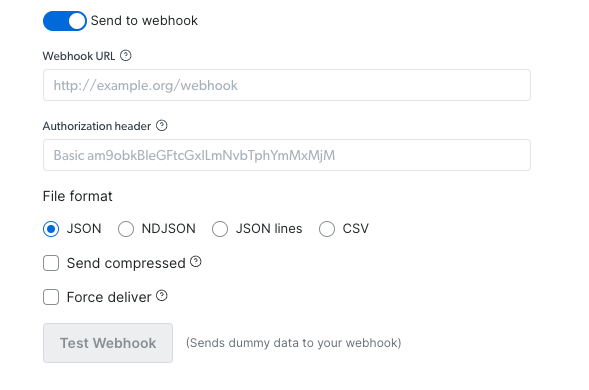
### How to deliver via webhook
1. Set your webhook URL and Authorization header if needed
2. Select your preferred file format (JSON, NDJSON, JSON lines, CSV)
3. Choose whether to send it compressed or not
4. Test webhook to validate that the operation runs successfully (using sample data)
5. Copy the code and run it.
## Which scraping methods are available
### Synchronous scraping (`/scrape`)
[Synchronous scraping](/api-reference/scrapers/synchronous-requests) allows you to initiate a scrape and receive results in a single request, ideal for real-time quick data retrieval.
```powershell cURL theme={null}
curl "https://api.brightdata.com/datasets/v3/scrape?dataset_id=gd_l1viktl72bvl7bjuj0&format=json" \
-H "Authorization: Bearer API_KEY" \
-H "Content-Type: application/json" \
-d '[{"url": "https://www.linkedin.com/in/elad-moshe-05a90413/"}]'
```
```javascript sync-scrape.js theme={null}
(async function synchronousScrape() {
try {
const response = await fetch(
'https://api.brightdata.com/datasets/v3/scrape?dataset_id=gd_l1viktl72bvl7bjuj0&format=json',
{
method: 'POST',
headers: {
'Authorization': 'Bearer API_KEY',
'Content-Type': 'application/json'
},
body: JSON.stringify([
{"url": "https://www.linkedin.com/in/elad-moshe-05a90413/"}
])
}
);
const data = await response.json();
console.log('Scrape completed:', data);
return data;
} catch (error) {
console.error('Error during scrape:', error);
}
})();
```
```python sync_scrape.py theme={null}
import requests
def synchronous_scrape():
url = "https://api.brightdata.com/datasets/v3/scrape"
params = {
"dataset_id": "gd_l1viktl72bvl7bjuj0",
"format": "json"
}
headers = {
"Authorization": "Bearer API_KEY",
"Content-Type": "application/json"
}
data = [
{"url": "https://www.linkedin.com/in/elad-moshe-05a90413/"}
]
response = requests.post(url, params=params, headers=headers, json=data)
response.raise_for_status()
print("Scrape completed:", response.json())
return response.json()
synchronous_scrape()
```
```json sample-response.json theme={null}
[
{
"id": "john-doe-123abc",
"name": "John Doe",
"city": "San Francisco",
"country_code": "US",
"about": "Lorem ipsum dolor sit amet, consectetur adipiscing elit. Proin vel magna at nunc commodo...",
"current_company": {
"link": "https://www.linkedin.com/company/acme-corp",
"name": "ACME Corporation",
"company_id": "acme-corp"
},
"url": "https://www.linkedin.com/in/john-doe-123abc/",
"people_also_viewed": [
{
"profile_link": "https://www.linkedin.com/in/jane-smith",
"name": "Jane Smith",
"location": "New York, USA"
},
{
"profile_link": "https://www.linkedin.com/in/robert-johnson",
"name": "Robert Johnson",
"location": "Boston, USA"
}
],
"educations_details": "Stanford University",
"education": [
{
"title": "Stanford University",
"url": "https://www.linkedin.com/school/stanford-university/",
"start_year": "2010",
"end_year": "2014"
}
],
"avatar": "https://example.com/avatar.jpg",
"courses": [
{
"subtitle": "-",
"title": "Machine Learning"
},
{
"subtitle": "-",
"title": "Data Structures"
},
{
"subtitle": "-",
"title": "Cloud Computing"
}
],
"followers": 1250,
"connections": 500,
"current_company_name": "ACME Corporation",
"projects": [
{
"title": "Open Source Project X",
"start_date": "January 2022",
"end_date": "Present",
"description": "Lorem ipsum dolor sit amet, consectetur adipiscing elit. Sed do eiusmod tempor incididunt ut labore et dolore magna aliqua."
}
],
"timestamp": "2023-06-15T14:27:07.001Z",
"input": {
"url": "https://www.linkedin.com/in/john-doe-123abc/"
}
}
]
```
#### Key features of synchronous scraping:
* Real-time results in the same request
* Perfect for single URL and quick extractions
* Simplified error handling
* 1-minute timeout (automatically switches to async if exceeded)
### Asynchronous scraping (`/trigger`)
[Asynchronous scraping](/api-reference/rest-api/scraper/asynchronous-requests) initiates a job that runs in the background, allowing you to handle larger and more complex scraping tasks in batch mode. Batch mode allows up to 100 concurrent requests, and each batch can process up to 1GB of inputs file size, making it ideal for high-volume data collection projects.
Discovery tasks (finding related products, scraping multiple pages) require the asynchronous scraping (`/trigger`) due to their need to navigate and extract data across multiple web pages.
```shell cURL theme={null}
curl "https://api.brightdata.com/datasets/v3/trigger?dataset_id=gd_l1viktl72bvl7bjuj0&format=json&uncompressed_webhook=true" \
-H "Authorization: Bearer API_KEY" \
-H "Content-Type: application/json" \
-d '[
{"url": "https://www.linkedin.com/in/elad-moshe-05a90413/"},
{"url": "https://www.linkedin.com/in/jonathan-myrvik-3baa01109"},
{"url": "https://www.linkedin.com/in/aviv-tal-75b81/"},
{"url": "https://www.linkedin.com/in/bulentakar/"},
{"url": "https://www.linkedin.com/in/nnikolaev/"}
]'
```
```javascript trigger-async-scrape.js theme={null}
(async function asynchronousScrape() {
try {
const response = await fetch(
'https://api.brightdata.com/datasets/v3/trigger?dataset_id=gd_l1viktl72bvl7bjuj0&format=json',
{
method: 'POST',
headers: {
'Authorization': 'Bearer API_KEY',
'Content-Type': 'application/json'
},
body: JSON.stringify([
{"url": "https://www.linkedin.com/in/elad-moshe-05a90413/"},
{"url": "https://www.linkedin.com/in/jonathan-myrvik-3baa01109"},
{"url": "https://www.linkedin.com/in/aviv-tal-75b81/"},
{"url": "https://www.linkedin.com/in/bulentakar/"},
{"url": "https://www.linkedin.com/in/nnikolaev/"}
])
}
);
const data = await response.json();
console.log('Snapshot ID:', data);
return data;
} catch (error) {
console.error('Error during scrape:', error);
}
})();
```
```python trigger-async-scrape.py theme={null}
import requests
def asynchronous_scrape():
url = "https://api.brightdata.com/datasets/v3/trigger"
params = {
"dataset_id": "gd_l1viktl72bvl7bjuj0",
"format": "json"
}
headers = {
"Authorization": "Bearer API_KEY",
"Content-Type": "application/json"
}
data = [
{"url": "https://www.linkedin.com/in/elad-moshe-05a90413/"},
{"url": "https://www.linkedin.com/in/jonathan-myrvik-3baa01109"},
{"url": "https://www.linkedin.com/in/aviv-tal-75b81/"},
{"url": "https://www.linkedin.com/in/bulentakar/"},
{"url": "https://www.linkedin.com/in/nnikolaev/"}
]
response = requests.post(url, params=params, headers=headers, json=data)
response.raise_for_status()
print("Snapshot ID:", response.json())
return response.json()
asynchronous_scrape()
```
```json sample-respone.json theme={null}
{
"snapshot_id": "s_maof15r7v28n4gc95"
}
```
#### Key features of asynchronous scraping:
* Handles multiple URLs in batch processing (up to 1GB of inputs file size)
* No timeout limitations for long-running jobs
* [Progress monitoring](https://docs.brightdata.com/api-reference/scrapers/management-apis/monitor-progress#monitor-progress) via status checks
* Ideal for large datasets
* Required for "discovery" tasks that need to crawl multiple pages or perform complex data extraction
### Understanding Synchronous and Asynchronous Scraping
When dealing with web scraping, it's essential to choose the right method based on your needs:
#### Synchronous Scraping, `/scrape` (labeled **"Synchronous (Real-time)"** in the UI):
* **Purpose**: Designed for quick, single-url jobs where instant results are required.
* **Response**: Returns the scraped data directly within the same request.
* **Ideal for**: Quick data checks, single-page extractions without long runtimes.
Have a simple one-link case? Consider trying Synchronous Requests for instant results.
#### Asynchronous Scraping, `/trigger` (labeled **"Asynchronous"** in the UI):
* **Purpose**: Used for large, complex, or long-running scraping jobs.
* **Response**: Immediately returns a snapshot\_id instead of data. This snapshot\_id is used to track job progress or download the data later.
* **Ideal for**: Batch processing, multiple URLs, or high-volume data collection. Requires managing multiple pages or complex data extractions.
Looking for large-scale scraping? Asynchronous Requests might be suited for your complex tasks.
## How To Collect?
## [Trigger a Collection](https://docs.brightdata.com/api-reference/rest-api/scraper/asynchronous-requests) ([Demo](https://app.arcade.software/share/BPGoTdRmf89Ip1EQuIOW))
1. Choose your target website from our [API offerings](https://brightdata.com/cp/scrapers/browse?category=all)
2. Select the appropriate scraper for your needs
3. Decide between synchronous or asynchronous scraping based on your requirements:
* Use synchronous (`/scrape`) for immediate results and simple extractions
* Use asynchronous (`/trigger`) for complex scraping, multiple URLs, or large datasets
4. Provide your input URLs via JSON or CSV
5. Enable error reporting to track any issues
6. Select your preferred delivery method
* [External storage](#via-deliver-to-external-storage:)
* [Webhook](https://docs.brightdata.com/datasets/scrapers/scrapers-library/overview#via-webhook%3A)
### How to deliver via webhook
1. Set your webhook URL and Authorization header if needed
2. Select your preferred file format (JSON, NDJSON, JSON lines, CSV)
3. Choose whether to send it compressed or not
4. Test webhook to validate that the operation runs successfully (using sample data)
5. Copy the code and run it.
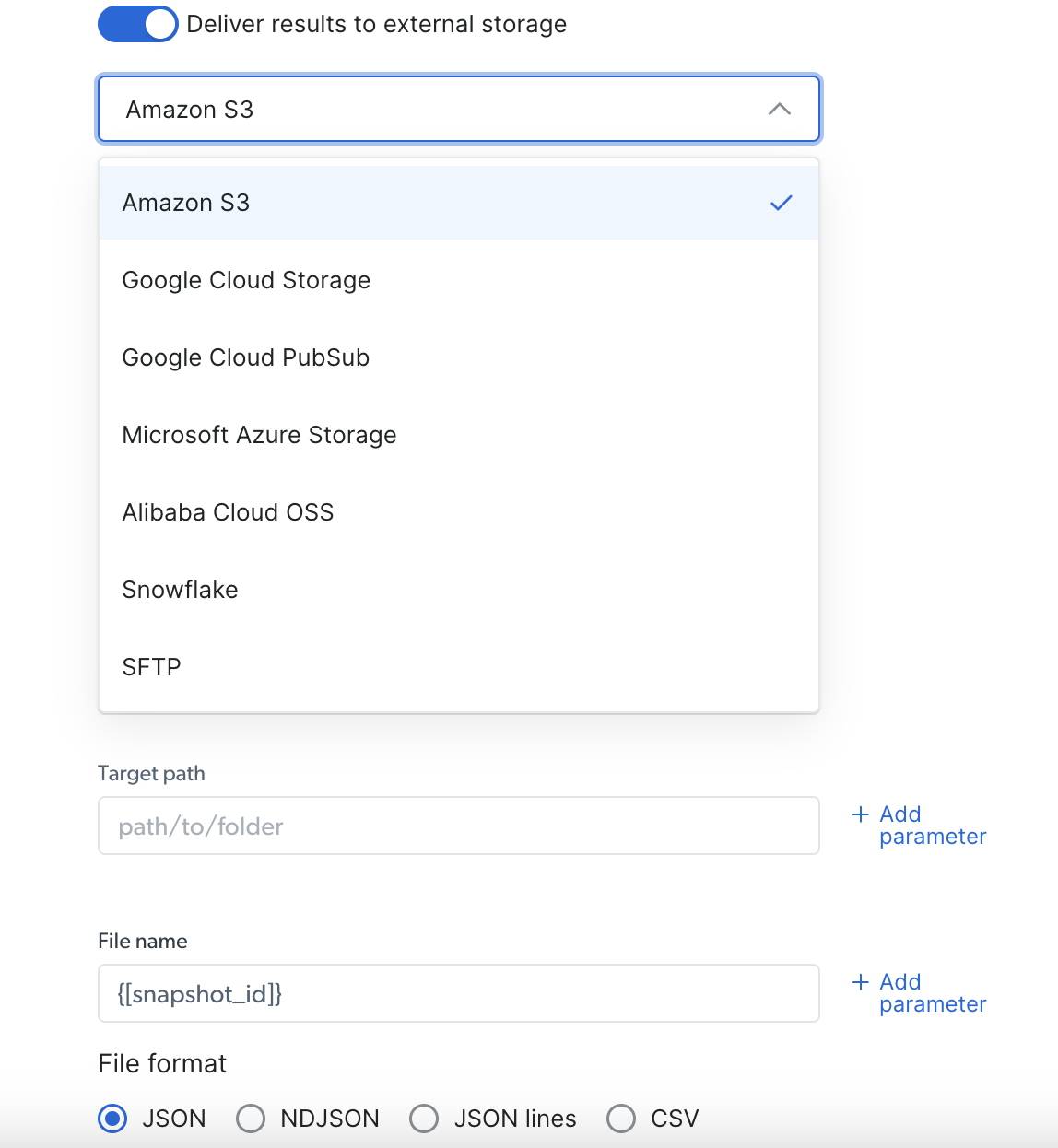
 ### Via Deliver to external storage:
1. Select your preferred delivery location (S3, Google Cloud, Snowflake, or any other available option)
2. Fill out the needed credentials according to your pick
3. Select your preferred file format (JSON, NDJSON, JSON lines, CSV)
4. Copy the code and run it.
### Via Deliver to external storage:
1. Select your preferred delivery location (S3, Google Cloud, Snowflake, or any other available option)
2. Fill out the needed credentials according to your pick
3. Select your preferred file format (JSON, NDJSON, JSON lines, CSV)
4. Copy the code and run it.
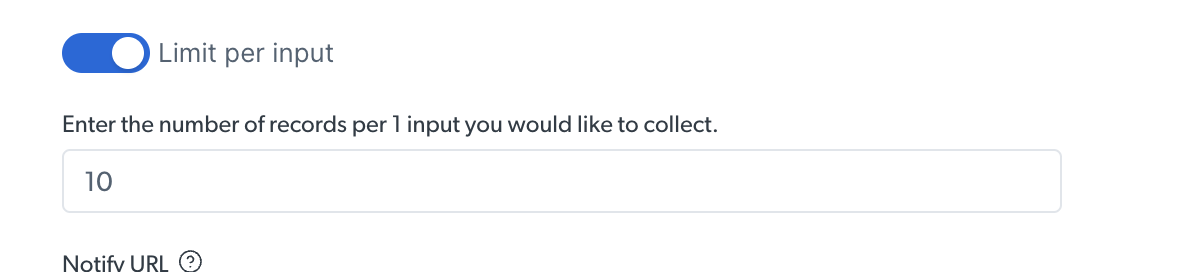
 ### How to limit records per input
While running a discovery API, you can set a limit of the number of results per input provided
### How to limit records per input
While running a discovery API, you can set a limit of the number of results per input provided
 In the example below, we’ve set a limitation of 10 results per input
 ## How to manage snapshots with the Management APIs
Additional actions you can do using our different API endpoints
## How to manage snapshots with the Management APIs
Additional actions you can do using our different API endpoints
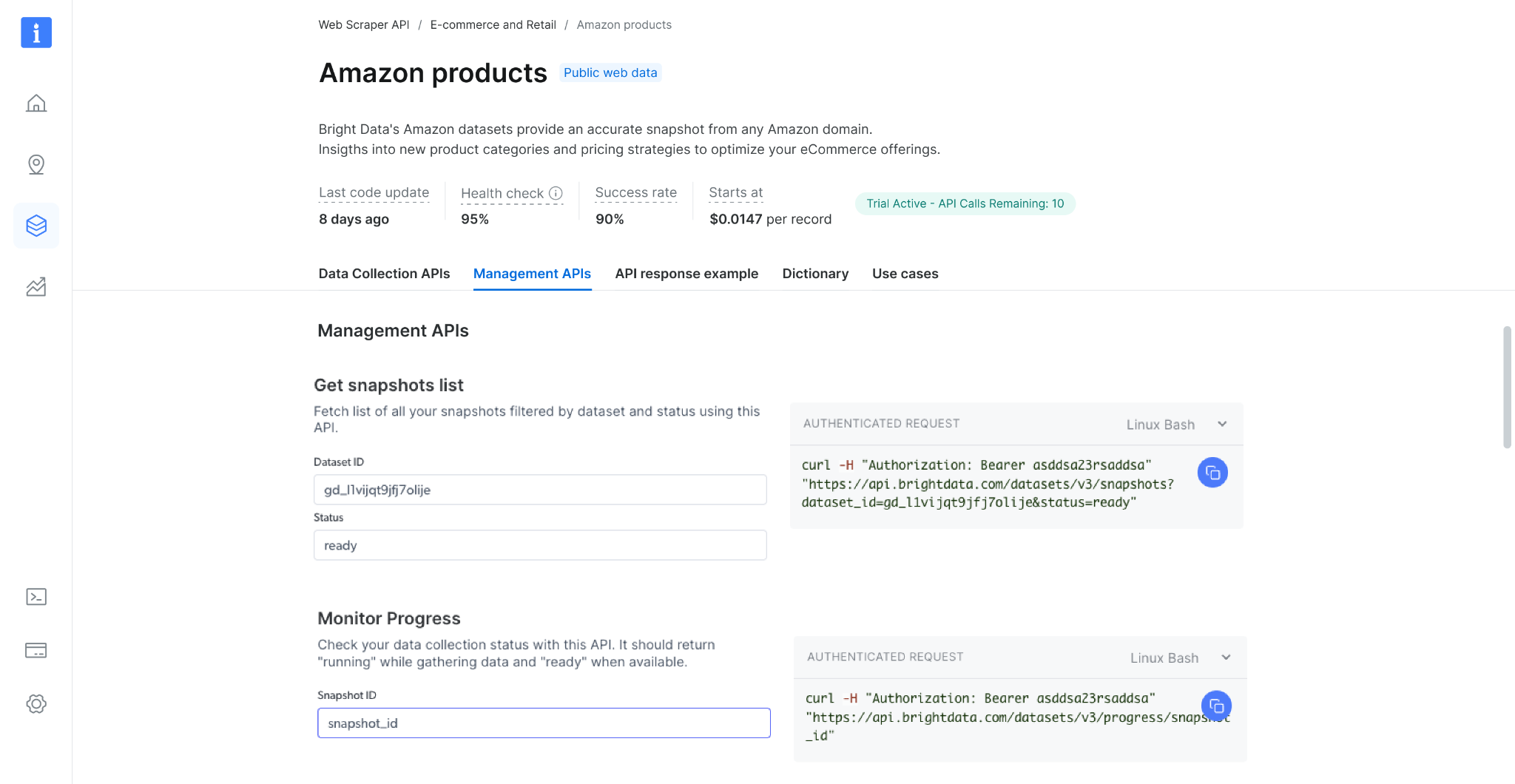 ### Get snapshot list
Check your snapshot history with this API. It returns a list of all available snapshots, including the snapshot ID, creation date, and status. ([link to endpoint playground](https://docs.brightdata.com/api-reference/scrapers/management-apis/get-snapshots))
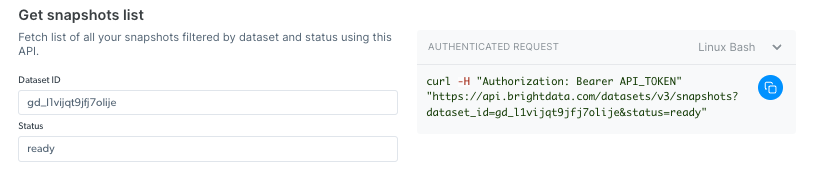
### Get snapshot list
Check your snapshot history with this API. It returns a list of all available snapshots, including the snapshot ID, creation date, and status. ([link to endpoint playground](https://docs.brightdata.com/api-reference/scrapers/management-apis/get-snapshots))
 If you are confused by receiving a `snapshot_id`, it means an asynchronous call was made. Consider using the synchronous `/scrape` endpoint for simpler, immediate tasks.
### Monitor Progress
Check your data collection status with this API. It should return "collecting" while gathering data, "digesting" when processing, and "ready" when available. ([link to endpoint playground](https://docs.brightdata.com/api-reference/scrapers/management-apis/monitor-progress))
If you are confused by receiving a `snapshot_id`, it means an asynchronous call was made. Consider using the synchronous `/scrape` endpoint for simpler, immediate tasks.
### Monitor Progress
Check your data collection status with this API. It should return "collecting" while gathering data, "digesting" when processing, and "ready" when available. ([link to endpoint playground](https://docs.brightdata.com/api-reference/scrapers/management-apis/monitor-progress))
 ### How to cancel a snapshot
Cancel a running collection, stop your data collection before finishing with this API. It should return "ok" while managing to stop the collection. ([link to endpoint playground](https://docs.brightdata.com/api-reference/scrapers/management-apis/cancel-snapshot))
### Monitor Delivery
Check your delivery status with this API. It should return "done" while the delivery was completed, "canceled" when the delivery was canceled, and "Failed" when the delivery was not completed. ([link to endpoint playground](https://docs.brightdata.com/api-reference/scrapers/management-apis/monitor-delivery))
## Known system limitations
### Maximum file size
| | |
| ---------------- | --------------------------------------------- |
| Input | up to 1GB |
| Webhook delivery | up to 1GB |
| API Download | up to 5GB (for bigger files use API delivery) |
| Delivery API | unlimited |
## Rate Limits & Concurrent Requests
To ensure stable performance and fair usage, the Scrapers enforces rate limits based on the type of request: single input or batch input. Exceeding these limits will result in a 429 error response.
### **What is the Rate Limit?**
The Scrapers supports the following maximum number of concurrent requests:
| Method | Rate-limit |
| :----------------------------------- | :----------------------------- |
| 1 input per request (real-time) | up to 5000 concurrent requests |
| 2 or more inputs per request (batch) | up to 100 concurrent requests |
If your application exceeds these limits, the API will return the following error:
> **429 Client Error: Too Many Requests for URL**
This error indicates that your request rate has surpassed the allowed threshold.
### **How to Avoid Hitting Rate Limits**
To reduce the number of concurrent requests and stay within the rate limits:
* Use the **batch input method** whenever possible.
* A single batch request can include up to **1GB of input data** (file size).
* By combining multiple inputs into one batch request, you can minimize the total number of requests sent concurrently.
When using the Discovery Scraper the system automatically utilizes batch input method where rate limit is up to 100 requests.
### **Best Practices for Managing API Rate Limits**
* Monitor your request volume and adjust your concurrency accordingly.
* Use batch requests to group multiple scraping tasks into fewer API calls.
* Contact our support team if you need help optimizing your requests.
### How to cancel a snapshot
Cancel a running collection, stop your data collection before finishing with this API. It should return "ok" while managing to stop the collection. ([link to endpoint playground](https://docs.brightdata.com/api-reference/scrapers/management-apis/cancel-snapshot))
### Monitor Delivery
Check your delivery status with this API. It should return "done" while the delivery was completed, "canceled" when the delivery was canceled, and "Failed" when the delivery was not completed. ([link to endpoint playground](https://docs.brightdata.com/api-reference/scrapers/management-apis/monitor-delivery))
## Known system limitations
### Maximum file size
| | |
| ---------------- | --------------------------------------------- |
| Input | up to 1GB |
| Webhook delivery | up to 1GB |
| API Download | up to 5GB (for bigger files use API delivery) |
| Delivery API | unlimited |
## Rate Limits & Concurrent Requests
To ensure stable performance and fair usage, the Scrapers enforces rate limits based on the type of request: single input or batch input. Exceeding these limits will result in a 429 error response.
### **What is the Rate Limit?**
The Scrapers supports the following maximum number of concurrent requests:
| Method | Rate-limit |
| :----------------------------------- | :----------------------------- |
| 1 input per request (real-time) | up to 5000 concurrent requests |
| 2 or more inputs per request (batch) | up to 100 concurrent requests |
If your application exceeds these limits, the API will return the following error:
> **429 Client Error: Too Many Requests for URL**
This error indicates that your request rate has surpassed the allowed threshold.
### **How to Avoid Hitting Rate Limits**
To reduce the number of concurrent requests and stay within the rate limits:
* Use the **batch input method** whenever possible.
* A single batch request can include up to **1GB of input data** (file size).
* By combining multiple inputs into one batch request, you can minimize the total number of requests sent concurrently.
When using the Discovery Scraper the system automatically utilizes batch input method where rate limit is up to 100 requests.
### **Best Practices for Managing API Rate Limits**
* Monitor your request volume and adjust your concurrency accordingly.
* Use batch requests to group multiple scraping tasks into fewer API calls.
* Contact our support team if you need help optimizing your requests.