> ## Documentation Index
> Fetch the complete documentation index at: https://docs.brightdata.com/llms.txt
> Use this file to discover all available pages before exploring further.
# Set Up Bright Data With ClonBrowser
> Configure Bright Data proxies in ClonBrowser to route browsing and automation profiles through residential, datacenter, ISP, or mobile IPs. Spans 195 countries.
**Account management is not a supported use case** on the Bright Data platform as of April 1, 2026. This includes managing accounts on platforms like TikTok, Instagram, or similar services. Bright Data proxies cannot be used for this purpose. See [Acceptable Use Policy](https://brightdata.com/acceptable-use-policy) for details.
### Your proxy access information
Bright Data proxies are grouped in "Proxy zones". Each zone holds the configuration for the proxies it holds.
To get access to the proxy zone:
1. Login to Bright Data control panel
2. Select the proxy zone or setup a new one
3. Click on the new zone name, and select the **Overview** tab.
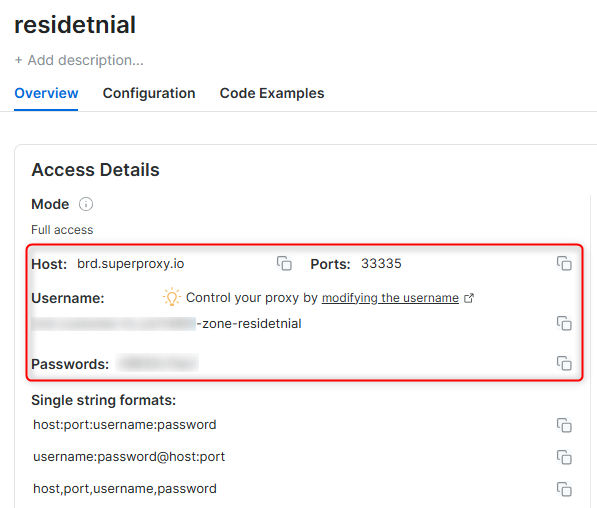
4. In the overview tab, under **Access details** you can find the proxy access details, and copy them to clipboard on click.
5. You will need: Proxy Host, Proxy Port, Proxy Zone username and Proxy Zone password.
6. Click on the copy icons to copy the text to your clipboard and paste in your tool's proxy configuration.
### Access Details Section Example
 ### Residential proxy access
To access Bright Data's **Residential Proxies** you will need to either get verified by our compliance team, or install a certificate. [Read more...](https://docs.brightdata.com/proxy-networks/residential/network-access)
### Targeting search engines?
If you target a search engine like google, bing or yandex, you need a special Search Engine Results Page (**SERP**) proxy API. Use Bright Data SERP API to target search engines.
[Click here to read more about Bright Data SERP proxy API.](https://docs.brightdata.com/scraping-automation/serp-api/introduction)
### Correct setup of proxy test to avoid "PROXY ERROR"
In many tools you will see a "test proxy" function, which performs a conncectivity test to your proxy, and some add a geolocation test as well, to identify the location of the proxy.
To correctly test your proxy you should target those search queries to:
`https://geo.brdtest.com/welcome.txt` .
Some tools use popular search engines (like google.com) as a default test target. Bright Data will block those requests and you tool will show **proxy error** although your proxy is perfectly fine.
If your proxy test fails, this is probably the reason. Make sure that your test domain is not a search engine (this is done in the tool configuration, and not controlled by Bright Data).
## What is ClonBrowser?
**ClonBrowser** is a multi-account browser designed for privacy-focused users, marketers, and automation experts. It enables you to manage multiple profiles while maintaining anonymity, making it ideal for managing campaigns, scraping, and other online tasks.
Maintain a consistent IP throughout your browser session by using the `-session` parameter in your username. This is essential because BrightData proxies default to rotating IPs with each request. [Learn more](https://docs.brightdata.com/proxy-networks/faqs#how-to-use-the-same-ip-for-an-extended-period-of-time-and-how-long-can-i-keep-it-long-session)
### Residential proxy access
To access Bright Data's **Residential Proxies** you will need to either get verified by our compliance team, or install a certificate. [Read more...](https://docs.brightdata.com/proxy-networks/residential/network-access)
### Targeting search engines?
If you target a search engine like google, bing or yandex, you need a special Search Engine Results Page (**SERP**) proxy API. Use Bright Data SERP API to target search engines.
[Click here to read more about Bright Data SERP proxy API.](https://docs.brightdata.com/scraping-automation/serp-api/introduction)
### Correct setup of proxy test to avoid "PROXY ERROR"
In many tools you will see a "test proxy" function, which performs a conncectivity test to your proxy, and some add a geolocation test as well, to identify the location of the proxy.
To correctly test your proxy you should target those search queries to:
`https://geo.brdtest.com/welcome.txt` .
Some tools use popular search engines (like google.com) as a default test target. Bright Data will block those requests and you tool will show **proxy error** although your proxy is perfectly fine.
If your proxy test fails, this is probably the reason. Make sure that your test domain is not a search engine (this is done in the tool configuration, and not controlled by Bright Data).
## What is ClonBrowser?
**ClonBrowser** is a multi-account browser designed for privacy-focused users, marketers, and automation experts. It enables you to manage multiple profiles while maintaining anonymity, making it ideal for managing campaigns, scraping, and other online tasks.
Maintain a consistent IP throughout your browser session by using the `-session` parameter in your username. This is essential because BrightData proxies default to rotating IPs with each request. [Learn more](https://docs.brightdata.com/proxy-networks/faqs#how-to-use-the-same-ip-for-an-extended-period-of-time-and-how-long-can-i-keep-it-long-session)
New users should begin with ISP or Data Center proxies, as residential proxies are incompatible with browser integration in [Immediate-Access mode](https://docs.brightdata.com/proxy-networks/residential/network-access#immediate-access) .
Connections to the following social networks are not supported on Data Center and ISP proxy networks: Facebook, TikTok, Instagram, X (Twitter), LinkedIn, YouTube, Reddit, Pinterest, Snapchat, and Discord.
## How to Integrate Bright Data With ClonBrowser
**Step 1. Download and Install ClonBrowser**
1\. Visit the [ClonBrowser website](https://www.clonbrowser.com/) and download the application for your operating system.
2\. Install the application and log in with your account credentials.
**Step 2. Set Up a New Browser Profile**
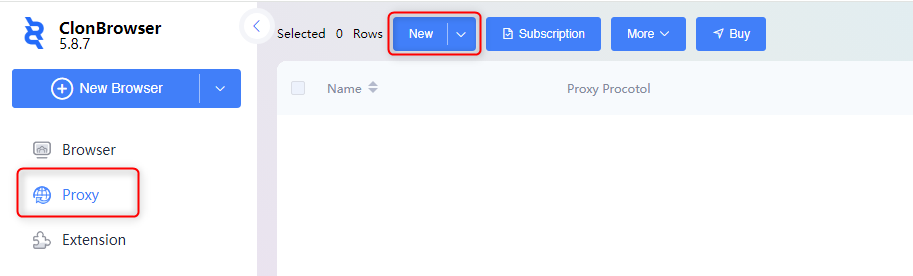
1\. Navigate to the **Proxy** tab within the profile management section.
2\. Click **New** to start creating a new browser profile.
 **Step 3. Configure Proxy Details**
1\. Go to your [Bright Data dashboard](https://brightdata.com/cp/zones)
2\. Create a ':' delimited string by combining: `Proxy Host:Proxy Port:Proxy Zone username:Proxy Zone password`
3\. Paste the proxy string code into the designated field in ClonBrowser.
4\. Click **Parse** to automatically fill in the required fields (Host, Port, Username, Password).
5\. Test the connection by clicking **Connect Test**.
6\. Once verified, click **Save** to apply the proxy settings.
For geo-targeted proxies, include the country code in your username (e.g., `your-username-country-US`) to access proxies from a specific region.
**Step 4. Finalize and Start Browsing**
1\. Go back to the **Proxy** tab and locate your newly configured profile.
2\. Click **Ping** to ensure the proxy is working correctly.
**Step 3. Configure Proxy Details**
1\. Go to your [Bright Data dashboard](https://brightdata.com/cp/zones)
2\. Create a ':' delimited string by combining: `Proxy Host:Proxy Port:Proxy Zone username:Proxy Zone password`
3\. Paste the proxy string code into the designated field in ClonBrowser.
4\. Click **Parse** to automatically fill in the required fields (Host, Port, Username, Password).
5\. Test the connection by clicking **Connect Test**.
6\. Once verified, click **Save** to apply the proxy settings.
For geo-targeted proxies, include the country code in your username (e.g., `your-username-country-US`) to access proxies from a specific region.
**Step 4. Finalize and Start Browsing**
1\. Go back to the **Proxy** tab and locate your newly configured profile.
2\. Click **Ping** to ensure the proxy is working correctly.
 By following these steps, you can seamlessly integrate Bright Data with ClonBrowser, ensuring a secure and efficient browsing experience tailored to your needs.