> ## Documentation Index
> Fetch the complete documentation index at: https://docs.brightdata.com/llms.txt
> Use this file to discover all available pages before exploring further.
# How to Configure Your Residential Proxy
> Configure Bright Data Residential proxies (400M+ residential IPs): IP types, geolocation targeting, long-session peers, sticky IP duration and rotation.
Start by going to the configuration tab of the proxy you want to configure.
## Which proxy type to choose
**Choose one of four Proxy types (IPs types) for your proxy zone:**
Rotating **IPv4** proxies worldwide, of real devices, worldwide.
A combined pool or rotating **IPv4 & IPv6** proxies of real devices, worldwide.
Our "Mega Pool".
Rotating **IPv6** proxies worldwide, of real devices, worldwide.
Sets of proxies with exclusive access to a set of specific domains, with minimal to no rotation at all.
***
## Selecting the right Residential proxies
We offer 4 types of proxies on our Residential proxy netowrk:
Shared proxies:
1. Shared IPv4
2. Shared IPv4+IPv6 ("Mega pool")
3. Shared IPv6
Dedicated proxies:
4. Dedicated residential proxies
## Residential network access
Access to our residential network is subject to our access policy. Our dedicated and IPv6 proxies is only to customers who passed our KYC verfification process. For more information on access - see here: [Residential network access policy](https://docs.brightdata.com/proxy-networks/residential/network-access#residential-network-access-policy).
## Configuring Residential shared proxies (Rotating proxies)
Bright data will automatically assign a new proxy for each of your requests. You can control the behavior of the shared proxies as well as rotation using control panel settings and proxy options which are relayed in the proxy username parameter.
Most common setup is the Geolocation targeting allowing you to route your requests via proxies in specified location. You can select a default location - which will route all requests thru specific locations via our control panel.
Best practice: set up a separate residential proxy zone, for each geolocation you wish to target.
### Geolocation resolution options
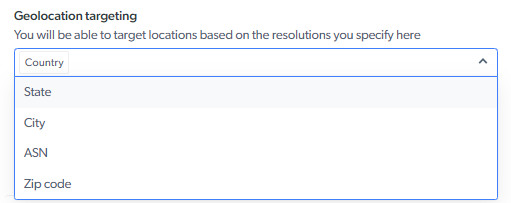
Geolocation targeting allows you to target specific locations based on `country`,`city`, `state`, `zip code`, or `ASN`. Select the resolution from the drop-down menu in your geolocation settings:
 ### Shared pool default countries' selection
When selecting countries in shared pool configuration, we will assign proxies only from the locations you select. You can select none (which means we will assign the next random proxy from the pool), one or more countries. [Read more...](https://docs.brightdata.com/api-reference/proxy/geolocation-targeting#default-countries-selection)
You can override the default selection or explicitly assign a specific country for your peer during rotation, use the flag `-country` in the proxy user name parameter with an ISO-3166 country code.
[FAQ: Where can I see the list of country codes?](https://docs.brightdata.com/general/faqs#where-can-i-see-the-list-of-country-codes)
***
## How to configure IPv4+IPv6 Shared residential proxies: "Mega Pool"
### Introduction: IPv6
Bright Data now supports IPv6 on its residential network. Setup and use of IPv6 proxies is very similar to IPv4 proxies.
IPv6 (Internet Protocol version 6) is the most recent version of the Internet Protocol, designed to replace IPv4. It was developed to address the limitations of IPv4, particularly the exhaustion of available IP addresses. While IPv4 uses 32-bit addresses (allowing for about 4.3 billion unique IPs), IPv6 uses 128-bit addresses, enabling a virtually unlimited number of unique IP addresses, over 340 undecillion (3.4×10³⁸).
What types of IPv6 Residential pools do we offer?
Bright data offers two types of residential pools with IPv6 proxies:
1. Combined IPv4+IPv6: also called "Mega Pool", of shared rotating proxies
2. IPv6 only shared rotating proxies
Bright Data currently does not offer IPv6 proxies in Datacenter or ISP networks.
### How big is IPv6 residential network?
We now support IPv6 on our worldwide reliable residential proxy network. Approximately 150,000 peers are available, with new ones joining every week. The proxies are collated in our “rotating shared pool” of residential proxies.
### What is IPv6 Access Policy?
IPv6 proxies comply with residential network access policy.It is available only to selected customers who passed our KYC and are eligible to use this protocol over our Residential network.
### Which options of Bright Data residential IPv6 proxies can I use?
All our IPv4 options are supported, except the list below:
| Targeting Option | Description |
| :--------------- | :--------------------------------------------------- |
| `gip` | No selected gIP targeting (group of residential IPs) |
| `asn` | No ASN targeting |
| `zip` | No ZIP code targeting |
| `ip` | No explicit IP targeting |
| `carrier` | No mobile carrier targeting |
| `os` | No explicit operating system targeting |
If you chose to relay those in your proxy username and your zone was set to IPv6, we will ignore them and process the request.
Full list of options can be found here: [https://docs.brightdata.com/proxy-networks/config-options](https://docs.brightdata.com/proxy-networks/config-options)
### What happens if I target IPv4 only host with IPv6 proxy?
If you choose to target with IPv6 proxy an IPv4 only domain, which do not have an IPv6 address, your request will result in HTTP error 502, with Bright Data error header (x-brd-err-code): `target_40011`. You should retry the request with IPv4 proxy.
Full list of errors can be seen in our catalog, together with target\_40011 here: [https://docs.brightdata.com/proxy-networks/errorCatalog#target-40011](https://docs.brightdata.com/proxy-networks/errorCatalog#target-40011)
### Can I switching zone from IPv4 to IPv6 and vice versa?
Yes. You can switch the zone from IPv4 to IPv6 and vice versa without any limitation. Once protocol version is chosen, it will impact all the proxies assigned to this zone and the selected protocol proxies will be assigned to relay your requests.
### Does the price of IPv6 traffic changes?
IPv6 traffic is currently charged at the same rate as IPv4. In your bill we will calculate how much traffic was relayed by which protocol version and charge accordingly. You can switch your zone between IPv6 and IPv4 - Bright Data will calculate the traffic and bill accordingly.
### Is there any change in access details or proxy credentials for IPv6?
No. All access details and credentials are identical to IPv4: Host, port, username and password remain the same. If you provide a username with parameters which are not supported in IPv6 (listed above) they will be ignored.
### Can I use IPv6 to access Bright Data proxy services?
No. We do not allow IPv6 to access our own proxy gateway: your accessing scraper or utility must connect to Bright Data using IPv4. Attempting to access with IPv6 will result in error. The error will be DNS related error stating that domain [brd.superproxy.io](http://brd.superproxy.io) could not be resolved.
Example with curl call:
```sh theme={null}
curl -i --proxy brd.superproxy.io:33335 --proxy-user brd-customer-*******-zone-residential_proxy21:********** "https://geo.brdtest.com/welcome.txt?product=resi&method=native" -g -6
```
Response error:
```sh theme={null}
curl: (5) Could not resolve proxy: [brd.superproxy.io](http://brd.superproxy.io)
```
#### Do I need to define allowlist and denylist in IPv6?
No. Allowlist (whitelist) and denylist (blacklist) refer to the IP addresses you use to connect to Bright Data proxy services. Since we allow only IPv4 to connect to our proxy service from your side, settings remain in IPv4 even if the zone is IPv6. Those lists determine which IPs can/cannot send requests to the zone and remain as IPv4 IPs and ranges.
## Configuring dedicated residential proxies access
Our dedicated residential proxies are accessible **only** to customers who were verified by our compliance department (**Full mode**). Customers with "**Immediate access**" mode will see this option as **disabled** in our control panel. To read more about it visit: [https://docs.brightdata.com/proxy-networks/residential/network-access](https://docs.brightdata.com/proxy-networks/residential/network-access).
### IP Groups `gIPs`
Only works with the **Dedicated** option
`gIP` contains between 6-90 IPs at any given moment while sharing the same attributes, targeting the selected dedicated domains within the zone "Configuration" section. `gIPs` are used by Bright Data to create a single identifier for this group of proxies (with distinct IP addresses). Those proxies will be used explicitly by you towards the domains you target.
### Shared pool default countries' selection
When selecting countries in shared pool configuration, we will assign proxies only from the locations you select. You can select none (which means we will assign the next random proxy from the pool), one or more countries. [Read more...](https://docs.brightdata.com/api-reference/proxy/geolocation-targeting#default-countries-selection)
You can override the default selection or explicitly assign a specific country for your peer during rotation, use the flag `-country` in the proxy user name parameter with an ISO-3166 country code.
[FAQ: Where can I see the list of country codes?](https://docs.brightdata.com/general/faqs#where-can-i-see-the-list-of-country-codes)
***
## How to configure IPv4+IPv6 Shared residential proxies: "Mega Pool"
### Introduction: IPv6
Bright Data now supports IPv6 on its residential network. Setup and use of IPv6 proxies is very similar to IPv4 proxies.
IPv6 (Internet Protocol version 6) is the most recent version of the Internet Protocol, designed to replace IPv4. It was developed to address the limitations of IPv4, particularly the exhaustion of available IP addresses. While IPv4 uses 32-bit addresses (allowing for about 4.3 billion unique IPs), IPv6 uses 128-bit addresses, enabling a virtually unlimited number of unique IP addresses, over 340 undecillion (3.4×10³⁸).
What types of IPv6 Residential pools do we offer?
Bright data offers two types of residential pools with IPv6 proxies:
1. Combined IPv4+IPv6: also called "Mega Pool", of shared rotating proxies
2. IPv6 only shared rotating proxies
Bright Data currently does not offer IPv6 proxies in Datacenter or ISP networks.
### How big is IPv6 residential network?
We now support IPv6 on our worldwide reliable residential proxy network. Approximately 150,000 peers are available, with new ones joining every week. The proxies are collated in our “rotating shared pool” of residential proxies.
### What is IPv6 Access Policy?
IPv6 proxies comply with residential network access policy.It is available only to selected customers who passed our KYC and are eligible to use this protocol over our Residential network.
### Which options of Bright Data residential IPv6 proxies can I use?
All our IPv4 options are supported, except the list below:
| Targeting Option | Description |
| :--------------- | :--------------------------------------------------- |
| `gip` | No selected gIP targeting (group of residential IPs) |
| `asn` | No ASN targeting |
| `zip` | No ZIP code targeting |
| `ip` | No explicit IP targeting |
| `carrier` | No mobile carrier targeting |
| `os` | No explicit operating system targeting |
If you chose to relay those in your proxy username and your zone was set to IPv6, we will ignore them and process the request.
Full list of options can be found here: [https://docs.brightdata.com/proxy-networks/config-options](https://docs.brightdata.com/proxy-networks/config-options)
### What happens if I target IPv4 only host with IPv6 proxy?
If you choose to target with IPv6 proxy an IPv4 only domain, which do not have an IPv6 address, your request will result in HTTP error 502, with Bright Data error header (x-brd-err-code): `target_40011`. You should retry the request with IPv4 proxy.
Full list of errors can be seen in our catalog, together with target\_40011 here: [https://docs.brightdata.com/proxy-networks/errorCatalog#target-40011](https://docs.brightdata.com/proxy-networks/errorCatalog#target-40011)
### Can I switching zone from IPv4 to IPv6 and vice versa?
Yes. You can switch the zone from IPv4 to IPv6 and vice versa without any limitation. Once protocol version is chosen, it will impact all the proxies assigned to this zone and the selected protocol proxies will be assigned to relay your requests.
### Does the price of IPv6 traffic changes?
IPv6 traffic is currently charged at the same rate as IPv4. In your bill we will calculate how much traffic was relayed by which protocol version and charge accordingly. You can switch your zone between IPv6 and IPv4 - Bright Data will calculate the traffic and bill accordingly.
### Is there any change in access details or proxy credentials for IPv6?
No. All access details and credentials are identical to IPv4: Host, port, username and password remain the same. If you provide a username with parameters which are not supported in IPv6 (listed above) they will be ignored.
### Can I use IPv6 to access Bright Data proxy services?
No. We do not allow IPv6 to access our own proxy gateway: your accessing scraper or utility must connect to Bright Data using IPv4. Attempting to access with IPv6 will result in error. The error will be DNS related error stating that domain [brd.superproxy.io](http://brd.superproxy.io) could not be resolved.
Example with curl call:
```sh theme={null}
curl -i --proxy brd.superproxy.io:33335 --proxy-user brd-customer-*******-zone-residential_proxy21:********** "https://geo.brdtest.com/welcome.txt?product=resi&method=native" -g -6
```
Response error:
```sh theme={null}
curl: (5) Could not resolve proxy: [brd.superproxy.io](http://brd.superproxy.io)
```
#### Do I need to define allowlist and denylist in IPv6?
No. Allowlist (whitelist) and denylist (blacklist) refer to the IP addresses you use to connect to Bright Data proxy services. Since we allow only IPv4 to connect to our proxy service from your side, settings remain in IPv4 even if the zone is IPv6. Those lists determine which IPs can/cannot send requests to the zone and remain as IPv4 IPs and ranges.
## Configuring dedicated residential proxies access
Our dedicated residential proxies are accessible **only** to customers who were verified by our compliance department (**Full mode**). Customers with "**Immediate access**" mode will see this option as **disabled** in our control panel. To read more about it visit: [https://docs.brightdata.com/proxy-networks/residential/network-access](https://docs.brightdata.com/proxy-networks/residential/network-access).
### IP Groups `gIPs`
Only works with the **Dedicated** option
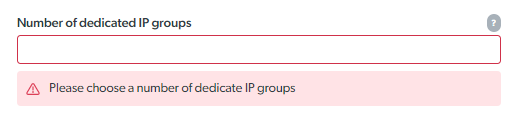
`gIP` contains between 6-90 IPs at any given moment while sharing the same attributes, targeting the selected dedicated domains within the zone "Configuration" section. `gIPs` are used by Bright Data to create a single identifier for this group of proxies (with distinct IP addresses). Those proxies will be used explicitly by you towards the domains you target.
 ***
### How to set dedicated domains
Only works with the **Dedicated** option
Define the domains you'd like your proxies to be exclusive to. Every request to a domain in this list is served thru your dedicated proxies exclusively. No one else is allowed to target those domains via your dedicated proxies. You can use this zone for requests to other target domains, yet those requests will be served thru our datacenter hosted Bright Data proxies.
For example: if in the list you have two domains: a.com and b.com, every request to a.com and b.com are routed thru your dedicated proxies, request to c.com is routed thru our datacenter hosted proxy. Requests to a.com and b.com from others will **never** go thru your dedicated proxies.
***
### How to set dedicated domains
Only works with the **Dedicated** option
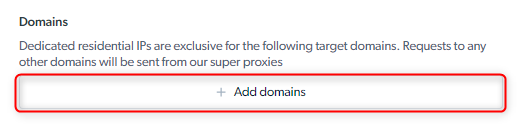
Define the domains you'd like your proxies to be exclusive to. Every request to a domain in this list is served thru your dedicated proxies exclusively. No one else is allowed to target those domains via your dedicated proxies. You can use this zone for requests to other target domains, yet those requests will be served thru our datacenter hosted Bright Data proxies.
For example: if in the list you have two domains: a.com and b.com, every request to a.com and b.com are routed thru your dedicated proxies, request to c.com is routed thru our datacenter hosted proxy. Requests to a.com and b.com from others will **never** go thru your dedicated proxies.
 ***
## How to configure advanced options
### Automatic failover for unavailable peers
In case we cannot reach the proxy peer for your request, we will route the request to another available peer. Automatic failover does not apply when you choose default countries: if we cannot find a peer in the country you selected, we will fail the request with error.
Enabling automatic failover assures execution of the request, regardless of the availability of a specific peer.
#### Automatic failover when accessing target website which does not publish IPv6 address with IPv6 proxy
To ensure continuity, we enable IPv6 to IPv4 automatic failover, which you can configure in the zone's advanced settings to either on or off (default: `ON`).
When toggled "On" (default), in case your target website does not publish an IPv6 address, we will route the request via an available IPv4 proxy in the same location. If this toggle is not enabled, trying to access a target host without IPv6 address will result in an error: [https://docs.brightdata.com/proxy-networks/errorCatalog#target-40011](https://docs.brightdata.com/proxy-networks/errorCatalog#target-40011)
***
### Special Ports & Protocols
Ports `80` and `443` are available by default, supporting HTTP and HTTPS & SOCKS5 protocols. We also support all ports over `1024` in our Datacenter proxy network. [Read more on ports and protocols...](https://docs.brightdata.com/proxy-networks/faqs#how-to-see-supported-ports-and-protocols)
Bright Data can support additional ports by request. A dedicated and additional compliance process with the Bright Data compliance team will follow every request to support a new port.
If you would like additional port permissions, you can contact Bright Data Support.
Examples of ports that require Bright Data compliance review before activation:
| Port | Protocol |
| ---- | -------- |
| `70` | HTTP |
| `98` | HTTPS |
### Zone usage limit
Set usage limit to your zone: you can limit spending or traffic. This provides additional layer of control to your budget and bandwidth consumption, mostly over our rotating shared pool proxies.
***
## How to configure advanced options
### Automatic failover for unavailable peers
In case we cannot reach the proxy peer for your request, we will route the request to another available peer. Automatic failover does not apply when you choose default countries: if we cannot find a peer in the country you selected, we will fail the request with error.
Enabling automatic failover assures execution of the request, regardless of the availability of a specific peer.
#### Automatic failover when accessing target website which does not publish IPv6 address with IPv6 proxy
To ensure continuity, we enable IPv6 to IPv4 automatic failover, which you can configure in the zone's advanced settings to either on or off (default: `ON`).
When toggled "On" (default), in case your target website does not publish an IPv6 address, we will route the request via an available IPv4 proxy in the same location. If this toggle is not enabled, trying to access a target host without IPv6 address will result in an error: [https://docs.brightdata.com/proxy-networks/errorCatalog#target-40011](https://docs.brightdata.com/proxy-networks/errorCatalog#target-40011)
***
### Special Ports & Protocols
Ports `80` and `443` are available by default, supporting HTTP and HTTPS & SOCKS5 protocols. We also support all ports over `1024` in our Datacenter proxy network. [Read more on ports and protocols...](https://docs.brightdata.com/proxy-networks/faqs#how-to-see-supported-ports-and-protocols)
Bright Data can support additional ports by request. A dedicated and additional compliance process with the Bright Data compliance team will follow every request to support a new port.
If you would like additional port permissions, you can contact Bright Data Support.
Examples of ports that require Bright Data compliance review before activation:
| Port | Protocol |
| ---- | -------- |
| `70` | HTTP |
| `98` | HTTPS |
### Zone usage limit
Set usage limit to your zone: you can limit spending or traffic. This provides additional layer of control to your budget and bandwidth consumption, mostly over our rotating shared pool proxies.