> ## Documentation Index
> Fetch the complete documentation index at: https://docs.brightdata.com/llms.txt
> Use this file to discover all available pages before exploring further.
# Understanding asynchronous requests
> Compare async vs sync requests across 2 Bright Data APIs (Unlocker and SERP) and how each approach impacts performance, cost and architecture.
## What are asynchronous requests?
Asynchronous requests let you submit scraping jobs without waiting for results. You send a request, get back a unique ID immediately, and retrieve the completed results later, like leaving a voicemail instead of staying on hold.
With synchronous requests, your connection stays open until results arrive (typically seconds). With async, results are processed in the background and stored for 48 hours. You retrieve them via API polling or webhook notification when ready (typically 5 minutes, up to 8 hours during peak times).
## Why asynchronous requests matter
If you're scraping thousands of URLs daily, synchronous requests create a bottleneck. Here's the problem: tracking 10,000 product prices with sync requests means holding 10,000 open connections for 30 seconds each. That's 300,000 seconds of concurrent connection time, and your server will struggle or crash.
Async decouples data collection from processing. Submit 10,000 requests in under a minute, then batch-process results when they're ready. Your infrastructure stays lightweight, and you avoid connection timeouts, thread blocking, and cascading failures.
## When to use async vs sync
### Use async when you're:
* **Running scheduled jobs** (nightly competitor analysis, weekly rank tracking)
* **Scraping high volumes** (500+ requests per hour)
* **Building data pipelines** where freshness within minutes is acceptable
* **Optimizing costs** (async offers 99.99% success rate = fewer retries)
### Use sync when you're:
* **Serving live user requests** (displaying search results in real-time)
* **Processing small volumes** (\< 100 requests per hour where simplicity matters)
* **Prototyping** and need quick iteration
* **Requiring sub-10-second responses**
Don't use async for user-facing features where people are actively waiting for results. The multi-minute latency will hurt UX.
**Real example:** An e-commerce platform uses async to scrape 50,000 competitor prices overnight for morning reports, but uses sync for their "check this product now" button that shoppers click.
## How it works
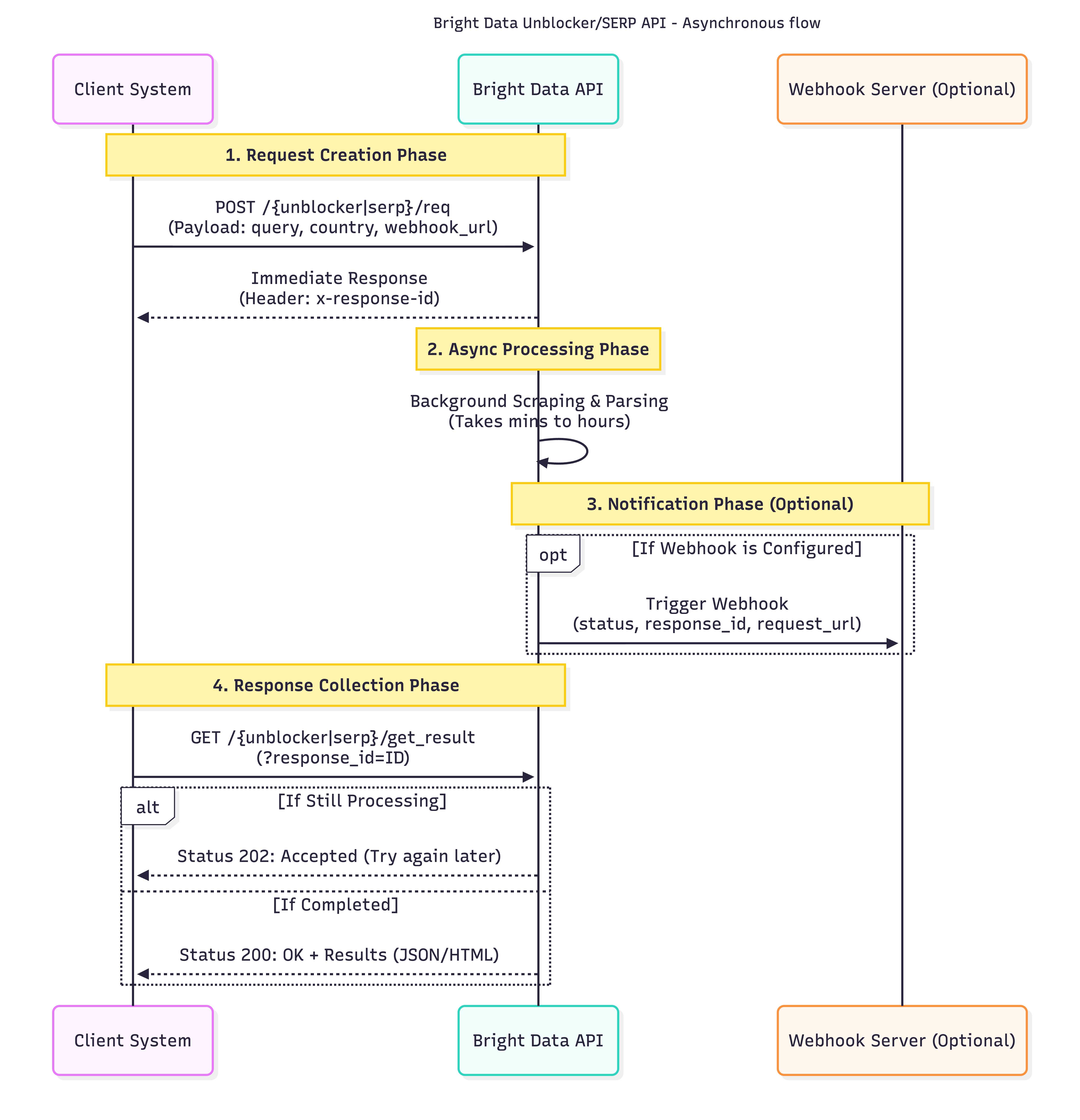 **Key difference:** You're billed for Step 1 (request submission) but not Step 2 (result retrieval). Results store for 48 hours.
When you poll before processing completes, you'll get a `202` status. Set up webhooks instead of polling to avoid wasted API calls:
```bash theme={null}
# Response includes your ID instantly
x-response-id: abc123-def456-ghi789
```
**SERP API: Avoid excessive polling.** Unlike some APIs, each poll request is individually metered and consumes resources. Use webhooks for instant notifications, or poll no more than once per minute.
## What the tradeoffs are
| Feature | Async | Sync |
| ----------------------------- | ------------------------------ | ----------------------- |
| **Success rate** | 99.99% | Standard |
| **Latency** | 5 min - 8 hours | Seconds |
| **Connection handling** | No open connections | Holds connections |
| **Implementation complexity** | Requires webhook/polling logic | Simple request/response |
| **Result retrieval cost** | Free | N/A |
**Cost is identical per request.** However, async's higher success rate means for large-scale operations.
## Common questions
No. Pricing is identical per request, but higher success rates mean fewer retries.
Results are stored for 48 hours from submission, then automatically deleted. Make sure your retrieval system runs within this window.
Configure a webhook URL in your zone settings or per-request using `webhook_url`. Bright Data POSTs a notification when processing completes.
**Required: Allowlist webhook IPs**
Make sure to allowlist these stable IPs or your firewall may block notifications:
* `100.27.150.189`
* `18.214.10.85`
[Webhook setup guide →](/scraping-automation/serp-api/asynchronous-requests#allowlist-our-webhook-ips)
Unrecoverable. Always store response IDs in your database alongside request metadata.
Yes, but create separate zones, each zone is either async or sync, not both. Most users run async for batch jobs and sync for ad-hoc requests.
**Key difference:** You're billed for Step 1 (request submission) but not Step 2 (result retrieval). Results store for 48 hours.
When you poll before processing completes, you'll get a `202` status. Set up webhooks instead of polling to avoid wasted API calls:
```bash theme={null}
# Response includes your ID instantly
x-response-id: abc123-def456-ghi789
```
**SERP API: Avoid excessive polling.** Unlike some APIs, each poll request is individually metered and consumes resources. Use webhooks for instant notifications, or poll no more than once per minute.
## What the tradeoffs are
| Feature | Async | Sync |
| ----------------------------- | ------------------------------ | ----------------------- |
| **Success rate** | 99.99% | Standard |
| **Latency** | 5 min - 8 hours | Seconds |
| **Connection handling** | No open connections | Holds connections |
| **Implementation complexity** | Requires webhook/polling logic | Simple request/response |
| **Result retrieval cost** | Free | N/A |
**Cost is identical per request.** However, async's higher success rate means for large-scale operations.
## Common questions
No. Pricing is identical per request, but higher success rates mean fewer retries.
Results are stored for 48 hours from submission, then automatically deleted. Make sure your retrieval system runs within this window.
Configure a webhook URL in your zone settings or per-request using `webhook_url`. Bright Data POSTs a notification when processing completes.
**Required: Allowlist webhook IPs**
Make sure to allowlist these stable IPs or your firewall may block notifications:
* `100.27.150.189`
* `18.214.10.85`
[Webhook setup guide →](/scraping-automation/serp-api/asynchronous-requests#allowlist-our-webhook-ips)
Unrecoverable. Always store response IDs in your database alongside request metadata.
Yes, but create separate zones, each zone is either async or sync, not both. Most users run async for batch jobs and sync for ad-hoc requests.