> ## Documentation Index
> Fetch the complete documentation index at: https://docs.brightdata.com/llms.txt
> Use this file to discover all available pages before exploring further.
# SERP API async requests
> Send async Bright Data SERP API (31 languages) and Unlocker API requests: compare with sync mode, learn when async is faster, configure key async parameters.
Async is supported by both **Unlocker API** and **SERP API** products
## Async VS Sync requests
There are 2 ways for us to handle your Unlocker API and SERP API requests:
* `default` **Synchronous requests** - Send a request and get a real-time response immediately
* **Asynchronous requests** - Send a request (without waiting for an immediate response) and retrieve the results later via our designated API endpoint. Callback times are usually up to 5 minutes but may take up to 8 hours during peak periods. Responses are stored for up to 48 hours from the time the request was sent.
Async is recommended for those with high-volume requests who **don't** need to serve an immediate or live response and can wait a few minutes to retrieve all their responses at once.
### Why should I use Async?
* 99.99% success rate
* Stability
* Flexibility - the ability to retrieve your requests at a later time of your choosing (and not have to wait for the response immediately after sending the request)
### How it works
Sending requests and receiving responses with Async mode is a two-step flow:
* **Sending the request** - This request includes the search parameters, returns a `response_ID`, and is a direct request (i.e. you will be billed for this request).
* **Collecting the response** - This request includes the `response_ID` and is free of charge (i.e. you will not be billed for this request). If you call for a `response_ID` which is still being processed you will receive a 202 status code.
We store responses for up to 48 hours from the time the request was sent.
### How to get started
Within your specific Unlocker API or SERP API [zone](https://brightdata.com/cp/zones), under "Advanced settings", enable the "Asynchronous requests" toggle. 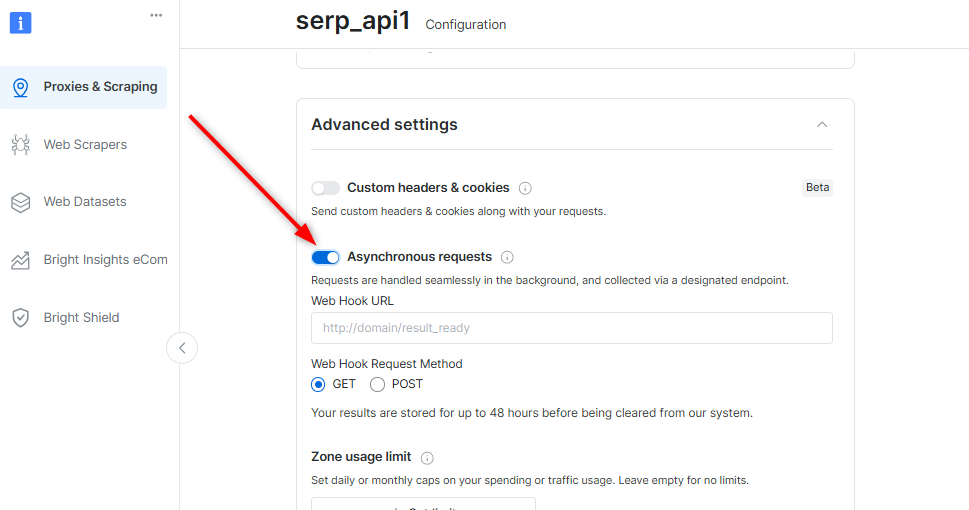 This is where you will get notified on the status of your future requests
A webhook can also be set **per** request (see "Initial request parameters" below)
The request syntax is slightly different from that of synchronous requests and requires an [API key](https://docs.brightdata.com/api-reference/authentication#how-do-i-generate-a-new-api-key%3F) for authentication. See a basic example below (for more request parameters see below):
```sh theme={null}
curl -i --silent --compressed "https://api.brightdata.com/unblocker/req?customer=[ACCOUNT_ID]&zone=[zone_name]" \
-H "Content-Type: application/json" \
-H "Authorization: Bearer [API_KEY]" \
-d '{"country":"us","query":{"q":"pizza","num":"100","hl":"en","gl":"au"}}'
```
You'll receive a response to the above that contains an `x-response-id` header with the ID of your request. This is the `RESPONSE_ID` for this request which you will use when collecting your results in the next step.
You can easily save the `RESPONSE_ID` in your script by initializing it along with your request like this:
```js theme={null}
RESPONSE_ID=$(
curl -i --silent --compressed "[https://api.brightdata.com/unblocker/req?customer=[ACCOUNT_ID]&zone=[zone_name]](https://api.brightdata.com/unblocker/req?customer=%5BACCOUNT_ID%5D&zone=%5BZONE_NAME%5D)" -H "Content-Type: application/json" -H "Authorization: Bearer API_KEY" -d '{"country":"us","query":{"q":"pizza","num":"100","hl":"en","gl":"au"}}' | sed -En 's/^x-response-id: (.*)/\1/p' | tr -d '\r'
)
```
If you've set up a webhook, you'll receive a notification immediately when the requests are ready with the following parameters: `status`, `response_id`, `request_url` and `hook_data` (optional - if you've used the `webhook_data` parameter in your request).
### Allowlist our webhook IPs
Our asynchronous webhooks delivery sends notifications from a pair of stable IP addresses, so please make sure to allowlist them:
1. `100.27.150.189`
2. `18.214.10.85`
We recommend to wait 20 seconds prior to the first poling request to get the response, 10 seconds for the second pole and 5 for the rest.
Bright Data may apply rate limit for excessive poling requests without response.
To get the response, use the `RESPONSE_ID` received in step 3, send the following:
```sh theme={null}
curl -i --silent --compressed "https://api.brightdata.com/unblocker/get_result?customer=[ACCOUNT_ID]&zone=[zone_name]&response_id=${[RESPONSE_ID]}" \
-H "Authorization: Bearer [API_KEY]"
```
## API - Request creation - `POST /{unblocker|serp}/req`
```sh Example theme={null}
curl -i --silent --compressed "https://api.brightdata.com/unblocker/req?customer=[ACCOUNT_ID]&zone=[zone_name]" \
-H "Content-Type: application/json" \
-H "Authorization: Bearer [API_KEY]" \
-d '{"url":"https://example.com?foo=bar","country":"us"}'
```
### Parameters
(\*) mandatory parameter
| Parameter | Type | Description |
| --------------- | ---------------- | -------------------------------------------------------------------------------------------------------------------------------------------------------------------------------- |
| url (\*) | String | Defines the url of the request |
| method | String | Defines the HTTP method of the request |
| headers | Object | Defines headers to be used in the request |
| body | String or Object | Defines body to be sent with request. If an object is specified, it is serialized to JSON, and Content-Type header is set to application/json. |
| country | String | Defines country to be used for request (2-letters code) |
| webhook\_url | String | Defines the URL to which the job status notification will be sent. If you don't want to setup a default webhook (above) or prefer the URL to be different per request, use this. |
| webhook\_method | String | Defines the HTTP method to use with the webhook\_url (GET or POST) |
| webhook\_data | Any | Defines the data that will be sent with job status notification |
### Which SERP-specific parameters to use
| Parameter | Type | Description |
| ---------- | ----------- | --------------------------- |
| query (\*) | Object | |
| brd\_json | 1 or "html" | Defines the response format |
```sh SERP Example theme={null}
curl -i --silent --compressed "https://api.brightdata.com/unblocker/req?customer=[ACCOUNT_ID]&zone=[zone_name]" \
-H "Content-Type: application/json" \
-H "Authorization: Bearer [API_KEY]" \
-d '{"country":"us","query":{"q":"pizza","num":"100","hl":"en","gl":"au"},"brd_json":"1"}'
```
## API - Response collection - `GET /{unblocker|serp}/get_result`
Note: `response_id` comes from the `x-response-id` header of the request creation response
```sh Example theme={null}
curl -k -v --compressed "https://api.brightdata.com/unblocker/get_result?customer={ACCOUNT_ID&zone={ASYNC_ZONE}&response_id={response_id}" \
-H "Authorization: Bearer {API_Key}" \
-o {Your_result_ouput_file}
```
### Parameters
(\*) mandatory parameter
| Parameter | Description |
| ----------------- | ----------------------------------------------------------------------------------- |
| response\_id (\*) | Defines the job id. Received in the response headers of your initial async request. |
This is where you will get notified on the status of your future requests
A webhook can also be set **per** request (see "Initial request parameters" below)
The request syntax is slightly different from that of synchronous requests and requires an [API key](https://docs.brightdata.com/api-reference/authentication#how-do-i-generate-a-new-api-key%3F) for authentication. See a basic example below (for more request parameters see below):
```sh theme={null}
curl -i --silent --compressed "https://api.brightdata.com/unblocker/req?customer=[ACCOUNT_ID]&zone=[zone_name]" \
-H "Content-Type: application/json" \
-H "Authorization: Bearer [API_KEY]" \
-d '{"country":"us","query":{"q":"pizza","num":"100","hl":"en","gl":"au"}}'
```
You'll receive a response to the above that contains an `x-response-id` header with the ID of your request. This is the `RESPONSE_ID` for this request which you will use when collecting your results in the next step.
You can easily save the `RESPONSE_ID` in your script by initializing it along with your request like this:
```js theme={null}
RESPONSE_ID=$(
curl -i --silent --compressed "[https://api.brightdata.com/unblocker/req?customer=[ACCOUNT_ID]&zone=[zone_name]](https://api.brightdata.com/unblocker/req?customer=%5BACCOUNT_ID%5D&zone=%5BZONE_NAME%5D)" -H "Content-Type: application/json" -H "Authorization: Bearer API_KEY" -d '{"country":"us","query":{"q":"pizza","num":"100","hl":"en","gl":"au"}}' | sed -En 's/^x-response-id: (.*)/\1/p' | tr -d '\r'
)
```
If you've set up a webhook, you'll receive a notification immediately when the requests are ready with the following parameters: `status`, `response_id`, `request_url` and `hook_data` (optional - if you've used the `webhook_data` parameter in your request).
### Allowlist our webhook IPs
Our asynchronous webhooks delivery sends notifications from a pair of stable IP addresses, so please make sure to allowlist them:
1. `100.27.150.189`
2. `18.214.10.85`
We recommend to wait 20 seconds prior to the first poling request to get the response, 10 seconds for the second pole and 5 for the rest.
Bright Data may apply rate limit for excessive poling requests without response.
To get the response, use the `RESPONSE_ID` received in step 3, send the following:
```sh theme={null}
curl -i --silent --compressed "https://api.brightdata.com/unblocker/get_result?customer=[ACCOUNT_ID]&zone=[zone_name]&response_id=${[RESPONSE_ID]}" \
-H "Authorization: Bearer [API_KEY]"
```
## API - Request creation - `POST /{unblocker|serp}/req`
```sh Example theme={null}
curl -i --silent --compressed "https://api.brightdata.com/unblocker/req?customer=[ACCOUNT_ID]&zone=[zone_name]" \
-H "Content-Type: application/json" \
-H "Authorization: Bearer [API_KEY]" \
-d '{"url":"https://example.com?foo=bar","country":"us"}'
```
### Parameters
(\*) mandatory parameter
| Parameter | Type | Description |
| --------------- | ---------------- | -------------------------------------------------------------------------------------------------------------------------------------------------------------------------------- |
| url (\*) | String | Defines the url of the request |
| method | String | Defines the HTTP method of the request |
| headers | Object | Defines headers to be used in the request |
| body | String or Object | Defines body to be sent with request. If an object is specified, it is serialized to JSON, and Content-Type header is set to application/json. |
| country | String | Defines country to be used for request (2-letters code) |
| webhook\_url | String | Defines the URL to which the job status notification will be sent. If you don't want to setup a default webhook (above) or prefer the URL to be different per request, use this. |
| webhook\_method | String | Defines the HTTP method to use with the webhook\_url (GET or POST) |
| webhook\_data | Any | Defines the data that will be sent with job status notification |
### Which SERP-specific parameters to use
| Parameter | Type | Description |
| ---------- | ----------- | --------------------------- |
| query (\*) | Object | |
| brd\_json | 1 or "html" | Defines the response format |
```sh SERP Example theme={null}
curl -i --silent --compressed "https://api.brightdata.com/unblocker/req?customer=[ACCOUNT_ID]&zone=[zone_name]" \
-H "Content-Type: application/json" \
-H "Authorization: Bearer [API_KEY]" \
-d '{"country":"us","query":{"q":"pizza","num":"100","hl":"en","gl":"au"},"brd_json":"1"}'
```
## API - Response collection - `GET /{unblocker|serp}/get_result`
Note: `response_id` comes from the `x-response-id` header of the request creation response
```sh Example theme={null}
curl -k -v --compressed "https://api.brightdata.com/unblocker/get_result?customer={ACCOUNT_ID&zone={ASYNC_ZONE}&response_id={response_id}" \
-H "Authorization: Bearer {API_Key}" \
-o {Your_result_ouput_file}
```
### Parameters
(\*) mandatory parameter
| Parameter | Description |
| ----------------- | ----------------------------------------------------------------------------------- |
| response\_id (\*) | Defines the job id. Received in the response headers of your initial async request. |