> ## Documentation Index
> Fetch the complete documentation index at: https://docs.brightdata.com/llms.txt
> Use this file to discover all available pages before exploring further.
# Your First Async Unlocker API Request
> Send asynchronous requests to the Bright Data Web Unlocker API (98% success rate) and retrieve results using a snapshot ID and webhook delivery method.
The following are required:
* [A Bright Data account](https://brightdata.com/?hs_signup=1\&utm_source=docs)
* [A Bright Data API key](/api-reference/authentication#how-do-i-generate-a-new-api-key)
* [An active Unlocker API zone](https://brightdata.com/cp/zones)
* [Basic knowledge of cURL](https://curl.se/)
In the Unlocker API [zone](https://brightdata.com/cp/zones), under "Advanced settings", enable the "Asynchronous requests" toggle.
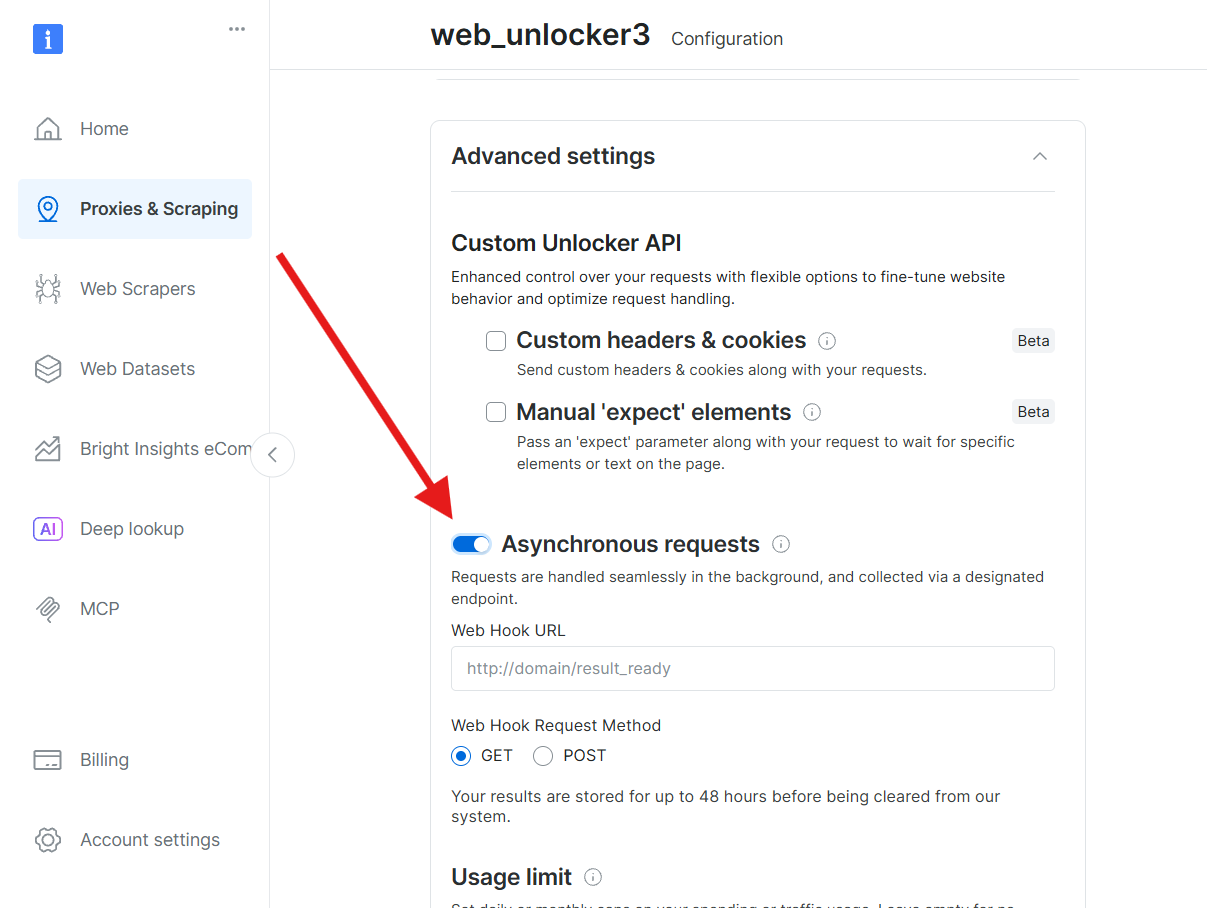 The following request submits an [asynchronous Unlocker API](https://docs.brightdata.com/api-reference/rest-api/unlocker/request) job:
```bash cURL icon=rectangle-terminal theme={null}
curl --request POST \
--url 'https://api.brightdata.com/unblocker/req?zone=web_unlocker1' \
--header 'Authorization: Bearer ' \
--header 'Content-Type: application/json' \
--data '{
"url": "https://geo.brdtest.com/welcome.txt",
}'
```
```python Python theme={null}
import requests
url = "https://api.brightdata.com/unblocker/req?zone=web_unlocker1"
payload = {
"url": "https://geo.brdtest.com/welcome.txt",
}
headers = {
"Authorization": "Bearer ",
"Content-Type": "application/json"
}
response = requests.post(url, json=payload, headers=headers)
print(response.text)
```
```js Node.js theme={null}
const options = {
method: 'POST',
headers: {Authorization: 'Bearer ', 'Content-Type': 'application/json'},
body: JSON.stringify({
url: 'https://geo.brdtest.com/welcome.txt',
})
};
fetch('https://api.brightdata.com/unblocker/req?zone=web_unlocker1', options)
.then(res => res.json())
.then(res => console.log(res))
.catch(err => console.error(err));
```
Replace `` and `` with valid values.
The following request submits an [asynchronous Unlocker API](https://docs.brightdata.com/api-reference/rest-api/unlocker/request) job:
```bash cURL icon=rectangle-terminal theme={null}
curl --request POST \
--url 'https://api.brightdata.com/unblocker/req?zone=web_unlocker1' \
--header 'Authorization: Bearer ' \
--header 'Content-Type: application/json' \
--data '{
"url": "https://geo.brdtest.com/welcome.txt"
}'
```
```python Python theme={null}
import requests
url = "https://api.brightdata.com/unblocker/req?zone=web_unlocker1"
payload = {
"url": "https://geo.brdtest.com/welcome.txt",
}
headers = {
"Authorization": "Bearer ",
"Content-Type": "application/json"
}
response = requests.post(url, json=payload, headers=headers)
print(response.text)
```
```js Node.js theme={null}
const options = {
method: 'POST',
headers: {Authorization: 'Bearer ', 'Content-Type': 'application/json'},
body: JSON.stringify({
url: 'https://geo.brdtest.com/welcome.txt',
})
};
fetch('https://api.brightdata.com/unblocker/req?zone=web_unlocker1', options)
.then(res => res.json())
.then(res => console.log(res))
.catch(err => console.error(err));
```
Replace `` and `` with valid values.
We recommend to wait 20 seconds prior to the first poling request to get the response, 10 seconds for the second pole and 5 for the rest.
Bright Data may apply rate limit for excessive poling requests without response.
The request returns a `response_id` used to retrieve results after processing completes.
```json theme={null}
{
"response_id": "s4t7w3619285042ra9dke1m8qx"
}
```
If the request is still processing, the API returns HTTP `202`:
```json HTTP/202 theme={null}
"Request is pending"
```
Processing time is typically up to 5 minutes and may extend to 8 hours during peak periods.
Responses are retained for up to 48 hours from submission time.
The following [request retrieves](https://docs.brightdata.com/api-reference/rest-api/unlocker/get-results) the completed result:
```sh theme={null}
curl --silent --compressed \
"https://api.brightdata.com/unblocker/get_result?&response_id=${RESPONSE_ID}" \
-H "Authorization: Bearer [API_KEY]" \
-o results.json
```
The response body is written to `results.json`.
Display the saved file:
```sh theme={null}
cat results.json
```
The file contains structured JSON results from the Unlocker API. For example:
```json Sample Response expandable theme={null}
{
"status_code": 200,
"headers": {
"access-control-allow-origin": "*",
"cache-control": "no-store",
"content-type": "text/plain; charset=utf-8",
"date": "Sun, 18 May 2025 20:01:18 GMT",
"server": "nginx",
"connection": "close",
"transfer-encoding": "chunked"
},
"body": "\nWelcome to Bright Data! Here are your proxy details\nCountry: US\nLatitude: 37.751\nLongitude: -97.822\nTimezone: America/Chicago\nASN number: 20473\nASN Organization name: AS-VULTR\nIP version: IPv4\n\nCommon usage examples:\n\n[USERNAME]-country-us:[PASSWORD] // US based Proxy\n[USERNAME]-country-us-state-ny:[PASSWORD] // US proxy from NY\n[USERNAME]-asn-56386:[PASSWORD] // proxy from ASN 56386\n[USERNAME]-ip-1.1.1.1.1:[PASSWORD] // proxy from dedicated pool\n\nTo get a simple JSON response, use https://geo.brdtest.com/mygeo.json .\n\nMore examples on https://docs.brightdata.com/api-reference/introduction\n\n"
}
```
**Congratulations!** If the file contains valid JSON search results, you're done!
The following request submits an [asynchronous Unlocker API](https://docs.brightdata.com/api-reference/rest-api/unlocker/request) job:
```bash cURL icon=rectangle-terminal theme={null}
curl --request POST \
--url 'https://api.brightdata.com/unblocker/req?zone=web_unlocker1' \
--header 'Authorization: Bearer ' \
--header 'Content-Type: application/json' \
--data '{
"url": "https://geo.brdtest.com/welcome.txt",
}'
```
```python Python theme={null}
import requests
url = "https://api.brightdata.com/unblocker/req?zone=web_unlocker1"
payload = {
"url": "https://geo.brdtest.com/welcome.txt",
}
headers = {
"Authorization": "Bearer ",
"Content-Type": "application/json"
}
response = requests.post(url, json=payload, headers=headers)
print(response.text)
```
```js Node.js theme={null}
const options = {
method: 'POST',
headers: {Authorization: 'Bearer ', 'Content-Type': 'application/json'},
body: JSON.stringify({
url: 'https://geo.brdtest.com/welcome.txt',
})
};
fetch('https://api.brightdata.com/unblocker/req?zone=web_unlocker1', options)
.then(res => res.json())
.then(res => console.log(res))
.catch(err => console.error(err));
```
Replace `` and `` with valid values.
The following request submits an [asynchronous Unlocker API](https://docs.brightdata.com/api-reference/rest-api/unlocker/request) job:
```bash cURL icon=rectangle-terminal theme={null}
curl --request POST \
--url 'https://api.brightdata.com/unblocker/req?zone=web_unlocker1' \
--header 'Authorization: Bearer ' \
--header 'Content-Type: application/json' \
--data '{
"url": "https://geo.brdtest.com/welcome.txt"
}'
```
```python Python theme={null}
import requests
url = "https://api.brightdata.com/unblocker/req?zone=web_unlocker1"
payload = {
"url": "https://geo.brdtest.com/welcome.txt",
}
headers = {
"Authorization": "Bearer ",
"Content-Type": "application/json"
}
response = requests.post(url, json=payload, headers=headers)
print(response.text)
```
```js Node.js theme={null}
const options = {
method: 'POST',
headers: {Authorization: 'Bearer ', 'Content-Type': 'application/json'},
body: JSON.stringify({
url: 'https://geo.brdtest.com/welcome.txt',
})
};
fetch('https://api.brightdata.com/unblocker/req?zone=web_unlocker1', options)
.then(res => res.json())
.then(res => console.log(res))
.catch(err => console.error(err));
```
Replace `` and `` with valid values.
We recommend to wait 20 seconds prior to the first poling request to get the response, 10 seconds for the second pole and 5 for the rest.
Bright Data may apply rate limit for excessive poling requests without response.
The request returns a `response_id` used to retrieve results after processing completes.
```json theme={null}
{
"response_id": "s4t7w3619285042ra9dke1m8qx"
}
```
If the request is still processing, the API returns HTTP `202`:
```json HTTP/202 theme={null}
"Request is pending"
```
Processing time is typically up to 5 minutes and may extend to 8 hours during peak periods.
Responses are retained for up to 48 hours from submission time.
The following [request retrieves](https://docs.brightdata.com/api-reference/rest-api/unlocker/get-results) the completed result:
```sh theme={null}
curl --silent --compressed \
"https://api.brightdata.com/unblocker/get_result?&response_id=${RESPONSE_ID}" \
-H "Authorization: Bearer [API_KEY]" \
-o results.json
```
The response body is written to `results.json`.
Display the saved file:
```sh theme={null}
cat results.json
```
The file contains structured JSON results from the Unlocker API. For example:
```json Sample Response expandable theme={null}
{
"status_code": 200,
"headers": {
"access-control-allow-origin": "*",
"cache-control": "no-store",
"content-type": "text/plain; charset=utf-8",
"date": "Sun, 18 May 2025 20:01:18 GMT",
"server": "nginx",
"connection": "close",
"transfer-encoding": "chunked"
},
"body": "\nWelcome to Bright Data! Here are your proxy details\nCountry: US\nLatitude: 37.751\nLongitude: -97.822\nTimezone: America/Chicago\nASN number: 20473\nASN Organization name: AS-VULTR\nIP version: IPv4\n\nCommon usage examples:\n\n[USERNAME]-country-us:[PASSWORD] // US based Proxy\n[USERNAME]-country-us-state-ny:[PASSWORD] // US proxy from NY\n[USERNAME]-asn-56386:[PASSWORD] // proxy from ASN 56386\n[USERNAME]-ip-1.1.1.1.1:[PASSWORD] // proxy from dedicated pool\n\nTo get a simple JSON response, use https://geo.brdtest.com/mygeo.json .\n\nMore examples on https://docs.brightdata.com/api-reference/introduction\n\n"
}
```
**Congratulations!** If the file contains valid JSON search results, you're done!