

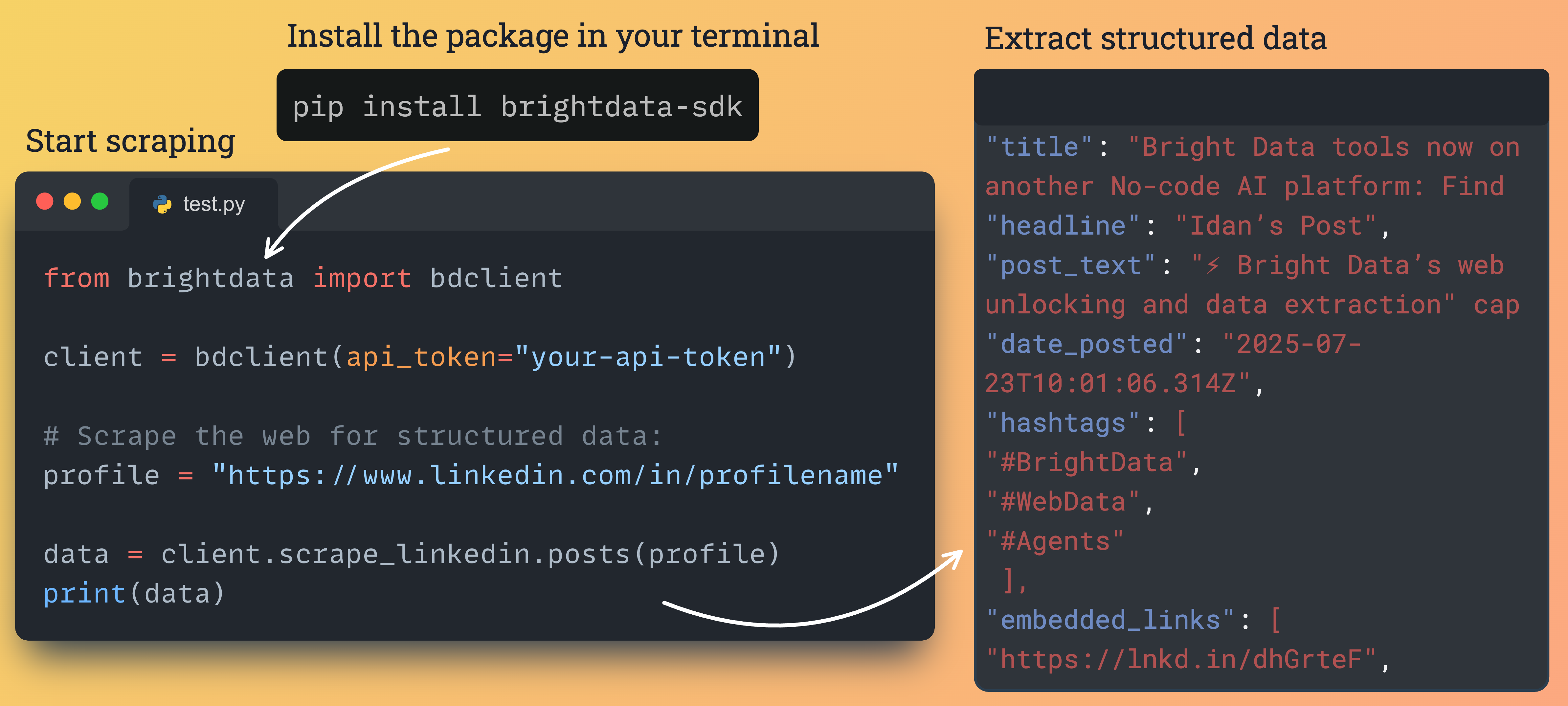
安装与配置
通过 pip 安装包:pip install brightdata-sdk
配置
您必须提供您的 API token。可在 Bright Data 控制面板 中找到。 选项 1:环境变量(推荐)export BRIGHTDATA_API_KEY="YOUR_API_KEY"
Python SDK 按以下顺序查找 API 密钥:
token 参数、BRIGHTDATA_API_TOKEN、BRIGHTDATA_API_KEY,最后是 brightdata login 保存的密钥。Bright Data CLI 读取的也是 BRIGHTDATA_API_KEY,因此导出一次即可同时用于两者。如果两个变量都已设置,以 BRIGHTDATA_API_TOKEN 为准。2.5.0 之前的版本只读取 BRIGHTDATA_API_TOKEN;请使用 pip install -U brightdata-sdk 升级,或改为导出该变量。# 异步客户端
from brightdata import BrightDataClient
async with BrightDataClient(token="YOUR_API_KEY") as client:
...
# 同步客户端
from brightdata import SyncBrightDataClient
with SyncBrightDataClient(token="YOUR_API_KEY") as client:
...
基本用法
简单脚本使用SyncBrightDataClient。需要高并发时配合 asyncio 使用 BrightDataClient。
from brightdata import SyncBrightDataClient

with SyncBrightDataClient() as client:
    # 抓取 URL
    data = client.scrape_url("https://example.com")
    print(f"Result: {data.data}")

    # Google 搜索
    search = client.search.google(query="Bright Data")
    print(f"Found: {len(search.data)}")
import asyncio
from brightdata import BrightDataClient

async def main():
    async with BrightDataClient() as client:
        result = await client.scrape_url("https://example.com")
        print(result.data)

        search = await client.search.google(query="Bright Data")
        print(f"Found: {len(search.data)}")

if __name__ == "__main__":
    asyncio.run(main())
发起抓取和网络搜索
from brightdata import BrightDataClient

client = BrightDataClient()

# Google 搜索
results = client.search.google(
    query="best shoes of 2025",
    location="United States",
    language="en",
    num_results=20
)

# Bing 搜索
results = client.search.bing(
    query="python tutorial",
    location="United States"
)

# Yandex 搜索
results = client.search.yandex(
    query="latest news",
    location="Germany"
)

if results.success:
    print(f"Cost: ${results.cost:.4f}")
    print(f"Time: {results.elapsed_ms():.2f}ms")
from brightdata import BrightDataClient

client = BrightDataClient()

# 抓取单个 URL
result = client.scrape_url("https://example.com")

# 并发抓取多个 URL
urls = [
    "https://example1.com",
    "https://example2.com",
    "https://example3.com"
]
results = client.scrape_url(urls)

for r in results:
    if r.success:
        print(f"Success: {r.data[:200]}...")
        r.save_to_file(f"result_{hash(r.data)}.json")
当处理多个查询或 URL 时,请求会并发执行以获得最佳性能。
使用平台专用 scrapers 提取结构化数据
从 Amazon、LinkedIn、Facebook、Instagram、TikTok、YouTube、Reddit、Pinterest、ChatGPT、Perplexity 与 Digikey 提取结构化数据。# Async
import asyncio
from brightdata import BrightDataClient
async def main():
async with BrightDataClient(auto_create_zones=False) as client:
products = await client.scrape.amazon.products(url="https://amazon.com/dp/B0CRMZHDG8")
reviews = await client.scrape.amazon.reviews(
url="https://amazon.com/dp/B0CRMZHDG8",
pastDays=30,
keyWord="quality"
)
sellers = await client.scrape.amazon.sellers(
url="https://amazon.com/sp?seller=AXXXXXXXXXXX"
)
asyncio.run(main())
# Sync
from brightdata import SyncBrightDataClient
with SyncBrightDataClient(auto_create_zones=False) as client:
products = client.scrape.amazon.products(url="https://amazon.com/dp/B0CRMZHDG8")
reviews = client.scrape.amazon.reviews(
url="https://amazon.com/dp/B0CRMZHDG8",
pastDays=30,
keyWord="quality"
)
sellers = client.scrape.amazon.sellers(
url="https://amazon.com/sp?seller=AXXXXXXXXXXX"
)
# Async:按 URL 采集,然后按参数发现
import asyncio
from brightdata import BrightDataClient

async def main():
    async with BrightDataClient(auto_create_zones=False) as client:
        profiles = await client.scrape.linkedin.profiles(
            url="https://www.linkedin.com/in/johndoe"
        )
        companies = await client.scrape.linkedin.companies(
            url="https://www.linkedin.com/company/bright-data"
        )
        jobs = await client.scrape.linkedin.jobs(
            url="https://www.linkedin.com/jobs/view/123456"
        )
        posts = await client.scrape.linkedin.posts(
            url="https://www.linkedin.com/feed/update/urn:li:activity:123"
        )

        # 按参数发现
        job_results = await client.search.linkedin.jobs(
            keyword="python developer",
            location="New York",
            remote=True
        )
        profile_results = await client.search.linkedin.profiles(
            first_name="John",
            last_name="Doe"
        )


asyncio.run(main())

# Sync
from brightdata import SyncBrightDataClient

with SyncBrightDataClient(auto_create_zones=False) as client:
    profiles = client.scrape.linkedin.profiles(url="https://www.linkedin.com/in/johndoe")
    companies = client.scrape.linkedin.companies(
        url="https://www.linkedin.com/company/bright-data"
    )
    jobs = client.scrape.linkedin.jobs(url="https://www.linkedin.com/jobs/view/123456")
    posts = client.scrape.linkedin.posts(
        url="https://www.linkedin.com/feed/update/urn:li:activity:123"
    )
# Async
import asyncio
from brightdata import BrightDataClient

async def main():
    async with BrightDataClient(auto_create_zones=False) as client:
        await client.scrape.facebook.posts_by_profile(
            url="https://www.facebook.com/nasa", num_of_posts=10
        )
        await client.scrape.facebook.posts_by_group(
            url="https://www.facebook.com/groups/example"
        )
        await client.scrape.facebook.posts_by_url(
            url="https://www.facebook.com/post/123456"
        )
        await client.scrape.facebook.comments(
            url="https://www.facebook.com/post/123456", num_of_comments=100
        )
        await client.scrape.facebook.reels(url="https://www.facebook.com/nasa")

        await client.scrape.instagram.profiles(url="https://www.instagram.com/nasa/")
        await client.scrape.instagram.posts(url="https://www.instagram.com/p/Cuf4s0MNqNr")
        await client.scrape.instagram.reels(
            url="https://www.instagram.com/reel/C5Rdyj_q7YN/"
        )
        await client.scrape.instagram.comments(
            url="https://www.instagram.com/p/CesFC7JLyFl/"
        )


asyncio.run(main())

# Sync
from brightdata import SyncBrightDataClient

with SyncBrightDataClient(auto_create_zones=False) as client:
    client.scrape.facebook.posts_by_profile(
        url="https://www.facebook.com/nasa", num_of_posts=10
    )
    client.scrape.instagram.profiles(url="https://www.instagram.com/nasa/")
# Async
import asyncio
from brightdata import BrightDataClient

async def main():
    async with BrightDataClient(auto_create_zones=False) as client:
        profiles = await client.scrape.tiktok.profiles(
            url="https://www.tiktok.com/@username"
        )
        posts = await client.scrape.tiktok.posts(
            url="https://www.tiktok.com/@user/video/7433494424040017194"
        )
        comments = await client.scrape.tiktok.comments(
            url="https://www.tiktok.com/@user/video/7216019547806092550"
        )
        fast_posts = await client.scrape.tiktok.posts_by_profile_fast(
            url="https://www.tiktok.com/@bbc"
        )
        search = await client.scrape.tiktok.posts_by_search_url_fast(
            url="https://www.tiktok.com/search?q=cats", num_of_posts=10
        )


asyncio.run(main())
# Async
import asyncio
from brightdata import BrightDataClient

async def main():
    async with BrightDataClient(auto_create_zones=False) as client:
        videos = await client.scrape.youtube.videos(
            url="https://www.youtube.com/watch?v=dQw4w9WgXcQ",
            transcription_language="English"
        )
        channels = await client.scrape.youtube.channels(
            url="https://www.youtube.com/@MrBeast/about"
        )
        comments = await client.scrape.youtube.comments(
            url="https://www.youtube.com/watch?v=dQw4w9WgXcQ", num_of_comments=100
        )


asyncio.run(main())
# Async
import asyncio
from brightdata import BrightDataClient

async def main():
    async with BrightDataClient(auto_create_zones=False) as client:
        posts = await client.scrape.reddit.posts(
            url="https://www.reddit.com/r/python/comments/abc123/"
        )
        by_keyword = await client.scrape.reddit.posts_by_keyword(
            keyword="machine learning", sort_by="Top", date="Past week"
        )
        by_subreddit = await client.scrape.reddit.posts_by_subreddit(
            url="https://www.reddit.com/r/datascience/"
        )
        comments = await client.scrape.reddit.comments(
            url="https://www.reddit.com/r/python/comments/abc123/", days_back=30
        )


asyncio.run(main())
# Async
import asyncio
from brightdata import BrightDataClient

async def main():
    async with BrightDataClient(auto_create_zones=False) as client:
        posts = await client.scrape.pinterest.posts(
            url="https://www.pinterest.com/pin/3166662230556591/"
        )
        profiles = await client.scrape.pinterest.profiles(
            url="https://www.pinterest.com/boredpanda/"
        )

        # 按参数发现
        by_keyword = await client.search.pinterest.posts_by_keyword(
            keyword="spaghetti recipes"
        )
        by_profile = await client.search.pinterest.posts_by_profile(
            url="https://www.pinterest.com/grandmapowpow/", num_of_posts=20
        )


asyncio.run(main())

# Sync
from brightdata import SyncBrightDataClient

with SyncBrightDataClient(auto_create_zones=False) as client:
    posts = client.scrape.pinterest.posts(
        url="https://www.pinterest.com/pin/3166662230556591/"
    )
    profiles = client.scrape.pinterest.profiles(
        url="https://www.pinterest.com/boredpanda/"
    )
# Async
import asyncio
from brightdata import BrightDataClient

async def main():
    async with BrightDataClient(auto_create_zones=False) as client:
        result = await client.scrape.chatgpt.prompt(
            "Explain async programming", web_search=True
        )
        batch = await client.scrape.chatgpt.prompts(
            prompts=["Explain Python", "Explain JavaScript"]
        )


asyncio.run(main())

# Sync
from brightdata import SyncBrightDataClient

with SyncBrightDataClient(auto_create_zones=False) as client:
    result = client.scrape.chatgpt.prompt(
        "Explain async programming", web_search=True
    )
    batch = client.scrape.chatgpt.prompts(
        prompts=["Explain Python", "Explain JavaScript"]
    )
import asyncio
from brightdata import BrightDataClient

async def main():
    async with BrightDataClient(auto_create_zones=False) as client:
        parts = await client.scrape.digikey.products(
            url="https://www.digikey.com/en/products/detail/abc"
        )
        answer = await client.scrape.perplexity.search(
            prompt="What is new in battery technology?"
        )


asyncio.run(main())
运行您的自定义 Scraper Studio scrapers
# Async
from brightdata import BrightDataClient

async with BrightDataClient() as client:
    data = await client.scraper_studio.run(
        collector="c_abc123",
        input={"url": "https://example.com/product/1"}
    )
    job = await client.scraper_studio.trigger(
        "c_abc123", {"url": "https://example.com/product/1"}
    )
    data = await job.wait_and_fetch(timeout=120)
    status = await client.scraper_studio.status("j_abc123")

# Sync
from brightdata import SyncBrightDataClient

with SyncBrightDataClient() as client:
    data = client.scraper_studio.run(
        collector="c_abc123",
        input={"url": "https://example.com/product/1"}
    )
    status = client.scraper_studio.status("j_abc123")
Datasets API
访问预先采集的数据快照。from brightdata import SyncBrightDataClient
with SyncBrightDataClient() as client:
# 1. 申请带筛选条件的快照
print("Requesting snapshot...")
snapshot_id = client.datasets.imdb_movies(
filter={"name": "year", "operator": "=", "value": 2024},
records_limit=10
)
# 2. 下载(SDK 会自动轮询)
print(f"Snapshot {snapshot_id} ready. Downloading...")
data = client.datasets.imdb_movies.download(snapshot_id)
print(f"Downloaded {len(data)} records.")
在 IDE 中将鼠标悬停在
BrightDataClient 类或其任意方法上,即可查看可用参数、类型提示与使用示例。SDK 提供完整的 IntelliSense 支持。使用 dataclass 负载实现类型安全
SDK 提供带运行时校验和辅助属性的 dataclass payloads。from brightdata import BrightDataClient
from brightdata.payloads import (
AmazonProductPayload,
LinkedInJobSearchPayload,
ChatGPTPromptPayload
)
client = BrightDataClient()
# 带校验的 Amazon 商品
amazon_payload = AmazonProductPayload(
url="https://amazon.com/dp/B123456789",
reviews_count=50 # 运行时校验
)
print(f"ASIN: {amazon_payload.asin}") # 辅助属性
print(f"Domain: {amazon_payload.domain}")
# LinkedIn 招聘搜索
linkedin_payload = LinkedInJobSearchPayload(
keyword="python developer",
location="San Francisco",
remote=True
)
print(f"Remote search: {linkedin_payload.is_remote_search}")
# 与客户端一起使用
result = client.scrape.amazon.products(**amazon_payload.to_dict())
连接至 Scraping Browser
通过 Browser API 将 Playwright 连接到 Bright Data 的云端浏览器。from brightdata import BrightDataClient
from playwright.async_api import async_playwright
client = BrightDataClient(
browser_username="brd-customer-xxxx-zone-scraping_browser1",
browser_password="YOUR_ZONE_PASSWORD",
)
async with async_playwright() as pw:
browser = await pw.chromium.connect_over_cdp(client.browser.get_connect_url())
page = await browser.new_page()
await page.goto("https://example.com", timeout=120000)
print(await page.content())
await browser.close()
使用 CLI 工具
SDK 提供命令行界面以便在终端中使用。# 搜索操作
brightdata search google "python tutorial" --location "United States"
brightdata search linkedin jobs --keyword "python developer" --remote
# 抓取操作
brightdata scrape amazon products "https://amazon.com/dp/B123"
brightdata scrape linkedin profiles "https://linkedin.com/in/johndoe"
# 通用网页抓取
brightdata scrape generic "https://example.com" --output-format pretty
# 将结果保存到文件
brightdata search google "AI news" --output-file results.json
异步用法获取更高性能
并发操作时,将 URL 列表传递给scrape_url,并在异步上下文管理器中运行。
import asyncio
from brightdata import BrightDataClient

async def main():
    async with BrightDataClient() as client:
        results = await client.scrape_url([
            "https://example1.com",
            "https://example2.com",
            "https://example3.com",
        ], mode="async", poll_timeout=180)

        for result in results:
            print(result.data)

asyncio.run(main())
资源
GitHub 仓库
查看源代码、示例并贡献代码
示例目录
覆盖所有功能的 10+ 个示例
PyPI 页面
包列表与发布历史
更新内容
| 功能 | 说明 |
|---|---|
| Scraper Studio | client.scraper_studio.run/trigger/status():触发并获取您的自定义 Scraper Studio scrapers。同步与异步客户端均可使用。 |
| Browser API | client.browser.get_connect_url():将 Playwright/Puppeteer 连接到 Bright Data 的云端浏览器。取代 client.connect_browser()。 |
| 新增 scrapers | client.scrape.* 新增 TikTok、YouTube、Reddit、Pinterest、Digikey、Perplexity |
| 平台搜索 | client.search.linkedin / amazon / instagram / tiktok / youtube / pinterest / chatgpt:按参数发现内容,而不仅是按 URL。 |
| 126+ 数据集 | 通过 client.datasets.* 访问完整目录,支持 .sample() 与 .download() |
| 完整的同步支持 | SyncBrightDataClient 现已覆盖全部功能:scrapers、search、discover、scraper studio、browser |