我们的 Archive API 允许你以无缝且高效的方式,从 Bright Data 的缓存数据集合中访问和检索数据快照(Data Snapshots)。
要访问此 API,你需要一个 Bright Data 的 API 密钥 运行搜索
要在我们的 Archive 中发起搜索,请使用 /search 端点。
Endpoint: POST api.brightdata.com/webarchive/search
Request
Response
Code Example
Dictionary
POST api.brightdata.com/webarchive/search
{
    filters: {
        max_age?: Duration,
        min_date?: yyyy-mm-dd,
        max_date?: yyyy-mm-dd,
        domain_whitelist?: ['example.com'],
        domain_blacklist?: ['example.com'],
        domain_regex_whitelist?: ['.*example..*'],
        domain_regex_blacklist?: ['.*example..*'],
        category_whitelist?: ['Automotive'],
        category_blacklist?: ['Automotive'],
        path_regex_whitelist?: ['.*/products/.*'],
        path_regex_blacklist?: ['.*/products/.*'],
        language_whitelist?: ['eng'], // ISO 639-3 语言代码
        language_blacklist?: ['eng'],
        ip_country_whitelist?: ['us', 'ie', 'in'],
        ip_country_blacklist?: ['mx', 'ae', 'ca'],
        captcha?: true,
        robots_block?: true,
    }
}
curl -X POST https://api.brightdata.com/webarchive/search \
  -H "Authorization: Bearer $API_KEY" \
  -H 'Content-Type: application/json' \
  --data '{"filters": {"max_age": "1d", "domain_whitelist": ["example.com"]}}'
以下是你可在请求中使用的各个参数的简要说明:| 参数 | 描述 |
|---|
| max_age | 限制返回指定时间范围内采集的数据。 |
| min_date | 返回在该日期或之后采集的数据。 |
| max_date | 返回在该日期或之前采集的数据。 |
| domain_whitelist | 仅返回来自指定域名的结果。 |
| domain_blacklist | 排除来自指定域名的结果。 |
| category_whitelist | 仅返回指定类别的结果。 |
| category_blacklist | 排除指定类别的结果。 |
| path_regex_whitelist | 仅返回匹配指定路径正则的数据。 |
| path_regex_blacklist | 排除匹配指定路径正则的数据。 |
| language_whitelist | 仅返回匹配特定语言代码(ISO 639-3)的结果。 |
| language_blacklist | 排除特定语言代码的结果。 |
| ip_country_whitelist | 仅返回来自指定国家 IP/节点的数据。 |
| ip_country_blacklist | 排除来自指定国家 IP/节点的数据。 |
| captcha | 仅返回触发验证码的结果。 |
| robots_block | 仅返回触发 robots block 的结果。 |
你每天最多可运行 100 次搜索而不会触发 dump。
一旦触发 dump,该搜索将不再计入你的每日限制。
获取搜索状态
用于检查某个特定查询的状态。
Endpoint: GET api.brightdata.com/webarchive/search/<search_id>
成功时将返回:
Request
Response
Code Example
GET api.brightdata.com/webarchive/search/<search_id>
{
    search_id: "ID",
    status: "in_progress"
}
curl https://api.brightdata.com/webarchive/search/$SEARCH_ID \
  -H "Authorization: Bearer $API_KEY"
获取所有搜索状态
检查所有当前搜索的状态。
Endpoint: GET api.brightdata.com/webarchive/searches
Request
Response
Code Example
GET api.brightdata.com/webarchive/searches
[
    {
        search_id: "ID",
        status: "in_progress"
    },
    {
        search_id: "ID",
        status: "done"
    },
    // ... 其他搜索状态
]
curl https://api.brightdata.com/webarchive/searches \
  -H "Authorization: Bearer $API_KEY"
数据时间范围对交付时间的影响
如果你的查询匹配到 过去 72 小时内 的数据——快照会立即开始处理/交付。
如果部分匹配数据 超过 72 小时 ——需要从冷存储中检索,交付可能需要 最多 72 小时。
我们建议在初始测试时使用 max_age = 1d。
将快照交付到 Amazon S3 存储
若要使用 S3 存储交付,你需要先进行以下操作:
- 创建一个 AWS 角色,授予 Bright Data 访问权限。
- 设置过程中,Amazon 会要求你提供 “external ID”。
- S3 的 external ID 是你的 Bright Data 账户 ID,可在 账户设置 中找到。
- 创建角色后,需要允许我们的系统交付角色
AssumeRole:
- 系统交付角色:
arn:aws:iam::422310177405:role/brd.ec2.zs-dca-delivery
search_id 的快照交付到 S3,请使用 /dump 端点。
Endpoint: POST api.brightdata.com/webarchive/dump
Request
Response
Code Example
POST api.brightdata.com/webarchive/dump
{
    search_id: <search_id>,
    max_entries?: 1000000,
    delivery: {
        strategy: 's3',
	    settings: {
            bucket: <your_bucket_name>,
            prefix: <your_custom_prefix>,
            assume_role: {
                role_arn: <role_you_created_above>,
            },
        },
    },
}
curl -X POST https://api.brightdata.com/webarchive/dump \
  -H "Authorization: Bearer $API_KEY" \
  -H 'Content-Type: application/json' \
  --data @- <<EOF
{
    "search_id": "$SEARCH_ID",
    "max_entries": 1000000,
    "delivery": {
        "strategy": "s3",
	    "settings": {
            "bucket": "$YOUR_BUCKET_NAME",
            "assume_role": {
                "role_arn": "$YOUR_DELIVERY_ROLE"
            }
        }
    }
}
EOF
将快照交付到 Azure Blob Storage
使用同样的 /dump 端点将特定 search_id 的快照交付到 Azure Blob Storage。
Endpoint: POST api.brightdata.com/webarchive/dump
Request
Response
Code Example
POST api.brightdata.com/webarchive/dump
{
  search_id: <search_id>,
  max_entries?: 1000000, // (optional) limit how many files you purchase
  delivery: {
    strategy: 'azure',
    settings: {
      container: <your_container>,
      prefix: <your_custom_prefix>, // (optional) customize top-level export folder
      credentials: {
        account: <your_account_name>,
        key: <your_account_key>, // use a key with write permission to the container
      },
    },
  },
}
curl -X POST https://api.brightdata.com/webarchive/dump \
  -H "Authorization: Bearer $API_KEY" \
  -H 'Content-Type: application/json' \
  --data @- <<EOF
{
  "search_id": "$SEARCH_ID",
  "max_entries": 1000000,
  "delivery": {
    "strategy": "azure",
    "settings": {
      "container": "$YOUR_CONTAINER",
      "credentials": {
        "account": "$YOUR_ACCOUNT_NAME",
        "key": "$YOUR_ACCOUNT_KEY"
      }
    }
  }
}
EOF
通过 Webhook 收集快照
通过 webhook 从特定的 search_id 收集数据快照
Endpoint: POST api.brightdata.com/webarchive/dump
Request
Response
Code Example
{
    search_id: <search_id>,
    max_entries?: 1000000,
    delivery: {
		strategy: 'webhook',
		settings: {
             url: string(),
             auth?: string(), // will be added as an Authorization header
        },
    }
}
curl -X POST https://api.brightdata.com/webarchive/dump \
  -H "Authorization: Bearer $API_KEY" \
  -H 'Content-Type: application/json' \
  --data @- <<EOF
{
    "search_id": "$SEARCH_ID",
    "max_entries": 1000000,
    "delivery": {
        "strategy": "webhook",
	    "settings": {
            "url": "$YOUR_WEBHOOK_URL"
        }
    }
}
EOF
获取数据快照状态
通过 dump_id 检查特定数据快照(dump)的状态。
Endpoint: GET api.brightdata.com/webarchive/dump/<dump_id>
Request
Response
Code Example
GET api.brightdata.com/webarchive/dump/<dump_id>
{
    dump_id: <id>,
    status: 'in_progress',
    batches_total: 130,
    batches_uploaded: 29,
    files_total: 1241241251,
    estimate_finish: ISODate
}
curl https://api.brightdata.com/webarchive/dump/$DUMP_ID \
  -H "Authorization: Bearer $API_KEY"
获取所有数据快照的状态
Endpoint: GET api.brightdata.com/webarchive/dumps
[
    {
        dump_id: 'ID',
        status: 'in_progress',
        batches_total: 130,
        batches_uploaded: 29,
        files_total: 1241241251,
        estimate_finish: Date
    },
    {
        dump_id: 'ID',
        status: 'done',
        batches_total: 130,
        files_total: 1241241251,
        files_uploaded: 2412515,
        completed_at: Date
    }
    // ... rest of the dumps
]
curl https://api.brightdata.com/webarchive/dumps \
  -H "Authorization: Bearer $API_KEY"
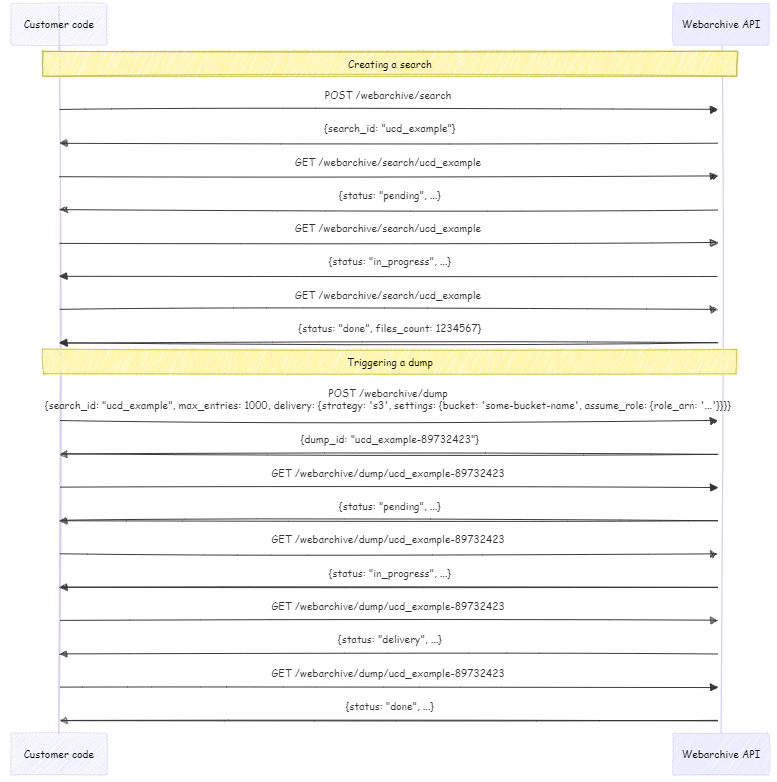
高级流程图