

What are asynchronous requests?
Asynchronous requests let you submit scraping jobs without waiting for results. You send a request, get back a unique ID immediately, and retrieve the completed results later, like leaving a voicemail instead of staying on hold. With synchronous requests, your connection stays open until results arrive (typically seconds). With async, results are processed in the background and stored for 48 hours. You retrieve them via API polling or webhook notification when ready (typically 5 minutes, up to 8 hours during peak times).Why asynchronous requests matter
If you’re scraping thousands of URLs daily, synchronous requests create a bottleneck. Here’s the problem: tracking 10,000 product prices with sync requests means holding 10,000 open connections for 30 seconds each. That’s 300,000 seconds of concurrent connection time, and your server will struggle or crash. Async decouples data collection from processing. Submit 10,000 requests in under a minute, then batch-process results when they’re ready. Your infrastructure stays lightweight, and you avoid connection timeouts, thread blocking, and cascading failures.When to use async vs sync
Use async when you’re:
- Running scheduled jobs (nightly competitor analysis, weekly rank tracking)
- Scraping high volumes (500+ requests per hour)
- Building data pipelines where freshness within minutes is acceptable
- Optimizing costs (async offers 99.99% success rate = fewer retries)
Use sync when you’re:
- Serving live user requests (displaying search results in real-time)
- Processing small volumes (< 100 requests per hour where simplicity matters)
- Prototyping and need quick iteration
- Requiring sub-10-second responses
How it works
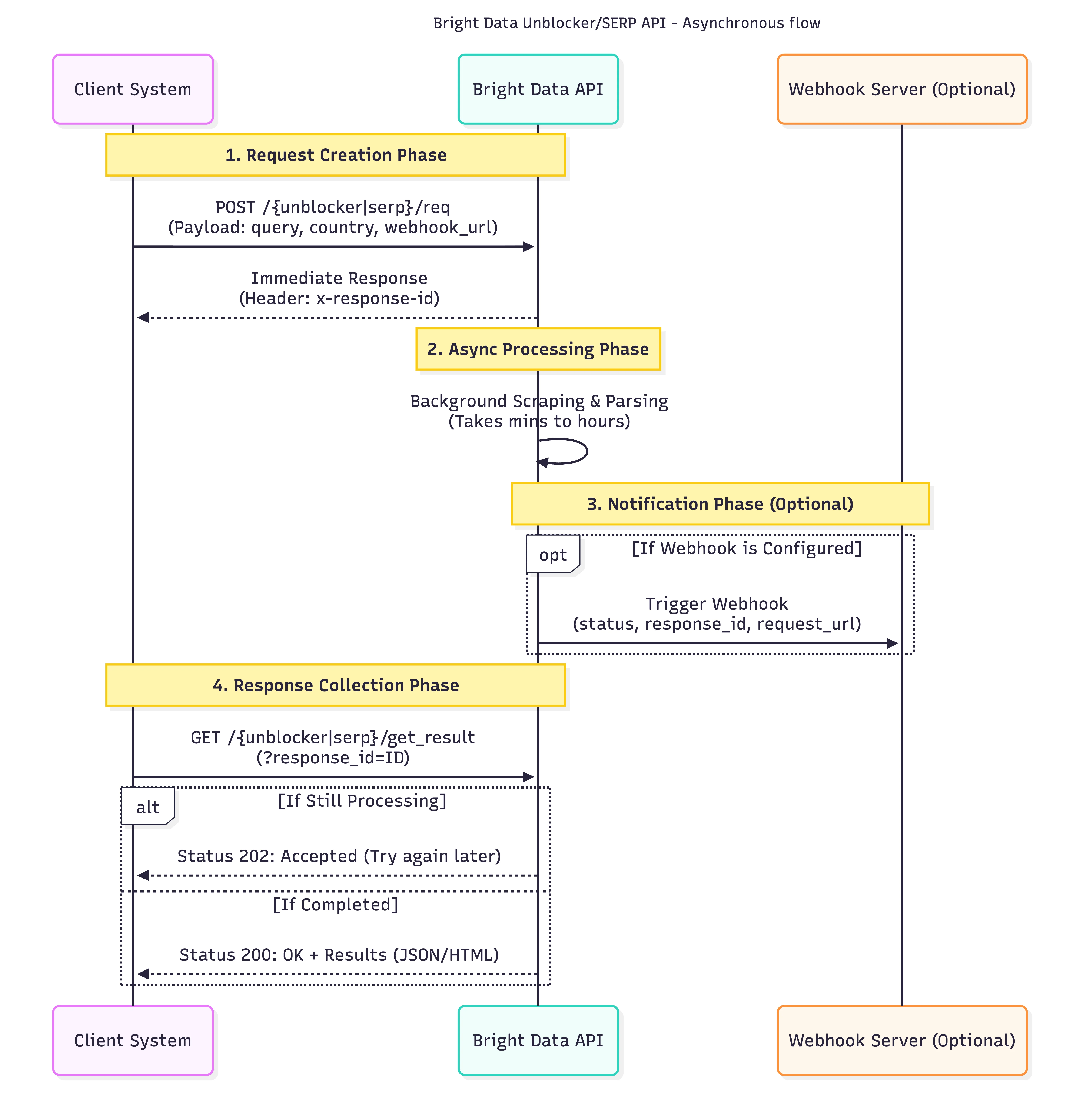
202 status. Set up webhooks instead of polling to avoid wasted API calls:
What the tradeoffs are
Cost is identical per request. However, async’s higher success rate means for large-scale operations.
Common questions
Is async more expensive?
Is async more expensive?
No. Pricing is identical per request, but higher success rates mean fewer retries.
How long are results stored?
How long are results stored?
Results are stored for 48 hours from submission, then automatically deleted. Make sure your retrieval system runs within this window.
How do I get notified when results are ready?
How do I get notified when results are ready?
Configure a webhook URL in your zone settings or per-request using
webhook_url. Bright Data POSTs a notification when processing completes.Required: Allowlist webhook IPsMake sure to allowlist these stable IPs or your firewall may block notifications:100.27.150.18918.214.10.85
What if I lose my response ID?
What if I lose my response ID?
Unrecoverable. Always store response IDs in your database alongside request metadata.
Can I use both async and sync?
Can I use both async and sync?
Yes, but create separate zones, each zone is either async or sync, not both. Most users run async for batch jobs and sync for ad-hoc requests.