

Getting started
What is the Scraper API?
The Bright Data Scraper API extracts fresh data on demand from websites through thousands of pre-built scrapers. You send a URL or a search input, and the API returns structured records in NDJSON (default), JSON, JSON lines, CSV and Parquet. Use it to automate data collection and feed other systems without writing or maintaining scrapers.How do I get started?
Open a Bright Data account, create an API key in account settings, then follow the quickstart, or the quickstart for your target site listed in the Scraper API overview. The first request is onePOST call.
How do I authenticate?
Send the API key in theAuthorization header of every request:
How do I test a scraper without writing code?
Open the scraper in the Control Panel, enter your inputs, choose synchronous or asynchronous mode and a delivery method, then copy the generated code from the Code examples panel. The same panel shows the dataset ID pre-filled. A tool such as webhook.site or Postman is enough to run it.What is a dataset ID and where do I find it?
A dataset ID identifies one scraper and goes in thedataset_id query parameter of every request. It looks like gd_l1viktl72bvl7bjuj0. Find it in four places:
- In scrapers.json, which lists the dataset ID, name, domain and collection methods of every pre-built scraper. No API key is needed.
- Through the Get all scrapers API, which returns each scraper’s dataset ID, input schema and output fields. The API needs an API key.
- In the browser URL when you open a scraper in the Control Panel:
/cp/scrapers/gd_.... - In the Code examples panel on the scraper’s Configuration tab, pre-filled in the cURL command.
sd_, for example sd_m7hm4et0141r2rhojq, is a snapshot ID, not a dataset ID. A snapshot is the data collected by one request.
Which sites have a scraper?
Thousands of pre-built scrapers cover LinkedIn, Instagram, TikTok, Amazon, Google Maps and many more sites. Browse the full list in the Control Panel; the ten most used platforms have their own documentation. For a site without a scraper, build one with Scraper Studio or ask about managed services.What is the difference between collect and discover scrapers?
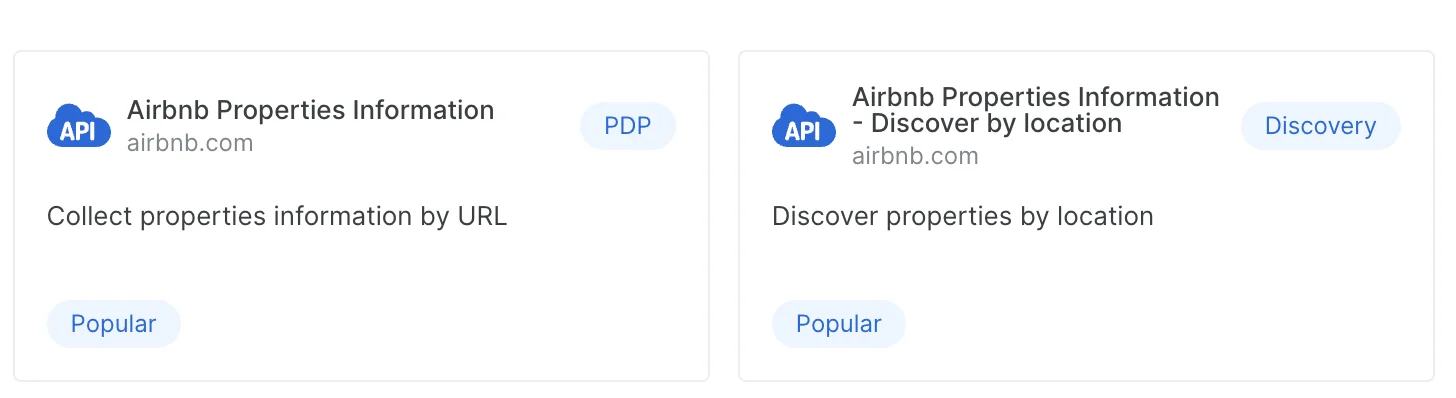
Each scraper takes different inputs. There are two kinds:- Collect scrapers take URLs and extract the detail page behind each one: product specifications, prices, profile fields.
- Discover scrapers find new records from a search input such as a keyword, a category URL or a location, then collect each result. The same site can have several discover scrapers, one per search method.
Requests and results
What is the difference between Synchronous and Asynchronous in the Control Panel?
The two labels map to the two API endpoints:
A synchronous request waits up to 1 minute. If the job needs longer, the response is HTTP
202 with a snapshot_id and the job continues asynchronously. See Understanding sync vs. async requests.
How fast is the Scraper API?
Response time depends on the target site and the scraper’s workload, and Bright Data does not publish a fixed figure. Collect scrapers with a few URLs usually return within the 1-minute synchronous window. Discover scrapers take longer because they visit many pages, so run them asynchronously. Each scraper’s page in the Control Panel shows an indication of its average run time.Which output formats are supported?
NDJSON (default), JSON, JSON lines, CSV and Parquet. Set theformat query parameter on /scrape or /trigger, or deliver.filename.extension for delivered files. /scrape accepts json, ndjson, jsonl and csv; Parquet is a delivered file format. See output formats.
What does an empty snapshot mean?
An empty snapshot holds no usable records. It usually still contains error records that explain why: invalid inputs, access restrictions, or dead pages such as a 404 or a removed product. Addinclude_errors=true to the request to see them.
How long is a snapshot available?
30 days after the job completes. Download it through the Download snapshot endpoint with the snapshot ID, or deliver it to storage or a webhook.Managing snapshots
Where do I get a snapshot ID?
The response toPOST /datasets/v3/trigger returns one. A synchronous request that runs past 1 minute also returns one in its 202 response. List every snapshot on the account with Get snapshots.
How do I cancel a running snapshot?
Send aPOST to /datasets/v3/snapshot/{snapshot_id}/cancel:
Can I rerun a failed snapshot?
Yes, with the Rerun snapshot endpoint:How do I retrieve the inputs I sent?
Call Get snapshot input:What is the difference between the notify URL and the webhook endpoint?
Thenotify URL receives a short status message when the job finishes: the snapshot ID and its status, not the data. The endpoint URL receives the data itself as soon as the snapshot is ready. Use notify to trigger your own download; use endpoint to have Bright Data push the records. See How to deliver results to a webhook or S3.
Delivering a snapshot
These questions concern Deliver snapshot,POST /datasets/v3/deliver/{snapshot_id}, which pushes an existing snapshot to a storage destination.
What do I do with the delivery job ID in the response?
Theid in the response is a delivery job ID. Poll GET /datasets/v3/delivery/{delivery_id} until its status is done.
Does the snapshot need to be in a specific status?
Yes,ready. Check with GET /datasets/v3/progress/{snapshot_id} first. The possible statuses are starting, running, ready, failed and canceled. You can deliver the same snapshot to several destinations by calling the endpoint once per destination.
How do I keep delivered files under the size limit?
Each delivered file has a hard limit of 5 GB. Setbatch_size to the number of records per file: divide 5 GB by your average record size, start lower and adjust from the file sizes you receive. With records of about 5 KB, a batch_size of 1,000,000 lands at the limit, so start around 500,000. A 400 from this endpoint most often means the batch_size produced a file over 5 GB. Set compress: true to receive gzip-compressed files.
Billing and plans
Is there a free trial?
Every new Bright Data account gets 5,000 free credits every month, with no credit card required. The Scraper API costs one credit per record, so the allowance covers up to 5,000 records. Credits renew on the first of each month. See the free tier.How is the Scraper API priced?
Per delivered record. Records that fail because the input was incorrect are still billed, because the request consumed resources. As of September 2026, pay as you go is $1.50 per 1,000 records and the Scale plan is $1.30 per 1,000 records beyond its included volume. Check the pricing page or your account for current rates.How do I upgrade my plan?
Open the billing section of the Control Panel and select the plan. For anything else, contact support.What do I do if my API key expires?
Account admins create a new key in account settings.

Platform limits and specific scrapers
Are there limits on specific scrapers or sites?
Three platforms have limits worth knowing before you build on them:- Instagram: media links in the response expire 24 hours after collection. Download the media you need within that window.
- TikTok: media is only accessible with a token generated in the same session, so store the record, not the media URL.
- LinkedIn: post collection is limited to the posts a profile shows publicly, typically about 10. Since November 13, 2025 the Position, Experience and Education profile fields are served from cache; see the LinkedIn Scraper API introduction.
Is there a scraper for hotel data?
Yes. The Google Scraper API includes a Google Hotels scraper that collects hotel listings by URL. For a site the library does not cover, build a custom scraper with Scraper Studio.How do I scrape Google Maps reviews?
Open the Google Maps reviews scraper in the Control Panel or send the request from code, pass the place URL and the number of days of reviews to retrieve, then run it and collect the data. The Google Scraper API endpoints page shows the request.Does the ChatGPT scraper run with web search active?
Web search is on by default. Passweb_search: false in the input to disable it, and read web_search_triggered in the response to confirm whether a search ran. See Query fan-out and web search control.
Can I view the code behind a scraper?
No. Pre-built scrapers are closed; their code cannot be viewed or modified. To see how scrapers work, create a new scraper in Scraper Studio, which offers example templates you can read and adapt.Choosing the right product
Which Bright Data product gives me the data I need?
- Ready-made data: the Dataset Marketplace sells datasets Bright Data has already collected and refreshes on a schedule.
- Fresh data from a supported site: a pre-built scraper in the Scraper API returns records on demand.
- Fresh data from any other site: build a scraper in Scraper Studio, or have Bright Data build and run one through managed services.