

Prerequisites
Prerequisites
The following are required:
1
Enable "Asynchronous requests"
In the SERP API zone, under “Advanced settings”, enable the “Asynchronous requests” toggle.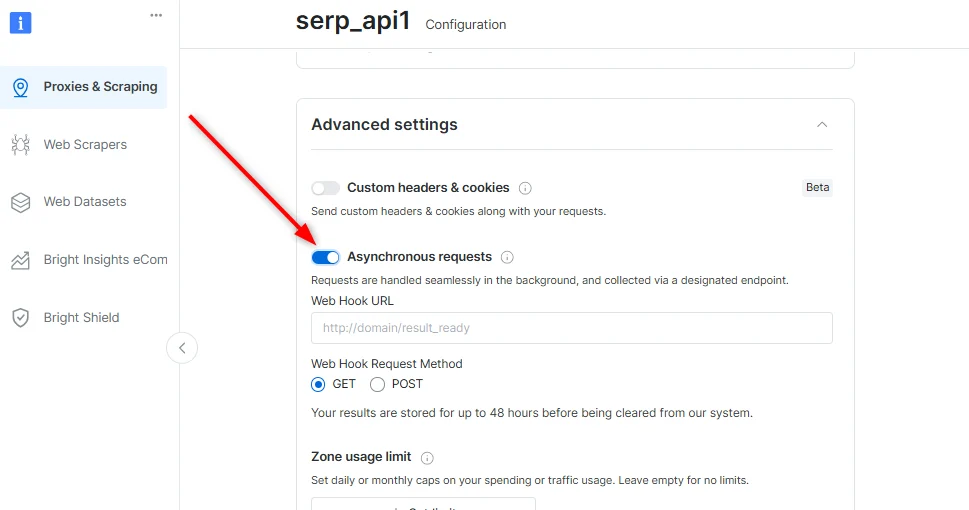
2
Send your first async request
The following request submits an asynchronous SERP API job:
cURL
curl --request POST \
  --url 'https://api.brightdata.com/serp/req?zone=<serp-zone-name>' \
  --header 'Authorization: Bearer <API_KEY>' \
  --header 'Content-Type: application/json' \
  --data '{
      "query": {"q": "pizza"},
      "brd_json": "json"
    }'
  import requests

  url = "https://api.brightdata.com/serp/req?zone=<serp-zone-name>"

  payload = {
      "query": {
          "q": "pizza",
      },
      "brd_json": "json"
  }
  headers = {
      "Authorization": "Bearer <API_KEY>",
      "Content-Type": "application/json"
  }

  response = requests.post(url, json=payload, headers=headers)

  print(response.text)
  const options = {
    method: 'POST',
    headers: {Authorization: 'Bearer <API_KEY>', 'Content-Type': 'application/json'},
    body: JSON.stringify({
      query: {q: 'pizza'},
      brd_json: 'json'
    })
  };

  fetch('https://api.brightdata.com/serp/req?zone=<serp-zone-name>', options)
    .then(res => res.json())
    .then(res => console.log(res))
    .catch(err => console.error(err));
Replace
<API_KEY> and <serp-zone-name> with valid values.3
Wait and check status
The request returns a If the request is still processing, the API returns HTTP
response_id used to retrieve results after processing completes.{
"response_id": "s4t7w3619285042ra9dke1m8qx"
}
202:HTTP/202
"Request is pending"
Processing time is typically up to 5 minutes and may extend to 8 hours during peak periods.Responses are retained for up to 48 hours from submission time.
4
Retrieve your results
The following request retrieves the completed result:
curl --silent --compressed \
  "https://api.brightdata.com/unblocker/get_result?&response_id=${RESPONSE_ID}" \
  -H "Authorization: Bearer [API_KEY]" \
  -o results.json
The response body is written to
results.json.5
Verify the output
Display the saved file:The file contains structured JSON SERP results. For example:
cat results.json
Sample Response
  {
    "general": {
      "search_engine": "google",
      "query": "pizza",
      "results_cnt": 1200000000,
      "search_time": 0.45,
      "language": "en",
      "location": "United States",
      "mobile": false,
      "basic_view": false,
      "search_type": "text",
      "page_title": "pizza - Google Search",
      "timestamp": "2026-02-19T09:23:10.353Z"
    },
    "input": {
      "original_url": "http://www.google.com/search?q=pizza&hl=en&gl=us"
    },
    "organic": [
      {
        "link": "https://www.pizzahut.com/",
        "source": "Pizza Hut",
        "display_link": "https://www.pizzahut.com",
        "title": "Pizza Hut | Delivery & Carryout - No One OutPizzas The Hut!",
        "description": "Discover classic & new menu items, find deals and enjoy seamless ordering for delivery and carryout. No One OutPizzas the Hut®.",
        "snippet_highlighted_words": [
          "classic & new menu items"
        ],
        "icon": "data:image/png;base64 ...",
        "image": "data:image/jpeg;base64 ...",
        "image_alt": "pizza from www.pizzahut.com",
        "image_base64": "data:image/jpeg;base64 ...",
        "rank": 1,
        "global_rank": 4
      },
      {
        "link": "https://www.dominos.com/",
        "source": "Domino's",
        "display_link": "https://www.dominos.com",
        "title": "Domino's: Pizza Delivery & Carryout, Pasta, Wings & More",
        "description": "Order pizza, pasta, sandwiches & more online for carryout or delivery from Domino's. View menu, find locations, track orders. Sign up for Domino's email ...",
        "snippet_highlighted_words": [
          "Order pizza, pasta, sandwiches & more online for carryout or delivery"
        ],
        "icon": "data:image/png;base64, ...",
        "rank": 2,
        "global_rank": 5
      },
      {
        "link": "https://en.wikipedia.org/wiki/Pizza",
        "source": "Wikipedia",
        "display_link": "https://en.wikipedia.org › wiki › Pizza",
        "title": "Pizza",
        "description": "Pizza is an Italian dish typically consisting of a flat base of leavened wheat-based dough topped with tomato, cheese, and other ingredients, baked at a ...Read more",
        "snippet_highlighted_words": [
          "an Italian dish typically consisting of a flat base of leavened wheat-based dough"
        ],
        "icon": "data:image/png;base64 ...",
        "image": "data:image/jpeg;base64 ...",
        "image_alt": "pizza from en.wikipedia.org",
        "image_base64": "data:image/jpeg;base64 ...",
        "rank": 3,
        "global_rank": 6
      }
    ],
    "perspectives": [
      {
        "title": "Barstool Pizza Review - Flour + Water Pizzeria (San Francisco, CA)",
        "author": "One Bite Pizza Reviews · YouTube",
        "source": "Pizza reviews & rankings",
        "date": "97.3K+ views · 10 hours ago",
        "link": "https://www.youtube.com/watch?v=7iWWdSsTI0I",
        "image": "https://img.youtube.com/vi/7iWWdSsTI0I/hqdefault.jpg",
        "image_url": "https://img.youtube.com/vi/7iWWdSsTI0I/hqdefault.jpg"
      },
      {
        "title": "Are there any just Sicilian style pizza places?",
        "author": "Pizzaholics · Facebook",
        "source": "Pizza enthusiast",
        "date": "8 reactions · 9 hours ago",
        "link": "https://www.facebook.com/groups/742034912983989/posts/2424981814689282/",
        "image": "https://encrypted-tbn0.gstatic.com/images?q=tbn:ANd9GcTAPzkwKJX8rct5LhEtAN6p-ypb5UjDiHn0aZ8e9S6nS8tPmROY_1E2gFxXeus&usqp=CAI&s",
        "image_url": "https://encrypted-tbn0.gstatic.com/images?q=tbn:ANd9GcTAPzkwKJX8rct5LhEtAN6p-ypb5UjDiHn0aZ8e9S6nS8tPmROY_1E2gFxXeus&usqp=CAI&s"
      },
      {
        "title": "Top Pizza in the Bay Area",
        "author": "Cesar Hernandez, Soleil Ho",
        "source": "San Francisco Chronicle",
        "date": "2 weeks ago",
        "link": "https://www.sfchronicle.com/projects/2023/best-pizza-sf-bay-area/",
        "image": "https://encrypted-tbn0.gstatic.com/images?q=tbn:ANd9GcSPGyTJpaRNE8ruXgkLdHkPFLVu5T7ykcJezvyYa07SUmrk7T0XaSntO19GBw&usqp=CAI&s",
        "image_url": "https://encrypted-tbn0.gstatic.com/images?q=tbn:ANd9GcSPGyTJpaRNE8ruXgkLdHkPFLVu5T7ykcJezvyYa07SUmrk7T0XaSntO19GBw&usqp=CAI&s"
      }
    ],
    "knowledge": {
      "name": "Pizza",
      "summary": "Dish",
      "subtitle": "Dish"
    },
    "overview": {
      "title": "Pizza",
      "kgmid": "/m/0663v"
    },
    "snack_pack_map": {
      "image": "data:image/png;base64 ...",
      "image_base64": "data:image/png;base64 ...",
      "link": "https://www.google.com/search?q=pizza&sca_esv=9559f81e103ba33b&hl=en&gl=us&udm=1&lsack=fdaWadL4D5OP9u8P8LrdoAI&sa=X&ved=2ahUKEwiSq-PSneWSAxWTh_0HHXBdFyQQtgN6BAgdEAM"
    },
    "snack_pack": [
      {
        "cid": "2036127367591792815",
        "name": "Hunt Brothers Pizza",
        "image": "data:image/png;base64 ...",
        "image_base64": "data:image/png;base64 ...",
        "reviews_cnt": 1,
        "type": "Pizza",
        "price": "$",
        "work_status": "Pit stop for pizza & chicken wings",
        "address": "Hollister, MO",
        "rank": 1,
        "global_rank": 1
      }
    ],
    "pagination": {
      "pages": [
        {
          "page": 2,
          "start": 10,
          "link": "https://www.google.com/search?q=pizza&sca_esv=9559f81e103ba33b&hl=en&gl=us&ei=fdaWadL4D5OP9u8P8LrdoAI&start=10&sa=N&sstk=Af77f_chnDKNIlZ0IppYwCTGX-8AsCUfZH2WQB4kzsZIYRjsE5mqBJMEdWa84P7jgf603q2kg3ocZLtVg3UcaoXgLxAF8bRxzTc64g&ved=2ahUKEwiSq-PSneWSAxWTh_0HHXBdFyQQ8tMDegQICxAE"
        },
        {
          "page": 3,
          "start": 20,
          "link": "https://www.google.com/search?q=pizza&sca_esv=9559f81e103ba33b&hl=en&gl=us&ei=fdaWadL4D5OP9u8P8LrdoAI&start=20&sa=N&sstk=Af77f_chnDKNIlZ0IppYwCTGX-8AsCUfZH2WQB4kzsZIYRjsE5mqBJMEdWa84P7jgf603q2kg3ocZLtVg3UcaoXgLxAF8bRxzTc64g&ved=2ahUKEwiSq-PSneWSAxWTh_0HHXBdFyQQ8tMDegQICxAG"
        },
        {
          "page": 4,
          "start": 30,
          "link": "https://www.google.com/search?q=pizza&sca_esv=9559f81e103ba33b&hl=en&gl=us&ei=fdaWadL4D5OP9u8P8LrdoAI&start=30&sa=N&sstk=Af77f_chnDKNIlZ0IppYwCTGX-8AsCUfZH2WQB4kzsZIYRjsE5mqBJMEdWa84P7jgf603q2kg3ocZLtVg3UcaoXgLxAF8bRxzTc64g&ved=2ahUKEwiSq-PSneWSAxWTh_0HHXBdFyQQ8tMDegQICxAI"
        }
      ],
      "current_page": 1,
      "next_page": 2,
      "next_page_start": 10,
      "next_page_link": "https://www.google.com/search?q=pizza&sca_esv=9559f81e103ba33b&hl=en&gl=us&ei=fdaWadL4D5OP9u8P8LrdoAI&start=10&sa=N&sstk=Af77f_chnDKNIlZ0IppYwCTGX-8AsCUfZH2WQB4kzsZIYRjsE5mqBJMEdWa84P7jgf603q2kg3ocZLtVg3UcaoXgLxAF8bRxzTc64g&ved=2ahUKEwiSq-PSneWSAxWTh_0HHXBdFyQQ8tMDegQICxAE"
    },
    "related": [
      {
        "text": "Pizza wiki",
        "link": "https://www.google.com/search?sca_esv=9559f81e103ba33b&hl=en&gl=us&q=Pizza+wiki&sa=X&ved=2ahUKEwiSq-PSneWSAxWTh_0HHXBdFyQQ1QJ6BAhLEAE",
        "rank": 1,
        "global_rank": 17
      },
      {
        "text": "Pizza open",
        "link": "https://www.google.com/search?sca_esv=9559f81e103ba33b&hl=en&gl=us&q=Pizza+open&sa=X&ved=2ahUKEwiSq-PSneWSAxWTh_0HHXBdFyQQ1QJ6BAhfEAE",
        "rank": 2,
        "global_rank": 18
      },
      {
        "text": "Pizza Hut near me",
        "link": "https://www.google.com/search?sca_esv=9559f81e103ba33b&hl=en&gl=us&q=Pizza+Hut+near+me&sa=X&ved=2ahUKEwiSq-PSneWSAxWTh_0HHXBdFyQQ1QJ6BAheEAE",
        "rank": 3,
        "global_rank": 19
      }
    ],
    "people_also_ask": [
      {
        "question": "What's the 2 hour rule for pizza?",
        "question_type": "featured",
        "answer_source": "Green Lantern Pizza",
        "answer_link": "https://greenlanternpizza.com/blog/how-long-does-pizza-last/#:~:text=Sitting%20out%20at%20Room%20Temperature,-How%20long%20can&text=The%20United%20States%20Department%20of,two%20hours%20before%20tossing%20it.",
        "answer_display_link": "https://greenlanternpizza.com › blog › how-long-does-pi...https://greenlanternpizza.com › blog › how-long-does-pi...",
        "answers": [
          {
            "type": "answer",
            "value": {
              "text": "Sitting out at Room Temperature The United States Department of Agriculture (USDA) strongly recommends following the “two-hour rule” when leaving food out, meaning you shouldn't let pizza or takeout sit at room temperature for over two hours before tossing it.Jan 29, 2025"
            },
            "rank": 1
          }
        ],
        "rank": 1,
        "global_rank": 7
      }
    ]
  }
Congratulations! If the file contains valid JSON search results, you’re done!