

Expand to get your Bright Data Proxy Access Information
Expand to get your Bright Data Proxy Access Information
Your proxy access information
Bright Data proxies are grouped in “Proxy zones”. Each zone holds the configuration for the proxies it holds.To get access to the proxy zone:- Login to Bright Data control panel
- Select the proxy zone or setup a new one
- Click on the new zone name, and select the Overview tab.
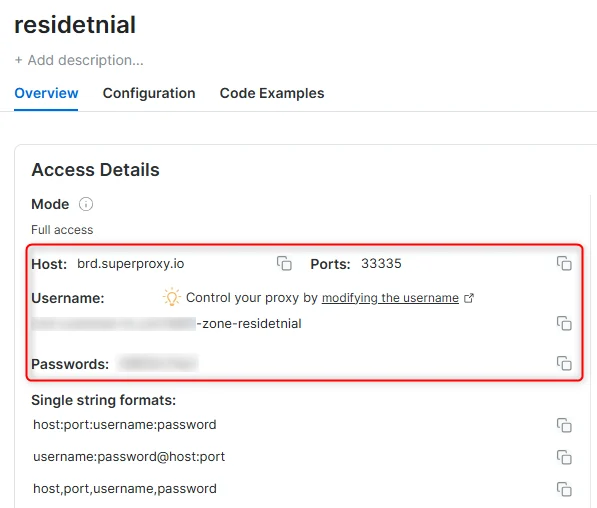
- In the overview tab, under Access details you can find the proxy access details, and copy them to clipboard on click.
- You will need: Proxy Host, Proxy Port, Proxy Zone username and Proxy Zone password.
- Click on the copy icons to copy the text to your clipboard and paste in your tool’s proxy configuration.
Access Details Section Example
Residential proxy access
To access Bright Data’s Residential Proxies you must be a KYC-verified business account. Complete KYC verification with the Bright Data compliance team; there is no automatic or no-KYC path. Without KYC, use ISP or Datacenter proxies. Read more…Targeting search engines?
If you target a search engine like google, bing or yandex, you need a special Search Engine Results Page (SERP) proxy API. Use Bright Data SERP API to target search engines. Click here to read more about Bright Data SERP proxy API.Correct setup of proxy test to avoid “PROXY ERROR”
In many tools you will see a “test proxy” function, which performs a conncectivity test to your proxy, and some add a geolocation test as well, to identify the location of the proxy. To correctly test your proxy you should target those search queries to:https://geo.brdtest.com/welcome.txt .Some tools use popular search engines (like google.com) as a default test target. Bright Data will block those requests and you tool will show proxy error although your proxy is perfectly fine.If your proxy test fails, this is probably the reason. Make sure that your test domain is not a search engine (this is done in the tool configuration, and not controlled by Bright Data).What is StablerSOLO?
StablerSOLO is a low-code data extraction and web scraping platform that allows developers, analysts, and data teams to configure and run scrapers without writing custom code for every target. It simplifies large-scale data collection while maintaining flexibility for advanced scraping needs. When combined with Bright Data proxies, StablerSOLO delivers higher success rates, stronger anonymity, and reliable access to geo-restricted content.Why Use Bright Data With StablerSOLO?
- Enhanced Anonymity: Protect your real IP address during scraping operations
- Geo-Targeted Access: Collect region-specific data using country- or city-level proxies
- Higher Success Rates: Reduce blocks and CAPTCHAs with premium proxy IPs
- Scalable Extraction: Run large-scale scraping tasks reliably
How to Integrate Bright Data With StablerSOLO
1
Prerequisites
Before you begin, ensure you have:
- An active StablerSOLO account
- An active Bright Data account
- A configured Bright Data proxy zone (ISP or Datacenter recommended)
- Your Bright Data proxy credentials (host, port, username, password)
2
Access StablerSOLO Proxy Configuration
- Log in to your StablerSOLO account.
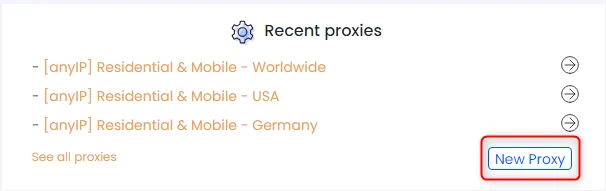
- From the main dashboard, scroll down to the Recent Proxies section.
- Click New Proxy to open the proxy configuration window.
3
Add Bright Data Proxy Details
- In the proxy configuration window:
- Switch to the Proxies List tab.
- Enter your Bright Data proxy credentials in the following format:
- Click Test a Proxy Randomly to verify connectivity.
- Once the test succeeds, click Add New Proxy to save the proxy.
To maintain a consistent IP, append a session parameter to your username
(for example,
(for example,
username-session-1).For geo-targeted scraping, format the username asusername-country-XX (for example, username-country-US).4
Apply the Proxy to Scraping Jobs
- Select the newly added proxy when configuring your scraping tasks.
- Run a small test extraction to confirm successful data retrieval.
- Monitor execution logs for stability and performance.
Best Practices
- Use ISP or Datacenter proxies for long-running scraping jobs
- Assign separate proxies for different target websites or regions
- Avoid excessive parallel requests from a single proxy
- Rotate sessions periodically for large-scale extraction
- Monitor StablerSOLO logs for proxy-related errors